USA
USA UAE
UAESmall Business
Designed for startups and growing businesses

See More


Brand: Joplin
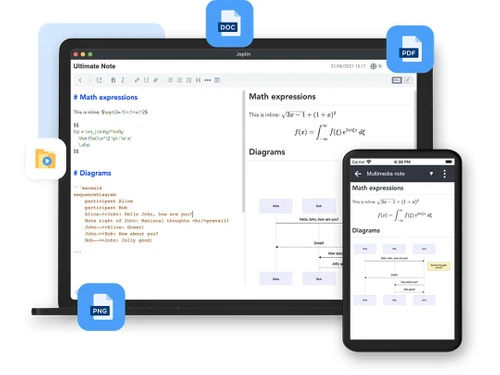
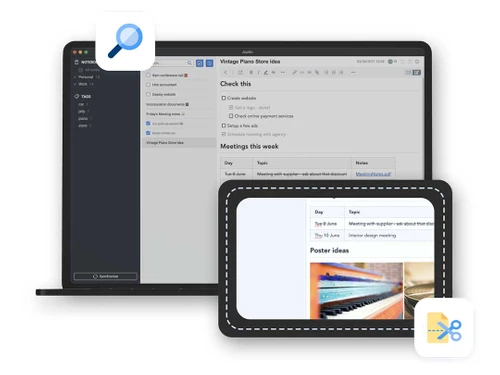
Joplin is a note-taking software designed to help users organise and manage their notes across multiple platforms. Its purpose is to provide a seamless note-taking experience, allowing users to access their notes anywhere, anytime.
See MoreHave you used Joplin before?
Share your insights for better experience
Brand: Joplin
Founded Year: 2016
Joplin is an open-source note-taking app. Capture your thoughts and securely access them from any device thanks to End-to-end encryption.
Primary Features
 Templates Annotations Version History Bookmarks To-do lists Voice Notes Offline Access Text Formatting Search Functionality Web Clipper Reminders Hierarchy Management Tagging and Labelling File Attachments
 Search and Retrieval
Full-Text Search with Filters OCR (Optical Character Recognition) Activity History NLP-based Search Collaboration
Real Time Editing Note Sharing Commenting and Feedback Permissions Control Customization & Personalization
End-to-End Encryption Themes and Colour Options Custom Fonts and Styles Quick Access Widgets Security and Privacy
Version Control Biometric Login Note Recovery Password Protection Alerts & Notifications
Email Notifications Push Notifications Due Date Notifications Calendar Alerts Customizable Reminders Snooze Reminders Event Reminders Administrative Features
User Access Management Auto Backup Access Logs Export Notes Import Notes Integrations
API Integration API Access Third Party Integration Calendar Integration Add-Ons AI Capabilities
Summarisation Voice-to-Text Image Recognition Smart Recommendations Content Generation  Windows
  iOS
iOS  Android MacOS
  Linux
Linux  Desktop
  Mobile
  Tablet
  Cloud-Based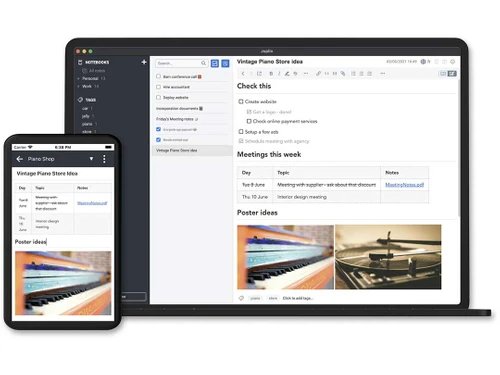
Small Business
Designed for startups and growing businesses
Medium Business
Built for business growth and flexibility
Enterprises
Designed for complex and large-scale business needs
4.2
Out of 5

Overall Rating
Based on
12 Verified Reviews
Rating Breakdown
87% Recommend this Product
Add ReviewUsers generally appreciate Joplin for its free access, strong organization capabilities, and robust multimedia support, making it a reliable choice for notetaking across various devices. The open-source nature and supportive community are also highlighted positively. However, common complaints include an outdated user interface, limited collaboration features, and occasional sync conflicts. Some users find the rich text editor lacking compared to competitors, while others wish for enhanced task management and search functionalities. Overall, Joplin offers a solid experience with room for improvement.
Pros
"There is no subscription required so there is no pressure to pay monthly fees. It is free unless I choose to support the developers."
"It allows me to use attachments and other multimedia content. I can add PDFs, images and even audio notes."
"I love using open-source software, especially Joplin since it is also backed up by a nice and enthusiastic community."
Cons
"The UI feels outdated. It is functional and basic but I wish it had more to it."
"I wish it had a built-in calendar or task integration feature. I must rely on external tools for managing tasks and deadlines."
"I sometimes encounter sync conflicts. It does not happen often but when it does it is annoying."


Dec 25, 2024
Techjockey Verified
“Free and Dependable”
Not having to worry about paying monthly fees unless I choose to help the developers is a welcome change. The user interface is the sole drawback; while functional, it feels a little antiquated and could need some changes.
Pros
There is no subscription required so there is no pressure to pay monthly fees. It is free unless I choose to support the developers.
Cons
The UI feels outdated. It is functional and basic but I wish it had more to it.
Reason to switch
I moved to Joplin since Zim did not offer the flexibility I was looking for.
Nov 21, 2024
Techjockey Verified
“Multimedia-Friendly Notetaking App”
Joplin is great for organizing everything I need because it allows me to connect PDFs, photos, and voice notes. The calendar and task management features are the only things lacking.
Pros
It allows me to use attachments and other multimedia content. I can add PDFs, images and even audio notes.
Cons
I wish it had a built-in calendar or task integration feature. I must rely on external tools for managing tasks and deadlines.
Reason to switch
Notesnook did not manage attachments as effortlessly as Joplin does.
Oct 5, 2024
Techjockey Verified
“Open Source with a Supportive Community”
Joplin is open-source and has a vibrant community. Knowing that I am a part of something that was created cooperatively makes me happy. The main drawback is the few sync conflicts, which are frustrating when they do occur.
Pros
I love using open-source software, especially Joplin since it is also backed up by a nice and enthusiastic community.
Cons
I sometimes encounter sync conflicts. It does not happen often but when it does it is annoying.
Reason to switch
I needed a more modern open-source tool with better syncing options and Joplin was just that.

Joplin
Price On Request
Desktop
Mobile
Web based
On Premises
Windows
Mac OS

GoodNotes
Price On Request
Desktop
Mobile
Web based
On Premises
Windows
Mac OS

Evernote
₹ 449
Desktop
Mobile
Web based
On Premises
Windows
Mac OS

Turbo AI
₹ 339
Desktop
Mobile
Web based
On Premises
Windows
Mac OS

Notability
Price On Request
Desktop
Mobile
Web based
On Premises
Windows
Mac OS

Obsidian
Price On Request
Desktop
Mobile
Web based
On Premises
Windows
Mac OS

Microsoft OneNote
Price On Request
Desktop
Mobile
Web based
On Premises
Windows
Mac OS

Notein
Price On Request
Desktop
Mobile
Web based
On Premises
Windows
Mac OS

Zoho Notebook
₹ 99
Desktop
Mobile
Web based
On Premises
Windows
Mac OS

Apple Notes
Price On Request
Desktop
Mobile
Web based
On Premises
Windows
Mac OS

RemNote
₹ 400
Desktop
Mobile
Web based
On Premises
Windows
Mac OS
(0) Product(s) selected
Available
Price on Request

Available
Price on Request

Starting Price:
$6 /Month

Starting Price:
$5 /Seat/Month

Starting Price:
$15 /Month

Available
Price on Request

Starting Price:
$63 /Year

Starting Price:
$2 /Month

Starting Price:
$12 /Month
Joplin software supports multiple operating systems, including Windows, iOS, Android, and MacOS.
Yes, Joplin software is available for Android and iOS app users.
Contact techjockey.com for detailed pricing information on Joplin. Pricing is customized based on specific business needs.
Joplin software is suitable for individuals and teams who need a note-taking solution that can be used across multiple platforms, allowing them to stay organized and focused.
A demo of Joplin is available at techjockey.com. You can contact our product experts for more information.
Yes, Joplin software is suitable for small businesses as it offers a flexible and customizable note-taking solution that can be used by teams and individuals.
Joplin software provides features such as data import/export, task management, and advanced search, which help protect user data and ensure secure note-taking.
Joplin software allows users to create and manage notebooks, checklists, and tasks across multiple platforms. It also offers data synchronization and advanced search features to help users stay organized and focused.
Joplin software offers features such as notebooks, checklists, task management, data import/export, and advanced search. You can contact our product experts for more information.
Standard Notes offers strong end-to-end encryption; Joplin also encrypts, and Obsidian supports encrypted sync.
0 0
People leave for a smoother interface, richer plugins (Obsidian), better collaboration (Notion), or simpler mobile sync.
0 0
Use robust passwords, enable encryption on devices, and sync notes selectively to safeguard your Joplin notes on shared devices. Think about utilizing offline mode for important notes and establish separate user accounts when feasible. These actions will strengthen the protection and confidentiality of your Joplin notes.
0 0
Joplin has the potential to be a strong asset for organizing digital information. Utilize it as a main storage location for all your notes, documents, and ideas. Arrange your notes by utilizing tags and folders, as well as generate to-do lists for monitoring tasks. You can tidy up your digital life and enhance your productivity by organizing all your digital information in Joplin.
0 0
Create a separate note in Joplin to organize your reading list. Arrange your books and articles with bullet points, tags, and links for better organization. Use different tags such as To Read,Reading Now,and Finished" to organize your list. Frequently update your reading list to remain organized and inspired.
0 0
20,000+ Software Listed
Best Price Guranteed
Free Expert Consultation
2M+ Happy Customers
Terms and Condtions

Users with registered businesses can purchase goods from merchants on the platform to satisfy their business needs. Users are not permitted to utilize any products acquired through the platform for resale, advertising, business, or further distribution.
For each purchase made, users will receive a Tax Invoice (or 'GST invoice') that includes specific details such as:
the GSTIN of the user associated with their registered business, and
the specified Entity Name for their business.
It should be noted that not all products are eligible for GST Invoice. Only the products displayed by participating sellers with the 'GST-based Invoice Available' callout on the product description page would qualify.
Certain goods and services are not eligible to get a GST Invoice, including items with VAS, i.e., Value Added Services (e.g., Total Mobile Protection/Assured Buyback) and those involving an exchange offer at the time of purchase.
Users must ensure the accuracy of the GSTIN, and business entity name provided for the GST Invoice. Requests for corrections into GST Invoice would not be accommodated by Techjockey.com or any Seller, and any issues arising from user-provided information are the sole responsibility of users.
Techjockey.com is not liable for the GST Invoice or any associated input tax credit. To efficiently claim an input tax credit, users should select the registered place of business address as per the GST authority's data and follow the provisions of the GST Act and rules.
To claim an input tax credit, the delivery and billing addresses must match. Furthermore, input tax credits will not be granted if the delivery address and GSTIN on the invoice are from different states. In case of incorrect GST details provided during the order placement, the order will be canceled automatically.