USA
USA UAE
UAESmall Business
Designed for startups and growing businesses

See More





Brand: Orion Studio
Notein is a versatile handwritten note-taking app for Android users, offering a wide range of features and tools for capturing, organising, and expressing ideas, as well as annotating research PDFs. It is designed to enhance productivity and collaboration across various devices and platforms.
See MoreHave you used Notein before?
Share your insights for better experience
Looking for The Right Pricing?
Share your requirements and get a plan built around your business.
Price Available on Request
Get personalised Notein pricing that fits your needs. Our team will connect with you.
Primary Features
 Templates Annotations To-do lists Offline Access Text Formatting Search Functionality Reminders File Attachments Version History Web Clipper Hierarchy Management Tagging and Labelling Voice Notes Bookmarks
 Search and Retrieval
OCR (Optical Character Recognition) Activity History Full-Text Search with Filters NLP-based Search Collaboration
Note Sharing Real Time Editing Commenting and Feedback Permissions Control Customization & Personalization
Themes and Colour Options Custom Fonts and Styles Quick Access Widgets End-to-End Encryption Security and Privacy
Password Protection Biometric Login Version Control Note Recovery Alerts & Notifications
Customizable Reminders Due Date Notifications Snooze Reminders Event Reminders Push Notifications Email Notifications Calendar Alerts Administrative Features
User Access Management Auto Backup Export Notes Import Notes Access Logs Integrations
Third Party Integration API Access Calendar Integration Add-Ons API Integration AI Capabilities
Summarisation Image Recognition Smart Recommendations Voice-to-Text Content Generation 

Watch the demo video to explore key features, real workflows, and how the software fits your business needs.
 Android
  Mobile
  Tablet
  Perpetual

Small Business
Designed for startups and growing businesses
Medium Business
Built for business growth and flexibility
Enterprises
Designed for complex and large-scale business needs
4.4
Out of 5

Overall Rating
Based on
11 Verified Reviews
Rating Breakdown
88% Recommend this Product
Add ReviewUsers generally appreciate Notein for its fast search capabilities, ease of collaboration, and effective syncing across devices, making it a valuable tool for note organization. The cloud backup feature is also well-received, providing peace of mind for users. However, common complaints include a lack of advanced editing tools, limited customization options, and the absence of voice note functionality. Additionally, some users have noted that the app may require a newer device for optimal performance, and they desire more export options for their notes.
Pros
"The collaborative notes are a good feature since I share my notes with my friends or colleagues. It is also great for group projects or brainstorming."
"It is nice to have checkboxes for to-dos inside my notes. The task lists help me stay on track."
"There is cloud backup which means that I do not have to worry about losing notes since everything is backed up automatically."
Cons
"Not the best if you have older devices. I had to upgrade my phone since it was laggy and not usable."
"It requires an account. I could not use the app without creating one. This feels unnecessary for a simple notetaking app."
"I wish there were a built-in reminder system. It could use a way to set reminders or deadline with notes."


Mar 13, 2024
Techjockey Verified
“Fast Search but Needs More Editing Tools”
Notein saves me a great deal of time because I can locate whatever message I am looking for. Though I occasionally wish there were more advanced tools to structure my notes the way I want, the editing features are respectable.
Pros
I can find my notes quickly since the search function is super responsive.
Cons
Its editing features are decent, but sometimes I wish there were more advanced tools for formatting.
Reason to switch
Touchnotes was good, but Notein’s search function was exactly what I needed.
Feb 1, 2025
Techjockey Verified
“Perfect for Collaboration but Requires a Newer Device”
Notein's collaborative function is one the best features. It makes it remarkably simple to share notes with friends or coworkers. I had to upgrade my phone to use the app, though, because it can be a little slow on earlier models.
Pros
The collaborative notes are a good feature since I share my notes with my friends or colleagues. It is also great for group projects or brainstorming.
Cons
Not the best if you have older devices. I had to upgrade my phone since it was laggy and not usable.
Reason to switch
Notein had better ability to share and work on notes with others in real time than Notewise.
Jan 4, 2025
Techjockey Verified
“Great for Task List but Requires an Account”
I appreciate that Notein allows me to add checkboxes for tasks within my notes. But since the app is only a basic note-taking tool, I did not like that I had to register to use it.
Pros
It is nice to have checkboxes for to-dos inside my notes. The task lists help me stay on track.
Cons
It requires an account. I could not use the app without creating one. This feels unnecessary for a simple notetaking app.
Reason to switch
I moved to Flexcil from Notein since I wanted something that made organizing my tasks easier within my notes.

Notein
Price On Request
Desktop
Mobile
Web based
On Premises
Windows
Mac OS

GoodNotes
Price On Request
Desktop
Mobile
Web based
On Premises
Windows
Mac OS

Evernote
₹ 449
Desktop
Mobile
Web based
On Premises
Windows
Mac OS

Turbo AI
₹ 339
Desktop
Mobile
Web based
On Premises
Windows
Mac OS

Notability
Price On Request
Desktop
Mobile
Web based
On Premises
Windows
Mac OS

Obsidian
Price On Request
Desktop
Mobile
Web based
On Premises
Windows
Mac OS

Microsoft OneNote
Price On Request
Desktop
Mobile
Web based
On Premises
Windows
Mac OS

Joplin
Price On Request
Desktop
Mobile
Web based
On Premises
Windows
Mac OS

Zoho Notebook
₹ 99
Desktop
Mobile
Web based
On Premises
Windows
Mac OS

Apple Notes
Price On Request
Desktop
Mobile
Web based
On Premises
Windows
Mac OS

RemNote
₹ 400
Desktop
Mobile
Web based
On Premises
Windows
Mac OS
(0) Product(s) selected
Starting Price:
€3 /Month
Available
Price on Request

Available
Price on Request

Starting Price:
$6 /Month

Starting Price:
$5 /Seat/Month

Starting Price:
$15 /Month

Available
Price on Request

Starting Price:
$63 /Year

Starting Price:
$2 /Month

Starting Price:
$12 /Month
Notein offers a range of features and tools to enhance productivity and organisation, including handwritten note-taking with PDF annotation, organising and expressing ideas, collaborative features for real-time note-sharing, integration with popular productivity apps and services, and customizable interface and formatting options. You can contact our product experts for more information.
Yes, Notein is available as an app at Google Play Store and Apple Store for both iOS and Android software.
Notein offers various pricing plans, including a Basic free plan, a Standard plan at $2.99/month (or $29.99/year), a Pro plan at $4.99/month (or $49.99/year), and a Business plan at $9.99/month (or $99.99/year). Contact techjockey.com for detailed pricing information on Notein. Pricing is customised based on specific business needs.
Notein is designed for users looking to enhance their productivity and organisation through handwritten note-taking and PDF annotation, including students, professionals, and anyone interested in digital note-taking.
A demo of Notein is available at techjockey.com. You can also contact them to explore trial options for Notein. They can provide information about available testing periods.
Yes, Notein is suitable for small businesses as it offers various pricing plans, including a Pro plan at $4.99/month (or $49.99/year) that caters to the needs of small teams and businesses. It also provides features for enhanced collaboration and communication, which are beneficial for small businesses.
Notein offers increased security and data protection for its users, ensuring that their notes and files are safe and secure. The software uses various security measures to protect user data and privacy.
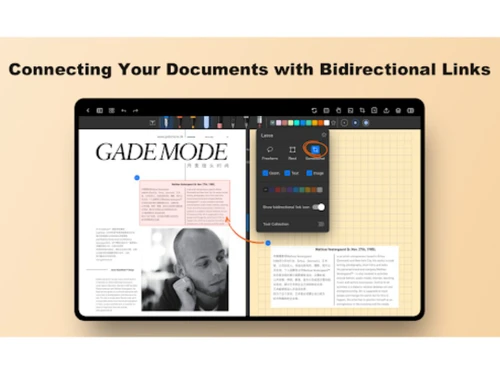
Notein allows users to create, edit, and share notes across various devices and platforms, including smartphones, tablets, and desktop computers. The software provides a range of formatting options, including text formatting, image embedding, and linking to external resources. Notein also offers PDF annotation tools, allowing users to markup, highlight, and annotate PDFs directly within the application.
Notein is supported on Android and iOS operating systems.
Yes, Notein provides a help centre with articles and tutorials to assist users in getting the most out of the application.
Notein's search feature is simplistic and may not be as robust as that of other note-taking applications. Finding particular notes might be a challenge, especially when they are not properly arranged.
0 0
Create a new note for each book you read. Include the book title, author, a brief summary, your thoughts, and a rating. You can also use tags to categorize your book reviews by genre or author.
0 0
Regrettably, Notein does not currently provide the capability to modify the background color of specific notes.
0 0
In Notein, adjust the font size by opening the app and locating the note you wish to modify.
0 0
Notein has several limitations that users should consider:
0 0
20,000+ Software Listed
Best Price Guranteed
Free Expert Consultation
2M+ Happy Customers
Terms and Condtions

Users with registered businesses can purchase goods from merchants on the platform to satisfy their business needs. Users are not permitted to utilize any products acquired through the platform for resale, advertising, business, or further distribution.
For each purchase made, users will receive a Tax Invoice (or 'GST invoice') that includes specific details such as:
the GSTIN of the user associated with their registered business, and
the specified Entity Name for their business.
It should be noted that not all products are eligible for GST Invoice. Only the products displayed by participating sellers with the 'GST-based Invoice Available' callout on the product description page would qualify.
Certain goods and services are not eligible to get a GST Invoice, including items with VAS, i.e., Value Added Services (e.g., Total Mobile Protection/Assured Buyback) and those involving an exchange offer at the time of purchase.
Users must ensure the accuracy of the GSTIN, and business entity name provided for the GST Invoice. Requests for corrections into GST Invoice would not be accommodated by Techjockey.com or any Seller, and any issues arising from user-provided information are the sole responsibility of users.
Techjockey.com is not liable for the GST Invoice or any associated input tax credit. To efficiently claim an input tax credit, users should select the registered place of business address as per the GST authority's data and follow the provisions of the GST Act and rules.
To claim an input tax credit, the delivery and billing addresses must match. Furthermore, input tax credits will not be granted if the delivery address and GSTIN on the invoice are from different states. In case of incorrect GST details provided during the order placement, the order will be canceled automatically.