USA
USA UAE
UAESmall Business
Designed for startups and growing businesses

See More





Brand: MyScript
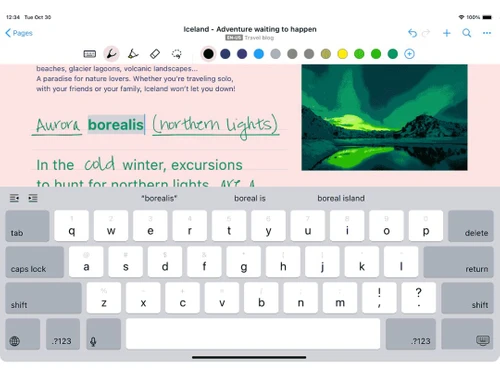
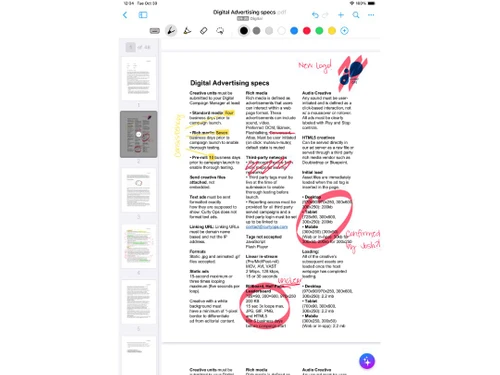
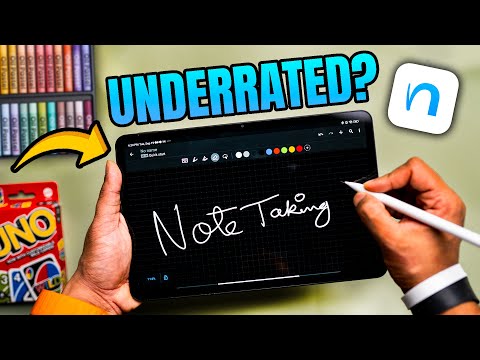
Nebo is a versatile note-taking application that combines handwriting, text, drawings, diagrams, and images on an expandable canvas. It offers accurate handwriting recognition in 66 languages, intuitive pen gestures for editing content, and the ability to export notes to various formats, making it a...
See MoreHave you used Nebo before?
Share your insights for better experience
Brand: MyScript
Founded Year: 1998
MyScript is the worldwide leader in real-time handwriting recognition for all types of content (text, math, shape, music).
Looking for The Right Pricing?
Share your requirements and get a plan built around your business.
Price Available on Request
Get personalised Nebo pricing that fits your needs. Our team will connect with you.
Primary Features
 To-do lists Offline Access Search Functionality Hierarchy Management Tagging and Labelling File Attachments Annotations Version History Text Formatting Web Clipper Templates Reminders Voice Notes Bookmarks
 Search and Retrieval
Full-Text Search with Filters Activity History OCR (Optical Character Recognition) NLP-based Search Collaboration
Note Sharing Commenting and Feedback Real Time Editing Permissions Control Customization & Personalization
Themes and Colour Options Custom Fonts and Styles Quick Access Widgets End-to-End Encryption Security and Privacy
Password Protection Note Recovery Biometric Login Version Control Alerts & Notifications
Customizable Reminders Due Date Notifications Snooze Reminders Event Reminders Push Notifications Email Notifications Calendar Alerts Administrative Features
Export Notes Import Notes User Access Management Access Logs Auto Backup Integrations
API Access Add-Ons Third Party Integration Calendar Integration API Integration AI Capabilities
Summarisation Image Recognition Voice-to-Text Smart Recommendations Content Generation 

Watch the demo video to explore key features, real workflows, and how the software fits your business needs.
 Ubuntu
  Windows
  iOS
iOS  Android MacOS
  Linux
Linux  Desktop
  Mobile
  Tablet
  iPad
iPad  Cloud-Based
  Perpetual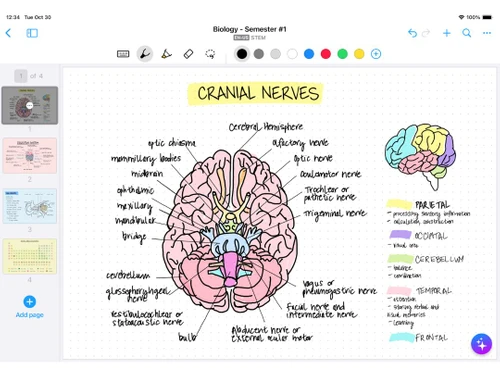
Small Business
Designed for startups and growing businesses
Medium Business
Built for business growth and flexibility
Enterprises
Designed for complex and large-scale business needs
4.3
Out of 5

Overall Rating
Based on
12 Verified Reviews
Rating Breakdown
88% Recommend this Product
Add ReviewOverall, users appreciate Nebo for its effective note-taking capabilities, particularly its handwriting recognition and multilingual support, making it a versatile tool for various roles. Many enjoy the customizable features and offline functionality, while also noting its seamless syncing across devices. However, common complaints include a steep learning curve for advanced features, limited formatting options compared to traditional word processors, and a lack of collaboration tools. Additionally, some users find the pricing a bit high for the features offered.
Pros
"Nebo has good AI tools. Which include AI Summarize, Explain and Chat which can summarize content, explain concepts, and assess knowledge."
"Most of the tools are customizable, be it a pen, highlighter, and eraser. All of these are customizable variables."
"It manages a lot of languages well. It supports multiple languages not just English, so it is good for foreign users."
Cons
"There is quite a learning curve for advanced features. While the basic use is easy, it can take time to properly master the craft."
"It has export issues sometimes. Formatting can get weird when you move notes elsewhere."
"It has incredibly low formatting options which is not comparable to Word or Google Docs. "


Jan 16, 2025
Techjockey Verified
“AI Tools but Takes Time to Master”
Concepts can be understood and assessed with the help of the Summarize, Explain, and Chat capabilities. While the fundamentals were simple to learn, it took me some time to fully grasp the more complex aspects.
Pros
Nebo has good AI tools. Which include AI Summarize, Explain and Chat which can summarize content, explain concepts, and assess knowledge.
Cons
There is quite a learning curve for advanced features. While the basic use is easy, it can take time to properly master the craft.
Reason to switch
I wanted something that would help me summarize and explain my notes and Nebo’s tools were exactly what I needed.
Dec 18, 2024
Techjockey Verified
“Customizable Tools but Export Needs Work”
I like how Nebo allows me to personalize notetaking by allowing me to tweak tools like the pen, highlighter, and eraser. The only issue is that when exporting notes, the formatting varies slightly when transferring them to different devices.
Pros
Most of the tools are customizable, be it a pen, highlighter, and eraser. All of these are customizable variables.
Cons
It has export issues sometimes. Formatting can get weird when you move notes elsewhere.
Reason to switch
Apple Notes felt too basic and did not have many customization options available.
Nov 21, 2024
Techjockey Verified
“Good for Multilingual Users but Limited Formatting.”
It manages the many languages I use quite effectively. It cannot match programs like Word or Google Docs, so it is not the best option if you require sophisticated formatting.
Pros
It manages a lot of languages well. It supports multiple languages not just English, so it is good for foreign users.
Cons
It has incredibly low formatting options which is not comparable to Word or Google Docs.
Reason to switch
Nebo made it much easier to take notes in different languages effortlessly.

Nebo
Price On Request
Desktop
Mobile
Web based
On Premises
Windows
Mac OS

GoodNotes
Price On Request
Desktop
Mobile
Web based
On Premises
Windows
Mac OS

Evernote
₹ 449
Desktop
Mobile
Web based
On Premises
Windows
Mac OS

Turbo AI
₹ 339
Desktop
Mobile
Web based
On Premises
Windows
Mac OS

Notability
Price On Request
Desktop
Mobile
Web based
On Premises
Windows
Mac OS

Obsidian
Price On Request
Desktop
Mobile
Web based
On Premises
Windows
Mac OS

Microsoft OneNote
Price On Request
Desktop
Mobile
Web based
On Premises
Windows
Mac OS

Notein
Price On Request
Desktop
Mobile
Web based
On Premises
Windows
Mac OS

Joplin
Price On Request
Desktop
Mobile
Web based
On Premises
Windows
Mac OS

Zoho Notebook
₹ 99
Desktop
Mobile
Web based
On Premises
Windows
Mac OS

Apple Notes
Price On Request
Desktop
Mobile
Web based
On Premises
Windows
Mac OS
(0) Product(s) selected
Starting Price:
€3 /Month
Available
Price on Request

Available
Price on Request

Starting Price:
$6 /Month

Starting Price:
$5 /Seat/Month

Starting Price:
$15 /Month

Starting Price:
$63 /Year

Starting Price:
$2 /Month

Starting Price:
$12 /Month
Nebo supports multiple operating systems including Ubuntu, Windows, iOS, Android, macOS, and Linux.
Yes, Nebo is available as an app on the Google Play Store and the Apple App Store for both Android and iOS users.
Nebo is priced at $9.99 and is available at techjockey.com. For detailed pricing information, you can contact techjockey.com
Nebo is designed for individuals who prefer digital note-taking. It is especially beneficial for students, professionals, and anyone who needs to organise their notes efficiently. Its handwriting recognition feature makes it ideal for those who prefer writing over typing.
For information about available testing periods or demo options for Nebo, contact techjockey.com. They can provide detailed information.
Yes, Nebo is suitable for small businesses, especially for brainstorming sessions, meeting notes, and project planning. Its interactive features can help in enhancing productivity and efficiency.
Nebo's primary function is note-taking and does not necessarily store sensitive data. However, it is always recommended to follow best practices for securing your devices.
Nebo allows users to take freeform notes using handwriting or text. It uses powerful AI to recognize and transcribe handwritten text. Users can create unlimited notebooks, add images, drawings, and diagrams, and export their notes in various formats.
Nebo offers features like handwriting recognition in 66 languages, pen gestures for editing, interactive ink, creation of unlimited notebooks, export options in various formats, and more. For additional information about Nebo's features, contact our product experts.
Nebo is consistently being enhanced with new features and improvements. The development team carefully listens to feedback from users and integrates suggestions into upcoming updates. This is the usual process for managing updates and implementing new features
0 0
If Nebo fails to recognize your handwriting, here are a few tips:
0 0
Integrating Nebo with Your Task Management Workflow
Here are some strategies to integrate Nebo with your task management workflow:
0 0
Nebo needs a recent CPU, a minimum of 4GB of RAM, and enough storage space. It works with Windows, macOS, and iOS. Using a stylus is strongly suggested for best results, particularly for handwriting recognition and drawing.
0 0
Here are some effective ways to organize your notes in Nebo:
0 0
20,000+ Software Listed
Best Price Guranteed
Free Expert Consultation
2M+ Happy Customers
Terms and Condtions

Users with registered businesses can purchase goods from merchants on the platform to satisfy their business needs. Users are not permitted to utilize any products acquired through the platform for resale, advertising, business, or further distribution.
For each purchase made, users will receive a Tax Invoice (or 'GST invoice') that includes specific details such as:
the GSTIN of the user associated with their registered business, and
the specified Entity Name for their business.
It should be noted that not all products are eligible for GST Invoice. Only the products displayed by participating sellers with the 'GST-based Invoice Available' callout on the product description page would qualify.
Certain goods and services are not eligible to get a GST Invoice, including items with VAS, i.e., Value Added Services (e.g., Total Mobile Protection/Assured Buyback) and those involving an exchange offer at the time of purchase.
Users must ensure the accuracy of the GSTIN, and business entity name provided for the GST Invoice. Requests for corrections into GST Invoice would not be accommodated by Techjockey.com or any Seller, and any issues arising from user-provided information are the sole responsibility of users.
Techjockey.com is not liable for the GST Invoice or any associated input tax credit. To efficiently claim an input tax credit, users should select the registered place of business address as per the GST authority's data and follow the provisions of the GST Act and rules.
To claim an input tax credit, the delivery and billing addresses must match. Furthermore, input tax credits will not be granted if the delivery address and GSTIN on the invoice are from different states. In case of incorrect GST details provided during the order placement, the order will be canceled automatically.