USA
USA UAE
UAESmall Business
Designed for startups and growing businesses

See More





Brand: GoodNotes
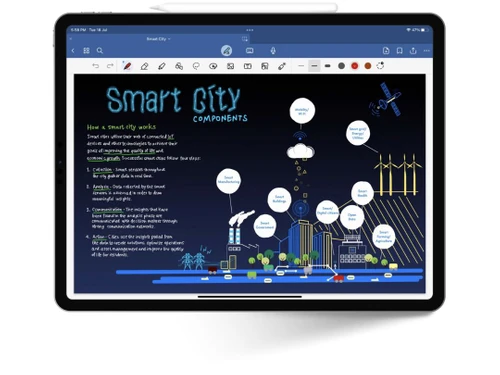
A combination of digital notebook and PDF markup that lets you organize your notes better, using folders and sub folders.
See MoreHave you used GoodNotes before?
Share your insights for better experience
Brand: GoodNotes
Founded Year: 2011
GoodNotes creates beautiful handwritten digital notes.
Primary Features
 Templates Annotations Version History Bookmarks To-do lists Voice Notes Offline Access Text Formatting Search Functionality Reminders Hierarchy Management Tagging and Labelling File Attachments Web Clipper
 Search and Retrieval
Full-Text Search with Filters Activity History OCR (Optical Character Recognition) NLP-based Search Collaboration
Real Time Editing Note Sharing Commenting and Feedback Permissions Control Customization & Personalization
End-to-End Encryption Themes and Colour Options Custom Fonts and Styles Quick Access Widgets Security and Privacy
Password Protection Version Control Biometric Login Note Recovery Alerts & Notifications
Email Notifications Push Notifications Customizable Reminders Due Date Notifications Event Reminders Snooze Reminders Calendar Alerts Administrative Features
User Access Management Auto Backup Export Notes Import Notes Access Logs Integrations
API Integration API Access Third Party Integration Calendar Integration Add-Ons AI Capabilities
Smart Recommendations Summarisation Voice-to-Text Image Recognition Content Generation 

Watch the demo video to explore key features, real workflows, and how the software fits your business needs.
 Windows
  iOS
iOS  Android MacOS
  Desktop
  Mobile
  iPad
iPad  Cloud-Based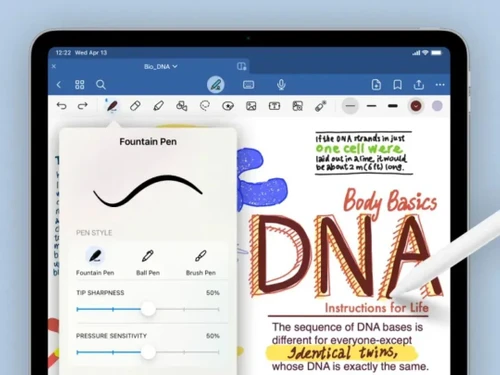

Small Business
Designed for startups and growing businesses
Medium Business
Built for business growth and flexibility
Enterprises
Designed for complex and large-scale business needs
4.6
Out of 5

Overall Rating
Based on
13 Verified Reviews
Rating Breakdown
91% Recommend this Product
Add ReviewUsers generally appreciate GoodNotes for its one-time purchase model, intuitive interface, and smooth handwriting experience, making it ideal for note-taking and annotations. The ability to customize notes and organize them into folders is also well-received. However, common complaints include limited pen options, lack of task management features, and restricted cloud storage options, as well as issues with battery drain during extended use and lag with large notebooks. A desire for a web version and dark mode functionality is also noted.
Pros
"There is no need for a subscription. I just paid once and I have all the features I need. No ongoing subscription, which is great."
"I like to zoom feature. The zoom box while writing helps me be more precise when I want to write in smaller text."
"There are lots of customization options. It gives you the ability to change the paper types, colors, and pens so my notes are exactly how I want them."
Cons
"It takes up quite a lot of space. The app and all my notes take up a lot of space on my device."
"I wish they had more pen selection options. There are fewer pen styles when compared to other note-taking apps. It limits my creativity."
"There are limited cloud storage options. You can only sync it with iCloud, if you use Google Drive it is not as flexible."


Jan 5, 2025
Techjockey Verified
“No Subscription Hassles but Takes Up Space”
It is great that there is not a membership fee. I only pay once to access all the features I require. The fact that it takes up a lot of room on my device, particularly as my notes accumulate, is a drawback.
Pros
There is no need for a subscription. I just paid once and I have all the features I need. No ongoing subscription, which is great.
Cons
It takes up quite a lot of space. The app and all my notes take up a lot of space on my device.
Reason to switch
GoodNotes was simpler with all the features for a one-time fee. Obsidian was complex and overwhelming.
Nov 12, 2024
Techjockey Verified
“Precise and Easy, But Limited Pen Options”
The Zoom box is one of my favorite features since it allows me to write more accurately and concisely without creating a mess. I wish there were additional pen-style options, though. GoodNotes has fewer options than other note-taking apps.
Pros
I like to zoom feature. The zoom box while writing helps me be more precise when I want to write in smaller text.
Cons
I wish they had more pen selection options. There are fewer pen styles when compared to other note-taking apps. It limits my creativity.
Reason to switch
I wanted a more precise and flexible note-taking app, and GoodNotes gave me the precision and features I was looking for.
Sep 30, 2024
Techjockey Verified
“Great for Creativity but Lacks Task Management”
Adding several layers is a tool I like since it allows me to stack text, objects, and photos. That said, GoodNotes does not have task management capabilities like checklists or reminders.
Pros
You can add multiple layers. I can add different elements like images and shapes on top of my notes without messing things up. It is like a digital whiteboard.
Cons
It lacks task management features. If you want task management features like checklists or reminders, you will have to look elsewhere.
Reason to switch
Asana was not flexible in notetaking and lacked creativity, GoodNotes provided that.

GoodNotes
Price On Request
Desktop
Mobile
Web based
On Premises
Windows
Mac OS

Notability
Price On Request
Desktop
Mobile
Web based
On Premises
Windows
Mac OS

Evernote
₹ 449
Desktop
Mobile
Web based
On Premises
Windows
Mac OS

Notein
Price On Request
Desktop
Mobile
Web based
On Premises
Windows
Mac OS

Obsidian
Price On Request
Desktop
Mobile
Web based
On Premises
Windows
Mac OS

Turbo AI
₹ 339
Desktop
Mobile
Web based
On Premises
Windows
Mac OS

RemNote
₹ 400
Desktop
Mobile
Web based
On Premises
Windows
Mac OS

Microsoft OneNote
Price On Request
Desktop
Mobile
Web based
On Premises
Windows
Mac OS

Anytype
Price On Request
Desktop
Mobile
Web based
On Premises
Windows
Mac OS

Zoho Notebook
₹ 99
Desktop
Mobile
Web based
On Premises
Windows
Mac OS

Mem AI
Price On Request
Desktop
Mobile
Web based
On Premises
Windows
Mac OS
(0) Product(s) selected
Starting Price:
$5 /Seat/Month
Starting Price:
$15 /Month

Starting Price:
€3 /Month

Available
Price on Request

Starting Price:
$63 /Year

Starting Price:
$6 /Month

Available
Price on Request

Available
Price on Request

Starting Price:
$2 /Month
GoodNotes is compatible with Windows, Android, Web, Mac, and iOS operating systems.
The GoodNotes app is available for Android, iOS, and Mac devices.
GoodNotes supports cloud-based deployment type.
GoodNotes pricing of the Essential Plan is starts at USD 12/year at techjockey.com.
GoodNotes is typically used by teachers, personal users, writers, and students in educational institutions.
No, there is no free trial or demo for GoodNotes.
Yes, you can use GoodNotes for free with basic features. However, to consume advanced features and tools, you need to upgrade to paid plans.
To download GoodNotes, you can contact Techjockey.com
The aim of the note-taking application – GoodNotes is to help you lead a paperless life by organizing all your notes and documents in one place so that you won’t ever lose anything.
Notability, Noteshelf, and PDF Expert offer excellent PDF annotation and handwriting comparable to GoodNotes.
0 0
People switch for a subscription-free option, better cross-platform sync, or free apps like OneNote and Apple Notes.
0 0
Yes, GoodNotes is compatible with the Xiaomi Pad 6S Pro. You can download it from the Google Play Store, provided your device has at least an 8' screen and over 3GB of RAM.
0 0
You can perform the following if GoodNotes crashes:
0 0
If you delete GoodNotes without syncing your notes to iCloud, you will lose all of your unsaved data. If your notes are synced to iCloud, you may quickly restore them by reinstalling GoodNotes on your device and signing in to your iCloud account. This will automatically sync your cloud-based notes to your smartphone.
0 0
20,000+ Software Listed
Best Price Guranteed
Free Expert Consultation
2M+ Happy Customers
Terms and Condtions

Users with registered businesses can purchase goods from merchants on the platform to satisfy their business needs. Users are not permitted to utilize any products acquired through the platform for resale, advertising, business, or further distribution.
For each purchase made, users will receive a Tax Invoice (or 'GST invoice') that includes specific details such as:
the GSTIN of the user associated with their registered business, and
the specified Entity Name for their business.
It should be noted that not all products are eligible for GST Invoice. Only the products displayed by participating sellers with the 'GST-based Invoice Available' callout on the product description page would qualify.
Certain goods and services are not eligible to get a GST Invoice, including items with VAS, i.e., Value Added Services (e.g., Total Mobile Protection/Assured Buyback) and those involving an exchange offer at the time of purchase.
Users must ensure the accuracy of the GSTIN, and business entity name provided for the GST Invoice. Requests for corrections into GST Invoice would not be accommodated by Techjockey.com or any Seller, and any issues arising from user-provided information are the sole responsibility of users.
Techjockey.com is not liable for the GST Invoice or any associated input tax credit. To efficiently claim an input tax credit, users should select the registered place of business address as per the GST authority's data and follow the provisions of the GST Act and rules.
To claim an input tax credit, the delivery and billing addresses must match. Furthermore, input tax credits will not be granted if the delivery address and GSTIN on the invoice are from different states. In case of incorrect GST details provided during the order placement, the order will be canceled automatically.