linkedin
Fireflies AI logo
play How to invite the Fireflies.ai Notetaker Bot to your meetings
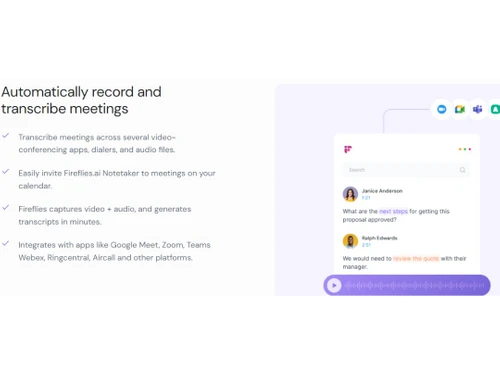
Fireflies Transcribe Meeting
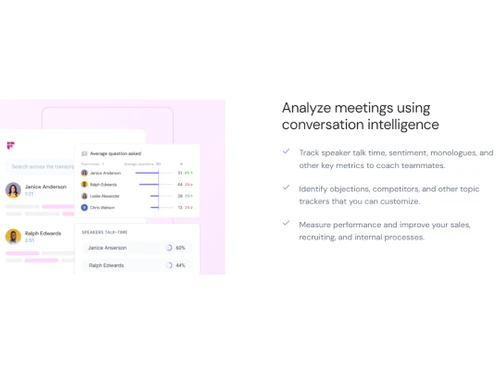
Fireflies Analyze Meetings

Fireflies AI

Brand: Fireflies.ai

  • 4.3

  • 14 Ratings & 14 Reviews

Fireflies AI is an advanced AI meeting assistant and note-taking tool that automates meeting recordings and transcriptions. It integrates with various web-conferencing platforms and business applications to enhance meeting productivity and collaboration.

See More

Have you used Fireflies AI before?

Share your insights for better experience

Add a Review
Starting Price
$18

View plans

100% Genuine
Products
Best Price
Guaranteed
Safe & Secure
Payment
  • Description

  • Pricing

  • Features

  • Specification

  • Review

  • Compare

  • Alternatives

  • FAQ

  • Questions

Starting at $18

Fireflies AI Software Overview

What is Fireflies AI?

Fireflies AI is a revolutionary tool that leverages artificial intelligence's power to transform how meetings are managed and analysed. It goes beyond simple recording and transcription, offering a comprehensive suite of features that streamline meeting organisation, improve collaboration, and extract valuable insights. Fireflies AI automatically transcribes and summarises meetings, saving time and effort for users. It seamlessly integrates with popular web-conferencing platforms and business applications, enhancing workflows and promoting efficient collaboration. This accessibility across platforms, including iOS and Android, makes it one of the better note taking software.

By automating the tedious task of note-taking, Fireflies AI empowers users to focus on the content of the meeting, fostering deeper engagement and more productive discussions.

Why Choose Fireflies AI?

  • Effortless Meeting Documentation: Fireflies AI automates meeting recordings and transcriptions, freeing up valuable time for users to focus on the conversation at hand.
  • Seamless Platform Integration: It seamlessly integrates with leading web conferencing platforms and popular business applications, creating a cohesive and efficient workflow across various tools.
  • Actionable Meeting Insights: Fireflies AI provides comprehensive meeting summaries that highlight key decisions, action items, and discussion points, ensuring that nothing falls through the cracks.
  • Advanced Data Analysis: The tool analyses meeting data to provide valuable insights into key topics, sentiment analysis, and speaker engagement, enabling data-driven decision-making.
  • Customizable Solutions: Fireflies AI offers customizable and scalable solutions to meet the unique needs of various organizations, including large enterprises with specialised requirements.
  • Priority Support and Dedicated Account Management: For organizations seeking an elevated level of service, Fireflies AI offers priority support and dedicated account management, ensuring seamless onboarding and personalised assistance.

Benefits of Fireflies AI

  • Maximise Productivity: Automatic transcription and meeting summaries allow users to focus on the conversation, boosting productivity and making meetings more impactful.
  • Enhance Collaboration: Seamless integration with business applications and CRMs promotes efficient workflows and communication, fostering a more cohesive and productive team environment.
  • Uncover Hidden Insights: Fireflies AI's advanced data analysis features unlock valuable insights from meeting data, empowering organizations to make informed decisions and improve their strategies.
  • Universal Accessibility: Available on both iOS and Android platforms, Fireflies AI provides convenient access for users on the go, ensuring that meetings can be captured and analysed from any device.
  • Effortless Meeting Management: Fireflies AI simplifies meeting management by automating recording, transcription, and summarization. This allows users to focus on their core tasks and avoid unnecessary administrative burdens.
  • Data-Driven Decision Making: The tool provides data-driven insights to inform strategies, identify trends, and optimise meeting effectiveness.

Top Features of Fireflies AI

  • Call Sharing: Share recordings and transcripts with team members for collaboration.
  • File Transfer: Easily transfer files during or after meetings within the platform.
  • Scheduled Recording: Pre-schedule call recordings for important conversations.
  • Distributed Call Recording: Record multiple participants from different locations.
  • Recording Bookmarking: Bookmark key moments in recordings for easy reference.
  • Annotations: Add notes and comments for clarity and context.
  • Multi-Language Support: Transcribe and translate conversations in multiple languages.
  • Collaboration Tools: Invite team members for viewing, editing, and commenting.
  • Automatic Transcription: Accurately transcribe conversations using natural language processing.
  • Custom Vocabulary: Improve transcription accuracy with industry-specific jargon and terms.

Pricing

Fireflies AI pricing starts at $18 per seat per month at techjockey.com. The pricing model is based on different parameters, including the amount of bandwidth you need, the number of servers you need, and the features you need. For further queries related to the product, you can contact our product team and learn more about the pricing and offers.

Read more

Fireflies.ai Company Details

Founded Year:  2016

Fireflies.ai offers an AI Meeting assistant that records, transcribes, and makes searchable meeting notes.

Director/Founders Krish Ramineni, Sam Udotong
Company Size 1-100 Employees

Fireflies AI Pricing & Plans

Pro
Starting at $18
    • Licenses

      Licenses
      Licenses
    • Monthly

      Monthly
      Monthly

Key Features

  • 8,000 mins of storage/seat

  • Unlimited transcription

  • Unlimited AI Summaries

  • Keywords & topic tracking

Business
Starting at ₹29
    • Licenses

      Licenses
      Licenses
    • Monthly

      Monthly
      Monthly

Key Features

  • Unlimited transcription

  • Unlimited AI Summaries

  • Unlimited storage

  • Unlimited integrations

Enterprise
Starting at ₹39
    • Licenses

      Licenses
      Licenses
    • Monthly

      Monthly
      Monthly

Key Features

  • Unlimited transcription

  • Unlimited AI Summaries

  • Unlimited storage

  • Dedicated account manager

Fireflies AI Features

Primary Features

  • icon_check Annotations
    Mark up images or PDFs with comments and highlights.
  • icon_check Bookmarks
    Mark important notes for easy access later.
  • icon_check Voice Notes
    Record audio notes directly within the app.
  • icon_check Offline Access
    View and edit notes without an internet connection.
  • icon_check Text Formatting
    Style text with bold, italics, headers, bullet points, and more.
  • icon_check Search Functionality
    Quickly locate notes with a powerful keyword search.
  • icon_check File Attachments
    Attach files to notes for richer, more detailed information.
  • icon_check Version History
    Access previous versions of notes to track changes.
  • icon_check Web Clipper
    Save content from the web directly to your notes.
  • icon_check Templates
    Use pre-built layouts for meetings, journals, and more.
  • icon_check To-do lists
    Create and check off tasks within your notes.
  • icon_check Reminders
    Set alerts to stay on top of important notes and tasks.
  • icon_check Hierarchy Management
    Organize notes with folders and subfolders.
  • icon_check Tagging and Labelling
    Add tags for easy note categorization and retrieval.

Search and Retrieval

  • icon_check NLP-based Search
    Search intuitively using natural language queries.
  • icon_check Activity History
    View a timeline of recent changes and updates.
  • icon_check Full-Text Search with Filters
    Find notes using keywords and advanced filters.
  • icon_check OCR (Optical Character Recognition)
    Search text within images or scanned files.

Collaboration

  • icon_check Real Time Editing
    Edit notes simultaneously with team members.
  • icon_check Note Sharing
    Share notes with collaborators or external viewers.
  • icon_check Permissions Control
    Control who can view or edit each note.
  • icon_check Commenting and Feedback
    Add comments and feedback on shared notes.

Customization & Personalization

  • icon_check Themes and Colour Options
    Choose dark, light, or custom themes.
  • icon_check Custom Fonts and Styles
    Personalize text with unique fonts and styles.
  • icon_check Quick Access Widgets
    Add widgets for instant note access from the home screen.
  • icon_check End-to-End Encryption
    Secure notes with encryption for privacy.

Security and Privacy

  • icon_check Biometric Login
    Use fingerprint or facial recognition for secure access.
  • icon_check Password Protection
    Lock individual notes with a password.
  • icon_check Version Control
    Revert to previous note versions if needed.
  • icon_check Note Recovery
    Restore deleted notes easily within the app.

Alerts & Notifications

  • icon_check Email Notifications
    Receive email updates for note changes or tasks.
  • icon_check Push Notifications
    Get instant alerts on mobile and desktop.
  • icon_check Customizable Reminders
    Set personalized reminders for notes or tasks.
  • icon_check Event Reminders
    Link notes with events and get timely reminders.
  • icon_check Calendar Alerts
    Sync with your calendar to schedule reminders.
  • icon_check Due Date Notifications
    Receive alerts before a task’s due date.
  • icon_check Snooze Reminders
    Delay reminders to focus and prioritize.

Administrative Features

  • icon_check Access Logs
    Track access history for shared notes.
  • icon_check Export Notes
    Export notes as PDFs, DOCX, or HTML.
  • icon_check User Access Management
    Control user roles and permissions.
  • icon_check Import Notes
    Easily import notes from other platforms.
  • icon_check Auto Backup
    Automatically save notes to prevent data loss.

Integrations

  • icon_check API Integration
    Connect with other apps using the note-taking app's API.
  • icon_check API Access
    Use APIs to integrate with custom tools or apps.
  • icon_check Third Party Integration
    Connect with Google Drive, Dropbox, and more.
  • icon_check Calendar Integration
    Sync notes with your calendar events.
  • icon_check Add-Ons
    Extend functionality with plugins and add-ons.

AI Capabilities

  • icon_check Smart Recommendations
    Suggested tags or related notes based on content.
  • icon_check Summarisation
    Generate summaries of long notes or articles.
  • icon_check Voice-to-Text
    Convert audio recordings into written text.
  • icon_check Image Recognition
    Detect text or objects within images.
  • icon_check Content Generation
    Use AI to brainstorm or draft note content.
Fireflies AI Demo Video play icon

Get Fireflies AI Demo

Watch the demo video to explore key features, real workflows, and how the software fits your business needs.

Understand
Key Features
Personal
Demo Insights
Interactive
Demo Support

Fireflies AI Specifications

Supported Platforms
Ubuntu Ubuntu Windows Windows MacOS MacOS Linux Linux
Devices
Desktop Desktop Mobile Mobile Tablet Tablet iPad iPad
Deployment
Cloud-Based Cloud-Based
Suitable For
All Industries
Business Specific
All Businesses
Business Size
Small Business Startups Medium Business Enterprises
Customer Support
Email Communities
Language
English
Integration
API Integration
Training Resources
Documentation Videos
AI Features
AI Integrated

Explore the Best Alternative Solutions Similar to Your Business Size and Needs

Fireflies AI Reviews

4.3

Out of 5

img

Overall Rating

Based on
14 Verified Reviews

Rating Breakdown

  • Features 4.4
  • Value for Money 4.4
  • Ease of Use 4.4
  • Customer Support 4.1

92% Recommend this Product

Add Review

Pros

  • "I found the cost to be affordable and reasonable. Considering all the features it offers it provides fair value."

    Shashank Shrikant KarkareJan 22, 2025

  • "The integrations are great. It can connect with most tools I use, like Zoom, Google Meet, and Slack."

    Dinesh Mondhe Dec 1, 2024

  • "It saves me a lot of time. The transcription of meetings is so quick! I do not have to manually take notes anymore."

    Rohit Banodha Oct 21, 2024

Cons

  • "The customer support is not the best. It takes a bit longer than I would like to get help from their support team when issues come up."

    Shashank Shrikant KarkareJan 22, 2025

  • "It can get pricey especially if you want to add extra features like advanced analytics or large team support. The cost can add up."

    Dinesh Mondhe Dec 1, 2024

  • "It is not perfect every time. Sometimes the transcriptions have minor errors. If people talk over each other there is a lot of background noise."

    Rohit Banodha Oct 21, 2024

Fireflies AI Video Reviews

youtubeVideoId

4.6

“Fireflies AI Review | Pros and Cons – Honest & Unbiased”

Review by: Bytes Media

youtubeVideoId

4.3

“Fireflies AI Review : Best AI Meeting Summarizer”

Review by: Show Me Software

Shashank Shrikant Karkare

Product Head

Industry: SAAS User since: < 6 months

4.5

Reviewed on: Jan 22, 2025

Techjockey Verified

“Great Value but Customer Support Could Be Better”

Considering all its capabilities, Fireflies.ai is incredibly reasonably priced. Although the customer service is not as quick as I would like, it offers excellent value for what I require.

Pros

I found the cost to be affordable and reasonable. Considering all the features it offers it provides fair value.

Cons

The customer support is not the best. It takes a bit longer than I would like to get help from their support team when issues come up.

Switched from Gong

Reason to switch

I moved since Fireflies.ai offered more affordable pricing and better overall value compared to Gong.

raman jain

Manager

Industry: Manufacturing User since: < 6 months

4.2

Reviewed on: Oct 16, 2024

Techjockey Verified

“Handy on The Go but Needs More Customization”

I appreciate that Fireflies.ai has a mobile app since it makes it simple for me to access meetings when I am on the go or not at my desk. I would want more stylistic features, so it is a little frustrating that there are no more alternatives to alter the transcribing format.

Pros

It also has a mobile app that lets me review meetings on the go. It is great while I am traveling or away from my desk.

Cons

it has limited customization options for transcription format. There is not much flexibility with how transcripts appear in terms of styling or layout.

Switched from Fellow

Reason to switch

Firefiles.ai’s mobile app was better and it had the ability to review meetings on the go.

Pooja Dabodia

Owner

Industry: Real Estate User since: 6-12 months

4.2

Reviewed on: Jul 9, 2024

Techjockey Verified

“Great for Multilingual Teams but Syncing Needs Work”

It has been incredibly useful for my international teams. Having transcripts in multiple languages in one location is incredible. But occasionally, while connecting with other programs, I have encountered syncing or permission issues.

Pros

I like that it offers multi-language support. I work with international teams and it is cool that Fireflies can handle many languages.

Cons

Even though it integrates with most tools. I face small issues with syncing or permissions across platforms.

Switched from Chorus

Reason to switch

I wanted a solution with multi-language support that fit the needs of my international teams more effectively than Chorus.

See All Fireflies AI Reviews

Compare Fireflies AI With other Note Taking Software

Products
Ratings
Pricing
Device Supported
Deployment
Supported Platforms
  • img

    Fireflies AI

  • 4.3

  • Price On Request

  • Desktop

    Mobile

  • Web based

    On Premises

  • Windows

    Mac OS

  • img

    GoodNotes

  • 4.6

  • Price On Request

  • Desktop

    Mobile

  • Web based

    On Premises

  • Windows

    Mac OS

  • img

    Evernote

  • 4.4

  • ₹ 449

  • Desktop

    Mobile

  • Web based

    On Premises

  • Windows

    Mac OS

  • img

    Turbo AI

  • 4.5

  • ₹ 339

  • Desktop

    Mobile

  • Web based

    On Premises

  • Windows

    Mac OS

  • img

    Notability

  • 4.5

  • Price On Request

  • Desktop

    Mobile

  • Web based

    On Premises

  • Windows

    Mac OS

  • img

    Obsidian

  • 4.4

  • Price On Request

  • Desktop

    Mobile

  • Web based

    On Premises

  • Windows

    Mac OS

  • img

    Microsoft OneNote

  • 4.3

  • Price On Request

  • Desktop

    Mobile

  • Web based

    On Premises

  • Windows

    Mac OS

  • img

    Notein

  • 4.4

  • Price On Request

  • Desktop

    Mobile

  • Web based

    On Premises

  • Windows

    Mac OS

  • img

    Joplin

  • 4.2

  • Price On Request

  • Desktop

    Mobile

  • Web based

    On Premises

  • Windows

    Mac OS

  • img

    Zoho Notebook

  • 4.2

  • ₹ 99

  • Desktop

    Mobile

  • Web based

    On Premises

  • Windows

    Mac OS

  • img

    Apple Notes

  • 4.3

  • Price On Request

  • Desktop

    Mobile

  • Web based

    On Premises

  • Windows

    Mac OS

(0) Product(s) selected

Fireflies AI Alternatives

See All Fireflies AI Alternatives

Starting Price:

€3 /Month

Starting Price:

$6 /Month

Starting Price:

$5 /Seat/Month

Starting Price:

$15 /Month

Nebo

4.3

Available

Price on Request

Starting Price:

$2 /Month

Articles for Fireflies AI

See All Related Articles

Which operating system does Fireflies AI Software Support?

Fireflies AI supports Ubuntu, Windows, MacOS, and Linux operating systems.

Is there any Fireflies AI App?

Yes, Fireflies AI is available as an application on the Google Play Store and Apple Store for iOS and Android users.

How much does Fireflies AI Software Cost?

Fireflies AI pricing starts at $18 per seat/month for the Pro plan. Contact techjockey.com for detailed pricing information on Fireflies AI. Pricing is customised based on specific business needs.

Who are the potential users of Fireflies AI Software?

Fireflies AI is designed for individuals and organizations looking to automate meeting recordings and transcriptions, making it ideal for professionals who need efficient meeting documentation across various industries.

Does Fireflies AI offer a free trial or a demo?

A demo of Fireflies AI is available at techjockey.com. You can contact our product experts for more information.

Is Fireflies AI suitable for small businesses?

Yes, Fireflies AI is suitable for small businesses. It offers a Pro plan at $10 per seat/month, which includes customised meeting summaries and integration with popular business applications, catering to the needs of small businesses and startups.

How secure is Fireflies AI?

Fireflies AI provides advanced security features such as secure data transmission and storage, ensuring that meeting recordings and transcriptions are protected.

How does Fireflies AI software Work?

Fireflies AI uses artificial intelligence to automatically transcribe meeting recordings, generate summaries, and analyse data. It integrates with platforms like Zoom and Google Meet to streamline the process of organising and managing meeting data, enhancing productivity and collaboration.

What features does Fireflies AI offer?

Fireflies AI offers features such as automatic transcription, meeting summaries, data analysis, and integration with popular web-conferencing platforms and business applications. You can contact our product experts for more information.

Fireflies AI Questions

A:

Avoma, Fathom, and Otter are praised for high-quality AI meeting summaries and action items.

Akash Singh • Sep 19, 2026
Q:

Why do people switch away from Fireflies AI?

Pragnesh Patel • Sep 3, 2026
A:

Teams leave over pricing, storage limits, summary quality, or wanting a no-bot recorder like Fathom.

Ayush Kumar • Sep 16, 2026
Q:

What are the main features of Fireflies AI?

Jaspreet Singh Ahuja • Nov 6, 2024
A:

Fireflies AI is a powerful meeting recording and transcription tool that offers a range of features, including: 

  • Automatic recording 
  • Transcription 
  • Search 
  • Playback 
  • Comments and reactions 
  • Clip out moments as soundbites 
  • Global search 
  • Uploads 
  • Public channels 
  • Chrome extension 
  • Fireflies mobile app 
  • AI Notes 
  • Conversation intelligence 
  • Team analytics 
  • Unlimited public and private channels 
  • User Groups 
  • API access 
appu • Nov 6, 2024
Q:

Does Fireflies AI support video conferencing?

BARUN sengupta • Nov 6, 2024
A:

Yes, Fireflies AI supports video conferencing. The Fireflies Chrome extension allows you to record and transcribe meetings on platforms such as Zoom, Google Meet, and Microsoft Teams. This allows you to record both audio and video information from your meetings and have it transcribed into text.

Ashish Anand • Nov 6, 2024
Q:

How to use Fireflies AI with Zoom?

Bharat bhushan • Nov 6, 2024
A:

To use Fireflies AI with Zoom, follow the given steps:

  1. Create a Fireflies AI account
  2. Install the Fireflies Chrome extension
  3. Connect your Zoom account
  4. Start recording
Raj Nath Rana • Nov 6, 2024
See All Fireflies AI Questions

20,000+ Software Listed

Best Price Guranteed

Free Expert Consultation

2M+ Happy Customers

Terms and Condtions

close

Users with registered businesses can purchase goods from merchants on the platform to satisfy their business needs. Users are not permitted to utilize any products acquired through the platform for resale, advertising, business, or further distribution.

For each purchase made, users will receive a Tax Invoice (or 'GST invoice') that includes specific details such as:

  • the GSTIN of the user associated with their registered business, and

  • the specified Entity Name for their business.

It should be noted that not all products are eligible for GST Invoice. Only the products displayed by participating sellers with the 'GST-based Invoice Available' callout on the product description page would qualify.

Certain goods and services are not eligible to get a GST Invoice, including items with VAS, i.e., Value Added Services (e.g., Total Mobile Protection/Assured Buyback) and those involving an exchange offer at the time of purchase.

Users must ensure the accuracy of the GSTIN, and business entity name provided for the GST Invoice. Requests for corrections into GST Invoice would not be accommodated by Techjockey.com or any Seller, and any issues arising from user-provided information are the sole responsibility of users.

Techjockey.com is not liable for the GST Invoice or any associated input tax credit. To efficiently claim an input tax credit, users should select the registered place of business address as per the GST authority's data and follow the provisions of the GST Act and rules.

To claim an input tax credit, the delivery and billing addresses must match. Furthermore, input tax credits will not be granted if the delivery address and GSTIN on the invoice are from different states. In case of incorrect GST details provided during the order placement, the order will be canceled automatically.