linkedin
Zoho Notebook logo
play Zoho Notebook - A Free Evernote Alternative
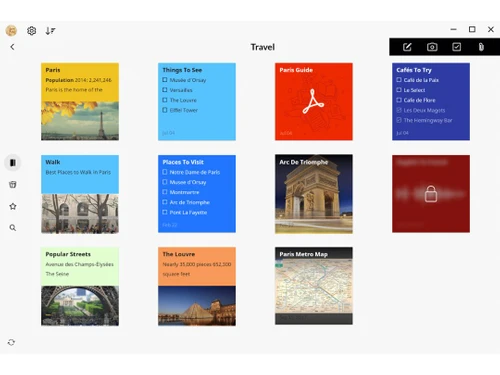
zoho notebook-travel
zoho notebook-template

Zoho Notebook

Brand: Zoho Corporation

  • 4.2

  • 5 Ratings & 1 Review

Zoho Notebook is a digital notebook for capturing, organising, and collaborating on notes and projects. It's a cloud-based application accessible via Zoho account or new account creation.

See More

Have you used Zoho Notebook before?

Share your insights for better experience

Add a Review
Starting Price
₹99 excl.GST
₹ 117 incl. GST

View plans

offer Save upto 18%, Get GST Invoice on your business purchase T&C
offer Buy Now & Pay Later, Check offer on payment page.
Buy Now
100% Genuine
Products
Best Price
Guaranteed
Safe & Secure
Payment
  • Description

  • Pricing

  • Features

  • Specification

  • Review

  • Compare

  • Alternatives

  • FAQ

Starting at ₹99
Buy Now

Zoho Notebook Software Overview

What is Zoho Notebook?

Imagine a place where you can jot down your thoughts, brainstorm ideas, and keep track of important information, all in one place. That's exactly what Zoho Notebook is – a digital notepad that's as easy to use as a traditional one, but with some awesome superpowers!

Zoho Notebook lets you create different types of notes, like regular text notes, to-do lists, and even sketches on a whiteboard. It's like having a whole bunch of notebooks, all neatly organised in one spot. You can add pictures, files, links, and even record audio notes to make your notes even more comprehensive.

The best part? Zoho Notebook works on your computer, tablet, and phone. So, whether you're at your desk, commuting, or on the go, your notes are always right there with you. It's also super easy to share your notes with other people, making collaboration a breeze.

Why Choose Zoho Notebook?

  • Note Formats for Every Need: Zoho Notebook gives you a bunch of different note formats, so you can choose the one that best fits what you're trying to do. You can create simple text notes, lists for your to-dos, and even draw sketches on a digital whiteboard.
  • Password Protection: You can set a password to keep your notes safe from prying eyes. It's like having a personal lock on your notebook.
  • Data Encryption: Zoho Notebook encrypts your notes, so even if someone were to get their hands on them, they wouldn't be able to read them. It's like scrambling your notes into a code that only you can decipher.
  • Affordable Options for Everyone: Zoho Notebook offers a free plan for individuals and small businesses, making it a cost-effective way to get organised.

Benefits of Zoho Notebook

  • Keep Your Notes Tidy: Zoho Notebook helps you keep your notes neat and organised, so you can easily find what you're looking for. It's like having a librarian who always knows exactly where everything is.
  • Work Together Seamlessly: Zoho Notebook makes it easy to share your notes with others and work together on projects. It's like a digital whiteboard where everyone can contribute their ideas.
  • Share Your Notes in Real-Time: Make changes to your notes with your team in real-time, so everyone is always on the same page. It's like having a live brainstorm session!
  • Boost Your Team's Productivity: Zoho Notebook helps your team stay organised, collaborate effectively, and get more done together.
  • Keep Your Notes Safe: Zoho Notebook uses encryption and password protection to keep your notes secure, so only you can access them. It's like having a personal safe for your thoughts.
  • Peace of Mind: You can rest assured that your notes are safe and secure with Zoho Notebook. You don't have to worry about losing them or someone else getting their hands on them.

Pricing of Zoho Notebook

Zoho Notebook pricing starts at INR 99 and is available at techjockey.com.

The pricing model is based on different parameters, including the amount of bandwidth you need, the number of servers you need, and the features you need. For further queries related to the product, you can contact our product team and learn more about the pricing and offers.

Read more

Zoho Corporation Company Details

Founded Year:  1996

Zoho Corporation is an Indian multinational company that specialises in software development, cloud computing, and web-based business tools. It is best known for Zoho Office suite and its enterprise IT management division, ManageEngine

Director/Founders Sridhar Vembu / Tony Thomas
Company Size 1000+ Employees

Zoho Notebook Pricing & Plans

Notebook Pro

Calculated Price

99 Exclusive of all taxes
    • Licenses

      Licenses
      Licenses
    • Monthly

      Monthly
      Monthly

Key Features

  • OCR and object detection

  • 100GB of cloud storage and upload files up to 1GB

  • Scan business cards, tables, and recurring reminde

  • Noteboards - a kanban-style board for organizing t

  • Premium covers and fonts

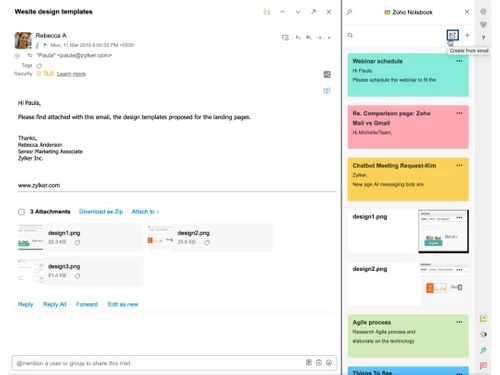
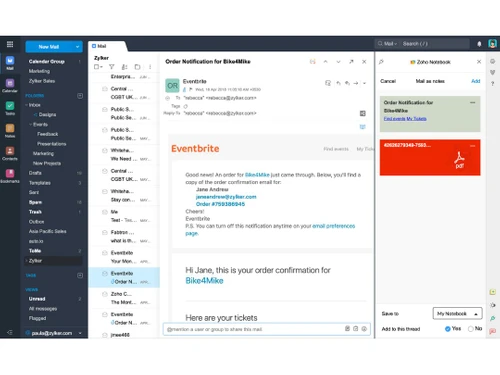
  • Turn emails into notecards

  • Access up to 100 versions of a notecard

  • Share notecards and notebooks

Notebook for Business

Calculated Price

399 Exclusive of all taxes
    • Users

      Users
      Users
    • Monthly

      Monthly
      Monthly

Key Features

  • All in Pro +

  • 1TB cloud storage for up to 10 users

  • Teams - a collaborative workspace for members

  • Whiteboards - a collaborative canvas

  • Integration with Zoho apps and third-party tools

  • Audit log to view all the activities of your organ

  • Advanced security and compliance standards

  • Admin console to manage roles and permissions

Zoho Notebook Features

Primary Features

  • icon_check Templates
    Use pre-built layouts for meetings, journals, and more.
  • icon_check Annotations
    Mark up images or PDFs with comments and highlights.
  • icon_check Version History
    Access previous versions of notes to track changes.
  • icon_check Bookmarks
    Mark important notes for easy access later.
  • icon_check To-do lists
    Create and check off tasks within your notes.
  • icon_check Voice Notes
    Record audio notes directly within the app.
  • icon_check Offline Access
    View and edit notes without an internet connection.
  • icon_check Text Formatting
    Style text with bold, italics, headers, bullet points, and more.
  • icon_check Search Functionality
    Quickly locate notes with a powerful keyword search.
  • icon_check Web Clipper
    Save content from the web directly to your notes.
  • icon_check Reminders
    Set alerts to stay on top of important notes and tasks.
  • icon_check Hierarchy Management
    Organize notes with folders and subfolders.
  • icon_check Tagging and Labelling
    Add tags for easy note categorization and retrieval.
  • icon_check File Attachments
    Attach files to notes for richer, more detailed information.

Search and Retrieval

  • icon_check OCR (Optical Character Recognition)
    Search text within images or scanned files.
  • icon_check Activity History
    View a timeline of recent changes and updates.
  • icon_check Full-Text Search with Filters
    Find notes using keywords and advanced filters.
  • icon_check NLP-based Search
    Search intuitively using natural language queries.

Collaboration

  • icon_check Note Sharing
    Share notes with collaborators or external viewers.
  • icon_check Real Time Editing
    Edit notes simultaneously with team members.
  • icon_check Commenting and Feedback
    Add comments and feedback on shared notes.
  • icon_check Permissions Control
    Control who can view or edit each note.

Customization & Personalization

  • icon_check Themes and Colour Options
    Choose dark, light, or custom themes.
  • icon_check Custom Fonts and Styles
    Personalize text with unique fonts and styles.
  • icon_check Quick Access Widgets
    Add widgets for instant note access from the home screen.
  • icon_check End-to-End Encryption
    Secure notes with encryption for privacy.

Security and Privacy

  • icon_check Password Protection
    Lock individual notes with a password.
  • icon_check Version Control
    Revert to previous note versions if needed.
  • icon_check Note Recovery
    Restore deleted notes easily within the app.
  • icon_check Biometric Login
    Use fingerprint or facial recognition for secure access.

Alerts & Notifications

  • icon_check Email Notifications
    Receive email updates for note changes or tasks.
  • icon_check Push Notifications
    Get instant alerts on mobile and desktop.
  • icon_check Customizable Reminders
    Set personalized reminders for notes or tasks.
  • icon_check Due Date Notifications
    Receive alerts before a task’s due date.
  • icon_check Snooze Reminders
    Delay reminders to focus and prioritize.
  • icon_check Event Reminders
    Link notes with events and get timely reminders.
  • icon_check Calendar Alerts
    Sync with your calendar to schedule reminders.

Administrative Features

  • icon_check User Access Management
    Control user roles and permissions.
  • icon_check Export Notes
    Export notes as PDFs, DOCX, or HTML.
  • icon_check Import Notes
    Easily import notes from other platforms.
  • icon_check Access Logs
    Track access history for shared notes.
  • icon_check Auto Backup
    Automatically save notes to prevent data loss.

Integrations

  • icon_check API Integration
    Connect with other apps using the note-taking app's API.
  • icon_check Third Party Integration
    Connect with Google Drive, Dropbox, and more.
  • icon_check Calendar Integration
    Sync notes with your calendar events.
  • icon_check Add-Ons
    Extend functionality with plugins and add-ons.
  • icon_check API Access
    Use APIs to integrate with custom tools or apps.

AI Capabilities

  • icon_check Smart Recommendations
    Suggested tags or related notes based on content.
  • icon_check Voice-to-Text
    Convert audio recordings into written text.
  • icon_check Content Generation
    Use AI to brainstorm or draft note content.
  • icon_check Summarisation
    Generate summaries of long notes or articles.
  • icon_check Image Recognition
    Detect text or objects within images.
Zoho Notebook Demo Video play icon

Get Zoho Notebook Demo

Watch the demo video to explore key features, real workflows, and how the software fits your business needs.

Understand
Key Features
Personal
Demo Insights
Interactive
Demo Support

Zoho Notebook Specifications

Supported Platforms
Ubuntu Ubuntu Windows Windows iOS iOS Android Android MacOS MacOS Linux Linux
Devices
Desktop Desktop Mobile Mobile Tablet Tablet iPad iPad
Deployment
Cloud-Based Cloud-Based Perpetual Perpetual
Suitable For
All Industries
Business Specific
All Businesses
Business Size
Small Business Startups Medium Business Enterprises SMBs SMEs MSMBs MSMEs Freelancers
Customer Support
Email Communities Forums
Language
English
Integration
API Integration
Training Resources
Videos

Explore the Best Alternative Solutions Similar to Your Business Size and Needs

Zoho Notebook Review

4.2

Out of 5

img

Overall Rating

Based on
1 Verified Review

Rating Breakdown

  • Features 4.5
  • Value for Money 4.3
  • Ease of Use 3.9
  • Customer Support 4.2

82% Recommend this Product

Add Review

Zoho Notebook Video Review

youtubeVideoId

4.1

“Zoho Notebook Review: Too Good to Be Free?”

Review by: Savage Reviews

Compare Zoho Notebook With other Note Taking Software

Products
Ratings
Pricing
Device Supported
Deployment
Supported Platforms
  • img

    Zoho Notebook

  • 4.2

  • ₹ 99.00 excl. GST

  • Desktop

    Mobile

  • Web based

    On Premises

  • Windows

    Mac OS

  • img

    GoodNotes

  • 4.6

  • Price On Request

  • Desktop

    Mobile

  • Web based

    On Premises

  • Windows

    Mac OS

  • img

    Evernote

  • 4.4

  • ₹ 449

  • Desktop

    Mobile

  • Web based

    On Premises

  • Windows

    Mac OS

  • img

    Turbo AI

  • 4.5

  • ₹ 339

  • Desktop

    Mobile

  • Web based

    On Premises

  • Windows

    Mac OS

  • img

    Notability

  • 4.5

  • Price On Request

  • Desktop

    Mobile

  • Web based

    On Premises

  • Windows

    Mac OS

  • img

    Obsidian

  • 4.4

  • Price On Request

  • Desktop

    Mobile

  • Web based

    On Premises

  • Windows

    Mac OS

  • img

    Microsoft OneNote

  • 4.3

  • Price On Request

  • Desktop

    Mobile

  • Web based

    On Premises

  • Windows

    Mac OS

  • img

    Joplin

  • 4.2

  • Price On Request

  • Desktop

    Mobile

  • Web based

    On Premises

  • Windows

    Mac OS

  • img

    Notein

  • 4.4

  • Price On Request

  • Desktop

    Mobile

  • Web based

    On Premises

  • Windows

    Mac OS

  • img

    Apple Notes

  • 4.3

  • Price On Request

  • Desktop

    Mobile

  • Web based

    On Premises

  • Windows

    Mac OS

  • img

    RemNote

  • 4.4

  • ₹ 400

  • Desktop

    Mobile

  • Web based

    On Premises

  • Windows

    Mac OS

(2) Product(s) selected

Zoho Notebook Alternatives

See All Zoho Notebook Alternatives

Starting Price:

€3 /Month

Starting Price:

$5 /Seat/Month

Starting Price:

$6 /Month

Starting Price:

$15 /Month

Nebo

4.3

Available

Price on Request

Starting Price:

$2 /Month

Starting Price:

$12 /Month

Articles for Zoho Notebook

See All Related Articles

How much does Zoho Notebook Software Platform Cost?

Zoho Notebook pricing starts at INR 99 and is available at techjockey.com. Pricing is customised based on specific business needs. Contact techjockey.com for detailed pricing information.

What features does Zoho Notebook offer?

Zoho Notebook offers a range of features, including note-taking, collaboration, search, and filtering. It has features like text, image, audio, checklist, and file notes. Real-time collaboration and voice-to-text transcription are also available.

Who are the potential users of Zoho Notebook?

Zoho Notebook targets individuals and businesses of all sizes. It's highly beneficial for students, professionals, and teams who want to efficiently capture, organise, and share notes, projects, and documents in a secure environment. Whether you're a freelancer or part of a large corporation, Zoho Notebook can streamline your work process.

Is Zoho Notebook suitable for small businesses?

Yes, Zoho Notebook is suitable for small businesses. Its features, such as file sharing, Kanban boards, and real-time collaboration, can help small businesses streamline workflows, enhance communication, and improve productivity.

Does Zoho offer a free trial or a demo?

Contact techjockey.com to explore trial options for Zoho Notebook. They can provide information about available testing periods.

Which operating system does Zoho Notebook Software Support?

Zoho Notebook supports Windows, iOS, Android, macOS and Linux operating systems.

Is there any Zoho Notebook App?

Yes, a Zoho Notebook app is available for Android and iOS users.

How secure is Zoho Notebook?

Zoho Notebook offers several security features, including encryption to protect your notes and data. Passcode-protected notes are also available for added security. Your information is safe with Zoho.

How does Zoho Notebook Work?

Zoho Notebook is a cloud-based application that allows users to capture, organise, and collaborate on notes and documents. It offers features like a noteboard for creating and organising notes, a whiteboard for collaborative note-taking, and encryption for secure data.

20,000+ Software Listed

Best Price Guranteed

Free Expert Consultation

2M+ Happy Customers

Terms and Condtions

close

Users with registered businesses can purchase goods from merchants on the platform to satisfy their business needs. Users are not permitted to utilize any products acquired through the platform for resale, advertising, business, or further distribution.

For each purchase made, users will receive a Tax Invoice (or 'GST invoice') that includes specific details such as:

  • the GSTIN of the user associated with their registered business, and

  • the specified Entity Name for their business.

It should be noted that not all products are eligible for GST Invoice. Only the products displayed by participating sellers with the 'GST-based Invoice Available' callout on the product description page would qualify.

Certain goods and services are not eligible to get a GST Invoice, including items with VAS, i.e., Value Added Services (e.g., Total Mobile Protection/Assured Buyback) and those involving an exchange offer at the time of purchase.

Users must ensure the accuracy of the GSTIN, and business entity name provided for the GST Invoice. Requests for corrections into GST Invoice would not be accommodated by Techjockey.com or any Seller, and any issues arising from user-provided information are the sole responsibility of users.

Techjockey.com is not liable for the GST Invoice or any associated input tax credit. To efficiently claim an input tax credit, users should select the registered place of business address as per the GST authority's data and follow the provisions of the GST Act and rules.

To claim an input tax credit, the delivery and billing addresses must match. Furthermore, input tax credits will not be granted if the delivery address and GSTIN on the invoice are from different states. In case of incorrect GST details provided during the order placement, the order will be canceled automatically.