USA
USA UAE
UAESmall Business
Designed for startups and growing businesses

See More


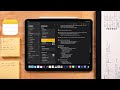


Brand: Apple Inc
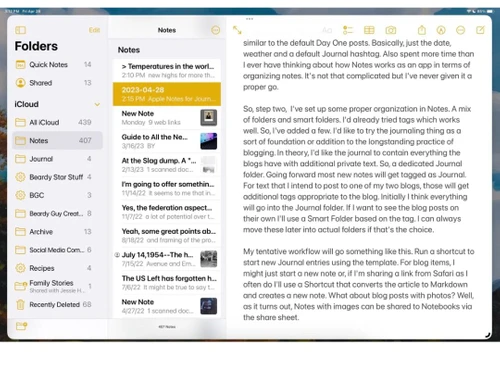
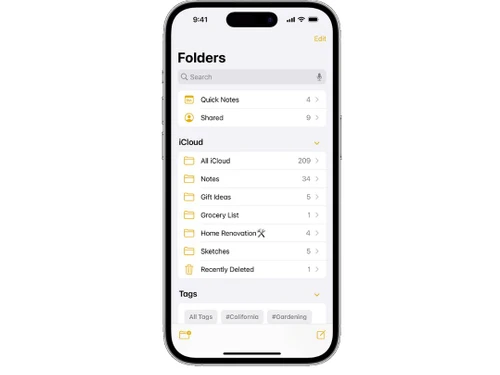
A note-taking app that allows users to create, organize, and sync notes across their devices using iCloud, supporting text, images, checklists, and sketches.
See MoreHave you used Apple Notes before?
Share your insights for better experience
Brand: Apple Inc
Founded Year: 1976
Apple is a multinational corporation that designs, manufactures, and markets consumer electronics, personal computers, and software.
Looking for The Right Pricing?
Share your requirements and get a plan built around your business.
Price Available on Request
Get personalised Apple Notes pricing that fits your needs. Our team will connect with you.
Primary Features
 Templates Annotations Version History Bookmarks To-do lists Voice Notes Text Formatting Search Functionality Reminders Hierarchy Management Tagging and Labelling File Attachments Offline Access Web Clipper
 Search and Retrieval
Activity History OCR (Optical Character Recognition) Full-Text Search with Filters NLP-based Search Collaboration
Real Time Editing Note Sharing Commenting and Feedback Permissions Control Customization & Personalization
End-to-End Encryption Custom Fonts and Styles Quick Access Widgets Themes and Colour Options Security and Privacy
Password Protection Biometric Login Note Recovery Version Control Alerts & Notifications
Email Notifications Push Notifications Customizable Reminders Snooze Reminders Due Date Notifications Event Reminders Calendar Alerts Administrative Features
User Access Management Auto Backup Access Logs Export Notes Import Notes Integrations
Third Party Integration Calendar Integration Add-Ons API Access API Integration AI Capabilities
Smart Recommendations Summarisation Voice-to-Text Image Recognition Content Generation 

Watch the demo video to explore key features, real workflows, and how the software fits your business needs.
 iOS MacOS
  Desktop
  Mobile
  iPad
iPad  Cloud-Based
  Perpetual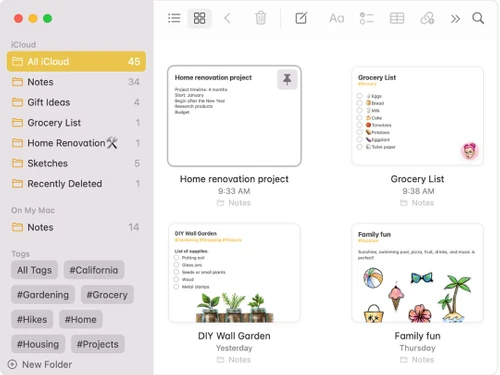
Small Business
Designed for startups and growing businesses
Medium Business
Built for business growth and flexibility
Enterprises
Designed for complex and large-scale business needs
4.3
Out of 5

Overall Rating
Based on
21 Verified Reviews
Rating Breakdown
89% Recommend this Product
Add ReviewUsers generally appreciate Apple Notes for its user-friendly interface, seamless synchronization across Apple devices, and its free availability. Many find it effective for basic note-taking and multimedia integration, while the quick search feature is frequently highlighted. However, limitations include occasional sync issues, lack of cross-platform support, and insufficient organizational tools such as tagging or advanced formatting options. Additionally, some users express a desire for better export capabilities and collaboration features, indicating that it may not fully meet the needs of more advanced users.
Pros
"The best part is that it is free to use. One of the best apps that Apple has put out there."
"The best part is that it is free to use. One of the best apps that Apple has put out there."
"There is no need for third-party applications. I do not have to rely on external apps to make simple notes, which keeps things cleaner."
Cons
"I found out it has occasional sync issues. My notes do not sync properly between devices."
"I found out it has occasional sync issues. My notes do not sync properly between devices."
"It has a limit in cross-platform usage. I can only use Apple Notes on Apple devices. This is bad since I cannot use it on Android or Windows."

Feb 4, 2025
Techjockey Verified
“Free and Handy but Sync Could be Better”
The nice part about Apple Notes is that it is still one of the greatest apps available and is free. It can be bothersome when my notes do not update correctly across devices due to sync problems.
Pros
The best part is that it is free to use. One of the best apps that Apple has put out there.
Cons
I found out it has occasional sync issues. My notes do not sync properly between devices.
Reason to switch
I moved from Simplenote to Apple Notes because I needed something with more features and integration with my Apple devices.
Dec 26, 2024
Techjockey Verified
“Simple and Clean but Limited to Apple”
Apple Notes is fantastic since it keeps things clutter-free and eliminates the need for third-party apps for quick and easy note-taking. However, it is limited to Apple devices, which is bad if I ever need to use Windows or Android.
Pros
There is no need for third-party applications. I do not have to rely on external apps to make simple notes, which keeps things cleaner.
Cons
It has a limit in cross-platform usage. I can only use Apple Notes on Apple devices. This is bad since I cannot use it on Android or Windows.
Reason to switch
ClickUp had more features but was not suitable for my simple requirements of everyday note-taking needs.
Nov 11, 2024
Techjockey Verified
“Multimedia Friendly but Lacks Organization”
I like how simple it is to add images, links, and attachments using Apple Notes. However, I wish it had a tagging system so I could better arrange my notes.
Pros
It supports the use of multimedia. It allows me to easily add photos, links, and attachments right into my notes.
Cons
There is no tagging system. It would have been great if I could use tags to categorize my notes.
Reason to switch
I moved to Apple Notes since it was more flexible for quick note-taking and syncing across devices.

Apple Notes
Price On Request
Desktop
Mobile
Web based
On Premises
Windows
Mac OS

GoodNotes
Price On Request
Desktop
Mobile
Web based
On Premises
Windows
Mac OS

Evernote
₹ 449
Desktop
Mobile
Web based
On Premises
Windows
Mac OS

Turbo AI
₹ 339
Desktop
Mobile
Web based
On Premises
Windows
Mac OS

Notability
Price On Request
Desktop
Mobile
Web based
On Premises
Windows
Mac OS

Obsidian
Price On Request
Desktop
Mobile
Web based
On Premises
Windows
Mac OS

Microsoft OneNote
Price On Request
Desktop
Mobile
Web based
On Premises
Windows
Mac OS

Notein
Price On Request
Desktop
Mobile
Web based
On Premises
Windows
Mac OS

Joplin
Price On Request
Desktop
Mobile
Web based
On Premises
Windows
Mac OS

Zoho Notebook
₹ 99
Desktop
Mobile
Web based
On Premises
Windows
Mac OS

RemNote
₹ 400
Desktop
Mobile
Web based
On Premises
Windows
Mac OS
(0) Product(s) selected
Starting Price:
€3 /Month

Available
Price on Request

Starting Price:
$6 /Month

Starting Price:
$5 /Seat/Month

Starting Price:
$15 /Month

Available
Price on Request

Starting Price:
$63 /Year

Starting Price:
$2 /Month

Starting Price:
$12 /Month
Yes, you can use Apple Notes for free if you are an Apple user.
Yes, Apple Notes is safe to use as it provides end-to-end encryption and password protection facilities.
To configure Notes with iCloud, go to Settings > [your name] > iCloud, and then enable Notes. Your notes will be available on all of your Apple devices that are signed in with the same Apple ID.
Price details for Apple Notes are available upon request at techjockey.com.
Yes, Apple Notes is available as an app on iOS devices.
Apple Notes is supported on iOS, macOS, and iPadOS.
Apple Notes does not require a free trial, as it is free to use.
Apple Notes is ideal for individuals using Apple devices who need simple, organized note-taking.
No, your synced notes are available on iPad, iPod, Mac, iPhone, and other Apple devices.
0 0
Yes, Apple Notes can be used offline, and changes will sync when the device reconnects to the internet.
0 0
Apple Notes allows users to create, organize, and sync notes across Apple devices.
0 0
Yes, you can export PDFs in Apple Notes.
0 0
Yes, you can undo your changes in Apple Notes. To undo changes in Apple's Notes, you need to click on the undo button to undo changes.
0 0
20,000+ Software Listed
Best Price Guranteed
Free Expert Consultation
2M+ Happy Customers
Terms and Condtions

Users with registered businesses can purchase goods from merchants on the platform to satisfy their business needs. Users are not permitted to utilize any products acquired through the platform for resale, advertising, business, or further distribution.
For each purchase made, users will receive a Tax Invoice (or 'GST invoice') that includes specific details such as:
the GSTIN of the user associated with their registered business, and
the specified Entity Name for their business.
It should be noted that not all products are eligible for GST Invoice. Only the products displayed by participating sellers with the 'GST-based Invoice Available' callout on the product description page would qualify.
Certain goods and services are not eligible to get a GST Invoice, including items with VAS, i.e., Value Added Services (e.g., Total Mobile Protection/Assured Buyback) and those involving an exchange offer at the time of purchase.
Users must ensure the accuracy of the GSTIN, and business entity name provided for the GST Invoice. Requests for corrections into GST Invoice would not be accommodated by Techjockey.com or any Seller, and any issues arising from user-provided information are the sole responsibility of users.
Techjockey.com is not liable for the GST Invoice or any associated input tax credit. To efficiently claim an input tax credit, users should select the registered place of business address as per the GST authority's data and follow the provisions of the GST Act and rules.
To claim an input tax credit, the delivery and billing addresses must match. Furthermore, input tax credits will not be granted if the delivery address and GSTIN on the invoice are from different states. In case of incorrect GST details provided during the order placement, the order will be canceled automatically.