USA
USA UAE
UAESmall Business
Designed for startups and growing businesses

See More


Brand: Automattic
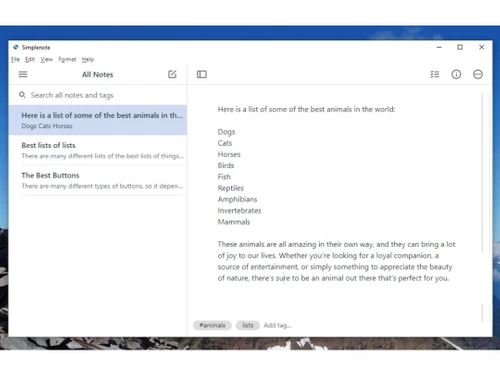
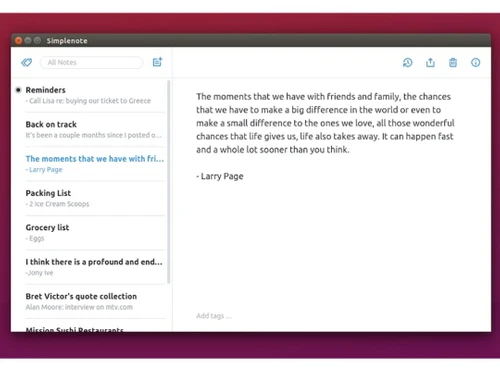
Simplenote is a simple, free note-taking app with cross-platform support. It's designed for quick note-taking and organisation. Users can easily sync notes across all devices.
See MoreHave you used Simplenote before?
Share your insights for better experience
Brand: Automattic
Founded Year: 2005
We are the people behind WordPress.com, Day One, WooCommerce, Jetpack, Tumblr, WordPress VIP, Simplenote, Longreads, Crowdsignal, Atavist, and more.
Looking for The Right Pricing?
Share your requirements and get a plan built around your business.
Price Available on Request
Get personalised Simplenote pricing that fits your needs. Our team will connect with you.
Primary Features
 Version History To-do lists Voice Notes Offline Access Text Formatting Search Functionality Tagging and Labelling Web Clipper Templates Reminders Hierarchy Management Annotations File Attachments Bookmarks
 Search and Retrieval
Activity History Full-Text Search with Filters OCR (Optical Character Recognition) NLP-based Search Collaboration
Real Time Editing Note Sharing Commenting and Feedback Permissions Control Customization & Personalization
Quick Access Widgets Themes and Colour Options Custom Fonts and Styles End-to-End Encryption Security and Privacy
Password Protection Version Control Note Recovery Biometric Login Alerts & Notifications
Customizable Reminders Due Date Notifications Snooze Reminders Event Reminders Push Notifications Email Notifications Calendar Alerts Administrative Features
User Access Management Auto Backup Export Notes Import Notes Access Logs Integrations
API Access Third Party Integration Calendar Integration Add-Ons API Integration AI Capabilities
Voice-to-Text Content Generation Summarisation Smart Recommendations Image Recognition  Windows
  iOS
iOS  Android MacOS
  Linux
Linux  Desktop
  Mobile
  Tablet
  iPad
iPad  Cloud-Based
  Perpetual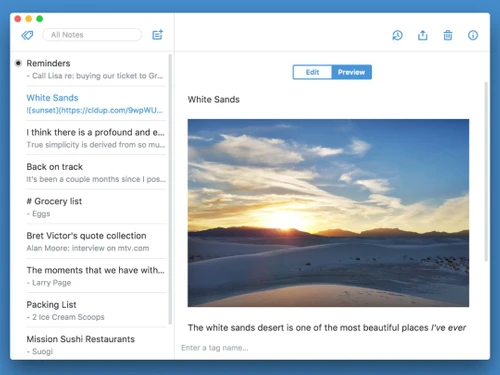
Small Business
Designed for startups and growing businesses
Medium Business
Built for business growth and flexibility
Enterprises
Designed for complex and large-scale business needs
4.3
Out of 5

Overall Rating
Based on
11 Verified Reviews
Rating Breakdown
89% Recommend this Product
Add ReviewCustomers generally appreciate Simplenote for its ad-free experience, speed, and cross-platform syncing capabilities, making note-taking straightforward and efficient. Users value its Markdown support and reliable search functionality, which enhances their organizational efforts. However, common complaints include the lack of advanced collaboration tools, limited export options, and insufficient formatting capabilities. Additionally, users miss features like file attachments, to-do lists, and offline editing, which could enhance their overall experience.
Pros
"The best part is that there are no ads that interrupt my workflow. It is just pure notetaking focus."
"I like how I can use Simplenote on almost any platform. I can use it in Android devices and iOS devices. I found it versatile."
"Great collaboration features. I can share notes with others even when I am working on a project."
Cons
"There are no collaboration tools beyond sharing. While I can share notes, there are not in-depth collaboration tools like comments or version history."
"It has limited export options. You must copy and paste the content in other platforms if you need to use them elsewhere."
"When I am working in long and detailed notes, it can get a little difficult since it is better suited for shorter notes."


Jan 10, 2025
Techjockey Verified
“No Ads but Lacks Collaboration Features.”
The best thing about Simplenote is that it does not have any advertisements. Even though I can exchange notes with other people, I do regret having more sophisticated collaboration tools like version history or comments.
Pros
The best part is that there are no ads that interrupt my workflow. It is just pure notetaking focus.
Cons
There are no collaboration tools beyond sharing. While I can share notes, there are not in-depth collaboration tools like comments or version history.
Reason to switch
ClickUp had good, advanced project management tools, but Simplenotes clean ad-free experience and ease of use made it a better fit.
Dec 20, 2024
Techjockey Verified
“Versatile Across Platforms but Lacks Export Options”
Simplenote works on almost any device, including iOS and Android. No matter what device I am using, I can easily retrieve my notes thanks to its great versatility.
Pros
I like how I can use Simplenote on almost any platform. I can use it in Android devices and iOS devices. I found it versatile.
Cons
It has limited export options. You must copy and paste the content in other platforms if you need to use them elsewhere.
Reason to switch
Coda is a bit too complex for my needs and I wanted a simpler and cleaner looking solution.
Nov 13, 2024
Techjockey Verified
“Excellent for Collaboration but Not for Long Notes”
Simplenote's collaboration features are great. Sharing notes with others is simple collaborative projects. However, while it works better for shorter notes, it can be a little challenging to handle lengthy and detailed ones.
Pros
Great collaboration features. I can share notes with others even when I am working on a project.
Cons
When I am working in long and detailed notes, it can get a little difficult since it is better suited for shorter notes.
Reason to switch
I was looking for something that was simpler and faster. Simplenote offered just that.

Simplenote
Price On Request
Desktop
Mobile
Web based
On Premises
Windows
Mac OS

GoodNotes
Price On Request
Desktop
Mobile
Web based
On Premises
Windows
Mac OS

Evernote
₹ 449
Desktop
Mobile
Web based
On Premises
Windows
Mac OS

Turbo AI
₹ 339
Desktop
Mobile
Web based
On Premises
Windows
Mac OS

Notability
Price On Request
Desktop
Mobile
Web based
On Premises
Windows
Mac OS

Obsidian
Price On Request
Desktop
Mobile
Web based
On Premises
Windows
Mac OS

Microsoft OneNote
Price On Request
Desktop
Mobile
Web based
On Premises
Windows
Mac OS

Notein
Price On Request
Desktop
Mobile
Web based
On Premises
Windows
Mac OS

Joplin
Price On Request
Desktop
Mobile
Web based
On Premises
Windows
Mac OS

Zoho Notebook
₹ 99
Desktop
Mobile
Web based
On Premises
Windows
Mac OS

Apple Notes
Price On Request
Desktop
Mobile
Web based
On Premises
Windows
Mac OS
(2) Product(s) selected
Starting Price:
€3 /Month
Available
Price on Request

Available
Price on Request

Starting Price:
$6 /Month

Starting Price:
$5 /Seat/Month

Starting Price:
$15 /Month

Available
Price on Request

Starting Price:
$63 /Year

Starting Price:
$2 /Month
Simplenote supports Windows, iOS, Android, macOS, and Linux operating systems.
Contact techjockey.com to explore trial options for Simplenote. They can provide information about available testing periods.
Simplenote pricing is available on request at techjockey.com
Yes, Simplenote is suitable for small businesses. It helps small businesses efficiently manage notes, and to-do lists, and capture ideas in a user-friendly manner.
Simplenote is available as a mobile application for Android and iOS devices.
Simplenote encrypted notes to protect user data. This helps safeguard sensitive information.
Simplenote is a note-taking app that supports Markdown. It allows users to sync their notes across all devices for free and format notes using Markdown. It provides a simple and efficient way to organise and store notes.
Simplenote offers note-taking, to-do lists, tags, pins, instant search, and third-party integrations. You can contact our product experts for more information.
Students, researchers, and individuals who need a simple and efficient way to organise notes, capture ideas, and create to-do lists are potential users of Simplenote.
Standard Notes and Joplin offer strong end-to-end encryption, making them the best privacy-focused alternatives to Simplenote.
0 0
Users leave Simplenote for richer formatting, attachments, folders, or collaboration found in tools like Notion, Obsidian, or Evernote.
0 0
Despite the lack of advanced formatting options in Simplenote, you have the ability to utilize Markdown for adding basic formatting like bold, italic, and headings. Bullet points and numbered lists can be utilized for structuring your notes.
0 0
Simplenote automatically syncs your notes across all your devices, ensuring that your notes are always backed up.
0 0
You can use Simplenote for the following activities:
Recipe keeping: Create a digital cookbook.
Travel planning: Plan your trips and keep track of your expenses.
Habit tracking: Track your habits and progress.
Idea generation: Jot down ideas and brainstorm.
0 0
20,000+ Software Listed
Best Price Guranteed
Free Expert Consultation
2M+ Happy Customers
Terms and Condtions

Users with registered businesses can purchase goods from merchants on the platform to satisfy their business needs. Users are not permitted to utilize any products acquired through the platform for resale, advertising, business, or further distribution.
For each purchase made, users will receive a Tax Invoice (or 'GST invoice') that includes specific details such as:
the GSTIN of the user associated with their registered business, and
the specified Entity Name for their business.
It should be noted that not all products are eligible for GST Invoice. Only the products displayed by participating sellers with the 'GST-based Invoice Available' callout on the product description page would qualify.
Certain goods and services are not eligible to get a GST Invoice, including items with VAS, i.e., Value Added Services (e.g., Total Mobile Protection/Assured Buyback) and those involving an exchange offer at the time of purchase.
Users must ensure the accuracy of the GSTIN, and business entity name provided for the GST Invoice. Requests for corrections into GST Invoice would not be accommodated by Techjockey.com or any Seller, and any issues arising from user-provided information are the sole responsibility of users.
Techjockey.com is not liable for the GST Invoice or any associated input tax credit. To efficiently claim an input tax credit, users should select the registered place of business address as per the GST authority's data and follow the provisions of the GST Act and rules.
To claim an input tax credit, the delivery and billing addresses must match. Furthermore, input tax credits will not be granted if the delivery address and GSTIN on the invoice are from different states. In case of incorrect GST details provided during the order placement, the order will be canceled automatically.