USA
USA UAE
UAESmall Business
Designed for startups and growing businesses

See More





Brand: Hefei Stack Top Information Technology
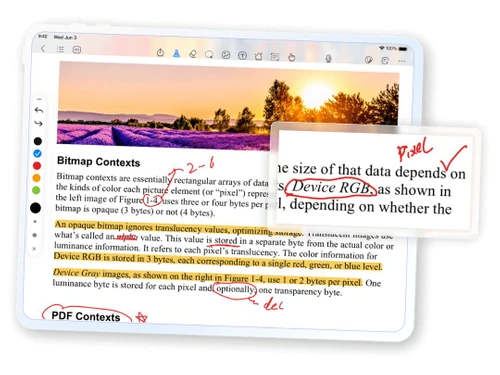
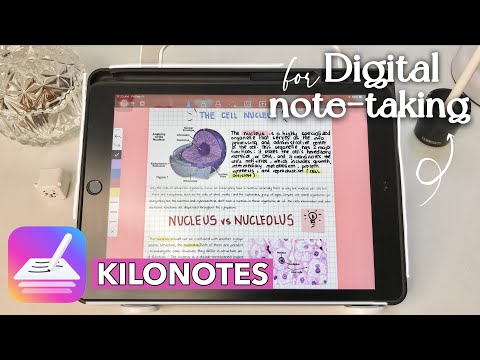
Kilonotes is a versatile note-taking app that offers handwriting support, customization options, template variety, and image tools for a seamless digital note-taking experience. Available for both iOS and Android devices, Kilonotes allows users to express their creativity and organise their notes ef...
See MoreHave you used Kilonotes before?
Share your insights for better experience
Looking for The Right Pricing?
Share your requirements and get a plan built around your business.
Price Available on Request
Get personalised Kilonotes pricing that fits your needs. Our team will connect with you.
Primary Features
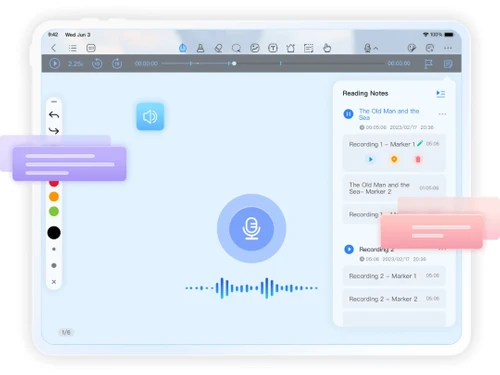
 Templates Annotations Bookmarks Voice Notes Offline Access Text Formatting Search Functionality Version History Web Clipper To-do lists Reminders Hierarchy Management Tagging and Labelling File Attachments
 Search and Retrieval
Full-Text Search with Filters OCR (Optical Character Recognition) Activity History NLP-based Search Collaboration
Note Sharing Real Time Editing Commenting and Feedback Permissions Control Customization & Personalization
End-to-End Encryption Custom Fonts and Styles Themes and Colour Options Quick Access Widgets Security and Privacy
Password Protection Note Recovery Biometric Login Version Control Alerts & Notifications
Customizable Reminders Due Date Notifications Snooze Reminders Event Reminders Push Notifications Email Notifications Calendar Alerts Administrative Features
User Access Management Auto Backup Access Logs Export Notes Import Notes Integrations
Add-Ons Third Party Integration API Access Calendar Integration API Integration AI Capabilities
Summarisation Smart Recommendations Voice-to-Text Image Recognition Content Generation 

Watch the demo video to explore key features, real workflows, and how the software fits your business needs.
 iOS
iOS  Android
  Mobile
  Tablet
  iPad
iPad  Perpetual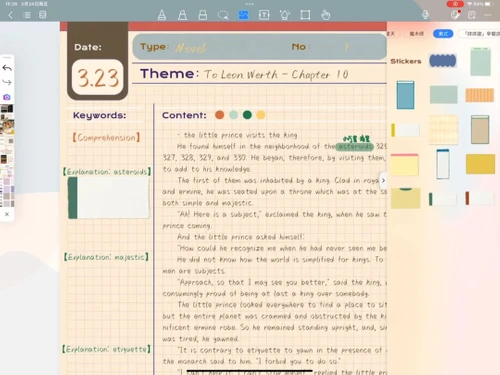
Small Business
Designed for startups and growing businesses
Medium Business
Built for business growth and flexibility
Enterprises
Designed for complex and large-scale business needs
4.3
Out of 5

Overall Rating
Based on
12 Verified Reviews
Rating Breakdown
91% Recommend this Product
Add ReviewUsers generally appreciate Kilonotes for its personalized and engaging notetaking style, which enhances clarity and memory retention. Many find the first-person approach motivating and enjoyable, making learning feel more like a conversation. However, common concerns include difficulties in collaboration due to its informal tone and challenges with organization, as notes can become jumbled and overly personal. Overall, while the product is well-received for individual use, users note that it may not suit collaborative environments or quick reviews.
Pros
"Personally, I find it more fun and enjoyable to take notes like this since it is tailored to my own voice."
"It is flexible as first-person notes evolve as your understanding of the topic changes. This is great for long-term learning."
"It can be easier to understand. Writing down information in your own words tend to make more sense."
Cons
"It can become hard to differentiate between your thoughts and the material if you are not careful. This makes it harder to recall later."
"It is harder to collaborate and work in a group. If others need to look at your notes, the first person can come across as too informal."
"It is not for the people who find first person writing not as effective as a notetaking style."


Dec 27, 2024
Techjockey Verified
“Fun and Personalized but Can Get Messy”
Since Kilonotes features notes in my own voice, which gives them a more intimate sense, I find it much more entertaining. The only drawback is that I occasionally mix my ideas with the information, which can make it difficult to remember later.
Pros
Personally, I find it more fun and enjoyable to take notes like this since it is tailored to my own voice.
Cons
It can become hard to differentiate between your thoughts and the material if you are not careful. This makes it harder to recall later.
Reason to switch
I moved from Penly since I wanted to really connect with my notes.
Nov 14, 2024
Techjockey Verified
“Perfect for Personal Growth but Not for Collaboration”
Kilonotes' flexibility is great for long-term study because it allows my notes to evolve. However, because my first-person style comes out as too casual to others, it is not the best for collective projects.
Pros
It is flexible as first-person notes evolve as your understanding of the topic changes. This is great for long-term learning.
Cons
It is harder to collaborate and work in a group. If others need to look at your notes, the first person can come across as too informal.
Reason to switch
Samsung Notes did not let me update my notes in a way that matched my understanding of the subject.
Sep 12, 2024
Techjockey Verified
“Clearer Notes in Your Own Voice”
I like how using Kilonotes to write in my own words makes everything so much simpler to comprehend. Although it seems more natural, I can understand how it would not be suitable for those who dislike taking notes in the first person.
Pros
It can be easier to understand. Writing down information in your own words tend to make more sense.
Cons
It is not for the people who find first person writing not as effective as a notetaking style.
Reason to switch
GoodNotes was great, but Kilonotes has helped me process information better.

Kilonotes
Price On Request
Desktop
Mobile
Web based
On Premises
Windows
Mac OS

GoodNotes
Price On Request
Desktop
Mobile
Web based
On Premises
Windows
Mac OS

Evernote
₹ 449
Desktop
Mobile
Web based
On Premises
Windows
Mac OS

Turbo AI
₹ 339
Desktop
Mobile
Web based
On Premises
Windows
Mac OS

Notability
Price On Request
Desktop
Mobile
Web based
On Premises
Windows
Mac OS

Obsidian
Price On Request
Desktop
Mobile
Web based
On Premises
Windows
Mac OS

Microsoft OneNote
Price On Request
Desktop
Mobile
Web based
On Premises
Windows
Mac OS

Notein
Price On Request
Desktop
Mobile
Web based
On Premises
Windows
Mac OS

Joplin
Price On Request
Desktop
Mobile
Web based
On Premises
Windows
Mac OS

Zoho Notebook
₹ 99
Desktop
Mobile
Web based
On Premises
Windows
Mac OS

Apple Notes
Price On Request
Desktop
Mobile
Web based
On Premises
Windows
Mac OS
(0) Product(s) selected
Starting Price:
€3 /Month
Available
Price on Request

Available
Price on Request

Starting Price:
$6 /Month

Starting Price:
$5 /Seat/Month

Starting Price:
$15 /Month

Available
Price on Request

Starting Price:
$63 /Year

Starting Price:
$2 /Month

Starting Price:
$12 /Month
Kilonotes software is a note-taking app that allows users to write, edit, and organise their notes in a digital format. It provides a range of handwriting tools, customization options, and template varieties for a versatile note-taking experience.
Yes, Kilonotes can be suitable for small businesses as it allows efficient note-taking and organisation. The app's features, such as the image tool, lasso tool, and template varieties, can help small businesses in expressing themselves creatively and personalising their notes to suit their needs, thus improving productivity and convenience.
Kilonotes offers features like handwriting support, customization options, a variety of templates, sticker options, and tools such as the image tool and lasso tool. Users can insert images, design the layout of their notes, and personalise their notes.
The potential users of Kilonotes Software include students, professionals, and anyone who needs a versatile and user-friendly digital note-taking solution.
Kilonotes Software supports both iOS and Android operating systems, making it accessible to a wide range of users.
Kilonotes is a free note-taking app available for both iOS and Android devices. Contact techjockey.com to explore trial options for additional features. They can provide information about available testing periods.
Kilonotes, being a note-taking app, it is designed to protect user data and privacy, ensuring that notes and personal information are securely stored within the app.
Yes, Kilonotes is available as a mobile app for both Android and iOS users, making it convenient for users to access their notes on the go.
Kilonotes is a free note-taking app. However, it may offer in-app purchases and subscriptions for additional features and customization options. For detailed pricing information, contact techjockey.com
Yes, depending on the use case, small businesses can benefit from using Kilonotes. It allows for efficient note-taking and organisation, which can improve productivity.
Kilonotes provides several security features to protect user data and ensure that notes and personal information are securely stored.
In Kilonotes, archiving notes enables you to transfer older or less significant notes from the primary workspace while ensuring they remain accessible. Archived notes are kept in a separate location, allowing for easy access or restoration when required, which aids in maintaining an organized active workspace while preserving essential information.
0 0
Indeed, you can look for particular content in your notes in Kilonotes by utilizing the search bar. It enables you to search using keywords, tags, or even the text within the notes, facilitating the swift discovery of pertinent information.
0 1
Follow the below steps to create templates for recurring notes in Kilonotes:
0 2
At present, Kilonotes lacks the ability to customize keyboard shortcuts, yet it provides default shortcuts for frequently used actions. You may utilize external tools or browser add-ons to establish personalized shortcuts. For updates, refer to the official documentation or support.
0 0
To efficiently handle extensive amounts of notes in Kilonotes, you can arrange them into notebooks and subfolders for convenient categorization. Utilize the tagging system and robust search features to swiftly find particular notes, while focusing on essential tasks through task management and templates.
Furthermore, utilize the version history and archiving capabilities to maintain a tidy workspace and guarantee straightforward access to past data when necessary.
0 0
20,000+ Software Listed
Best Price Guranteed
Free Expert Consultation
2M+ Happy Customers
Terms and Condtions

Users with registered businesses can purchase goods from merchants on the platform to satisfy their business needs. Users are not permitted to utilize any products acquired through the platform for resale, advertising, business, or further distribution.
For each purchase made, users will receive a Tax Invoice (or 'GST invoice') that includes specific details such as:
the GSTIN of the user associated with their registered business, and
the specified Entity Name for their business.
It should be noted that not all products are eligible for GST Invoice. Only the products displayed by participating sellers with the 'GST-based Invoice Available' callout on the product description page would qualify.
Certain goods and services are not eligible to get a GST Invoice, including items with VAS, i.e., Value Added Services (e.g., Total Mobile Protection/Assured Buyback) and those involving an exchange offer at the time of purchase.
Users must ensure the accuracy of the GSTIN, and business entity name provided for the GST Invoice. Requests for corrections into GST Invoice would not be accommodated by Techjockey.com or any Seller, and any issues arising from user-provided information are the sole responsibility of users.
Techjockey.com is not liable for the GST Invoice or any associated input tax credit. To efficiently claim an input tax credit, users should select the registered place of business address as per the GST authority's data and follow the provisions of the GST Act and rules.
To claim an input tax credit, the delivery and billing addresses must match. Furthermore, input tax credits will not be granted if the delivery address and GSTIN on the invoice are from different states. In case of incorrect GST details provided during the order placement, the order will be canceled automatically.