linkedin
Express Scribe Transcription Software logo
play Express Scribe Transcription Software Tutorial | Overview
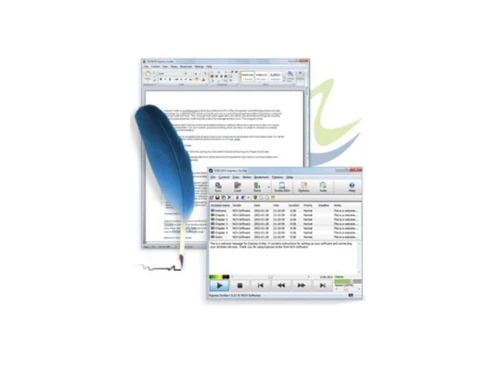
express scribe transcription software hotkeys
express scribe transcription software multi file

Express Scribe Transcription Software

Brand: NCH Software

  • 4.5

  • 3 Ratings

Express Scribe Transcription Software is a powerful tool for typists and transcription work. With its advanced integration tools, users can easily work with third-party apps and hardware, making it an ideal choice for those with an existing workflow structure. This transcription software allows users to use their preferred word processors and offers specialized functionalities like variable speed...

See More

Have you used Express Scribe Transcription Software before?

Share your insights for better experience

Add a Review
Starting Price
$50

View plans

100% Genuine
Products
Best Price
Guaranteed
Safe & Secure
Payment
  • Description

  • Pricing

  • Features

  • Specification

  • Review

  • Compare

  • Alternatives

  • FAQ

Starting at $50

Express Scribe Transcription Software Overview

What is Express Scribe?

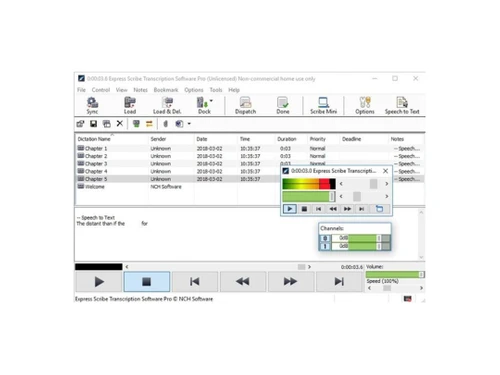
Express Scribe Transcription Software is a powerful tool for typists and transcription work. With its advanced integration tools, users can easily work with third-party apps and hardware, making it an ideal choice for those with an existing workflow structure. This transcription software allows users to use their preferred word processors and offers specialized functionalities like variable speed playback and easy foot pedal controls, making it a perfect fit for professional transcriptionists.

Express Scribe supports all the popular audio formats, including WAV, MP3, WMA, and more. Its automation tools make sending finished work to clients via email easy. The software's multi-channel control, file management, and hotkeys give users complete control over their transcription process. With a forever free version, Express Scribe is the fastest and easiest way to transcribe audio files.

Why Choose Express Scribe?

  • Audio Transfer: Easily transfer audio from hand-held recorders.
  • Docking: Quickly load recordings from analog and digital voice recorders.
  • Automated Loading: Receive and load files automatically through various means.
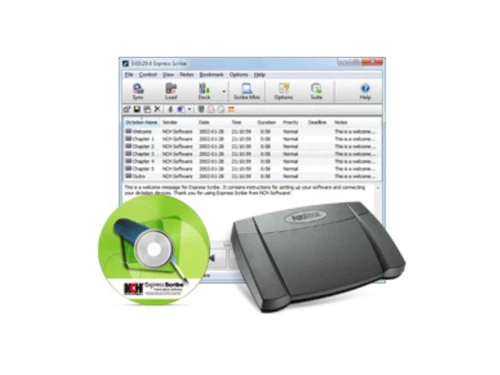
  • CD Audio Loading: Load audio directly from CDs.
  • Speech Recognition Integration: Convert speech to text automatically with speech recognition.
  • Word Processor Compatibility: Works with Microsoft Word and other major word processors.
  • Text Expansion: Use FastFox for entering common phrases with keyboard shortcuts.

Benefits of Express Scribe Transcription Software

  • An easy-to-use interface like an audio player.
  • Advanced integration with existing hardware and software, including popular word processors.
  • Ability to handle analog and digital audio files without needing separate software.
  • Automated voice recognition and transcription for faster workflow.
  • Cost-effective pricing with a one-time payment option and a forever free version for non-professional users.
  • Compatibility with various audio file formats, including encrypted dictation files.
  • Convenient dock for portable recorders, making it ideal for medical transcription.

Pricing of Express Scribe

Express Scribe pricing is available on request at techjockey.com.

The price may vary based on factors like customization, additional features required, number of users, and the deployment type. For subscription-related details and offers on premium packages, please request a call back from our product experts.

Read more

NCH Software Company Details

Founded Year:  1993

NCH Software develops customized software solutions for Windows, Mac, Android, and other portable devices.

Director/Founders Peter Lupton
Company Size 1-100 Employees

Express Scribe Transcription Software Pricing & Plans

Express Scribe (Basic Annual Plan)
Starting at $50
    • Yearly

      Yearly
      Yearly
Express Scribe (Professional Annual Plan)
Starting at $60
    • Yearly

      Yearly
      Yearly

Express Scribe Transcription Software Features

  • icon_check Variable Speed Playback
    Adjust the playback speed of audio or video files to your preference.
  • icon_check fedal control
    Control audio playback with a foot pedal for hands-free operation.
  • icon_check Multi File Format Support
    Play back a variety of audio and video file formats in one software.
  • icon_check File Management
    Organize and manage files with renaming, sorting, and categorizing tools.
  • icon_check Hot Keys
    Use customizable keyboard shortcuts for frequently used functions to increase efficiency.
  • icon_check Work with Other Software
    Integrate with other software for seamless workflow and transcription.
  • icon_check Automatic Transcription
    Automatically transcribe audio to text with advanced speech recognition technology.
Express Scribe Transcription Software Demo Video play icon

Get Express Scribe Transcription Software Demo

Watch the demo video to explore key features, real workflows, and how the software fits your business needs.

Understand
Key Features
Personal
Demo Insights
Interactive
Demo Support

Express Scribe Transcription Software Specifications

Supported Platforms
Windows Windows
Devices
Desktop Desktop
Deployment
Cloud-Based Cloud-Based
Suitable For
All Industries
Business Specific
All Businesses
Business Size
Small Business Startups Medium Business Enterprises SMBs SMEs MSMBs MSMEs
Customer Support
Phone Email Communities Forums
Language
English
Training Resources
Documentation Videos

Explore the Best Alternative Solutions Similar to Your Business Size and Needs

Small Business

Designed for startups and growing businesses

Dubverse

4.5

Audext

4.5

Noty AI

4.5

See More

Express Scribe Transcription Software Review

4.5

Out of 5

img

Overall Rating

Based on
3 Verified Ratings

Rating Breakdown

  • Features 4.5
  • Value for Money 4.3
  • Ease of Use 4.5
  • Customer Support 5

96% Recommend this Product

Add Review

Techjockey Trusted Reviews from Verified Users

No reviews are currently available for Express Scribe Transcription Software. Discover similar Transcription Software reviews

  • Happy Scribe

    4.5

    Whats great - Team responsive by email, generally helpful read more

  • Gotranscript

    4.4

    Whats great - For long interviews, academic lectures, multi-speaker recordings, GoTranscript handles them well; human transcribers don’t pa... read more

  • Obsidian

    4.4

    Whats great - There are so many cool plugins that let me do things like task management thanks to community plugins. read more

Compare Express Scribe Transcription Software With other Transcription Software

Products
Ratings
Pricing
Device Supported
Deployment
Supported Platforms
  • img

    Express Scribe Transcription Software

  • 4.5

  • Price On Request

  • Desktop

    Mobile

  • Web based

    On Premises

  • Windows

    Mac OS

  • img

    Wispr Flow

  • 4.3

  • ₹ 400

  • Desktop

    Mobile

  • Web based

    On Premises

  • Windows

    Mac OS

  • img

    Tactiq

  • 4.0

  • Price On Request

  • Desktop

    Mobile

  • Web based

    On Premises

  • Windows

    Mac OS

  • img

    tl;dv

  • 4.4

  • ₹ 2764

  • Desktop

    Mobile

  • Web based

    On Premises

  • Windows

    Mac OS

  • img

    Scribejoy

  • 4.3

  • Price On Request

  • Desktop

    Mobile

  • Web based

    On Premises

  • Windows

    Mac OS

  • img

    Audext

  • 4.5

  • Price On Request

  • Desktop

    Mobile

  • Web based

    On Premises

  • Windows

    Mac OS

  • img

    AutoSubtitles

  • 3.9

  • Price On Request

  • Desktop

    Mobile

  • Web based

    On Premises

  • Windows

    Mac OS

  • img

    Typeless

  • 4.3

  • Price On Request

  • Desktop

    Mobile

  • Web based

    On Premises

  • Windows

    Mac OS

  • img

    Speechify

  • 4.5

  • Price On Request

  • Desktop

    Mobile

  • Web based

    On Premises

  • Windows

    Mac OS

  • img

    Happy Scribe

  • 4.3

  • Price On Request

  • Desktop

    Mobile

  • Web based

    On Premises

  • Windows

    Mac OS

  • img

    Revoicer

  • 4.5

  • Price On Request

  • Desktop

    Mobile

  • Web based

    On Premises

  • Windows

    Mac OS

(2) Product(s) selected

Express Scribe Transcription Software Alternatives

See All Express Scribe Transcription Software Alternatives

Starting Price:

$12 /User/Month

Starting Price:

$49 /Provider/Month

Starting Price:

$30 /User/Month

Starting Price:

$14 /Month

Starting Price:

$29 /Month
Starting Price:

$12 /Month

Available

Price on Request

Which operating system does Express Scribe Transcription Software support?

Express Scribe Transcription Software is compatible with Windows operating systems.

Is there any Express Scribe Transcription Software support app?

The app is available for Android mobile devices.

What is the deployment type of Express Scribe Transcription Software support?

It supports on-premises deployment type.

How much does Express Scribe Transcription Software support cost?

The pricing is available on request at techjockey.com.

Who are the potential users of Express Scribe Transcription Software support?

It is typically used in small and medium businesses.

Is there any free trial or demo for Express Scribe Transcription Software support?

The demo is available for free with techjockey.com.

Is Express Scribe Transcription Software support free?

It offers a free trial. However, the premium plan with advanced features is available at techjockey.com with exciting deals.

How can you download Express Scribe Transcription Software support?

You can download it directly from the official website for installation.

How does Express Scribe Transcription Software support work?

Express Scribe Transcription Software helps with File Management, Automatic Transcription, and Variable Speed Playback. It also adjusts the playback speed of audio or video files to your preference.

20,000+ Software Listed

Best Price Guranteed

Free Expert Consultation

2M+ Happy Customers

Terms and Condtions

close

Users with registered businesses can purchase goods from merchants on the platform to satisfy their business needs. Users are not permitted to utilize any products acquired through the platform for resale, advertising, business, or further distribution.

For each purchase made, users will receive a Tax Invoice (or 'GST invoice') that includes specific details such as:

  • the GSTIN of the user associated with their registered business, and

  • the specified Entity Name for their business.

It should be noted that not all products are eligible for GST Invoice. Only the products displayed by participating sellers with the 'GST-based Invoice Available' callout on the product description page would qualify.

Certain goods and services are not eligible to get a GST Invoice, including items with VAS, i.e., Value Added Services (e.g., Total Mobile Protection/Assured Buyback) and those involving an exchange offer at the time of purchase.

Users must ensure the accuracy of the GSTIN, and business entity name provided for the GST Invoice. Requests for corrections into GST Invoice would not be accommodated by Techjockey.com or any Seller, and any issues arising from user-provided information are the sole responsibility of users.

Techjockey.com is not liable for the GST Invoice or any associated input tax credit. To efficiently claim an input tax credit, users should select the registered place of business address as per the GST authority's data and follow the provisions of the GST Act and rules.

To claim an input tax credit, the delivery and billing addresses must match. Furthermore, input tax credits will not be granted if the delivery address and GSTIN on the invoice are from different states. In case of incorrect GST details provided during the order placement, the order will be canceled automatically.