linkedin
Noty AI logo
play Noty.AI - New AI Website that transcribes your zoom or google meet meetings | Nerdy two minute AI
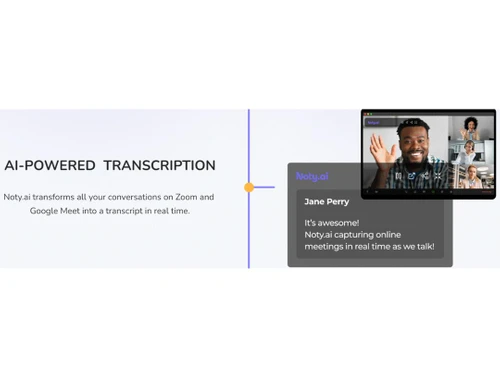
Noty AI Powered Transcription
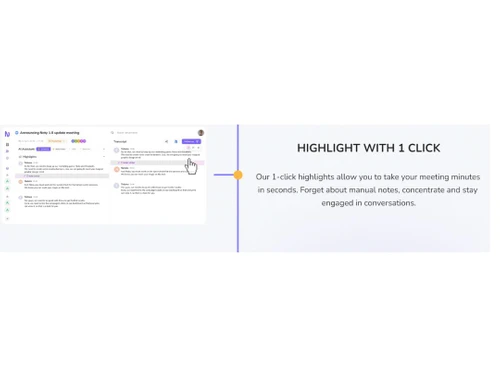
Noty AI Highlight with 1 clicks

Noty AI

Brand: Noty.ai

  • 4.5

  • 3 Ratings

Noty AI is an extensive transcription software designed to easily recreate Zoom and Google Meet conversations.

See More

Have you used Noty AI before?

Share your insights for better experience

Add a Review
Starting Price
$20

View plans

100% Genuine
Products
Best Price
Guaranteed
Safe & Secure
Payment
  • Description

  • Pricing

  • Features

  • Specification

  • Review

  • Compare

  • Alternatives

  • FAQ

Starting at $20

Noty AI Software Overview

What is Noty AI?

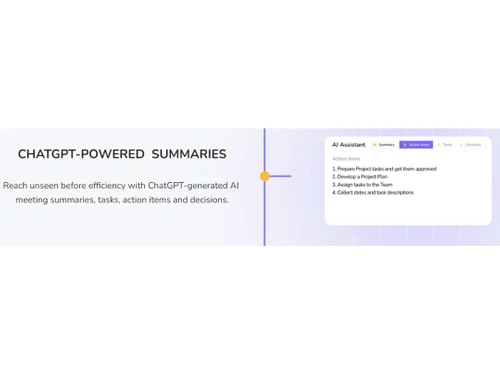
Noty.ai is a robust transcription software powered by ChatGPT meeting assistant. This software recreates the Zoom and Google Meet conversations as transcriptions, summaries, follow-up texts, and action items in seconds.

This tool simplifies the note-taking functions with features like highlighting important parts, saving captions, drafting a meeting summary, and extracting minutes.

Noty.ai tool can seamlessly integrate with Slack, Google Drive, Google Meet, Zoom and other Google products to streamline the workflow.

The tool offers unique features like AI transcription, AI meeting manager, and AI meeting assistant to be productive and enhance notetaking. This tool helps in sales and discovery, project management, product management, UI/UX research and more.

Why Choose Noty AI Transcription Software?

  • Tasks: Create a list of Tasks from the Zoom and Google Meet conversations.
  • AI Meeting Assistant: This meeting assistant helps transcribe Zoom and Google Meet conversations in real time.
  • Pre-drafted Follow-Ups: Create email or meeting follow-ups using the Noty AI to enhance communication and save time.
  • Team Management: Sync between multiple teams, timelines, and team alignment with Noty.ai

Benefits of Noty AI Software

  • Real-time transcription with Zoom and Google Meet.
  • Easy integration with Google Products like Meet, Docs, etc.
  • Create highlighted notes in one 1-click.
  • Update team members with enhanced communication on task assignments.
  • Save meetings to use as a reference.
  • Structure sales and discovery call with transcripts, AI summaries and more.
  • Manage product teams with ideas, research, and strategies.

Pricing of Noty AI Transcription Software

Noty AI pricing starts at $20 on TechJockey.com.

The overall pricing model is based on different factors such as personalization, extra features required, total users, and the deployment type. Please feel free to request a call from our product experts if you want to learn more about our subscription plans or premium package deals.

Read more

Noty.ai Company Details

Founded Year:  2021

AI-powered assistant transforming meetings into actions and follow-ups.

Director/Founders Mykola Zomchak, Natalie Marina
Company Size 1-100 Employees

Noty AI Pricing & Plans

Superhero
Key Features
  • Real-time transcription
  • Highlights
  • Users(Up to 20 team members)
  • Conversations(80 per user/month)
  • Transcript editing
  • Transcript editing
  • AI summarisation
  • Notification system
  • Max conversation duration(Unlimited)
Starting at $20
    • Licenses

      Licenses
      Licenses
    • Monthly

      Monthly
      Monthly

Key Features

  • Real-time transcription

  • Highlights

  • Users(Up to 20 team members)

  • Conversations(80 per user/month)

  • Transcript editing

  • Transcript editing

  • AI summarisation

  • Notification system

  • Max conversation duration(Unlimited)

Noty AI Features

  • icon_check Automatic Transcription
    Recreate all the conversations of Zoom and Google Meet into transcripts in real-time.
  • icon_check Collaboration Tools
    The workspace offers an easy-to-way-share of the conversations and transcripts with the team via link.
  • icon_check File Sharing
    Share the raw conversations or the final transcripted output with the team in the workspace or by link.
  • icon_check Text Editor
    Edit the transcripted text using the advanced text editor built-in with the Noty.ai
  • icon_check Timecoding
    Transcript the Zoom and Google Meet conversations with proper timecoding
  • icon_check Multi-Language Support
    Noty.ai supports multiple languages to transcript conversations with zero errors.
  • icon_check Transcript Editing
    Transcript editing is easy with time stamp, time coding and advanced text editor.
  • icon_check AI Summarization
    Transcribe a Zoom and Google Meet conversation and ask Noty.ai to summarize the texts.
  • icon_check Real-Time Transcription
    The transcription feature works during the actual meeting and transcribes the meeting in real-time.
  • icon_check Integrations
    This generative AI tool easily integrates with Gmail, Google Calendar, Google Meet, Zoom, and Google Docs.
Noty AI Demo Video play icon

Get Noty AI Demo

Watch the demo video to explore key features, real workflows, and how the software fits your business needs.

Understand
Key Features
Personal
Demo Insights
Interactive
Demo Support

Noty AI Specifications

Supported Platforms
Ubuntu Ubuntu Windows Windows MacOS MacOS Linux Linux
Devices
Desktop Desktop Mobile Mobile Tablet Tablet iPad iPad
Deployment
Cloud-Based Cloud-Based
Suitable For
All Industries
Business Specific
All Businesses
Business Size
Small Business Medium Business Enterprises
Customer Support
Email Live Chat Communities
Language
English
Training Resources
Documentation Videos
AI Features
AI Integrated

Explore the Best Alternative Solutions Similar to Your Business Size and Needs

Small Business

Designed for startups and growing businesses

Rask AI

4.4

Dubverse

4.5

Audext

4.5

See More

Noty AI Review

4.5

Out of 5

img

Overall Rating

Based on
3 Verified Ratings

Rating Breakdown

  • Features 4.3
  • Value for Money 4.6
  • Ease of Use 4.5
  • Customer Support 4.6

93% Recommend this Product

Add Review

Techjockey Trusted Reviews from Verified Users

No reviews are currently available for Noty AI. Discover similar Transcription Software reviews

  • Happy Scribe

    4.5

    Whats great - Team responsive by email, generally helpful read more

  • Gotranscript

    4.4

    Whats great - For long interviews, academic lectures, multi-speaker recordings, GoTranscript handles them well; human transcribers don’t pa... read more

  • Obsidian

    4.4

    Whats great - There are so many cool plugins that let me do things like task management thanks to community plugins. read more

Compare Noty AI With other Transcription Software

Products
Ratings
Pricing
Device Supported
Deployment
Supported Platforms
  • img

    Noty AI

  • 4.5

  • Price On Request

  • Desktop

    Mobile

  • Web based

    On Premises

  • Windows

    Mac OS

  • img

    Wispr Flow

  • 4.3

  • ₹ 400

  • Desktop

    Mobile

  • Web based

    On Premises

  • Windows

    Mac OS

  • img

    Tactiq

  • 4.0

  • Price On Request

  • Desktop

    Mobile

  • Web based

    On Premises

  • Windows

    Mac OS

  • img

    tl;dv

  • 4.4

  • ₹ 2764

  • Desktop

    Mobile

  • Web based

    On Premises

  • Windows

    Mac OS

  • img

    Scribejoy

  • 4.3

  • Price On Request

  • Desktop

    Mobile

  • Web based

    On Premises

  • Windows

    Mac OS

  • img

    Audext

  • 4.5

  • Price On Request

  • Desktop

    Mobile

  • Web based

    On Premises

  • Windows

    Mac OS

  • img

    AutoSubtitles

  • 3.9

  • Price On Request

  • Desktop

    Mobile

  • Web based

    On Premises

  • Windows

    Mac OS

  • img

    Typeless

  • 4.3

  • Price On Request

  • Desktop

    Mobile

  • Web based

    On Premises

  • Windows

    Mac OS

  • img

    Speechify

  • 4.5

  • Price On Request

  • Desktop

    Mobile

  • Web based

    On Premises

  • Windows

    Mac OS

  • img

    Happy Scribe

  • 4.3

  • Price On Request

  • Desktop

    Mobile

  • Web based

    On Premises

  • Windows

    Mac OS

  • img

    Revoicer

  • 4.5

  • Price On Request

  • Desktop

    Mobile

  • Web based

    On Premises

  • Windows

    Mac OS

(0) Product(s) selected

Noty AI Alternatives

See All Noty AI Alternatives

Starting Price:

$12 /User/Month

Starting Price:

$49 /Provider/Month

Starting Price:

$30 /User/Month

Starting Price:

$14 /Month

Starting Price:

$29 /Month
Starting Price:

$12 /Month

Available

Price on Request

Which operating system does Noty AI support?

Noty AI is compatible with Windows and MacOS operating systems.

Is there any Noty AI app?

Noty AI app is not available on Android and iOS devices.

What is the deployment type of Noty AISoftware?

Noty AI software supports web-based deployment.

How much does Noty AI Transcription Software cost?

Noty AI Transcription Software is priced at $20 on TechJockey.com.

Who are the potential users of Noty AI?

Noty AI can be used by entrepreneurs, professionals, and businesses seeking seamless meeting management, enhanced productivity, and streamlined collaboration.

Is there any free trial or demo for Noty AI Software?

Noty AI Software demo is available for free with techjockey.com.

Is Noty AI Software free?

Noty AI does not offer a free trial.

How can you download Noty AI Software?

Noty AI is a web-based platform. So, you need not download any software or app to use it.

How does Noty software work?

Noty software is powered by ChatGPT. It helps transform meetings into concise transcriptions, action items, summaries, and follow-ups.

20,000+ Software Listed

Best Price Guranteed

Free Expert Consultation

2M+ Happy Customers

Terms and Condtions

close

Users with registered businesses can purchase goods from merchants on the platform to satisfy their business needs. Users are not permitted to utilize any products acquired through the platform for resale, advertising, business, or further distribution.

For each purchase made, users will receive a Tax Invoice (or 'GST invoice') that includes specific details such as:

  • the GSTIN of the user associated with their registered business, and

  • the specified Entity Name for their business.

It should be noted that not all products are eligible for GST Invoice. Only the products displayed by participating sellers with the 'GST-based Invoice Available' callout on the product description page would qualify.

Certain goods and services are not eligible to get a GST Invoice, including items with VAS, i.e., Value Added Services (e.g., Total Mobile Protection/Assured Buyback) and those involving an exchange offer at the time of purchase.

Users must ensure the accuracy of the GSTIN, and business entity name provided for the GST Invoice. Requests for corrections into GST Invoice would not be accommodated by Techjockey.com or any Seller, and any issues arising from user-provided information are the sole responsibility of users.

Techjockey.com is not liable for the GST Invoice or any associated input tax credit. To efficiently claim an input tax credit, users should select the registered place of business address as per the GST authority's data and follow the provisions of the GST Act and rules.

To claim an input tax credit, the delivery and billing addresses must match. Furthermore, input tax credits will not be granted if the delivery address and GSTIN on the invoice are from different states. In case of incorrect GST details provided during the order placement, the order will be canceled automatically.