linkedin
Happy Scribe logo
play How to convert your transcription file into a subtitles file!
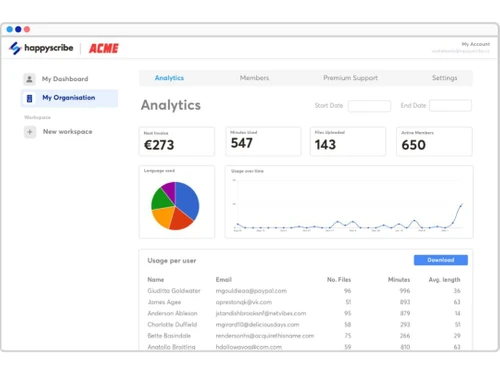
happy scribe-dashboard
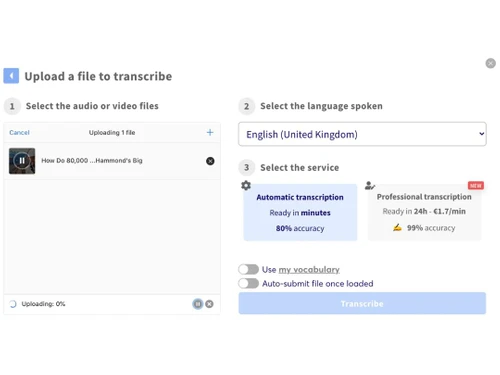
happy scribe-transcription

Happy Scribe

Brand: Happy Scribe

  • 4.3

  • 16 Ratings & 11 Reviews

HappyScribe is a powerful AI-based transcription software supporting title generation and translation of audio and video content.

See More

Have you used Happy Scribe before?

Share your insights for better experience

Add a Review
Starting Price
$9

View plans

100% Genuine
Products
Best Price
Guaranteed
Safe & Secure
Payment
  • Description

  • Pricing

  • Features

  • Specification

  • Review

  • Compare

  • Alternatives

  • FAQ

Starting at $9

Happy Scribe Software Overview

What is HappyScribe?

Happy Scribe is an online transcription software to convert audio or video into text. It uses AI technology to transcribe and subtitle the content quickly. The user uploads the file on its friendly interface in formats like MP3, MP4, and WAV, selects the desired language, and gets editable text. It generates automatic speech text, titles, and translates the content into more than 100 languages. This tool comes with a side-by-side audio player and text editor for supporting corrections and exports.

Happy Scribe automatic transcription can be enhanced using expert proofreading support. It supports transcription of different dialects and generates automatic titles, subtitles for the video and audio content. Its editor allows you to adjust timestamps, speaker labels, and subtitle styles. The software provides export options in formats like Word, PDF, or SRT. It supports team collaboration, caption generation, and custom vocabulary supporting fast documentation.

Why Choose HappyScribe?

  • Transcription: It uses AI to convert speech from audio and video to text, automatically generating notes for speeches and different content.
  • Translation: Translates the content into different languages, converting subtitles or transcripts into multiple Indian and foreign languages with decent accuracy.
  • Caption Generation: Automatically creates timed captions for videos, improving accessibility and viewer engagement across platforms like YouTube or Instagram.
  • Proofreading: Provides human-verified transcripts with 99% accuracy that can be used for official documentation, academic use, or media publishing.
  • Team Collaboration: Allows multiple users to edit, comment, and manage transcripts together, working in media teams, agencies, and academic projects.

Benefits of HappyScribe

  • User-friendly Interface: It comes with a simple layout with audio and text side-by-side, making it easy to edit and export transcripts.
  • Fast Processing: Uses AI that gives quick results within minutes, saving time for transcription and translation of audio and video content.
  • Multiple Export Formats: Allows downloading transcripts in Word, PDF, SRT, etc, thus making it possible to share and use on different platforms.
  • Multiple Language Support: Supports Indian languages like Hindi, Tamil, and Bengali, along with global ones, making it suitable for content creators and educators.
  • Speaker Identification: Automatically tags different speakers in the transcript, which is helpful for interviews, panel discussions, and multi-person recordings.
  • Subtitle Styling: Allows customization of font, size, and timing in subtitles for making content appealing for social media and professional videos.

Pricing of HappyScribe

HappyScribe Price starts at $9 at techjockey.com.

HappyScribe comes with multiple pricing plans and caters to a diverse customer base. For subscription-related details and offers on premium packages, please request a call back from our product experts.

Read more

Happy Scribe Company Details

Founded Year:  2017

Happy Scribe is an Audiovisual Language Platform, enabling media brands, traditional language service providers and corporates around the world to scale their audiovisual language needs with ease.

Director/Founders André Bastié, Marc Assens Reina
Company Size 1-100 Employees

Happy Scribe Pricing & Plans

Starter
Starting at $12
    • Licenses

      Licenses
      Licenses
    • Minutes

      Minutes
      Minutes

Key Features

  • 10-minute free trial of AI Transcription, Subtitli

  • Unlimited meeting recordings; 60 minutes per recor

  • AI Dubbing

  • Automatic speaker detection

  • Record meetings on Google Meet, Zoom and Teams

  • Edit files collaboratively

  • Export files in DOCX, TXT, SRT and MP4 (watermarke

  • Integrate with Youtube, Vimeo, Drive, Box, and Dro

Lite
Starting at $9
    • Licenses

      Licenses
      Licenses
    • Monthly

      Monthly
      Monthly

Key Features

  • 60 minutes of AI Transcription and Subtitling per

  • Unlimited meeting recordings; unlimited minutes pe

  • Key features in Starter, plus

  • Ask questions, get summaries and more with AI

  • Remove watermark from video exports

Pro
Starting at $29
    • Licenses

      Licenses
      Licenses
    • Monthly

      Monthly
      Monthly

Key Features

  • 600 minutes of AI Transcription, Subtitling, and T

  • Unlimited meeting recordings; unlimited minutes pe

  • AI Dubbing

  • Everything in Lite, plus

  • 3 user seats

  • Translate or Dub files between more than 80+ langu

  • Export subtitles in multiple formats like VTT, STL

  • Human proofreading (from $2.00/min)

Business-[Billed annually]
Starting at $49
    • Licenses

      Licenses
      Licenses
    • Monthly

      Monthly
      Monthly

Key Features

  • 60,000 minutes of AI Transcription, Subtitling, an

  • Unlimited meeting recordings; unlimited minutes pe

  • AI Dubbing

  • Everything in Pro, plus

  • 5 user seats

  • Manage workspace roles and permissions

  • Create unlimited Style guides and Glossaries

  • Human proofreading (from $1.90/min)

Happy Scribe Features

  • icon_check Subtitle Editor
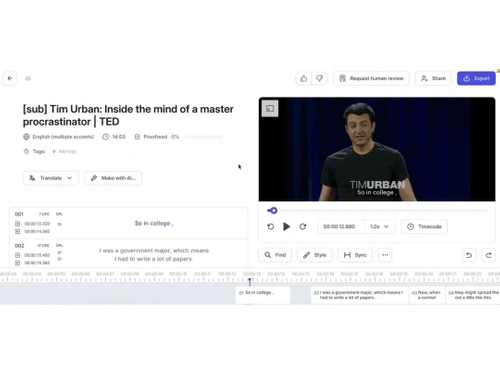
    Easily adjust subtitles to match your video's timing and style for better viewer understanding.
  • icon_check Transcript Editor
    Simple interface helps you edit transcripts quickly with audio and text shown side by side.
  • icon_check Multiple Export Formats
    Export your files in Word, PDF, SRT, or TXT, making it suitable for different platforms and needs.
  • icon_check AI Notetaker
    Automatically takes meeting notes and gives useful summaries that save time and improve follow-ups.
  • icon_check Automatic Speaker Detection
    Helps to identify speakers in audio, making transcripts clearer for interviews or group discussions.
  • icon_check Team Collaboration
    Share files with your team, edit together, and manage workspaces for smooth group coordination.
  • icon_check Third Party Integration
    Connect the software with YouTube, Zapier, and other apps to simplify your workflow and sharing.
  • icon_check AI Dubbing
    Use AI to dub videos in other languages as users need for regional content and wider reach.
  • icon_check User Roles & Permissions
    Assign roles to team members so only authorised people can edit or manage your files.
  • icon_check Translation Glossaries
    Add special terms to improve translation quality, especially for technical or regional Indian content.
Happy Scribe Demo Video play icon

Get Happy Scribe Demo

Watch the demo video to explore key features, real workflows, and how the software fits your business needs.

Understand
Key Features
Personal
Demo Insights
Interactive
Demo Support

Happy Scribe Specifications

Supported Platforms
Ubuntu Ubuntu Windows Windows MacOS MacOS Linux Linux
Devices
Desktop Desktop
Deployment
Cloud-Based Cloud-Based
Suitable For
All Industries
Business Specific
All Businesses
Business Size
Small Business Startups Medium Business Enterprises SMBs SMEs MSMBs MSMEs Freelancers
Customer Support
Email Communities
Language
English
Integration
API Integration
Training Resources
Videos
AI Features
AI Integrated

Explore the Best Alternative Solutions Similar to Your Business Size and Needs

Small Business

Designed for startups and growing businesses

Dubverse

4.5

Audext

4.5

Noty AI

4.5

See More

Happy Scribe Reviews

4.3

Out of 5

img

Overall Rating

Based on
11 Verified Reviews

Rating Breakdown

  • Features 4.4
  • Value for Money 4.3
  • Ease of Use 4.3
  • Customer Support 4.3

88% Recommend this Product

Add Review

Happy Scribe Video Review

youtubeVideoId

4.3

“Happy Scribe Audio service Honest Review - Watch Before Using”

Review by: Smart format

Glordin Healthcare

Scrum Master

Industry: Cyber Security User since: 2+ years

4.5

Reviewed on: Mar 10, 2025

Techjockey Verified

“Customer support’s hit-and-miss”

I moved from Intercom-only tools to Happy?Scribe. Support’s helpful and solved my Qs. But if I need a quick chat, there’s none—and some email replies took a day.

Pros

Team responsive by email, generally helpful

Cons

Poor chat availability and slow replies at times

Switched from Dubverse

Reason to switch

Valued email support but missed instant chat.

BaryonsSoftwareSolutions PVTLTD

User

Industry: Wine and Spirits User since: 1-2 years

4.6

Reviewed on: Feb 9, 2025

Techjockey Verified

“Supports 120+ languages & dialects”

I switched from software limited to English/Spanish—I produce content in French, Tamil, and Arabic. Happy?Scribe supports them all, though I do have to tweak dialect accuracy on less common ones.

Pros

Wide language set, auto-translate support

Cons

Some dialects still on the weak side

Switched from Speakatoo TTS

Reason to switch

Needed a versatile multilingual transcript tool.

NARESH CHOUHAN

User

Industry: Professional Services User since: 1-2 years

4.5

Reviewed on: Jul 8, 2025

Techjockey Verified

“Human review gives me peace of mind”

I moved from DIY AI transcription to Happy?Scribe when I needed legal accuracy. The humanreview option is reassuring. But it costs more per minute—so I only use it for critical audio.

Pros

Optional human proofreading to reach 99% accuracy

Cons

Manual review is expensive per minute

Switched from Notta

Reason to switch

Needed 99% accurate transcripts with professional oversight.

See All Happy Scribe Reviews

Compare Happy Scribe With other Transcription Software

Products
Ratings
Pricing
Device Supported
Deployment
Supported Platforms
  • img

    Happy Scribe

  • 4.3

  • Price On Request

  • Desktop

    Mobile

  • Web based

    On Premises

  • Windows

    Mac OS

  • img

    Wispr Flow

  • 4.3

  • ₹ 400

  • Desktop

    Mobile

  • Web based

    On Premises

  • Windows

    Mac OS

  • img

    Tactiq

  • 4.0

  • Price On Request

  • Desktop

    Mobile

  • Web based

    On Premises

  • Windows

    Mac OS

  • img

    tl;dv

  • 4.4

  • ₹ 2764

  • Desktop

    Mobile

  • Web based

    On Premises

  • Windows

    Mac OS

  • img

    Scribejoy

  • 4.3

  • Price On Request

  • Desktop

    Mobile

  • Web based

    On Premises

  • Windows

    Mac OS

  • img

    Audext

  • 4.5

  • Price On Request

  • Desktop

    Mobile

  • Web based

    On Premises

  • Windows

    Mac OS

  • img

    AutoSubtitles

  • 3.9

  • Price On Request

  • Desktop

    Mobile

  • Web based

    On Premises

  • Windows

    Mac OS

  • img

    Typeless

  • 4.3

  • Price On Request

  • Desktop

    Mobile

  • Web based

    On Premises

  • Windows

    Mac OS

  • img

    Speechify

  • 4.5

  • Price On Request

  • Desktop

    Mobile

  • Web based

    On Premises

  • Windows

    Mac OS

  • img

    Revoicer

  • 4.5

  • Price On Request

  • Desktop

    Mobile

  • Web based

    On Premises

  • Windows

    Mac OS

  • img

    Notta

  • 4.2

  • Price On Request

  • Desktop

    Mobile

  • Web based

    On Premises

  • Windows

    Mac OS

(2) Product(s) selected

Happy Scribe Alternatives

See All Happy Scribe Alternatives

Starting Price:

$12 /User/Month

Starting Price:

$49 /Provider/Month

Starting Price:

$30 /User/Month

Starting Price:

$14 /Month

Starting Price:

$29 /Month
Starting Price:

$12 /Month

Available

Price on Request

How much does HappyScribe cost?

HappyScribe pricing plans start from $9 at techjockey.com. Higher plans come with more minutes and team features.

Who uses HappyScribe?

HappyScribe is used by journalists, educators, researchers, YouTubers, and media teams who need fast and accurate transcription or subtitles.

How does HappyScribe work?

HappyScribe is a web-based software that uses AI and human experts to convert audio and video files into editable text and subtitles.

Which operating systems are compatible with HappyScribe software?

HappyScribe runs on Windows, macOS, and Linux without installation as it is a browser-based application.

Is a free demo available for HappyScribe?

Yes, HappyScribe offers a free trial and demo option for users to test transcription and subtitle features.

Can HappyScribe handle Indian languages?

Yes, HappyScribe supports Hindi, Tamil, Bengali, Marathi, and many other Indian languages for transcription and subtitles.

Does HappyScribe identify speakers automatically?

HappyScribe can auto-detect speakers in multi-person audio, though manual correction may be needed in some cases.

Can HappyScribe export files in different formats?

Yes, HappyScribe allows export in Word, PDF, TXT, SRT, and other formats for publishing, editing, or sharing.

20,000+ Software Listed

Best Price Guranteed

Free Expert Consultation

2M+ Happy Customers

Terms and Condtions

close

Users with registered businesses can purchase goods from merchants on the platform to satisfy their business needs. Users are not permitted to utilize any products acquired through the platform for resale, advertising, business, or further distribution.

For each purchase made, users will receive a Tax Invoice (or 'GST invoice') that includes specific details such as:

  • the GSTIN of the user associated with their registered business, and

  • the specified Entity Name for their business.

It should be noted that not all products are eligible for GST Invoice. Only the products displayed by participating sellers with the 'GST-based Invoice Available' callout on the product description page would qualify.

Certain goods and services are not eligible to get a GST Invoice, including items with VAS, i.e., Value Added Services (e.g., Total Mobile Protection/Assured Buyback) and those involving an exchange offer at the time of purchase.

Users must ensure the accuracy of the GSTIN, and business entity name provided for the GST Invoice. Requests for corrections into GST Invoice would not be accommodated by Techjockey.com or any Seller, and any issues arising from user-provided information are the sole responsibility of users.

Techjockey.com is not liable for the GST Invoice or any associated input tax credit. To efficiently claim an input tax credit, users should select the registered place of business address as per the GST authority's data and follow the provisions of the GST Act and rules.

To claim an input tax credit, the delivery and billing addresses must match. Furthermore, input tax credits will not be granted if the delivery address and GSTIN on the invoice are from different states. In case of incorrect GST details provided during the order placement, the order will be canceled automatically.