linkedin
Dubverse logo
play Dub-served by Dubverse
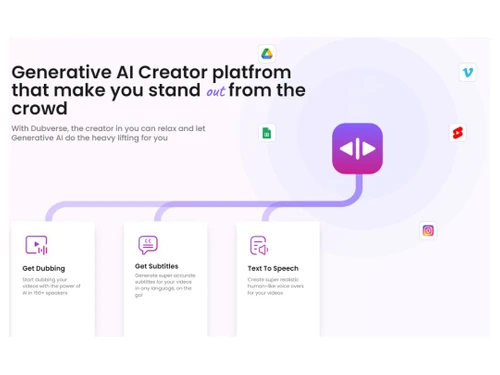
Dubverse AI Creator platfrom
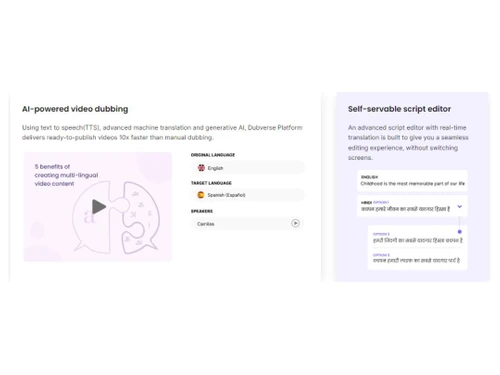
Dubverse AI powered video dubbing

Dubverse

Brand: Lensmatic Solutions

  • 4.5

  • 4 Ratings

Leverage AI to increase the reach of your content by easily dubbing it to multiple languages in human-like voices.

See More

Have you used Dubverse before?

Share your insights for better experience

Add a Review
Starting Price
$29

View plans

100% Genuine
Products
Best Price
Guaranteed
Safe & Secure
Payment
  • Description

  • Pricing

  • Features

  • Specification

  • Review

  • Compare

  • Alternatives

  • FAQ

Starting at $29

Dubverse Software Overview

What is Dubverse?

Dubverse Transcription Software is an online video dubbing software that revolutionizes how videos are localized and adapted for global audiences. The advanced AI algorithms analyze the audio tracks and synchronize the translated dialogue with the original video content. This eliminates the need for manual dubbing, saving significant time and effort.

The algorithms optimize the voiceover tracks, ensuring clear pronunciation, natural intonation, and seamless lip synchronization. The result is a professional and immersive viewing experience where the dubbing seamlessly integrates with the video content.

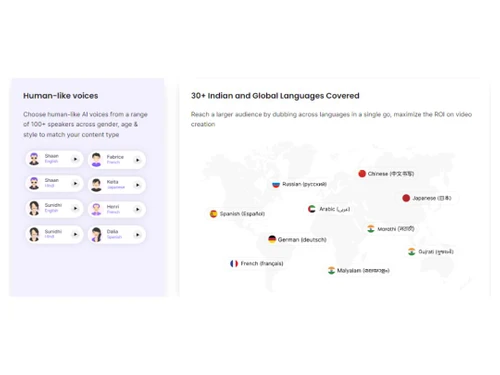
With over 30 languages available for dubbing, users can effortlessly cater to the specific linguistic preferences of their target audience. The quick turnaround time allows faster content localization and distribution, maximizing the video's impact and relevance. The intuitive platform guides users through the dubbing process, offering customization options for voiceover selection, style preferences, and post-production adjustments.

Key Functionalities of Dubverse

  • Automatic Lip Synchronization: The dubbing platform uses advanced AI algorithms to synchronize the dubbed audio with the lip movements of the original video.
  • Noise Reduction: It improves the audio quality of the dubbed videos to enhance the overall viewing experience.
  • Voice Actor Casting: The software allows users to select from a diverse pool of professional voice talents for their dubbing projects.
  • AI Voice Cloning: The video dubbing tool enables users to replicate and use specific voices for consistent dubbing across multiple videos.
  • Timecode Alignment: It automatically aligns the dubbed audio with the original video's timecode to ensure accurate synchronization between the two.
  • Voice Modulation: The tool allows users to modulate and adjust the pitch, tone, and speed of the dubbed voices for versatility and creative control.

Benefits of Dubverse

  • The dubbing platform ensures the accuracy and consistency of the dubbed content to maintain high standards throughout the dubbing process.
  • It allows users to adjust and fine-tune the characteristics of the dubbed voices during the dubbing process.
  • The video dubbing tool enables users to ensure accurate pronunciation of words and names specific to their content.
  • It allows users to customize the appearance and style of subtitles to match their branding and visual preferences.

Pricing of Dubverse

Dubverse price in India starts at $29 onwards. Dubverse comes with multiple pricing plans and caters to the diverse customer base.

Read more

Lensmatic Solutions Company Details

Founded Year:  2021

Dübverse is an AI startup working on a product that is automatically dubbing video content to multiple languages decreasing the cost and time of video recreation.

Director/Founders Varshul CW
Company Size 1-100 Employees

Dubverse Pricing & Plans

Pro
Key Features
  • 50 Extra credits= 100 Credits
  • Get studio log/ history
  • Create multiple projects in one go
  • Process videos longer than 30 minutes
  • Share watermark-free content
  • Video configuration tools
  • Find and replace words
  • Optimize audio/video
  • Use segment menu
  • Edit videos
  • Transliterate
Starting at $29
    • Licenses

      Licenses
      Licenses
    • Monthly

      Monthly
      Monthly

Key Features

  • 50 Extra credits= 100 Credits

  • Get studio log/ history

  • Create multiple projects in one go

  • Process videos longer than 30 minutes

  • Share watermark-free content

  • Video configuration tools

  • Find and replace words

  • Optimize audio/video

  • Use segment menu

  • Edit videos

  • Transliterate

Dubverse Features

  • icon_check AI Dubbing
    Utilizes advanced AI technology to dub videos automatically.
  • icon_check Generate accurate subtitles
    Generates accurate and synchronized subtitles for the original and dubbed languages.
  • icon_check Text-to-Speech
    Allows users to convert written text into spoken dialogue for dubbing.
  • icon_check Multi Language Support
    Supports dubbing in over 30 languages, enabling users to reach global audiences.
  • icon_check Self-servable script editor
    Allows users to customize and fine-tune the dialogue for the dubbing process.
  • icon_check Human-like voices
    Utilizes advanced voice synthesis technology to produce natural and human-like voices for dubbed videos.
  • icon_check Sharing
    Facilitates easy sharing and distributing of dubbed videos through various platforms and channels.
  • icon_check Cost Effective
    Eliminates the need for extensive manual dubbing processes and reduces overall production costs.
  • icon_check Profile optimization
    Allows users to create and optimize their profiles for future dubbing projects.
  • icon_check Output page
    Provides a dedicated output page where users can access and download the final dubbed videos in their desired formats.
  • icon_check Video preview
    Allows users to preview and review the dubbing results before finalizing and sharing the videos.
Dubverse Demo Video play icon

Get Dubverse Demo

Watch the demo video to explore key features, real workflows, and how the software fits your business needs.

Understand
Key Features
Personal
Demo Insights
Interactive
Demo Support

Dubverse Specifications

Supported Platforms
Windows Windows
Devices
Desktop Desktop
Deployment
Cloud-Based Cloud-Based
Suitable For
All Industries
Business Specific
All Businesses
Business Size
Small Business Startups Medium Business Enterprises SMBs
Customer Support
Phone Email Communities
Language
English
Training Resources
Documentation Videos
AI Features
AI Integrated

Explore the Best Alternative Solutions Similar to Your Business Size and Needs

Small Business

Designed for startups and growing businesses

Rask AI

4.4

Audext

4.5

Noty AI

4.5

See More

Dubverse Review

4.5

Out of 5

img

Overall Rating

Based on
4 Verified Ratings

Rating Breakdown

  • Features 4.5
  • Value for Money 4.5
  • Ease of Use 4.6
  • Customer Support 4.7

90% Recommend this Product

Add Review

Techjockey Trusted Reviews from Verified Users

No reviews are currently available for Dubverse. Discover similar Transcription Software reviews

  • Happy Scribe

    4.5

    Whats great - Team responsive by email, generally helpful read more

  • Gotranscript

    4.4

    Whats great - For long interviews, academic lectures, multi-speaker recordings, GoTranscript handles them well; human transcribers don’t pa... read more

  • Obsidian

    4.4

    Whats great - There are so many cool plugins that let me do things like task management thanks to community plugins. read more

Compare Dubverse With other Transcription Software

Products
Ratings
Pricing
Device Supported
Deployment
Supported Platforms
  • img

    Dubverse

  • 4.5

  • Price On Request

  • Desktop

    Mobile

  • Web based

    On Premises

  • Windows

    Mac OS

  • img

    Wispr Flow

  • 4.3

  • ₹ 400

  • Desktop

    Mobile

  • Web based

    On Premises

  • Windows

    Mac OS

  • img

    Tactiq

  • 4.0

  • Price On Request

  • Desktop

    Mobile

  • Web based

    On Premises

  • Windows

    Mac OS

  • img

    tl;dv

  • 4.4

  • ₹ 2764

  • Desktop

    Mobile

  • Web based

    On Premises

  • Windows

    Mac OS

  • img

    Scribejoy

  • 4.3

  • Price On Request

  • Desktop

    Mobile

  • Web based

    On Premises

  • Windows

    Mac OS

  • img

    Audext

  • 4.5

  • Price On Request

  • Desktop

    Mobile

  • Web based

    On Premises

  • Windows

    Mac OS

  • img

    AutoSubtitles

  • 3.9

  • Price On Request

  • Desktop

    Mobile

  • Web based

    On Premises

  • Windows

    Mac OS

  • img

    Typeless

  • 4.3

  • Price On Request

  • Desktop

    Mobile

  • Web based

    On Premises

  • Windows

    Mac OS

  • img

    Speechify

  • 4.5

  • Price On Request

  • Desktop

    Mobile

  • Web based

    On Premises

  • Windows

    Mac OS

  • img

    Happy Scribe

  • 4.3

  • Price On Request

  • Desktop

    Mobile

  • Web based

    On Premises

  • Windows

    Mac OS

  • img

    Revoicer

  • 4.5

  • Price On Request

  • Desktop

    Mobile

  • Web based

    On Premises

  • Windows

    Mac OS

(0) Product(s) selected

Dubverse Alternatives

See All Dubverse Alternatives

Starting Price:

$12 /User/Month

Starting Price:

$49 /Provider/Month

Starting Price:

$30 /User/Month

Starting Price:

$14 /Month

Starting Price:

$29 /Month
Starting Price:

$12 /Month

Available

Price on Request

Which operating system does Dubverse support?

Dubverse is compatible with Windows operating systems.

Is there any Dubverse app?

Dubverse app is not available for mobile devices.

What is the deployment type of Dubverse?

Dubverse supports cloud based deployment type.

How much does Dubverse cost?

Dubverse pricing starts at $29 onwards.

Who are the potential users of Dubverse?

Dubverse is typically used by video & film makers.

Is there any free trial or demo for Dubverse?

Dubverse demo is available for free with techjockey.com.

Is Dubverse free?

Dubverse offers a free trial. However, the premium plan with advanced features starts at $29.

How can you download Dubverse?

For Dubverse installation is not required, as it is web-based. Just open the Setup Wizard to get started.

How does Dubverse work?

Dubverse helps with automatically dubbing videos. It's a complete solution that offers users customization options for voiceover selection, style preferences, and post-production adjustments.

20,000+ Software Listed

Best Price Guranteed

Free Expert Consultation

2M+ Happy Customers

Terms and Condtions

close

Users with registered businesses can purchase goods from merchants on the platform to satisfy their business needs. Users are not permitted to utilize any products acquired through the platform for resale, advertising, business, or further distribution.

For each purchase made, users will receive a Tax Invoice (or 'GST invoice') that includes specific details such as:

  • the GSTIN of the user associated with their registered business, and

  • the specified Entity Name for their business.

It should be noted that not all products are eligible for GST Invoice. Only the products displayed by participating sellers with the 'GST-based Invoice Available' callout on the product description page would qualify.

Certain goods and services are not eligible to get a GST Invoice, including items with VAS, i.e., Value Added Services (e.g., Total Mobile Protection/Assured Buyback) and those involving an exchange offer at the time of purchase.

Users must ensure the accuracy of the GSTIN, and business entity name provided for the GST Invoice. Requests for corrections into GST Invoice would not be accommodated by Techjockey.com or any Seller, and any issues arising from user-provided information are the sole responsibility of users.

Techjockey.com is not liable for the GST Invoice or any associated input tax credit. To efficiently claim an input tax credit, users should select the registered place of business address as per the GST authority's data and follow the provisions of the GST Act and rules.

To claim an input tax credit, the delivery and billing addresses must match. Furthermore, input tax credits will not be granted if the delivery address and GSTIN on the invoice are from different states. In case of incorrect GST details provided during the order placement, the order will be canceled automatically.