linkedin
Vectary logo
play Vectary - Design platform reshaping 3D project sharing, use, and accessibility.
vectary-designs
vectary-models

Vectary

Brand: Vectary

  • No Ratings & Reviews

Vectary enables users to create, edit, render, and share interactive 3D models and AR experiences online.

See More

Have you used Vectary before?

Share your insights for better experience

Add a Review
Starting Price
$25

View plans

100% Genuine
Products
Best Price
Guaranteed
Safe & Secure
Payment
  • Description

  • Pricing

  • Features

  • Specification

  • Review

  • FAQ

Starting at $25

Vectary Software Overview

What is Vectary?

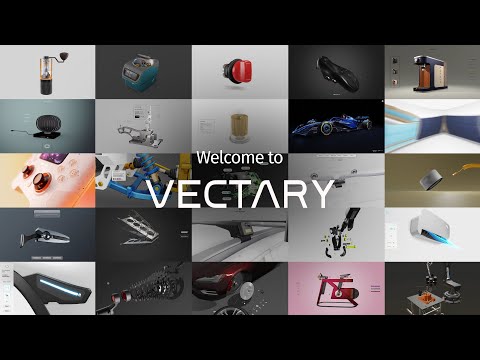
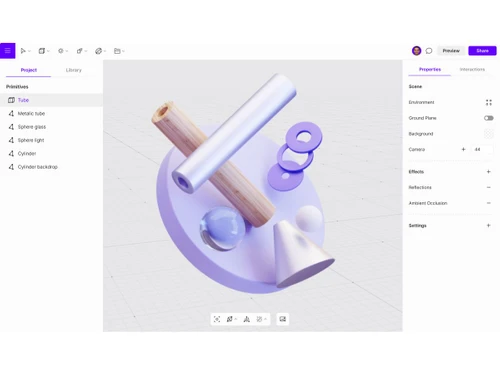
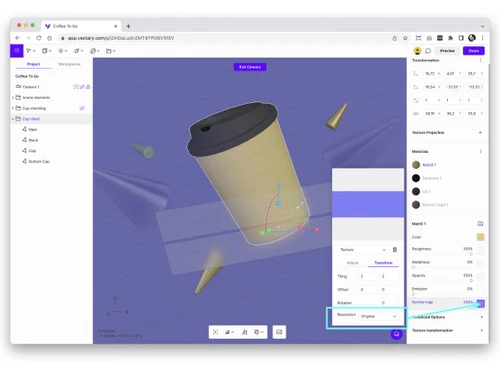
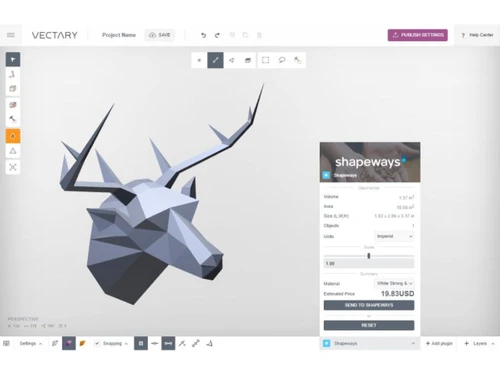
Vectary is a browser-based 3D design software that helps users create, edit, customize, and share 3D models online without needing advanced coding or design skills. It provides tools for 3D modeling, real-time rendering, animations, and interactive 3D presentations in one platform. Users can build 3D objects from scratch or import existing CAD and 3D files for editing.

Vectary also supports augmented reality (AR) and virtual reality (VR) experiences, allowing users to view designs in real-world environments. The software includes drag-and-drop tools, customizable templates, and no-code workflows for easier design creation.

Teams can collaborate on projects, leave comments, and share designs through links directly in the browser. Vectary supports interactive 3D product configurators, digital twins, and web-based 3D experiences. It can be integrated with websites, presentations, and productivity tools through embedding features.

Why Choose Vectary Software?

  • Browser-Based Platform: Create 3D designs directly in a web browser.
  • No Software Installation: Start designing without downloading applications.
  • Easy 3D Modeling: Build 3D models with simple tools and workflows.
  • User-Friendly Interface: Suitable for both beginners and professionals.
  • Real-Time Rendering: View design changes instantly while working.
  • AR Experience Creation: Build and share augmented reality projects.
  • Interactive 3D Content: Create engaging 3D experiences for websites and presentations.
  • Drag-and-Drop Tools: Simplifies the design process.
  • Ready-Made Templates: Access templates to speed up project creation.
  • Team Collaboration: Work together on projects in real time.
  • Cloud-Based Access: Access projects from anywhere with internet connectivity.
  • Cross-Device Compatibility: Works on desktops, laptops, and mobile devices.
  • 3D File Import Support: Import existing CAD and 3D models.
  • 3D File Export Options: Export designs in multiple formats.

Benefits of Vectary Software

  • Product Visualization: Showcase products in realistic 3D environments.
  • Website Embedding: Easily embed 3D models into websites.
  • Presentation Integration: Add 3D content to presentations and digital content.
  • VR Compatibility: Supports virtual reality experiences.
  • Interactive Product Configurators: Create customizable product experiences.
  • Digital Twin Creation: Build digital representations of real-world products.
  • Fast Project Sharing: Share projects through simple links.
  • Comment and Feedback Tools: Improve collaboration with built-in review features.
  • Professional Rendering Quality: Generate visually appealing 3D outputs.
  • Marketing and Sales Support: Create engaging visual content for promotions.

Vectary Pricing

Vectary price starts at USD 29 at techjockey.com.

The pricing model is based on different parameters, including extra features, deployment type, and the total number of users. For further queries related to the product, you can contact our product team and learn more about the pricing and offers.

Read more

Vectary Company Details

Founded Year:  2014

Vectary is an online 3D design software that lets you turn CAD models into interactive product displays, digital twins, and user manuals.

Director/Founders Michal Koor, Pavol Sovis
Company Size 1-100 Employees

Vectary Pricing & Plans

Pro AI
Key Features
  • 25 projects
  • 100x GenAI incl. / month
  • Generate 3D from image - GenAI
  • Generate Images - GenAI
  • Studio - best in class 3D editor
  • Import/Export 3D (incl. usdz, glb, gltf)
  • App-free Augmented Reality
  • Share public links
  • Figma plugin
Starting at $25
    • Licenses

      Licenses
      Licenses
    • Monthly

      Monthly
      Monthly

Key Features

  • 25 projects

  • 100x GenAI incl. / month

  • Generate 3D from image - GenAI

  • Generate Images - GenAI

  • Studio - best in class 3D editor

  • Import/Export 3D (incl. usdz, glb, gltf)

  • App-free Augmented Reality

  • Share public links

  • Figma plugin

Vectary Features

  • icon_check Floating UI Designer
    A no-code interface for building 2D menus and control panels that overlay 3D scenes to manage configuration and user navigation.
  • icon_check Version Control
    A system that tracks project changes and stores previous states, allowing users to revert to earlier iterations of a 3D design.
  • icon_check API Integration
    A JavaScript-based messaging layer that facilitates real-time communication between embedded 3D scenes and external web systems.
  • icon_check Shared Workspaces
    A collaborative environment where multiple users can manage assets, provide comments, and co-edit projects within a unified hub.
  • icon_check SVG Vector Extrusion
    A tool that converts 2D vector graphics into 3D geometry by applying thickness and beveling to paths for logo and UI development.
  • icon_check Parametric Modifiers
    Algorithmic tools like Booleans and Subdivisions that modify 3D mesh geometry while maintaining editable underlying parameters.
  • icon_check PBR Material Engine
    A rendering system using Physically Based Rendering to simulate light interaction with surfaces for high-fidelity visualization.
  • icon_check Import/Export Management
    A conversion utility supporting over sixty file formats to translate high-fidelity engineering data into web-optimized 3D meshes.
  • icon_check Interaction Triggers
    Functional event listeners that initiate specific actions or animations when a user clicks, hovers, or scrolls near 3D objects.
  • icon_check Augmented Reality Export
    Automated generation of USDZ and GLB files to enable native spatial viewing on mobile devices without external app installations.
  • icon_check Keyframe Animations
    A timeline-based system for defining object transformations over time to create smooth transitions and complex motion sequences.
  • icon_check Multi Camera System
    Tools for defining several viewing perspectives within a single scene to control user focus and navigate complex 3D environments.
  • icon_check Hotspot Annotations
    Interactive 2D elements anchored to 3D coordinates that display contextual information or trigger logic upon user interaction.
Vectary Demo Video play icon

Get Vectary Demo

Watch the demo video to explore key features, real workflows, and how the software fits your business needs.

Understand
Key Features
Personal
Demo Insights
Interactive
Demo Support

Vectary Specifications

Supported Platforms
Ubuntu Ubuntu Windows Windows MacOS MacOS Linux Linux
Devices
Desktop Desktop
Deployment
Cloud-Based Cloud-Based
Suitable For
All Industries
Business Specific
All Businesses
Business Size
Individual Small Business Startups Medium Business Enterprises SMBs SMEs MSMBs MSMEs Freelancers
Customer Support
Email Communities
Language
English
Integration
API Integration
Training Resources
Videos
AI Features
AI Integrated

Vectary Review

Techjockey Trusted Reviews from Verified Users

No reviews are currently available for Vectary. Discover similar 3D Design Software reviews

  • Power NURBS Pro

    4.8

    Whats great - PowerNurbs is an incredible NURBS apparatus, natural and amazing. 3Ds max joined with PowerNurbs winds up a standout amongst ... read more

  • Autodesk Autocad Plant 3D Toolset

    4.6

    Whats great - Produce and offer isometrics, orthographics, and materials reports. read more

  • Power Translator Pro

    4.4

    Whats great - Exquisite on the grounds that its planners imagined the sorts of reports and situations that individuals need to decipher. read more

How much does Vectary Software cost?

Vectary pricing starts from USD 25 on techjockey.com.

Is there a mobile app available for Vectary Software?

No, Vectary does not offer mobile apps for both Android and iOS users.

Which operating systems are compatible with Vectary Software?

Vectary is a web-based platform accessible on Windows, MacOS, Ubuntu and Linux.

Does Vectary Software offer a free trial?

Vectary offers a free plan that allows users to try its 3D design and collaboration features.

How does Vectary Software function?

Vectary works by enabling users to create, edit, render, and share 3D models and AR experiences directly through a web browser.

Who uses Vectary Software?

Vectary is used by designers, engineers, marketers, educators, product developers, and creative teams for 3D design projects.

Is a free demo available for Vectary Software?

Yes, Vectary provides free access and guided resources that act as a demo for exploring its platform features.

Is Vectary Software available for free?

Yes, Vectary is available for free with limited features, while advanced tools and capabilities are offered through paid plans.

20,000+ Software Listed

Best Price Guranteed

Free Expert Consultation

2M+ Happy Customers

Terms and Condtions

close

Users with registered businesses can purchase goods from merchants on the platform to satisfy their business needs. Users are not permitted to utilize any products acquired through the platform for resale, advertising, business, or further distribution.

For each purchase made, users will receive a Tax Invoice (or 'GST invoice') that includes specific details such as:

  • the GSTIN of the user associated with their registered business, and

  • the specified Entity Name for their business.

It should be noted that not all products are eligible for GST Invoice. Only the products displayed by participating sellers with the 'GST-based Invoice Available' callout on the product description page would qualify.

Certain goods and services are not eligible to get a GST Invoice, including items with VAS, i.e., Value Added Services (e.g., Total Mobile Protection/Assured Buyback) and those involving an exchange offer at the time of purchase.

Users must ensure the accuracy of the GSTIN, and business entity name provided for the GST Invoice. Requests for corrections into GST Invoice would not be accommodated by Techjockey.com or any Seller, and any issues arising from user-provided information are the sole responsibility of users.

Techjockey.com is not liable for the GST Invoice or any associated input tax credit. To efficiently claim an input tax credit, users should select the registered place of business address as per the GST authority's data and follow the provisions of the GST Act and rules.

To claim an input tax credit, the delivery and billing addresses must match. Furthermore, input tax credits will not be granted if the delivery address and GSTIN on the invoice are from different states. In case of incorrect GST details provided during the order placement, the order will be canceled automatically.