 USA
USA UAE
UAE
Wondershare Filmora
Whats great - It seemed to me all so familiar and straightforward, I easily processed various video files and made interesting titles and e... read more



Brand: VideoMule
Have you used VideoMule before?
Share your insights for better experience
Brand: VideoMule
Founded Year: 2025
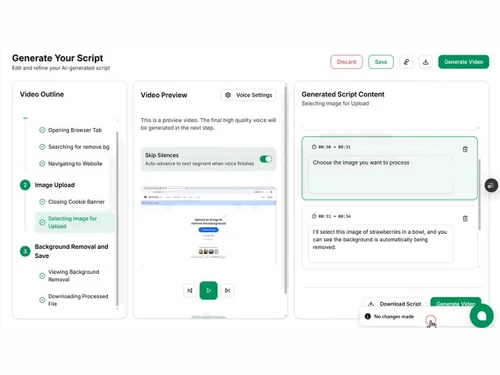
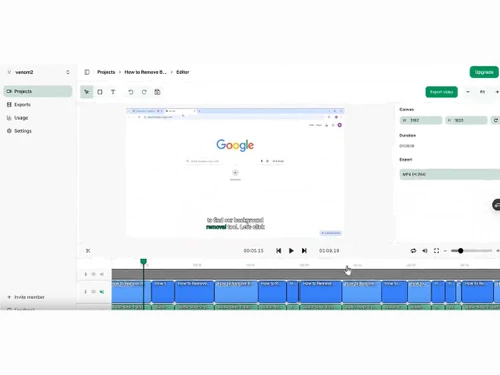
VideoMule is an AI-powered video maker that transforms silent screen recordings into professional, engaging videos with realistic AI voiceovers. Create tutorials, product demos, and training videos faster - without recording your own voice or using complex editing tools.
Basic Editing Tools / Timeline Editing
 Non-Linear Editing (NLE) Trim, Crop & Resize Split & Merge Drag and Drop Functionality Transition Effects Video Masking Video Overlays Scene Cut Detection Preview Functionality Speed Ramping and Speed Changing
 Color Correction & Enhancement
Color Grading and Correction Color Blending and Filters Color LUTs Video Enhancer Advanced Editing Tools
Video Stabilization Proxy Tools Auto Reframe Nested Timelines Key Frames and Animations Object Motion Tracking 3D Animations Background Removal Screen / Camera Recording Duplicate Detection Visual Effects & Motion Graphics
Content Library and Elements Green Screen and Chroma Key / Luma Key VFX SFX Audio Editing Tools
Voiceovers, Subtitles and Transcripts Audio Waveforms Silence Remover Audio Denoise Audio Stretching Auto Synchronization Audio Mixing Beat Synchronization Image Editing Tools
Image Stabilization Noise Removal File Storage and Management
File Rendering Automatic Project Backup 4K and HD Export Audio / Video Conversion AI Video Creator / Editor
AI Co-Pilot Editing AI Text to Speech AI Voice Changer AI Auto Face Blur AI Speech / Dialogue Enhancer AI Text-To-Video AI Text-Based Editing Collaboration & Sharing
Social Media Integration Real Time Collaboration Multi Device Compatibility Multi Format Compatibility Video Brand Kit  Windows
  MacOS
MacOS  Desktop
  Cloud-Based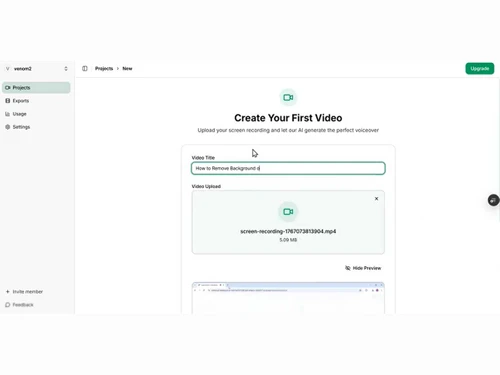
Techjockey Trusted Reviews from Verified Users
No reviews are currently available for VideoMule. Discover similar Video Editing Software reviews
Wondershare Filmora
Whats great - It seemed to me all so familiar and straightforward, I easily processed various video files and made interesting titles and e... read more

Wisecut
Whats great - Wisecut AI is an AI video editing tool that works in a way where you just upload the video and it edits it for you. read more

KineMaster
Whats great - KineMaster is an excellent video editing application that has been developed with the user in mind. The application enables u... read more








20,000+ Software Listed
Best Price Guranteed
Free Expert Consultation
2M+ Happy Customers
Terms and Condtions

Users with registered businesses can purchase goods from merchants on the platform to satisfy their business needs. Users are not permitted to utilize any products acquired through the platform for resale, advertising, business, or further distribution.
For each purchase made, users will receive a Tax Invoice (or 'GST invoice') that includes specific details such as:
the GSTIN of the user associated with their registered business, and
the specified Entity Name for their business.
It should be noted that not all products are eligible for GST Invoice. Only the products displayed by participating sellers with the 'GST-based Invoice Available' callout on the product description page would qualify.
Certain goods and services are not eligible to get a GST Invoice, including items with VAS, i.e., Value Added Services (e.g., Total Mobile Protection/Assured Buyback) and those involving an exchange offer at the time of purchase.
Users must ensure the accuracy of the GSTIN, and business entity name provided for the GST Invoice. Requests for corrections into GST Invoice would not be accommodated by Techjockey.com or any Seller, and any issues arising from user-provided information are the sole responsibility of users.
Techjockey.com is not liable for the GST Invoice or any associated input tax credit. To efficiently claim an input tax credit, users should select the registered place of business address as per the GST authority's data and follow the provisions of the GST Act and rules.
To claim an input tax credit, the delivery and billing addresses must match. Furthermore, input tax credits will not be granted if the delivery address and GSTIN on the invoice are from different states. In case of incorrect GST details provided during the order placement, the order will be canceled automatically.