linkedin
Visual Studio IntelliCode logo
play IntelliCode whole line completions in Visual Studio 2022
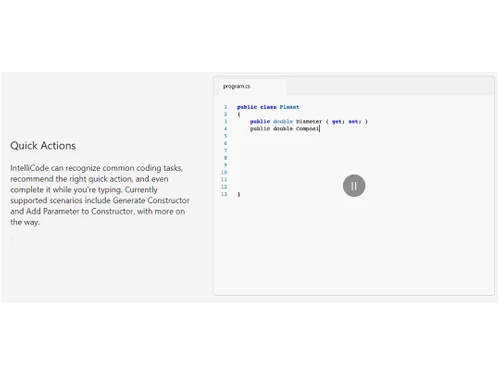
visual studio intellicode quick actions
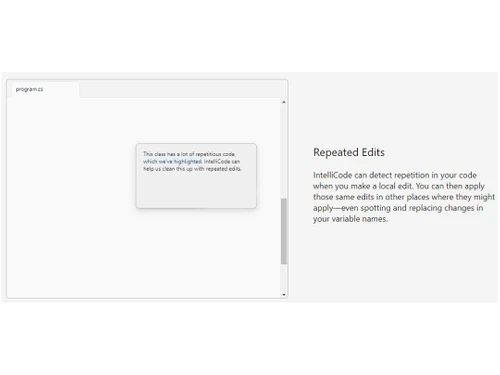
visual studio intellicode repeated edits

Visual Studio IntelliCode

Brand: Microsoft Corporation

  • 4.1

  • 5 Ratings

Microsoft Visual Studio IntelliCode software enhances the coding experience by intelligently suggesting code completions and personalized recommendations.

See More

Have you used Visual Studio IntelliCode before?

Share your insights for better experience

Add a Review
Starting Price
$45

View plans

100% Genuine
Products
Best Price
Guaranteed
Safe & Secure
Payment
  • Description

  • Pricing

  • Features

  • Specification

  • Review

  • Compare

  • Alternatives

  • FAQ

Starting at $45

Visual Studio IntelliCode Software Overview

What is Microsoft Visual Studio IntelliCode Software?

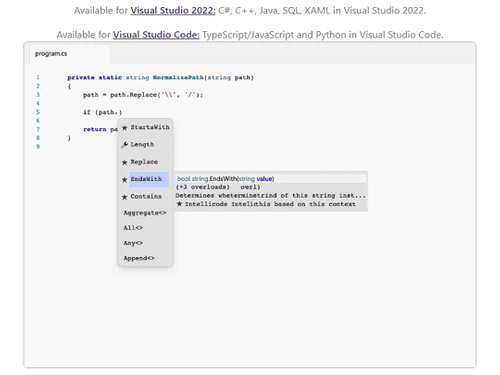
Microsoft Visual Studio IntelliCode revolutionizes the coding experience by seamlessly integrating AI assistance into your personal development workflow. With IntelliCode, you can type less and code more efficiently. Its whole line autocompletion feature empowers you with accurate and consistent code suggestions that can fill in entire lines of code at once. By analyzing your code context and understanding variables, functions, and code types, IntelliCode delivers intelligent suggestions tailored to your coding needs.

IntelliCode goes beyond traditional IntelliSense by prioritizing the most relevant and frequently used suggestions at the top of your completion list. These recommendations are based on extensive analysis of hundreds of thousands of open-source contributions available on GitHub. Additionally, IntelliCode allows you to customize its recommendations by adding your custom methods as well as code base properties, providing a truly personalized coding experience. Best of all, IntelliCode operates locally on your machine, ensuring the privacy and security of your code.

IntelliCode can identify repeated edits in your code and help you apply those edits across multiple locations, saving you valuable time and effort.

IntelliCode recognizes common coding tasks and suggests the appropriate quick actions, often completing them for you as you type. Whether it's generating constructors or adding parameters, IntelliCode streamlines your coding process and boosts your productivity. It is currently available for C# in Visual Studio 2022 and Python in Visual Studio Code.

Why Choose Microsoft Visual Studio IntelliCode System?

Microsoft Visual Studio IntelliCode is a valuable tool for developers of all levels and backgrounds. Beginner developers can benefit from IntelliCode's AI assistance, which helps them learn coding best practices, correct mistakes, and improve their overall coding skills. It provides helpful suggestions and completions, reducing the learning curve and enabling beginners to write better code with confidence.

Experienced developers, on the other hand, can leverage IntelliCode to boost their productivity and streamline their coding workflow. The AI-powered features, such as quick actions, refactoring tools, and code generators, automate repetitive tasks and help developers focus on more complex and critical aspects of their projects.

Benefits of Microsoft Visual Studio IntelliCode Software

  • Save time and write code faster with AI-powered suggestions and automated completions.
  • Enhance accuracy and consistency in your code with intelligent recommendations.
  • Receive tailored suggestions that align with your coding style and preferences.
  • Streamline your coding workflow with quick actions, refactoring tools, and AI code generators.
  • Easily identify and apply repeated edits, refactor code seamlessly, and maintain code consistency.
  • Benefit from the power of AI to intelligently analyze open-source contributions and prioritize relevant suggestions.

Pricing of Microsoft Visual Studio IntelliCode Software

Microsoft Visual Studio IntelliCode platform pricing is available on request at techjockey.com.

The overall pricing model is based on different factors such as personalization, extra features required, total users, and the deployment type. Please feel free to request a call from our product experts if you want to learn more about our subscription plans or premium package deals.

Read more

Microsoft Corporation Company Details

Founded Year:  1975

Microsoft Corporation is an American multinational technology company with headquarters in Redmond, Washington.

Director/Founders Paul Allen , Bill Gates
Company Size 1000+ Employees

Visual Studio IntelliCode Pricing & Plans

Professional monthly
Starting at $45
    • Users

      Users
      Users
    • Monthly

      Monthly
      Monthly

Key Features

  • Visual Studio 2022 Enterprise

  • Azure DevOps (Basic plan)

Enterprise monthly
Starting at $250
    • Users

      Users
      Users
    • Monthly

      Monthly
      Monthly

Key Features

  • Visual Studio 2022 Enterprise

  • Azure DevOps (Basic + Test plan)?

Visual Studio IntelliCode Features

  • icon_check Quick Action
    Boost your productivity with intelligent recommendations and automated completion of common coding tasks.
  • icon_check Repeated Edits
    Save time and effort by effortlessly applying repeated edits across your codebase.
  • icon_check Refactoring with ease
    Seamlessly refactor your code with automated suggestions and streamlined editing capabilities.
  • icon_check AI Assisstant
    Benefit from AI-powered assistance that enhances your coding experience and provides intelligent suggestions.
  • icon_check Code Generators
    Generate code snippets and templates automatically to accelerate your development process.
  • icon_check Whole-line autocompletions
    Experience accurate and context-aware code completions that can fill in entire lines of code.
Visual Studio IntelliCode Demo Video play icon

Get Visual Studio IntelliCode Demo

Watch the demo video to explore key features, real workflows, and how the software fits your business needs.

Understand
Key Features
Personal
Demo Insights
Interactive
Demo Support

Visual Studio IntelliCode Specifications

Supported Platforms
Windows Windows
Devices
Desktop Desktop
Deployment
Cloud-Based Cloud-Based
Suitable For
All Industries
Business Specific
All Businesses
Business Size
Small Business Startups Medium Business Enterprises SMBs SMEs MSMBs MSMEs
Customer Support
Email
Language
English
Training Resources
Videos
AI Features
AI Integrated

Explore the Best Alternative Solutions Similar to Your Business Size and Needs

Visual Studio IntelliCode Review

4.1

Out of 5

img

Overall Rating

Based on
5 Verified Ratings

Rating Breakdown

  • Features 4.1
  • Value for Money 4
  • Ease of Use 4.3
  • Customer Support 4.2

84% Recommend this Product

Add Review

Be the First to Review

This product has no reviews yet. Be the first to leave your feedback.

Add Review

Compare Visual Studio IntelliCode With other AI Code Generators

Products
Ratings
Pricing
Device Supported
Deployment
Supported Platforms
  • img

    Visual Studio IntelliCode

  • 4.1

  • Price On Request

  • Desktop

    Mobile

  • Web based

    On Premises

  • Windows

    Mac OS

  • img

    Emergent

  • 3.9

  • Price On Request

  • Desktop

    Mobile

  • Web based

    On Premises

  • Windows

    Mac OS

  • img

    Deepcode AI

  • 4.1

  • Price On Request

  • Desktop

    Mobile

  • Web based

    On Premises

  • Windows

    Mac OS

  • img

    Lovable

  • 4.3

  • Price On Request

  • Desktop

    Mobile

  • Web based

    On Premises

  • Windows

    Mac OS

  • img

    CodeAnt AI

  • 4.4

  • Price On Request

  • Desktop

    Mobile

  • Web based

    On Premises

  • Windows

    Mac OS

  • img

    Anima

  • 4.3

  • ₹ 1999

  • Desktop

    Mobile

  • Web based

    On Premises

  • Windows

    Mac OS

  • img

    Codiga

  • 4.2

  • Price On Request

  • Desktop

    Mobile

  • Web based

    On Premises

  • Windows

    Mac OS

  • img

    BlackBox AI

  • 4.7

  • Price On Request

  • Desktop

    Mobile

  • Web based

    On Premises

  • Windows

    Mac OS

  • img

    Kodezi

  • 4.6

  • Price On Request

  • Desktop

    Mobile

  • Web based

    On Premises

  • Windows

    Mac OS

  • img

    Cursor

  • 4.2

  • Price On Request

  • Desktop

    Mobile

  • Web based

    On Premises

  • Windows

    Mac OS

  • img

    ZZZ Code AI

  • 4.4

  • Price On Request

  • Desktop

    Mobile

  • Web based

    On Premises

  • Windows

    Mac OS

(0) Product(s) selected

Visual Studio IntelliCode Alternatives

See All Visual Studio IntelliCode Alternatives

Starting Price:

$20 /Month

Starting Price:

$25 /Month

Available

Price on Request

Starting Price:

$15 /Month

Available

Price on Request

Starting Price:

$19 /Month
Starting Price:

$10 /Month

Articles for Visual Studio IntelliCode

See All Related Articles

Which operating system does the Microsoft Visual Studio IntelliCode Software Support?

Microsoft Visual Studio IntelliCode software is compatible with Windows and macOS operating systems.

Is there any Microsoft Visual Studio IntelliCode App?

Microsoft Visual Studio IntelliCode app is not available on Android and iOS devices.

What is the deployment type of the Microsoft Visual Studio IntelliCode System?

Microsoft Visual Studio IntelliCode system supports on-premises deployment.

How much does the Microsoft Visual Studio IntelliCode AI Code Generator Software cost?

Microsoft Visual Studio IntelliCode AI Code Generator software pricing is available on request at techjockey.com.

Who are the potential users of the Microsoft Visual Studio IntelliCode?

Microsoft Visual Studio IntelliCode AI Code Generator can be used by programmers, software engineers, and developers seeking to boost productivity and streamline the coding process with the assistance of an advanced AI-powered code generator.

Is there any free trial or demo for Microsoft Visual Studio IntelliCode software?

Microsoft Visual Studio IntelliCode software demo is available for free with techjockey.com.

Is the Microsoft Visual Studio IntelliCode AI Code Generator software Free?

Microsoft Visual Studio IntelliCode AI Code Generator software does not offer a free trial.

How can you download Microsoft Visual Studio IntelliCode?

For Microsoft Visual Studio IntelliCode installation, you can go directly to Techjockey official website and buy this solution. Once purchased, you will receive a key to download the same via email.

How does Microsoft Visual Studio IntelliCode AI Code Generator Work?

Microsoft Visual Studio IntelliCode is an AI-powered code generator that assists developers in writing code by providing suggestions and auto-completions. It analyzes existing codebases, documentation, and patterns to offer contextual recommendations, saving time and enhancing productivity.

20,000+ Software Listed

Best Price Guranteed

Free Expert Consultation

2M+ Happy Customers

Terms and Condtions

close

Users with registered businesses can purchase goods from merchants on the platform to satisfy their business needs. Users are not permitted to utilize any products acquired through the platform for resale, advertising, business, or further distribution.

For each purchase made, users will receive a Tax Invoice (or 'GST invoice') that includes specific details such as:

  • the GSTIN of the user associated with their registered business, and

  • the specified Entity Name for their business.

It should be noted that not all products are eligible for GST Invoice. Only the products displayed by participating sellers with the 'GST-based Invoice Available' callout on the product description page would qualify.

Certain goods and services are not eligible to get a GST Invoice, including items with VAS, i.e., Value Added Services (e.g., Total Mobile Protection/Assured Buyback) and those involving an exchange offer at the time of purchase.

Users must ensure the accuracy of the GSTIN, and business entity name provided for the GST Invoice. Requests for corrections into GST Invoice would not be accommodated by Techjockey.com or any Seller, and any issues arising from user-provided information are the sole responsibility of users.

Techjockey.com is not liable for the GST Invoice or any associated input tax credit. To efficiently claim an input tax credit, users should select the registered place of business address as per the GST authority's data and follow the provisions of the GST Act and rules.

To claim an input tax credit, the delivery and billing addresses must match. Furthermore, input tax credits will not be granted if the delivery address and GSTIN on the invoice are from different states. In case of incorrect GST details provided during the order placement, the order will be canceled automatically.