 USA
USA UAE
UAE
Small Business
Designed for startups and growing businesses


See More




Brand: vtiger
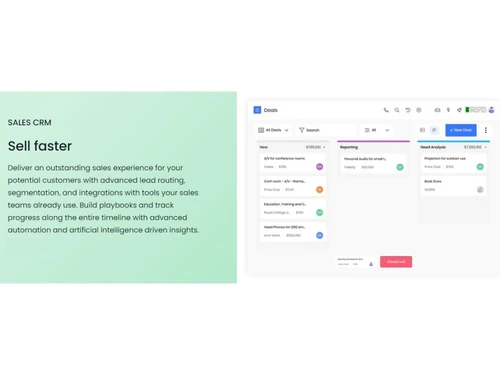
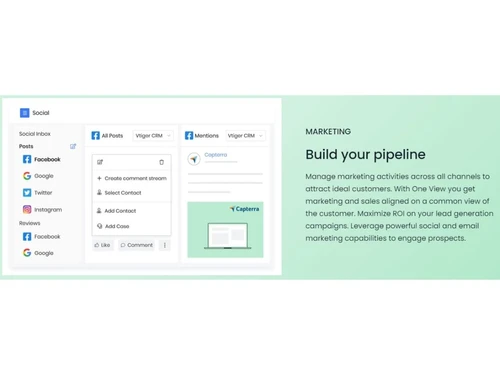
Vtiger is a customer relationship management (CRM) software that empowers 300,000+ businesses all over the world. It helps organizations to keep their support, sales and marketing teams in sync with one another. Vtiger CRM hosts automation tools like contact management, lead management, and analytics that make the entire process a lot easier. With Vtiger CRM, managers can get a unified view of th...
See More
21+ people visited in last 30 minutes
Brand: vtiger
Founded Year: 2004
vtiger
Customer Data Management (CDM)
 Contact Management Account Management Customer Profiles Contact Segmentation Activity History
 Sales Management
Lead Management Territory Management Order Management Sales Forecasting Deal Management Sales Automation Workflow Automation and Management Quote Management Opportunity & Pipeline Management Contract Management Marketing Automation
Email Marketing Campaign Management Lead Nurturing Customer Journey Tracking Customer Segmentation Event-Triggered Workflows Automated Campaigns Data Sourcing / Integrations
Social Media Integration Data Import/Export API Access Calendar Integration Third Party Integrations Email Marketing Tools Integration Marketing Tools Integration eCommerce Integrations Interactive Voice Response (IVR) Integration Collaboration Tools
Team Communication Document Sharing & File Storage Omnichannel Support & Engagement Task / Activity Management Security & Compliance
Data Encryption Role-Based Access Control (RBAC) Backup & Disaster Recovery GDPR & Data Privacy Audit Trail AI & Machine Learning
Predictive Analytics Lead Scoring Chatbots Reporting & Analytics
Predictive Analytics Real Time Analytics Campaign Performance Custom Dashboards Sales Performance Reports Customer Insights Forecasting & Trends Performance Tracking Alerts & Notifications
Event-Triggered Notifications Custom Workflow Alerts System Errors/Failures Customer Interaction Alerts Workflow Trigger Alerts SLA Violations Lead Activity Alerts Others
Budget Tracking Touchpoint Monitoring Landing Pages & Forms Call Tracking and Recording Ticketing System 

Watch the demo video to explore key features, real workflows, and how the software fits your business needs.
 Ubuntu
  Windows
  iOS
iOS  Android MacOS
  Linux
Linux  Desktop
  Mobile
  Tablet
  iPad
iPad  Cloud-Based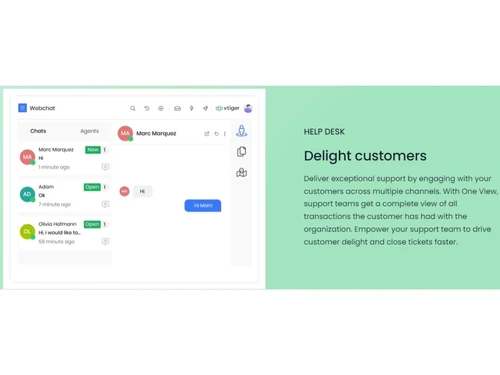
Small Business
Designed for startups and growing businesses
Medium Business
Built for business growth and flexibility
Enterprises
Designed for complex and large-scale business needs
4.3
Out of 5

Overall Rating
Based on
13 Verified Reviews
Rating Breakdown
83% Recommend this Product
Add ReviewVtiger CRM is generally well-received for its robust integrations, helpful customer support, and powerful reporting features, making it a valuable tool for managing multiple communication channels. Users appreciate its affordability and ease of use, although some find the extensive features overwhelming initially. Common complaints include occasional syncing issues, slow customer support during peak times, and limitations in the free version. Additionally, users have noted bugs and performance lags with larger datasets, particularly in the mobile app.
Pros
"Vtiger integrate well with other tools that my team uses such as Google Apps, Mail Chimp and many payment gateways. It is easy to connect with my existing software."
"The customer support is always helpful. When I need help, the support team is responsive and they have been able to solve my issues quickly."
"It allows me to save time and reduce human error due to its workflow automation tools making it easy for me to streamline repetitive tasks."
Cons
"It does have occasional sync issues. I noticed that sometimes data syncing between different apps or devices does not happen smoothly which can be a hassle."
"The tutorials and documentation are not clear and I had to go through the internet to find what I need."
"The mobile app requires a paid plan; this is annoying since it would be nice to have access on the free plan."


Feb 24, 2025
Techjockey Verified
“Great Integrations but Sync Issues Can Be Frustrating”
It's simple to link everything in one location using Vtiger CRM's integration with products my team already utilizes, such as Google Apps, Mailchimp, and many payment methods. It can be a little annoying when data doesn't always update seamlessly between apps due to sporadic syncing problems.
Pros
Vtiger integrate well with other tools that my team uses such as Google Apps, Mail Chimp and many payment gateways. It is easy to connect with my existing software.
Cons
It does have occasional sync issues. I noticed that sometimes data syncing between different apps or devices does not happen smoothly which can be a hassle.
Reason to switch
I moved from Sage CRM because it did not offer enough integrations to connect all my tools. Vtiger CRM provided the integrations I wanted.
Feb 22, 2025
Techjockey Verified
“Helpful Support Team but Documentation Needs Improvement”
I like their promptness and responsiveness in resolving my problems. On the minus side, I frequently had to look things up online because the tutorials and manuals aren't particularly clear.
Pros
The customer support is always helpful. When I need help, the support team is responsive and they have been able to solve my issues quickly.
Cons
The tutorials and documentation are not clear and I had to go through the internet to find what I need.
Reason to switch
I switched from SAP Sales Cloud since their support was not as responsive and I needed a CRM with better customer assistance.
Feb 12, 2025
Techjockey Verified
“Excellent Reporting and Support But May Be an Overkill for Small Teams”
The excellent reporting features in Vtiger CRM provide me with the information I need to make choices. But for smaller teams that don't require such a comprehensive system, the sheer volume of functions can be a little intimidating.
Pros
It has great reporting tools. When I want help, the support team is responsive and they have been able to solve my issues quickly.
Cons
The large number of features might me too much for smaller team that do not need such an extensive CRM solution.
Reason to switch
Zandesk Sell was good but Vtiger CRM offered more secure reports and better support.

Vtiger CRM
₹ 1050.00 excl. GST
Desktop
Mobile
Web based
On Premises
Windows
Mac OS
Bitrix24
₹ 2390
Desktop
Mobile
Web based
On Premises
Windows
Mac OS

Zoho CRM
₹ 1300
Desktop
Mobile
Web based
On Premises
Windows
Mac OS

Odoo CRM
₹ 760
Desktop
Mobile
Web based
On Premises
Windows
Mac OS

CrmOne
Price On Request
Desktop
Mobile
Web based
On Premises
Windows
Mac OS

Solid Performers CRM
₹ 500
Desktop
Mobile
Web based
On Premises
Windows
Mac OS

Kylas CRM
₹ 12999
Desktop
Mobile
Web based
On Premises
Windows
Mac OS

Zendesk Sell
Price On Request
Desktop
Mobile
Web based
On Premises
Windows
Mac OS

Cleomitra
₹ 999
Desktop
Mobile
Web based
On Premises
Windows
Mac OS

In-Sync CRM
₹ 5000
Desktop
Mobile
Web based
On Premises
Windows
Mac OS

HighLevel
Price On Request
Desktop
Mobile
Web based
On Premises
Windows
Mac OS
(2) Product(s) selected
Starting Price:
$99 /Month
Starting Price:
$19 /Agent/Month
Starting Price:
₹999 /Month ₹2,000
Starting Price:
₹5,000 /Month
Starting Price:
$97 /Month
Starting Price:
€300 /User/Year
Starting Price:
₹3,900 /Year ₹4,900

Starting Price:
₹1,299 /Month

Starting Price:
$10 /User/Month

Available
Price on Request

Starting Price:
₹500



Yes, Vtiger CRM offers a dedicated customer portal for your clients with which they can view and update tickets, invoices or quotes, access knowledge base and share files as well.
Get your company registered with Vtiger CRM, log in using ID and password, setup company details, select modules, customize the platform as per your business needs and add in other users.
Yes, you can request an online demo of Vtiger CRM. Our in-house product experts will get back to you as per your mentioned schedule.
Yes, you can integrate the particular with 500+ apps like Zapier, Gmail, Outlook, Office365 and more.
Yes, Vtiger CRM has a dedicated mobile app available for both Android and iOS devices.
You can buy Vtiger CRM directly from techjockey.com. Simply choose your preferred subscription plan and complete the checkout process. We offer the software at competitive prices starting from INR 1,050 per month.
Techjockey.com accepts a range of payment methods, including credit/debit cards, net banking, UPI, and popular digital wallets.
Yes, all software bought from techjockey.com is completely authentic and comes with a valid license.
Yes, techjockey.com offers support for software installation. You can contact our customer support team for help with the installation process.
Yes, you can move your license to a new device. Just uninstall the software from your current device and install it on the new one using the same license key.
Yes, techjockey.com often has special discounts and deals on Vtiger CRM. Visit our website to find the latest offers.
The pricing model is based on different parameters, including extra features, deployment type, and the total number of users. For further queries related to the product, you can contact our product team and learn more about the pricing and offers.
Pipedrive, HubSpot, and Zoho are generally easier to use, with cleaner interfaces and simpler setup than Vtiger.
0 0
HubSpot and Pipedrive offer stronger, more visual pipeline automation, while Zoho provides robust automation at a comparable price.
0 0
To uninstall a module in Vtiger, go to the Module Manager, find the module you want to uninstall, and click on the “Uninstall” button. Follow the prompts to complete the uninstallation process.
0 0
To create an invoice in Vtiger CRM, go to the Invoices module, click on Add Invoice, fill in the necessary details such as customer information, products or services, and pricing, and then save the invoice. You can also generate PDF versions of the invoice for printing or emailing.
0 0
To create a new module in Vtiger CRM 7, you can use the Module Builder tool available in the CRM. This tool allows you to define module fields, layouts, and relationships with other modules. You can also customize the module to fit your specific requirements.
0 0
20,000+ Software Listed
Best Price Guranteed
Free Expert Consultation
2M+ Happy Customers
Terms and Condtions

Users with registered businesses can purchase goods from merchants on the platform to satisfy their business needs. Users are not permitted to utilize any products acquired through the platform for resale, advertising, business, or further distribution.
For each purchase made, users will receive a Tax Invoice (or 'GST invoice') that includes specific details such as:
the GSTIN of the user associated with their registered business, and
the specified Entity Name for their business.
It should be noted that not all products are eligible for GST Invoice. Only the products displayed by participating sellers with the 'GST-based Invoice Available' callout on the product description page would qualify.
Certain goods and services are not eligible to get a GST Invoice, including items with VAS, i.e., Value Added Services (e.g., Total Mobile Protection/Assured Buyback) and those involving an exchange offer at the time of purchase.
Users must ensure the accuracy of the GSTIN, and business entity name provided for the GST Invoice. Requests for corrections into GST Invoice would not be accommodated by Techjockey.com or any Seller, and any issues arising from user-provided information are the sole responsibility of users.
Techjockey.com is not liable for the GST Invoice or any associated input tax credit. To efficiently claim an input tax credit, users should select the registered place of business address as per the GST authority's data and follow the provisions of the GST Act and rules.
To claim an input tax credit, the delivery and billing addresses must match. Furthermore, input tax credits will not be granted if the delivery address and GSTIN on the invoice are from different states. In case of incorrect GST details provided during the order placement, the order will be canceled automatically.


