Open Time Clock and TimeCheck are two attendance management systems that can be used in any organization to monitor employee working hours and facilitate better attendance. Each system has features to track timesheets, improve attendance options, and boost workforce effectiveness. An attendance management platform helps companies manage employee working hours, and compliance and allows easy management of payslips. Here, we present the main similarities and differences between Open Time Clock and TimeCheck, and you can decide which one is more suitable for your needs.
Open Time Clock vs TimeCheck: An Overview
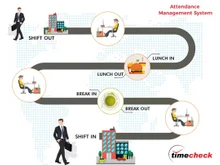
Open Time Clock has an interface that is clear and rather simple and its main goal is to provide the means for tracking one’s attendance. It is perfect for businesses that want to avoid complications, though it offers useful features, such as clock-in/out options, break tracking, and simple reporting. Moreover, there is an accessibility option for the cloud, which is convenient for teams working remotely or with flexible schedules for managing employees’ attendance.
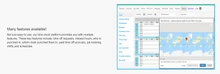
TimeCheck, however, offers a more complex solution to managing attendance and specifically caters to shift-based organizations. It entails features such as shift management, the ability to set alerts on cases of truancy, and even rules that one can set in the system to address unique organizational policies. TimeCheck also has more features in terms of analytics and reporting, providing information on attendance and performance fluctuations. It is perfect for businesses that require an all-in-one solution to manage rigid working schedules and to uphold standards in workforce planning.
Open Time Clock vs TimeCheck: Key Differences
- Open Time Clock offers essential time-tracking features such as clock-in/out and break tracking. TimeCheck, however, includes more advanced features like shift scheduling, customizable attendance policies, and automated alerts for any attendance violations.
- Open Time Clock provides basic time-tracking without extensive customization. TimeCheck, on the other hand, allows businesses to set custom rules for shifts, breaks, and attendance policies to suit specific company needs.
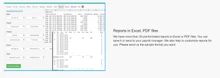
- TimeCheck attendance management system offers detailed analytics and reporting tools, providing insights into employee attendance trends and productivity. On the contrary, Open Time Clock has simpler reporting capabilities that are more focused on basic time records.
- Open Time Clock works well for companies with straightforward time-tracking needs or smaller, remote teams. On the other hand, TimeCheck is more suited to organizations with complex shift structures or businesses that require detailed compliance and performance tracking.
Open Time Clock vs TimeCheck: In Terms of Features
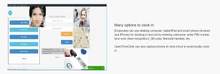
- Employee Check-in Methods: Open Time Clock supports check-in through the web and mobile with additional fingerprint facilities which may be required by various employees. In contrast, TimeCheck is mainly aimed at Web and biometric sign-ins, which would be suitable for on-site teams, who need secure sign-ins.
- Overtime Tracking: Open Time Clock has features such as overtime alerts feature which calculates hours and rates. On the other hand, TimeCheck attendance management software allows adjusting overtime options, which ensures that companies can set proper calculations for fairness.
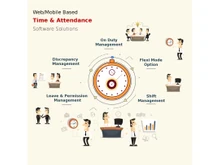
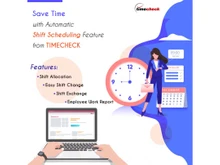
- Shift Scheduling: Open Time Clock has the basics of shift scheduling with a simple setup for up to mid-size teams. In contrast, TimeCheck lays out the replacement and notifications in shifts with an enhanced feature of the shift schedule.
- Absence and Leave Management: Open Time Clock records leave applications with a simple approval process. On the contrary, TimeCheck has rich functionality for leave management, approval, and absence reporting to enhance scheduling.
- Geolocation Tracking: Open Time Clock incorporates GPS adherence that allows remote employees to clock in the right locations only. On the other hand, TimeCheck has very few related to GPS location tracking because it is more suited for office or biometrics-based attendance systems.
- User Interface: The Open Time clock is easy, easy to use, and more suited for basic training with less complexity when it comes to the interface. In contrast, TimeCheck is more modern, flexible, and equipped better for mid- and large-sized teams with complex requirements.
- Mobile Access: Open Time Clock attendance management software has mobile applications for iOS and Android which means flexibility for remote employees. On the contrary, TimeCheck is web-based in nature and is more effective when the team is situated at a fixed location.
- Employee Self-Service: Open Time Clock has the most basic feature package for viewing hours and requesting time off, it is appropriate for several employees. On the other hand, TimeCheck offers all-rounded features for checking the roster, applying for leave, and swapping shifts in large teams.
Open Time Clock vs TimeCheck: Integrations
Open Time Clock has limited interaction capabilities, ideal for being used independently or in small companies. On the other hand, larger businesses can integrate with HR and Payroll systems meaning that data flow is supported by TimeCheck.
Open Time Clock vs TimeCheck: Alerts and Notifications
Open Time Clock has a simple notification for the clock-in and clock-out which are efficient for simple uses. On the contrary, TimeCheck provides extra features for notifications and scheduling, attendance, shift, and policy, making it better suited for complex companies.
Open Time Clock vs TimeCheck: Customer Support
Open Time Clock provides the customer with just very limited services mainly through emails. Thus, it is ideal for those customers who are willing to handle their own issues without much assistance. In contrast, While using TimeCheck, the support is offered by email, phone, or live chat, which is more assertive and better for businesses requiring rapid help and detailed advice for complicated problems.
Open Time Clock vs TimeCheck: Pricing
Open Time Clock offers multiple pricing options. A Free Plan with basic features, and a Paid Plan ($39/month or $399/year) for full access, with a Lite option at $99/year. Non-profits like schools or hospitals can apply for the NPO Plan for free access to paid features, or add a sponsor link to get the Sponsor Link Plan at no cost. TimeCheck does not disclose the pricing on its website. However, if you want to avail a free demo, you can reach out to Techjockey.com.
Tabular Comparison Between Open Time Clock & TimeCheck Based on their Features
| Feature |
Open Time Clock |
TimeCheck |
| Clock In and Out |
Simple check-in and check-out process |
Secure web and biometric options. |
| Real-Time Tracking |
Monitors attendance as it occurs |
Provides live attendance tracking. |
| Biometric Attendance Tracking |
Fingerprint check-in for security |
Various biometric verification options. |
| Break Tracking |
Tracks employee break durations |
Monitors break efficiently. |
| Overtime Tracking |
Automatically calculates overtime hours |
Customizable overtime settings. |
| Leave Management |
Manages basic leave requests |
Comprehensive leave management system |
| Employee Self-Service |
Basic options for viewing hours |
Full self-service features available |
| Mobile Access |
Accessible via mobile devices |
Limited mobile functionality |
| Pricing |
A Free Plan with basic features, and a Paid Plan ($39/month or $399/year) for full access, with a Lite option at $99/year. Non-profits like schools or hospitals can apply for the NPO Plan for free access to paid features, or add a sponsor link to get the Sponsor Link Plan at no cost. |
Price on Request at Techjockey.com |
Verdict: Open Time Clock vs TimeCheck
TimeCheck and Open Time Clock have their advantages, however, this is where the choice depends. Open Time Clock lacks some features and almost all the options are available on their free package which makes it easy to use for tracking the attendance and leave. It is fine to be used by small teams who want a simplistic design and simple features to use. TimeCheck; however, stands out with features such as biometric mode and a default system that has a reminder system.
However, it suits businesses that need more comprehensive features and extensive analysis of their performance. If you are more concerned with usability and the price, then, select Option, Open Time Clock. However, for a more extensive and integrated method that can grow with your enterprise, go for the TimeCheck. Make the right decision and pay for a tool that helps your team become faster and more effective!
 USA
USA UAE
UAE


 Comparison


 6 Ratings & 0 Reviews


 Free Trial




 Get directly in your email inbox on your Whatsapp


