linkedin
Open Time Clock logo
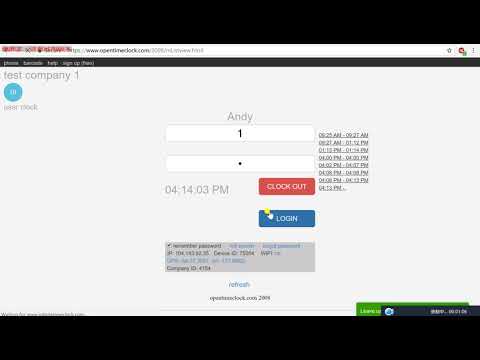
play How to use Open Time Clock, product 2008 - Open Time Clock Demo
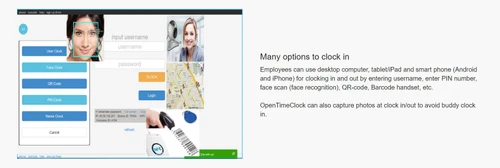
open time clock option
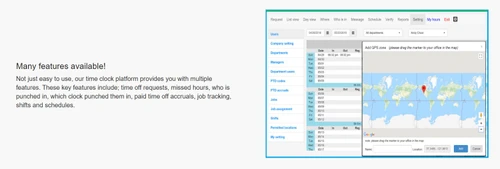
open time clock features

Open Time Clock

Brand: Busycode

  • 4.2

  • 6 Ratings

Track employee attendance easily with multiple clock-in methods, fraud prevention features, and real-time reporting to streamline payroll.

See More

Have you used Open Time Clock before?

Share your insights for better experience

Add a Review
Starting Price
$39

View plans

100% Genuine
Products
Best Price
Guaranteed
Safe & Secure
Payment
  • Description

  • Pricing

  • Features

  • Specification

  • Review

  • Compare

  • Alternatives

  • FAQ

  • Questions

Starting at $39

Open Time Clock Software Overview

What is Open Time Clock?

Open Time Clock is a simple attendance management system that allows tracking the attendance of the employees online. It assists small and large companies in monitoring work hours, schedules, and pays employees. Employees can clock in using any device which can be on computer, smartphones, or even by using face recognition. The software also has a geolocation feature that makes it possible to administer employees’ compliance with the registered place to work.

Other functional requirements include overtime control, attendance management system, shift management, and fraud control to address some crucial issues such as buddy punching. Managers can create more than 80 different reports and improve this process and control of employee performance.

Key Features of Open Time Clock

  • Multiple clock-in methods – Employees may clock in either on their computer, their mobile device, or a web browser.
  • Facial recognition or QR code – An option for the clock-in that utilizes the facial recognition or QR code option.
  • GPS tracking – It is used to capture the employee’s location at the time of clocking to eliminate remote clocking.
  • Offline clock-in – Open Time Clock allows employees to check-in without the need for the internet to make the attendance management system easier.
  • Shift scheduling – Open Time Clock allows managers to view images of their employees from a webcam, to approve or request a new scheduling shift.
  • Overtime tracking – Automatically calculates and tracks overtime hours.
  • Paid time off (PTO) management – It provides the ability to track leave, break and vacation requests.
  • Fraud prevention – Aspects such as photo identification and location tracking to eliminate fraudulence like buddy punching.

Why Choose Open Time Clock?

  • The Open Time Clock is the best attendance management software for every business type, starting with small businesses and ending up with large-scale companies.
  • Accurate time tracking helps make the payroll and client billing correct in Open Time Clock software.
  • Minimalization in aspects such as attendance control, shift schedule formation, and differentiation of overtime.
  • Open Time Clock comes with a free plan for schools, governmental institutions, hospitals, and non-profit organizations.

Benefits of Open Time Clock

  • By integrating hours worked, overtime, and leave in the payroll system, it reduces time spent and minimizes payroll errors.
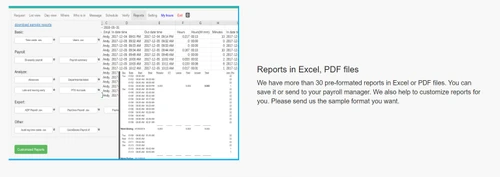
  • Provides comprehensive PDF and Excel reports to managers, with information on attendance patterns, which in turn greatly enhances scheduling in the attendance management system.
  • The process of requesting and granting leave is also integrated into the app, which minimizes the challenges that come with time-off management.
  • It is convenient for shift changeovers and enables managers to arrange work weeks without complications while expecting sufficient staffing of shifts.

Pricing of Open Time Clock

Open Time Clock offers flexible pricing to suit different needs, and its plans are categorized further:

  • The Free Plan can create and analyze an unlimited number of projects with a full feature set except for the PDF/Excel reports that are available for the first 30 days (about 4 and a half weeks).
  • The Paid Plan is $39/month and allows up to 100 users and includes, for example, extra reports. Limited users for those bigger companies can sign up for the $99/month that covers 500 users or $199/month for unlimited users.
  • Further, an NPO Plan is offering nearly all the paid plugins for free to governmental organizations, schools, and NPOs.
  • The Sponsor Link Plan provides free use of features of the paid plan for businesses that place a sponsor link on their website. For more information on these plans, we encourage you to contact Techjockey.com
Read more

Open Time Clock Pricing & Plans

Basic
Key Features
  • Free technical support
  • 24 hour techical support is free to all customers
  • Toll-free phone call, live chat, ticket, email and
  • Access from web browsers in computer and smart dev
  • Native app for Windows, Android, iOS
  • Clock in with barcode/QR-code, RFID swipe card and
  • Clock in with OFFLINE mode, in your mobile device
  • Clock in with traditional landline telephone dial
Starting at $39
    • Licenses

      Licenses
      Licenses
    • Monthly

      Monthly
      Monthly

Key Features

  • Free technical support

  • 24 hour techical support is free to all customers

  • Toll-free phone call, live chat, ticket, email and

  • Access from web browsers in computer and smart dev

  • Native app for Windows, Android, iOS

  • Clock in with barcode/QR-code, RFID swipe card and

  • Clock in with OFFLINE mode, in your mobile device

  • Clock in with traditional landline telephone dial

Open Time Clock Features

  • icon_check Attendance Management
    Open Time Clock gives you the feature to record attendance with several devices such as face recognition,
  • icon_check Document Management
    Please remove this feature, Open Time Clock does not contain this feature. [REMARK]
  • icon_check Shift Management
    Open Time Clock helps you manage your workplace’s shift scheduling. It is excellent to maintain your workplace when your
  • icon_check Time Tracking
    Track your employees’ time they are working in their office with respect to their work. Check for latecomers and early leavers
  • icon_check Leave Management
    Employees can quickly check their leaves and file for it accordingly.
  • icon_check Reporting
    Open Time Clock helps you generate insights on your employee’s attendance and time management.
  • icon_check Employee Scheduling
    Schedule your employees working hours in tandem with your office requirements with Open Time Clock.
  • icon_check Time and Attendance
    Generate reports of your employees to see whether they are leaving early or going late. It also accounts for the absence that
Open Time Clock Demo Video play icon

Get Open Time Clock Demo

Watch the demo video to explore key features, real workflows, and how the software fits your business needs.

Understand
Key Features
Personal
Demo Insights
Interactive
Demo Support

Open Time Clock Specifications

Supported Platforms
Ubuntu Ubuntu Windows Windows iOS iOS Android Android MacOS MacOS Linux Linux
Devices
Desktop Desktop Mobile Mobile Tablet Tablet iPad iPad
Deployment
Cloud-Based Cloud-Based
Suitable For
All Industries
Business Specific
All Businesses
Business Size
Small Business Startups Medium Business Enterprises
Customer Support
Email Communities
Language
English
Training Resources
Videos
Compliance Regulation
HIPAA GDPR

Explore the Best Alternative Solutions Similar to Your Business Size and Needs

Open Time Clock Review

4.2

Out of 5

img

Overall Rating

Based on
6 Verified Ratings

Rating Breakdown

  • Features 4.6
  • Value for Money 4.1
  • Ease of Use 4.2
  • Customer Support 3.9

88% Recommend this Product

Add Review

Techjockey Trusted Reviews from Verified Users

No reviews are currently available for Open Time Clock. Discover similar Attendance Management Software reviews

  • Kent CamAttendance

    4.4

    Whats great - Affordable pricing, robust features, excellent customer support. read more

  • truMe Attendance Management

    4.9

    Whats great - Rule based configuration help you apply your policy on need basis read more

  • RollCall Attendance

    4.4

    Whats great - Techjockey was very helpful in taking my listed requirements and narrowing my search to a usable list of providers. Techjocke... read more

Compare Open Time Clock With other Attendance Management Software

Products
Ratings
Pricing
Device Supported
Deployment
Supported Platforms
  • img

    Open Time Clock

  • 4.2

  • Price On Request

  • Desktop

    Mobile

  • Web based

    On Premises

  • Windows

    Mac OS

  • img

    Nialabs

  • 5

  • Price On Request

  • Desktop

    Mobile

  • Web based

    On Premises

  • Windows

    Mac OS

  • img

    PagarGuru

  • 4.3

  • ₹ 500

  • Desktop

    Mobile

  • Web based

    On Premises

  • Windows

    Mac OS

  • img

    Spryple

  • 4.2

  • Price On Request

  • Desktop

    Mobile

  • Web based

    On Premises

  • Windows

    Mac OS

  • img

    Hajiri

  • 4.3

  • ₹ 69

  • Desktop

    Mobile

  • Web based

    On Premises

  • Windows

    Mac OS

  • img

    Tempus Central

  • 4.3

  • Price On Request

  • Desktop

    Mobile

  • Web based

    On Premises

  • Windows

    Mac OS

  • img

    NoQu TAM

  • 4.1

  • Price On Request

  • Desktop

    Mobile

  • Web based

    On Premises

  • Windows

    Mac OS

(0) Product(s) selected

Open Time Clock Alternatives

See All Open Time Clock Alternatives

Available

Price on Request

Starting Price:

₹600 /Month

Starting Price:

₹69 /Month

Available

Price on Request

Starting Price:

₹200 /Month

Available

Price on Request

FRAS

4.0

Available

Price on Request

Starting Price:

$500 /Month

Articles for Open Time Clock

See All Related Articles

Is the Open Time Clock free?

Yes, it has a free version that allows an unlimited number of users so any business can use it.

How does an Open Time Clock app work?

This attendance management software can check in and check out using facial recognition, PIN, QR Code, or RFID.

What is the browser-based time-tracking app Open Time Clock?

It is an online time tracking tool which works through any browser. It can be used to monitor attendance and working hours of employees more efficiently.

How do I sign up to Open Time Clock?

To log into this attendance management software, visit the home page or access the Open Time Clock application. If you have already installed it on your device, use your account username and password to sign in or utilize other login methods such as facial recognition or PIN depending on the software setup.

Where can I find the Open time clock download?

The download can be found on its official website. This tool is compatible with Windows, MacOS, Android and iOS systems.

What is the cost of an Open Time Clock?

It is attendance management software that has a Free plan with unlimited users and most features. The Paid Plan costs $39/month for 100 users with extra features such as PDF/Excel. Bigger plans are expensive, but any nonprofit organization can request a subscription for the paid functions at no cost.

What systems do you support?

It is compatible with several systems both for personal computers, such as Windows and MacOS, and has applications for Android and iPhone.

Open Time Clock Questions

A:

To schedule shifts and jobs in Open Time Clock, follow the steps given below:

  • Log in to Open Time Clock
  • Navigate to the 'Schedule' tab
  • Assign shifts and tasks to employees including the shift details
  • Hit Save to notify employees of their schedules.
SANDEEP JAID • Dec 3, 2024
A:

To set up notifications in Open Time Clock, follow the given below:

  • Log in to Open Time Clock
  • Navigate to the settings tab
  • Enable notifications as per your requirements
Rohit Baaaa • Nov 30, 2024
A:

To manage hours in List View and Day View in Open Time, you can simply navigate to the Time Management section and switch between List View for an overview of all hours logged and Day View for detailed, daily records. You can edit, approve, or reject entries as needed.

AZIZ JADWET • Dec 2, 2024
Q:

How do I subscribe to a paid plan in Open Time Clock?

Mohamed Jinna • Nov 29, 2024
A:

To subscribe to a paid plan in Open Time Clock, follow the steps given below:

  • Navigate to the official website of Open Time Clock
  • Navigate to the Purchase page
  • Select your plan
  • Submit payment
  • The account will be manually upgraded within 24 hours
Gurmeet singh • Nov 30, 2024
Q:

How do I manage shifts in Open Time Clock?

beikhokhei Beingaichhho • Nov 29, 2024
A:

To manage shifts in Open Time Clock, follow the steps given below:

  • Log in to Open Time Clock
  • Navigate to the 'Shifts' section
  • Here you can create, edit, or delete shift schedules for employees.
Tenzing Sangma • Dec 1, 2024
See All Open Time Clock Questions

20,000+ Software Listed

Best Price Guranteed

Free Expert Consultation

2M+ Happy Customers

Terms and Condtions

close

Users with registered businesses can purchase goods from merchants on the platform to satisfy their business needs. Users are not permitted to utilize any products acquired through the platform for resale, advertising, business, or further distribution.

For each purchase made, users will receive a Tax Invoice (or 'GST invoice') that includes specific details such as:

  • the GSTIN of the user associated with their registered business, and

  • the specified Entity Name for their business.

It should be noted that not all products are eligible for GST Invoice. Only the products displayed by participating sellers with the 'GST-based Invoice Available' callout on the product description page would qualify.

Certain goods and services are not eligible to get a GST Invoice, including items with VAS, i.e., Value Added Services (e.g., Total Mobile Protection/Assured Buyback) and those involving an exchange offer at the time of purchase.

Users must ensure the accuracy of the GSTIN, and business entity name provided for the GST Invoice. Requests for corrections into GST Invoice would not be accommodated by Techjockey.com or any Seller, and any issues arising from user-provided information are the sole responsibility of users.

Techjockey.com is not liable for the GST Invoice or any associated input tax credit. To efficiently claim an input tax credit, users should select the registered place of business address as per the GST authority's data and follow the provisions of the GST Act and rules.

To claim an input tax credit, the delivery and billing addresses must match. Furthermore, input tax credits will not be granted if the delivery address and GSTIN on the invoice are from different states. In case of incorrect GST details provided during the order placement, the order will be canceled automatically.