linkedin
ARCHICAD logo
play Archicad demo
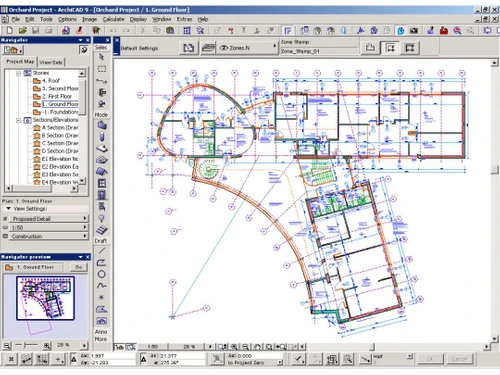
archicad-dashboard
archicad-diagram

ARCHICAD

Brand: GraphiSoft

  • 4.3

  • 5 Ratings

Design, document, and collaborate on projects of any size with ARCHICAD's intuitive BIM tools, your ultimate solution for efficient and streamlined workflows.

See More

Have you used ARCHICAD before?

Share your insights for better experience

Add a Review
Starting Price
$72

View plans

100% Genuine
Products
Best Price
Guaranteed
Safe & Secure
Payment
  • Description

  • Pricing

  • Features

  • Specification

  • Review

  • Compare

  • Alternatives

  • FAQ

Starting at $72

ARCHICADSoftware Overview

What is ARCHICAD?

ARCHICAD, developed by Graphisoft, is a premier Building Information Modeling (BIM) software designed for architects, designers, engineers, and other professionals in the Architecture, Engineering, and Construction (AEC) industry. It provides a comprehensive suite of tools to manage the entire design and documentation process within a single, integrated platform. The software empowers users to translate their creative visions into detailed virtual building models, produce high-quality construction documentation, and facilitate seamless collaboration among project teams. By leveraging data-driven design intelligence, ARCHICAD streamlines workflows, enhances accuracy, and accelerates project delivery from initial concept to final construction.

Why Choose ARCHICAD?

  • Intuitive Design Experience: Work with familiar architectural elements like Walls, Windows, and Roofs, which behave like their real-world counterparts, allowing for a natural and fluid design process.
  • Integrated Workflow: ARCHICAD covers the entire project lifecycle, from conceptual mass modeling and sketches to detailed construction documents and photorealistic visualizations, all within one application.
  • Seamless Collaboration: With its foundation in OpenBIM standards and robust BIMcloud integration, ARCHICAD enables real-time collaboration across disciplines and software platforms, ensuring all stakeholders are synchronized.
  • Data-Driven Efficiency: The software automates repetitive tasks, such as updating drawings and schedules, and enriches models with smart metadata, allowing designers to focus on creative problem-solving rather than manual data entry.
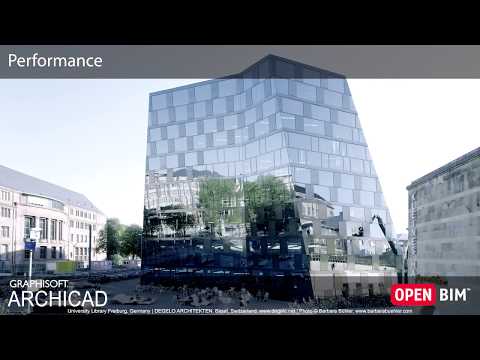
  • Advanced Performance: ARCHICAD is optimized for smooth navigation and handling of large, complex models, ensuring a responsive experience even on demanding projects.

Advanced Features of ARCHICAD

  • Parametric Design Tools: Create and manage complex geometries with smart tools for Stairs, Railings, and Curtain Walls. The software also allows for the creation of custom parametric components to streamline workflows.
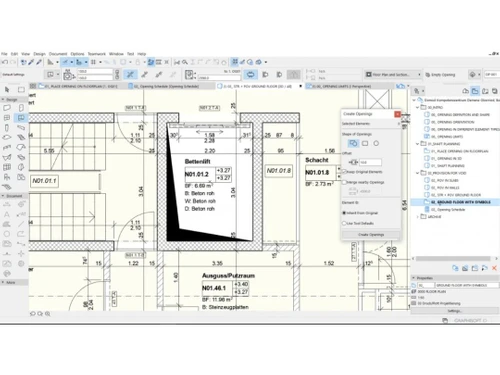
  • Automated Documentation: Generate fully coordinated 2D drawings, sections, elevations, and schedules directly from the 3D model. Any change in the model is automatically reflected across all documentation, minimizing errors.
  • Integrated Clash Detection: Identify and resolve issues between different disciplines' models directly within ARCHICAD. This proactive approach helps prevent costly errors during construction.
  • Sustainable Design Analysis: Perform built-in energy analysis and Life Cycle Assessment (LCA) to optimize building performance, reduce environmental impact, and make informed, sustainable design decisions from the project's outset.
  • Graphisoft AI Assistant (BETA): This intelligent design companion aims to streamline workflows by providing instant guidance and smart documentation support, simplifying complex tasks.
  • Superior Interoperability: Full support for open standards like IFC, BCF, and IDS ensures transparent and efficient data exchange with engineers and consultants using other software.
  • High-End Visualization: Produce a range of visual outputs, from simple white model renderings and sketches to stunning, photo-realistic visuals, to effectively communicate design intent to clients and stakeholders.

Key Capabilities of ARCHICAD

  1. Conceptual & Early-Stage Design: Quickly explore design ideas with intuitive mass modeling, sketching, and optioneering tools, complete with integrated quantity take-offs for early cost estimation.
  2. Design Development & Modeling: Develop a complete Building Information Model using a comprehensive library of smart, parametric objects and tools that simplify the creation of complex architectural elements.
  3. BIM-Based Documentation: Transition seamlessly from a 3D model to precise, fully coordinated 2D construction drawings. The system automates annotations and updates, ensuring consistency and accuracy.
  4. Teamwork & Collaboration: Utilize BIMcloud for a centralized model that enables real-time, simultaneous work by multiple team members. Integrated issue tracking and support for OpenBIM standards facilitate smooth coordination with all project stakeholders.
  5. Data Management & Compliance: Enrich the BIM model with intelligent metadata to ensure compliance with industry standards, streamline data exchange, and enable advanced analysis and facility management.

How to Use ARCHICAD?

  1. Project Setup: Begin by defining project information, stories, and grid systems to establish the foundational structure.
  2. Conceptual Modeling: Use massing and sketching tools to explore initial design concepts and spatial relationships.
  3. Detailed 3D Modeling: Build the virtual building using intelligent tools like Walls, Slabs, Doors, and Windows. Add complex elements like custom profiles and curtain wall systems.
  4. Data Integration: Assign properties, classifications, and other metadata to model elements to enrich the model with non-graphical information for schedules and analysis.
  5. Collaboration and Coordination: Share the model via BIMcloud for team collaboration and use OpenBIM formats to coordinate with external consultants, running clash detection to ensure model integrity.
  6. Documentation and Publishing: Create drawing layouts, add annotations, and publish complete drawing sets in various formats (e.g., PDF, DWG) directly from the model.
  7. Visualization: Generate high-quality renderings and animations to present the final design to clients.

ARCHICAD Price

ARCHICAD software price starts at USD 72 per monthat Techjockey. The pricing model is based on different parameters, including extra features, deployment type, and the total number of users. For further queries related to the product, you can contact our product expert and learn more about the pricing and offers.

Read more

GraphiSoft Company Details

Founded Year:  1982

GRAPHISOFT® empowers teams to create great architecture, through award-winning software solutions, learning programs, and professional services for the Architecture, Engineering, and Construction industry. Archicad®, the architects’ BIM software of choice, offers a complete end-to-end design.

Director/Founders Steve Jobs / Gábor Bojár
Company Size 501-1000 Employees

ARCHICAD Pricing & Plans

Archicad Studio
Starting at $72
    • Licenses

      Licenses
      Licenses
    • Monthly

      Monthly
      Monthly

Key Features

  • Facade Design

  • 2D Navigation

  • Parametric Custom Profiles

  • Streamlined Workflows

  • Increase Productivity

  • Model with parametric objects

Archicad Collaborate
Starting at $85
    • Quantity

      Quantity
      Quantity
    • Monthly

      Monthly
      Monthly

Key Features

  • Facade Design

  • 2D Navigation

  • Parametric Custom Profiles

ARCHICAD Features

  • icon_check Facade Design
    ARCHICAD's remastered Façade Design workflow enables architects to design, develop and detail hierarchical curtain wall systems
  • icon_check 2D Navigation
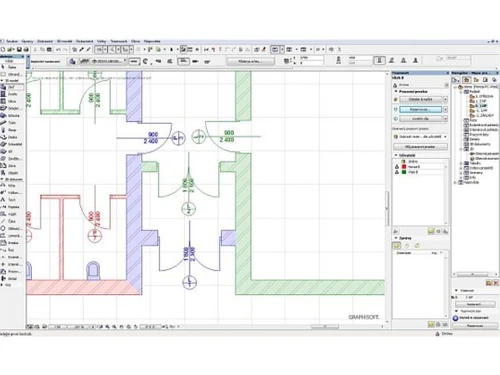
    ARCHICAD 22 introduces significant performance improvements, focusing on a smooth and truly responsive 2D panning and zooming
  • icon_check Parametric Custom Profiles
    ARCHICAD 22 introduces significant performance improvements, focusing on a smooth and truly responsive 2D panning and zooming
  • icon_check Streamlined Workflows
    ARCHICAD 22 brings several productivity improvements, providing easier and more intuitive building design, faster and more
  • icon_check Increase Productivity
  • icon_check Model with parametric objects
    ARCHICAD 22 allows you to use logical expressions to derive new properties and property values that depend on the element’s own
ARCHICAD Demo Video play icon

Get ARCHICAD Demo

Watch the demo video to explore key features, real workflows, and how the software fits your business needs.

Understand
Key Features
Personal
Demo Insights
Interactive
Demo Support

ARCHICAD Specification

Supported Platforms
Windows Windows MacOS MacOS
Devices
Desktop Desktop
Deployment
Web-Based Web-Based Perpetual Perpetual
Suitable For
Architecture
Business Specific
All Businesses
Language
English

Explore the Best Alternative Solutions Similar to Your Business Size and Needs

ARCHICAD Review

4.3

Out of 5

img

Overall Rating

Based on
5 Verified Ratings

Rating Breakdown

  • Features 4
  • Value for Money 4.3
  • Ease of Use 4.6
  • Customer Support 4.4

90% Recommend this Product

Add Review

Techjockey Trusted Reviews from Verified Users

No reviews are currently available for ARCHICAD. Discover similar Architecture Design Software reviews

  • Arcon Evo House Design Software

    4.6

    Whats great - Arcon Evo is the perfect answer for all structure plan needs. Make nitty gritty, precise floor plans, heights, cross segments... read more

  • Allplan Architecture

    4.5

    Whats great - The best part of the software is the maximum ease I felt while creating the project. I could find the evaluation cost through... read more

  • Fusion 360

    4.5

    Whats great - I use Fusion 360 as a speedy and straightforward approach to effortlessly coax things out. It is an a lot quicker stacking an... read more

Compare ARCHICAD With other Architecture Design Software

Products
Ratings
Pricing
Device Supported
Deployment
Supported Platforms
  • img

    ARCHICAD

  • 4.3

  • Price On Request

  • Desktop

    Mobile

  • Web based

    On Premises

  • Windows

    Mac OS

  • img

    ARCHITEChTURES

  • 4.1

  • Price On Request

  • Desktop

    Mobile

  • Web based

    On Premises

  • Windows

    Mac OS

  • img

    Visoid

  • 4.4

  • Price On Request

  • Desktop

    Mobile

  • Web based

    On Premises

  • Windows

    Mac OS

  • img

    Arch Synth

  • 4.4

  • Price On Request

  • Desktop

    Mobile

  • Web based

    On Premises

  • Windows

    Mac OS

  • img

    Maket

  • 4.3

  • Price On Request

  • Desktop

    Mobile

  • Web based

    On Premises

  • Windows

    Mac OS

  • img

    ArkDesign

  • 4.2

  • Price On Request

  • Desktop

    Mobile

  • Web based

    On Premises

  • Windows

    Mac OS

  • img

    Architect Render

  • 4.4

  • Price On Request

  • Desktop

    Mobile

  • Web based

    On Premises

  • Windows

    Mac OS

  • img

    ArchitectAI

  • 4.3

  • Price On Request

  • Desktop

    Mobile

  • Web based

    On Premises

  • Windows

    Mac OS

(0) Product(s) selected

ARCHICAD Alternatives

See All ARCHICAD Alternatives

Starting Price:

$29

Starting Price:

$10 /Month

Starting Price:

$30

Available

Price on Request

Available

Price on Request

Starting Price:

$119 /Month

Articles for ARCHICAD

See All Related Articles

Where do I find the User Control Panel

Click on your user in the upper right corner of the page and select 'User Control Panel'.

Where to find the Notification Settings?

Click on your login name in the right upper corner and select Control Panel. Then Navigate to Board Preferences/Edit Notification Options

How to subscribe to a Topic or bookmark a Topic?

Navigate to a topic and click on the ’eye’ icon at the right upper corner to subscribe or on the ’star’ icon to bookmark.

What is Archicad used for?

Archicad is a Building Information Modeling (BIM) software used by architects, designers, and engineers to design buildings, produce high-quality construction documentation, and collaborate with project teams.

Is Archicad better than Revit?

Archicad is presented as a highly intuitive BIM software with a user-friendly interface and a strong focus on open collaboration through OpenBIM workflows, which may be preferable for certain users and teams.

Is Archicad easy to learn?

Yes, Archicad is designed to be intuitive for architects, featuring a user-friendly interface and familiar tools like Walls, Windows, and Roofs to provide a smooth design experience.

How much does an Archicad license cost?

ARCHICAD software price starts at USD 72 per month at Techjockey.com.

Who uses Archicad?

Archicad is used by architects, designers, engineers, and AEC professionals, including architectural firms, solo practitioners, construction professionals, and BIM managers, as well as students and educators via free educational licensing.

What is OpenBIM and how does Archicad support it?

Archicad supports OpenBIM, which allows professionals to collaborate across different software platforms using open standards like IFC and BCF, ensuring transparent and efficient communication between teams.

Does Archicad have any AI-powered features?

Yes, Archicad is developing the Graphisoft AI Assistant (BETA), an intelligent design companion intended to streamline workflows, provide instant guidance, and simplify complex documentation tasks.

How does Archicad handle team collaboration on a single project?

Archicad enables real-time team collaboration through BIMcloud, which hosts a centralized model that allows multiple team members to work on a project simultaneously with live updates.

Can I perform sustainable design analysis within Archicad?

Yes, Archicad includes built-in energy analysis and Life Cycle Assessment (LCA) tools that help you optimize building performance and make sustainable design decisions from the start of a project.

20,000+ Software Listed

Best Price Guranteed

Free Expert Consultation

2M+ Happy Customers

Terms and Condtions

close

Users with registered businesses can purchase goods from merchants on the platform to satisfy their business needs. Users are not permitted to utilize any products acquired through the platform for resale, advertising, business, or further distribution.

For each purchase made, users will receive a Tax Invoice (or 'GST invoice') that includes specific details such as:

  • the GSTIN of the user associated with their registered business, and

  • the specified Entity Name for their business.

It should be noted that not all products are eligible for GST Invoice. Only the products displayed by participating sellers with the 'GST-based Invoice Available' callout on the product description page would qualify.

Certain goods and services are not eligible to get a GST Invoice, including items with VAS, i.e., Value Added Services (e.g., Total Mobile Protection/Assured Buyback) and those involving an exchange offer at the time of purchase.

Users must ensure the accuracy of the GSTIN, and business entity name provided for the GST Invoice. Requests for corrections into GST Invoice would not be accommodated by Techjockey.com or any Seller, and any issues arising from user-provided information are the sole responsibility of users.

Techjockey.com is not liable for the GST Invoice or any associated input tax credit. To efficiently claim an input tax credit, users should select the registered place of business address as per the GST authority's data and follow the provisions of the GST Act and rules.

To claim an input tax credit, the delivery and billing addresses must match. Furthermore, input tax credits will not be granted if the delivery address and GSTIN on the invoice are from different states. In case of incorrect GST details provided during the order placement, the order will be canceled automatically.