linkedin
Chief Architect Premier logo
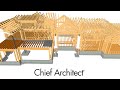
play Learn Framing Basics in Chief Architect Software: Walls, Floors, Roofs, & More!
CHief Architect Premiere

Chief Architect Premier

Brand: Chief Architect

  • 4.2

  • 5 Ratings

Chief Architect Premier is an architecture design software that is used for every aspect related to light commercial and residential designs. As one places smart doors and windows and draws walls, the software creates a 3D design model, followed by generating a list of materials required. It also helps with the management of construction documents through its built-in powerful building tools. Chi...

See More

Have you used Chief Architect Premier before?

Share your insights for better experience

Add a Review
Starting Price
$229

View plans

100% Genuine
Products
Best Price
Guaranteed
Safe & Secure
Payment
  • Description

  • Pricing

  • Features

  • Specification

  • Review

  • Compare

  • Alternatives

  • FAQ

Starting at $229

Chief Architect Premier Software Overview

What is Chief Architect Premier?

Chief Architect Premier is an architecture design software that is used for every aspect related to light commercial and residential designs. As one places smart doors and windows and draws walls, the software creates a 3D design model, followed by generating a list of materials required. It also helps with the management of construction documents through its built-in powerful building tools.

Chief Architect Premier also provides full-proof framing and site plans, elevations and section details, along with necessary construction documents. You can style your kitchen or chalk out interior designing plans for your house and give it a modern appearance. One can also use the CAD tools of Chief Architect Premier for increased productivity and the finest precision.

How does Chief Architect Premier create 3D models for buildings and interiors?

  • 3D Modeling and Design Tools

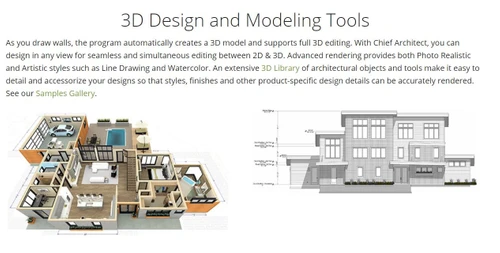
As a user starts to draw walls in a construction project to give it an attractive look, the software automatically creates a 3D model and also allows full 3D Editing. Chief Architect Premier allows you to design in any view seamlessly and simultaneously edit between 2D and 3D. Photo Realistic and Artistic Styles such as Watercolor and Line Drawing are done through the Advanced Rendering feature of the architect or CAD software. In order to accessorize your designs, you can avail the 3D library of architectural tools and objects inbuilt within the software. This helps you to accurately render the styles and product-oriented design details, and make neat finishes.

  • Buildings

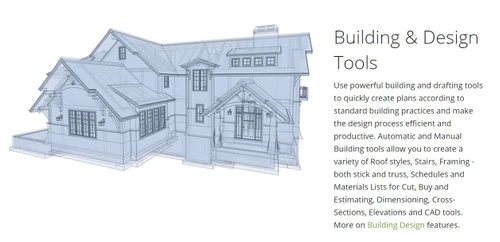
Users can avail the powerful drafting and building tools of the software to create building plans effectively as per standard construction practices and also make the design procedure productive. Both the manual and automatic building tools enable one to create a range of roof styles, stick and truss framing, cross-sections, dimensioning, elevations and material lists for buying, cutting and estimating.

  • Interior Designing

The software uses cabinets to easily create numerous shapes, styles and sizes for your kitchen, bath or interior designs. It partners with certain manufacturers of appliances, doors, cabinets, etc. to accurately draw and render product-specific design details, styles and finishes as per the customer needs.

How does Chief Architect Premier produce construction documents and site plans?

  • CAD Tools for Precision and Productivity

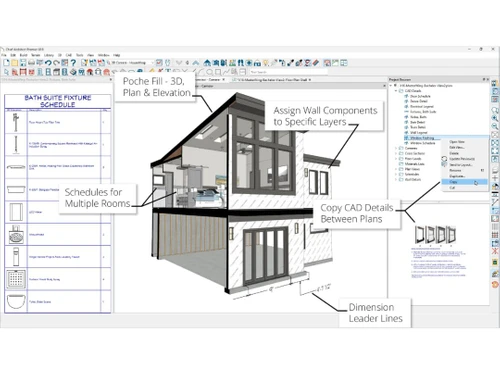
The software comes with a powerful inbuilt CAD engine that is equipped with tools for polylines, splines, solids and arcs for producing objects that can be anything from custom entry columns to deck ledger details. Users can swiftly design objects with multiple align, copy, replicate and reflect at certain intervals. If you want to quickly see your created model in 3D, you can use the CAD-to-Walls tool that not only imports AutoCAD files but also provides mapping for the layers. You may draw customized CAD details, and import them as DWG or PDF files. You can also go to the exclusive SSA catalog to choose from 500+ CAD details for overlaying on your designs.

  • Construction Documents

3D renderings help sell your project while construction drawings assist you with building specifications. All the views in the project such as floor plans, electrical, framing, elevation, etc. have user-defined scales and links to a particular drawing, which automatically updates as you change your design. If you wish to create professional construction drawings, the software provides you with layers that control the display of drawing pages.

  • Site Planning

You may create site plans both for single as well as multiple lots either by importing terrain survey data or using the terrain modeling tools present in the software. One can view terrain data in 3D or even use it for a 2D site plan. Chief Architect Premier provides you with the names of over 4000 plants and their roles for landscaping purposes, including the inbuilt Hardiness Zone Maps.

Compatible OS of Chief Architect Premier

The software runs exclusively on Windows and MacOS, having a processor of 64-bit.

Pricing of Chief Architect Premier

The pricing of Chief Architect Premier is available at USD 229 for a monthly plan at techjockey.com.

You can contact us through the “request a callback” option on our website for all the details pertaining to activation and license key, renewal of the plan or any other query. 

Read more

Chief Architect Company Details

Founded Year:  1992

Chief Architect Software is a leading developer and publisher of 3D Architectural home design software for builders, designers, architects and home DIY enthusiasts.

Director/Founders Jack Simpson
Company Size 1-100 Employees

Chief Architect Premier Pricing & Plans

Chief Architect Premier
Key Features
  • Automatic Building Tools
  • 3D Rendering & Virtual Tours
  • Construction Documents
  • Materials List & Schedules
  • CAD Tools
  • 3D Design & Styling
  • Catalogue Management
Starting at $229
    • Licenses

      Licenses
      Licenses
    • Monthly

      Monthly
      Monthly

Key Features

  • Automatic Building Tools

  • 3D Rendering & Virtual Tours

  • Construction Documents

  • Materials List & Schedules

  • CAD Tools

  • 3D Design & Styling

  • Catalogue Management

Chief Architect Premier Features

  • icon_check Smart Wall Technology
    Draw interior and exterior walls that automatically connect and create 3D framing, surfaces, and foundations as you design.
  • icon_check Automatic Roof Tools
    Generate complex roof systems instantly, including hips, gables, and sheds, with fully customizable pitches and overhangs.
  • icon_check Advanced Stair Engine
    Design straight, curved, or flared stairs with automated railing generation and precise headroom clearance calculations.
  • icon_check Real-Time 3D Views
    Experience your design instantly with various 3D rendering modes, including glass house, technical, and artistic styles.
  • icon_check Custom Terrain Maps
    Model accurate site topography by importing GPS data or manual elevation points to visualize the home on its actual lot.
  • icon_check Automatic Building Tools
    Smart tool technology creates all the building systems automatically
  • icon_check 3D Rendering & Virtual Tours
    Sell more jobs by helping your clients visualize with realistic renderings, 360° renderings, live 3D Viewer models and virtual
  • icon_check Construction Documents
    Create professional residential construction drawings for permits, subcontractors and clients.
  • icon_check Materials List & Schedules
    Instant materials lists and schedules give you the information you need to quickly cost out your jobs.
  • icon_check CAD Tools
  • icon_check 3D Design & Styling
  • icon_check Catalogue Management
  • icon_check Content Import/ Export
  • icon_check Printing
  • icon_check Dimension
Chief Architect Premier Demo Video play icon

Get Chief Architect Premier Demo

Watch the demo video to explore key features, real workflows, and how the software fits your business needs.

Understand
Key Features
Personal
Demo Insights
Interactive
Demo Support

Chief Architect Premier Specifications

Supported Platforms
Windows Windows iOS iOS Android Android MacOS MacOS
Devices
Desktop Desktop Mobile Mobile Tablet Tablet iPad iPad
Deployment
Perpetual Perpetual
Suitable For
Architecture
Business Specific
All Businesses
Business Size
Individual Small Business Medium Business Enterprises SMBs
Customer Support
Phone Email Communities
Language
English
Training Resources
In Person Live Online Webinars Documentation Videos
Technology
Next Generation

Explore the Best Alternative Solutions Similar to Your Business Size and Needs

Chief Architect Premier Review

4.2

Out of 5

img

Overall Rating

Based on
5 Verified Ratings

Rating Breakdown

  • Features 4.4
  • Value for Money 4.1
  • Ease of Use 4.5
  • Customer Support 4

84% Recommend this Product

Add Review

Techjockey Trusted Reviews from Verified Users

No reviews are currently available for Chief Architect Premier. Discover similar Architecture Design Software reviews

  • Arcon Evo House Design Software

    4.6

    Whats great - Arcon Evo is the perfect answer for all structure plan needs. Make nitty gritty, precise floor plans, heights, cross segments... read more

  • Allplan Architecture

    4.5

    Whats great - The best part of the software is the maximum ease I felt while creating the project. I could find the evaluation cost through... read more

  • Fusion 360

    4.5

    Whats great - I use Fusion 360 as a speedy and straightforward approach to effortlessly coax things out. It is an a lot quicker stacking an... read more

Compare Chief Architect Premier With other Architecture Design Software

Products
Ratings
Pricing
Device Supported
Deployment
Supported Platforms
  • img

    Chief Architect Premier

  • 4.2

  • Price On Request

  • Desktop

    Mobile

  • Web based

    On Premises

  • Windows

    Mac OS

  • img

    ARCHITEChTURES

  • 4.1

  • Price On Request

  • Desktop

    Mobile

  • Web based

    On Premises

  • Windows

    Mac OS

  • img

    Visoid

  • 4.4

  • Price On Request

  • Desktop

    Mobile

  • Web based

    On Premises

  • Windows

    Mac OS

  • img

    Arch Synth

  • 4.4

  • Price On Request

  • Desktop

    Mobile

  • Web based

    On Premises

  • Windows

    Mac OS

  • img

    Maket

  • 4.3

  • Price On Request

  • Desktop

    Mobile

  • Web based

    On Premises

  • Windows

    Mac OS

  • img

    ArkDesign

  • 4.2

  • Price On Request

  • Desktop

    Mobile

  • Web based

    On Premises

  • Windows

    Mac OS

  • img

    Architect Render

  • 4.4

  • Price On Request

  • Desktop

    Mobile

  • Web based

    On Premises

  • Windows

    Mac OS

  • img

    ArchitectAI

  • 4.3

  • Price On Request

  • Desktop

    Mobile

  • Web based

    On Premises

  • Windows

    Mac OS

(0) Product(s) selected

Chief Architect Premier Alternatives

See All Chief Architect Premier Alternatives

Starting Price:

$29

Starting Price:

$10 /Month

Starting Price:

$30

Available

Price on Request

Available

Price on Request

Starting Price:

$72 /Month
Starting Price:

$119 /Month

Articles for Chief Architect Premier

See All Related Articles

Which operating system does Chief Architect Premier support?

Chief Architect Premier is compatible with Windows operating systems.

Is there any Chief Architect Premier app?

Chief Architect Premier app is not available.

What is deployment type of Chief Architect Premier?

Chief Architect Premier supports Web-Based and Perpetual.

How much does Chief Architect Premier cost?

The pricing of Chief Architect Premier is available at USD 229 for a monthly plan at techjockey.com.

Who uses Chief Architect Premier?

Chief Architect Premier is typically used in Architecture.

Is there any free trial or demo for Chief Architect Premier?

Chief Architect Premier demo is available for free with Techjockey.com

Is Chief Architect Premier free?

Chief Architect Premier offers a free trial. However, the premium plan with advanced features available at Techjockey.

How can you download Chief Architect Premier?

For Chief Architect Premier installation, insert the given CD/USB flash storage in your system and open the Setup Wizard to get started.

How does Chief Architect Premier work?

Chief Architect Premier helps with Automatic Building Tools,3D Rendering & Virtual Tours,Construction Documents and Materials List & Schedules. It's a complete solution for CAD Tools,3D Design & Styling,Catalogue Management and Content Import/ Export.

20,000+ Software Listed

Best Price Guranteed

Free Expert Consultation

2M+ Happy Customers

Terms and Condtions

close

Users with registered businesses can purchase goods from merchants on the platform to satisfy their business needs. Users are not permitted to utilize any products acquired through the platform for resale, advertising, business, or further distribution.

For each purchase made, users will receive a Tax Invoice (or 'GST invoice') that includes specific details such as:

  • the GSTIN of the user associated with their registered business, and

  • the specified Entity Name for their business.

It should be noted that not all products are eligible for GST Invoice. Only the products displayed by participating sellers with the 'GST-based Invoice Available' callout on the product description page would qualify.

Certain goods and services are not eligible to get a GST Invoice, including items with VAS, i.e., Value Added Services (e.g., Total Mobile Protection/Assured Buyback) and those involving an exchange offer at the time of purchase.

Users must ensure the accuracy of the GSTIN, and business entity name provided for the GST Invoice. Requests for corrections into GST Invoice would not be accommodated by Techjockey.com or any Seller, and any issues arising from user-provided information are the sole responsibility of users.

Techjockey.com is not liable for the GST Invoice or any associated input tax credit. To efficiently claim an input tax credit, users should select the registered place of business address as per the GST authority's data and follow the provisions of the GST Act and rules.

To claim an input tax credit, the delivery and billing addresses must match. Furthermore, input tax credits will not be granted if the delivery address and GSTIN on the invoice are from different states. In case of incorrect GST details provided during the order placement, the order will be canceled automatically.