linkedin
Canvas LMS logo
play Canvas LMS: Simple to Use. Easy to Love.
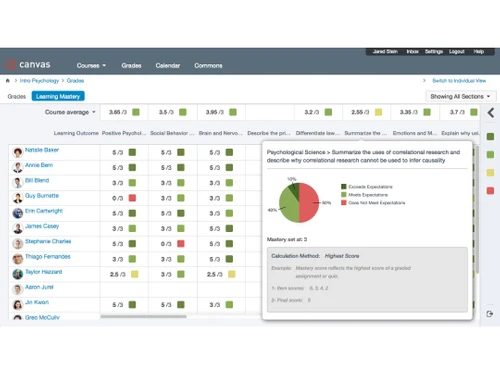
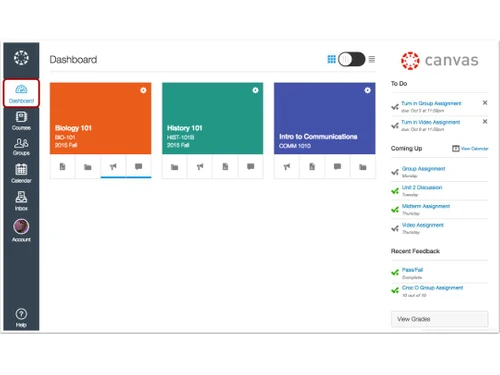
Canvas LMS Dashboard
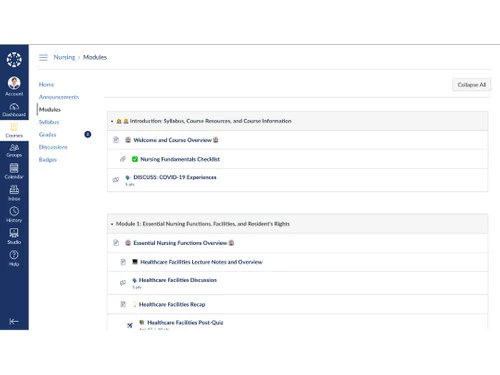
Canvas LMS Modules

Canvas LMS

Brand: Instructure

  • 4.2

  • 6 Ratings

Supercharge your classroom! Canvas LMS is a powerful, user-friendly platform that simplifies teaching and empowers student success.

See More

Have you used Canvas LMS before?

Share your insights for better experience

Add a Review

Price Available on Request

Questions about pricing or customization? We’re here to help, just a click away.

100% Genuine
Products
Best Price
Guaranteed
Safe & Secure
Payment
  • Description

  • Pricing

  • Features

  • Specification

  • Review

  • Compare

  • Alternatives

  • FAQ

Canvas LMS Software Overview

What is Canvas LMS Software?

Canvas LMS software is a digital classroom toolbox that makes teaching and learning much easier. It can be called a super-organized online space where teachers can create courses, share assignments and resources, and even grade quizzes. Students can also access everything they need in one place, from lecture notes and discussion boards to video chats and study groups.

That being said, using Canvas LMS involves more than merely sharing content online! The whole thing is designed to be incredibly participatory and fascinating. Educators may create polls, conversations, and even video assignments, and students can work together on projects and provide feedback to one another.

It's nothing less than having an online classroom that's constantly open, operational, and accessible from any location with an Internet connection. Know that Canvas LMS is a great learning management solution, whether you're a student seeking a more engaging educational experience or a teacher seeking a more effective approach to monitoring your lessons.

Why Choose Canvas LMS Software?

  • All-in-One Hub for Learning: Do away with that backbreaking act of juggling! Canvas organizes everything in one central spot. From a single platform, teachers can develop courses, exchange resources, and grade assignments, while students may access lectures, discussions, and assignments.
  • Engagement Boost: Learning shouldn't be a snoozefest! Canvas lets teachers create interactive activities like discussions, polls, and video assignments. Students can collaborate on projects, give feedback, and participate actively.
  • Easy to Use: You won't have any tech hassles! Canvas's user-friendly interface is rather easy to use for both instructors and students. You'll be up and running in no time, regardless of your level of tech familiarity.
  • Supercharged Workflow: Teachers no longer have to put up with tedious tasks! Canvas uses tools such as rubrics and automated grading to make marking more efficient. Free up time to concentrate on what counts, i.e., developing engaging lessons and supporting your students.
  • Always Connected: Learning shouldn't be confined to four walls! Canvas allows access from anywhere with an internet connection. This flexibility is ideal for remote learners or students who simply prefer to study online.

Benefits of Canvas LMS Platform

  • Accessibility for All: There should be no constraints on learning! Thanks to the software's accommodating mobile friendliness, teachers and students may access courses and materials on the move from any device.
  • Personalized Learning: Every student learns in a unique way! Teachers may thus customize assignments and content using Canvas to meet each student's Requirements. As a result, learning becomes more efficient and joyful overall.
  • Global Classroom Connections: Break down boundaries based on geography! Canvas facilitates global classroom connections while encouraging cooperation and cross-cultural learning.
  • Content Library Sharing: Educators can pool valuable resources and save precious time by sharing premade courses, assignments, and other resources in the content repository provided by Canvas.
  • Streamlined Communication: Stay abreast of developments! The centralization of conversations, announcements, and communications in Canvas keeps teachers and students informed and engaged.

Pricing of Canvas LMS Learning Management Software

Canvas LMS price details are available on request at techjockey.com.

Its price may vary based on factors like customization, additional features required, the number of users, and the deployment type. Please request a callback for subscription-related details and to avail yourself of offers on premium packages.

Read more

Instructure Company Details

Founded Year:  2008

Instructure is a learning technology company and the creator of the Canvas learning management system for K-12 and higher education.

Director/Founders Brian Whitmer, Devlin Daley
Company Size 501-1000 Employees

Canvas LMS Pricing & Plans

Looking for The Right Pricing?

Share your requirements and get a plan built around your business.

  • Define your business needs
  • Get customised pricing
  • Choose features that fit your workflow

Price Available on Request

Get personalised Canvas LMS pricing that fits your needs. Our team will connect with you.

Canvas LMS Features

  • icon_check Assessments
    Make tests fun! Canvas has different question types that fit any learner.
  • icon_check Dashboards
    Teacher central! See assignments, grades, and deadlines at a glance.
  • icon_check Reporting & Analytics
    Data that tells a story! Track student progress and identify areas for improvement.
  • icon_check Integrations
    All your favorite tools together. Connect apps like Google Drive directly to Canvas.
  • icon_check Automated Grading Tool
    Save valuable time! Canvas auto-grades quizzes with multiple-choice or fill-in-the-blank questions.
  • icon_check Audio and video communication
    Get face-to-face, anywhere! Video chat and discussions bring your classroom to life.
  • icon_check Collaboration Tools
    Teamwork makes the dream work! Students can work together, share ideas, and give feedback.
Canvas LMS Demo Video play icon

Get Canvas LMS Demo

Watch the demo video to explore key features, real workflows, and how the software fits your business needs.

Understand
Key Features
Personal
Demo Insights
Interactive
Demo Support

Canvas LMS Specifications

Supported Platforms
Ubuntu Ubuntu Windows Windows iOS iOS Android Android MacOS MacOS Linux Linux
Devices
Desktop Desktop Mobile Mobile Tablet Tablet iPad iPad
Deployment
Cloud-Based Cloud-Based Perpetual Perpetual
Suitable For
Education Governments K-12 Non-Profit BFSI
Business Specific
All Businesses
Business Size
Small Business Medium Business Enterprises
Customer Support
Email Live Chat Communities
Language
English
Training Resources
Webinars Videos
AI Features
AI Integrated

Explore the Best Alternative Solutions Similar to Your Business Size and Needs

Canvas LMS Review

4.2

Out of 5

img

Overall Rating

Based on
6 Verified Ratings

Rating Breakdown

  • Features 4.1
  • Value for Money 4.5
  • Ease of Use 4.0
  • Customer Support 4

98% Recommend this Product

Add Review

Techjockey Trusted Reviews from Verified Users

No reviews are currently available for Canvas LMS. Discover similar Learning Management Software (LMS) reviews

  • Pocket Study

    4.9

    Whats great - PocketStudy is an essential component of every teacher's learning, particularly in view of the diversity of the students, and... read more

  • Classplus

    4.3

    Whats great - Clean, intuitive, and easy-to-use interface. read more
  • Nrich LMS

    5.0

    Whats great - The platform is very user-friendly and does not require heavy technical knowledge to operate. It combines course management, ... read more

Compare Canvas LMS With other Learning Management Software (LMS)

Products
Ratings
Pricing
Device Supported
Deployment
Supported Platforms
  • img

    Canvas LMS

  • 4.2

  • Price On Request

  • Desktop

    Mobile

  • Web based

    On Premises

  • Windows

    Mac OS

  • img

    Classplus

  • 4.3

  • ₹ 19999

  • Desktop

    Mobile

  • Web based

    On Premises

  • Windows

    Mac OS

  • img

    Diwo

  • 4.3

  • Price On Request

  • Desktop

    Mobile

  • Web based

    On Premises

  • Windows

    Mac OS

  • img

    Graphy

  • 3.5

  • ₹ 24999

  • Desktop

    Mobile

  • Web based

    On Premises

  • Windows

    Mac OS

  • img

    Nrich LMS

  • 4.7

  • ₹ 26118

  • Desktop

    Mobile

  • Web based

    On Premises

  • Windows

    Mac OS

  • img

    Kviden

  • 4.3

  • Price On Request

  • Desktop

    Mobile

  • Web based

    On Premises

  • Windows

    Mac OS

  • img

    Wayvida

  • 4.0

  • ₹ 2999

  • Desktop

    Mobile

  • Web based

    On Premises

  • Windows

    Mac OS

  • img

    Vidyalaya LMS

  • 4.1

  • ₹ 1000

  • Desktop

    Mobile

  • Web based

    On Premises

  • Windows

    Mac OS

  • img

    eGurukul

  • 4.6

  • ₹ 2499

  • Desktop

    Mobile

  • Web based

    On Premises

  • Windows

    Mac OS

  • img

    Green LMS

  • 4.2

  • Price On Request

  • Desktop

    Mobile

  • Web based

    On Premises

  • Windows

    Mac OS

  • img

    Edsby

  • 4.6

  • Price On Request

  • Desktop

    Mobile

  • Web based

    On Premises

  • Windows

    Mac OS

(0) Product(s) selected

Canvas LMS Alternatives

See All Canvas LMS Alternatives

Diwo

4.3

Available

Price on Request

Available

Price on Request

Available

Price on Request
Available

Price on Request

Available

Price on Request

NEXO

4.1

Starting Price:

₹100,000 /Year

Starting Price:

₹3,000 /month

Articles for Canvas LMS

See All Related Articles

Which operating system does Canvas LMS Software Support?

Canvas LMS software is compatible with Ubuntu, Windows, MacOS, and Linux systems.

Is there any Canvas LMS App?

Canvas LMS software is available for Android and iOS users.

What is the deployment type of the Canvas LMS System?

Canvas LMS system supports web-based deployment.

How much does Canvas LMS Software Cost?

Canvas LMS price details are available on request at techjockey.com.

Who are the potential users of Canvas LMS?

Potential users of Canvas LMS mostly include schools, colleges, educators, students, and business leaders looking for a streamlined platform to facilitate teaching, learning, and collaboration.

Is there any free demo for the Canvas LMS Solution?

Yes, a demo of this product is available at techjockey.com.

Is Canvas LMS Software Free?

No, Canvas LMS Software is not available for free.

Does Canvas LMS offer a free trial?

Yes, Canvas LMS learning management solution offers a free trial.

How can you download Canvas LMS?

Since the product supports web-based deployment, there is no need for software installation. Just open the setup wizard and get started.

How does Canvas LMS Work?

Canvas LMS works by providing a centralized hub for educational resources, assessments, communication, and collaboration tools. You can enhance teaching and learning experiences through the innovative tool's intuitive interface and extensive integrations.

20,000+ Software Listed

Best Price Guranteed

Free Expert Consultation

2M+ Happy Customers

Terms and Condtions

close

Users with registered businesses can purchase goods from merchants on the platform to satisfy their business needs. Users are not permitted to utilize any products acquired through the platform for resale, advertising, business, or further distribution.

For each purchase made, users will receive a Tax Invoice (or 'GST invoice') that includes specific details such as:

  • the GSTIN of the user associated with their registered business, and

  • the specified Entity Name for their business.

It should be noted that not all products are eligible for GST Invoice. Only the products displayed by participating sellers with the 'GST-based Invoice Available' callout on the product description page would qualify.

Certain goods and services are not eligible to get a GST Invoice, including items with VAS, i.e., Value Added Services (e.g., Total Mobile Protection/Assured Buyback) and those involving an exchange offer at the time of purchase.

Users must ensure the accuracy of the GSTIN, and business entity name provided for the GST Invoice. Requests for corrections into GST Invoice would not be accommodated by Techjockey.com or any Seller, and any issues arising from user-provided information are the sole responsibility of users.

Techjockey.com is not liable for the GST Invoice or any associated input tax credit. To efficiently claim an input tax credit, users should select the registered place of business address as per the GST authority's data and follow the provisions of the GST Act and rules.

To claim an input tax credit, the delivery and billing addresses must match. Furthermore, input tax credits will not be granted if the delivery address and GSTIN on the invoice are from different states. In case of incorrect GST details provided during the order placement, the order will be canceled automatically.