linkedin
Open LMS logo
play Meet the new My Courses view
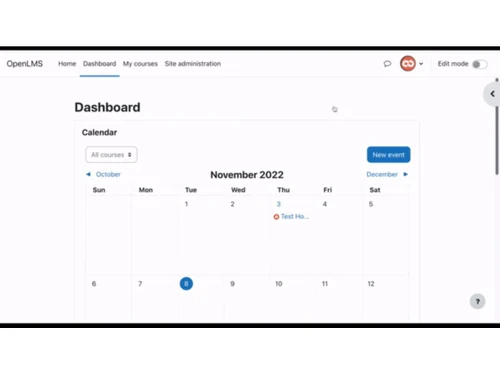
open lms-dashboard
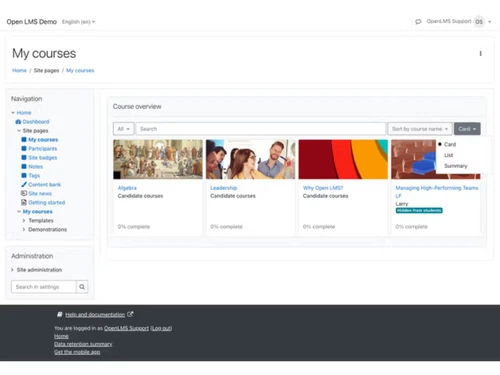
open lms-courses

Open LMS

Brand: Learning Technologies Group

  • 4.0

  • 3 Ratings

Open LMS is a cloud-based learning management software that helps deliver scalable, customizable education and training solutions.

See More

Have you used Open LMS before?

Share your insights for better experience

Add a Review

Price Available on Request

Questions about pricing or customization? We’re here to help, just a click away.

100% Genuine
Products
Best Price
Guaranteed
Safe & Secure
Payment
  • Description

  • Pricing

  • Features

  • Specification

  • Review

  • FAQ

Open LMS Software Overview

What is Open LMS?

Open LMS is a cloud-based learning management software built on Moodle. It helps to deliver online courses and training. Teachers can upload lessons, videos, and assignments that students enrolled in can take by logging into their accounts.

Open LMS supports flexible course creation, multimedia, and assessment tools. The software provides grading options, progress tracking, and reporting dashboards. It sends notifications to the students and supports offline access. The platform provides two Moodle courses: one to support business workforce learning and the other for school- or professional-study-based learning.

This Learning Management Software provides a mobile app, an AI editor for typing and translating content, Plagiarism checking, chatbots, analytical support, and a personalized developing designer to make learning effective.

Why Choose Open LMS Learning Management Software?

  • AI-powered Editor: Helps teachers quickly design lessons, auto-check grammar, and suggest improvements, saving time while improving content quality.
  • Analytics: Tracks learner progress, highlights weak areas, and provides detailed reports, enabling smarter decisions for teaching and training programs.
  • LMS: Manages courses, assignments, and communication in one place, offering easy access for students and teachers across devices.
  • Course Creation: Thai Learning Management Software provides tools to build structured lessons, add multimedia, and organize modules, for building engaging learning experiences.
  • Assessment Tools: Open Learning Management Software offers quizzes, grading options, and feedback systems, helping educators to measure performance, and learners can monitor their progress.

Benefits of Open LMS

  • Engagement: Interactive tools, multimedia lessons, and mobile access keep learners motivated and actively involved.
  • Easy to use: Simple dashboard and clear menus make navigation smooth for teachers and learners.
  • Rich tools: Provides grading, reporting, messaging, and integration features, supporting complete course and training management.
  • AI support: Open Learning Management Software comes with a smart editor that suggests improvements, checks grammar, and helps educators create engaging lessons quickly.
  • Better learning: Learners benefit from structured modules, interactive activities, and progress tracking that improve overall outcomes.
  • Multimedia support: Courses include videos, audio, and images, making lessons more engaging for students.
  • Personalized learning: The software provides adaptive features that allow customized paths, so that the students can receive content suited to their pace and needs.

Pricing of Open LMS

Open LMS details are available on request at techjockey.com.

Open LMS may vary based on factors like customization, additional features required, number of users, and the deployment type. Please request a callback for subscription-related details and to avail offers on premium packages at techjockey.com.

Read more

Learning Technologies Group Company Details

Founded Year:  2013

Learning Technologies Group (LTG) and its businesses work as a strategic partner, helping our customers close the gap between current and future workforce capabilities.

Director/Founders Jonathan Satchell
Company Size 1000+ Employees

Open LMS Pricing & Plans

Looking for The Right Pricing?

Share your requirements and get a plan built around your business.

  • Define your business needs
  • Get customised pricing
  • Choose features that fit your workflow

Price Available on Request

Get personalised Open LMS pricing that fits your needs. Our team will connect with you.

Open LMS Features

  • icon_check Course Management
    Create, organize, and deliver courses efficiently with structured modules and resources for learners.
  • icon_check User Management
    Manage learners, instructors, and administrators with role-based access and permissions.
  • icon_check Content Authoring
    Build interactive courses using native tools and integrated content creation features.
  • icon_check Reporting & Analytics
    Generate detailed insights on learner progress, course effectiveness, and engagement metrics.
  • icon_check Compliance Tracking
    Monitor and report compliance training to ensure organizational and legal standards are met.
  • icon_check E-Commerce Integration
    Sell courses online and manage payments seamlessly through an integrated LMS marketplace.
  • icon_check Gamification
    Enhance engagement with badges, leaderboards, and achievement tracking for learners.
  • icon_check Multi-Tenancy
    Support multiple departments or institutions with isolated environments on one platform.
  • icon_check AI Content Generation
    Leverage AI tools to generate content, summaries, and translations efficiently.
  • icon_check Resource Management
    Organize and distribute course materials, documents, and multimedia efficiently.
  • icon_check Alerts & Notifications
    Send automated updates and reminders for deadlines, assignments, and events.
  • icon_check Third Party Integration
    Connect seamlessly with external tools, plugins, and third-party learning solutions.
Open LMS Demo Video play icon

Get Open LMS Demo

Watch the demo video to explore key features, real workflows, and how the software fits your business needs.

Understand
Key Features
Personal
Demo Insights
Interactive
Demo Support

Open LMS Specifications

Supported Platforms
Windows Windows iOS iOS Android Android MacOS MacOS
Devices
Desktop Desktop Mobile Mobile Tablet Tablet iPad iPad
Deployment
Cloud-Based Cloud-Based
Suitable For
All Industries
Business Specific
All Businesses
Business Size
Small Business Startups Medium Business Enterprises SMBs SMEs MSMBs MSMEs
Customer Support
Email Communities
Language
English
Training Resources
Webinars Videos
AI Features
AI Integrated

Open LMS Review

4.0

Out of 5

img

Overall Rating

Based on
3 Verified Ratings

Rating Breakdown

  • Features 4.6
  • Value for Money 4
  • Ease of Use 3.8
  • Customer Support 3.6

80% Recommend this Product

Add Review

Techjockey Trusted Reviews from Verified Users

No reviews are currently available for Open LMS. Discover similar Learning Management Software (LMS) reviews

  • Pocket Study

    4.9

    Whats great - PocketStudy is an essential component of every teacher's learning, particularly in view of the diversity of the students, and... read more
  • Classplus

    4.3

    Whats great - Clean, intuitive, and easy-to-use interface. read more
  • Nrich LMS

    5.0

    Whats great - The platform is very user-friendly and does not require heavy technical knowledge to operate. It combines course management, ... read more

Articles for Open LMS

See All Related Articles

How much does Open LMS cost?

Open LMS pricing plans are available at techjockey.com.and can be availed upon request.

Who uses Open Learning Management Software?

Open LMS is used by schools, universities, and companies for delivering online courses, training, and professional development.

How does Open LMS work?

Open LMS Learning Management Software works as a cloud-hosted platform where educators upload courses, learners or students access content, and progress is tracked automatically.

Which operating systems are compatible with Open LMS Software?

Open LMS runs smoothly on operating systems like Windows, macOS, Linux, Android, and iOS for mobile learning.

Is a free demo available for Open LMS Learning Management Software?

Yes, a free demo of Open LMS software is available.

What features does Open LMS provide for teachers?

Open Learning Management Software provides grading tools, reporting dashboards, course creation options, and communication features to help teachers in their teaching tasks.

Can Open LMS integrate with other systems?

Yes, Open LMS integrates with HR, ERP, and external tools, ensuring smooth data flow and compliance tracking.

Does Open LMS include analytics for tracking performance?

Yes, Open Learning Management Software includes analytics dashboards that track learner progress, highlight weak areas, and improve teaching effectiveness.

20,000+ Software Listed

Best Price Guranteed

Free Expert Consultation

2M+ Happy Customers

Terms and Condtions

close

Users with registered businesses can purchase goods from merchants on the platform to satisfy their business needs. Users are not permitted to utilize any products acquired through the platform for resale, advertising, business, or further distribution.

For each purchase made, users will receive a Tax Invoice (or 'GST invoice') that includes specific details such as:

  • the GSTIN of the user associated with their registered business, and

  • the specified Entity Name for their business.

It should be noted that not all products are eligible for GST Invoice. Only the products displayed by participating sellers with the 'GST-based Invoice Available' callout on the product description page would qualify.

Certain goods and services are not eligible to get a GST Invoice, including items with VAS, i.e., Value Added Services (e.g., Total Mobile Protection/Assured Buyback) and those involving an exchange offer at the time of purchase.

Users must ensure the accuracy of the GSTIN, and business entity name provided for the GST Invoice. Requests for corrections into GST Invoice would not be accommodated by Techjockey.com or any Seller, and any issues arising from user-provided information are the sole responsibility of users.

Techjockey.com is not liable for the GST Invoice or any associated input tax credit. To efficiently claim an input tax credit, users should select the registered place of business address as per the GST authority's data and follow the provisions of the GST Act and rules.

To claim an input tax credit, the delivery and billing addresses must match. Furthermore, input tax credits will not be granted if the delivery address and GSTIN on the invoice are from different states. In case of incorrect GST details provided during the order placement, the order will be canceled automatically.