linkedin
Clover logo
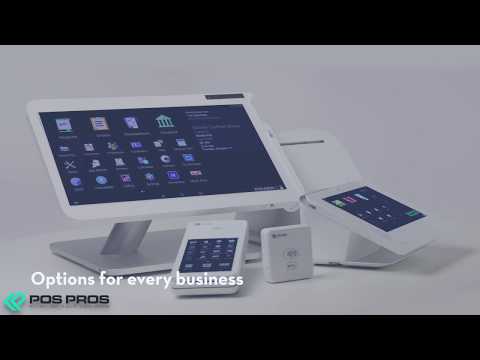
play Demo of Clover Pos System - Clover Demo
clover online business
clover management

Clover

Brand: Clover Network

  • 4.1

  • 4 Ratings

Clover is an all-in-one point-of-sale (POS) system that helps businesses manage payments, inventory, and customer interactions efficiently.

See More

Have you used Clover before?

Share your insights for better experience

Add a Review

Price Available on Request

Questions about pricing or customization? We’re here to help, just a click away.

100% Genuine
Products
Best Price
Guaranteed
Safe & Secure
Payment
  • Specification

  • Pricing

  • Features

  • Description

  • Review

  • Compare

  • Alternatives

  • FAQ

Clover Specifications

Supported Platforms
Ubuntu Ubuntu Windows Windows MacOS MacOS Linux Linux
Devices
Desktop Desktop Mobile Mobile Tablet Tablet iPad iPad
Deployment
Cloud-Based Cloud-Based
Suitable For
Retail Cafe & Restaurants
Business Specific
Restaurants Retailers
Business Size
Small Business Startups Medium Business Enterprises
Customer Support
Email Live Chat Communities
Training Resources
Videos

Clover Pricing & Plans

Looking for The Right Pricing?

Share your requirements and get a plan built around your business.

  • Define your business needs
  • Get customised pricing
  • Choose features that fit your workflow

Price Available on Request

Get personalised Clover pricing that fits your needs. Our team will connect with you.

Clover Features

  • icon_check Payment Options
    Supports various payment methods, including credit cards, mobile wallets, and contactless payments for seamless transactions.
  • icon_check POS
    A comprehensive point-of-sale system to manage sales, inventory, and customer interactions efficiently.
  • icon_check Financial
    Offers tools to track and manage financial transactions, helping with budgeting and financial reporting.
  • icon_check Reporting
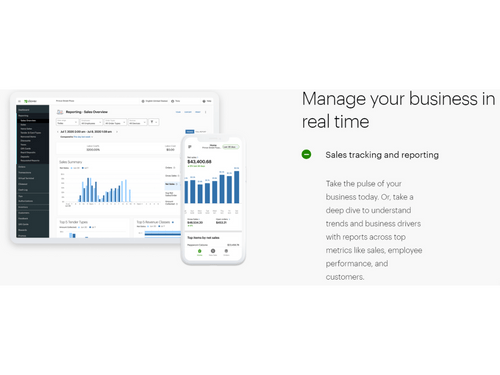
    Provides detailed reports and analytics on sales, performance, and customer behavior to make informed business decisions.
  • icon_check Customization
    Allows businesses to customize the system with apps and add-ons to meet specific operational needs.
  • icon_check Order Management
    Helps businesses track and manage customer orders, from ordering to fulfillment.
  • icon_check Feedbacks
    Collects customer feedback to improve services and products, enhancing customer satisfaction.
  • icon_check Stability
    Known for reliable, consistent performance with minimal downtime, ensuring smooth business operations.
  • icon_check Easy Access Dashboard
    User-friendly interface providing easy access to key business insights, reports, and features.
  • icon_check Performance Management
    Tools to monitor and assess business performance, including sales, staff productivity, and operational efficiency.
  • icon_check Permission Management
    Allows business owners to set access levels and permissions for employees to ensure security and data integrity.

Clover Overview

What is Clover?

Clover is a versatile point-of-sale (POS) system designed to help businesses manage their sales and payments efficiently. It offers a range of features, including payment processing, inventory management, and customer engagement tools, all integrated into one platform. Clover allows businesses to accept various payment methods, including credit cards, debit cards, and contactless payments like Apple Pay.

The system is user-friendly and can be accessed on mobile devices, making it convenient for businesses on the go. Additionally, Clover provides tools for tracking sales data and generating reports to help owners make informed decisions. It is suitable for various types of businesses, from restaurants to retail shops, aiming to streamline operations and enhance customer experiences.

Why Choose Clover Software?

  • All-in-One Solution: It combines POS, payment processing, and inventory management in a single platform, simplifying business operations.
  • User-Friendly Interface: The intuitive design makes it easy for staff to learn and use, reducing training time.
  • Customizable Features: Businesses can tailor the software to meet their specific needs with various apps and hardware options available.
  • Robust Customer Management: It offers tools for managing customer relationships, including loyalty programs and personalized promotions.
  • Dynamic Inventory Management: It provides advanced inventory features, allowing businesses to track sales trends and manage stock efficiently.
  • Mobile Payment Options: It supports mobile transactions, enabling businesses to accept payments anywhere, anytime.
  • Real-Time Reporting: Users can access live sales data and generate detailed reports to analyze business performance.
  • Multiple Payment Methods: It allows businesses to accept various payment types, including credit cards, digital wallets, and contactless payments.
  • Integrated Employee Management: The software includes features for scheduling and tracking employee performance, streamlining workforce management.
  • Strong Support Resources: It offers customer support to assist with setup and troubleshooting, ensuring businesses can get help when needed.

Benefits of Clover Software

  • Flexible Financing Options: Clover Capital allows businesses to convert future sales into working capital, providing quick access to funds for growth.
  • Contactless Payment Acceptance: It supports various contactless payment methods, including Apple Pay, enhancing customer convenience and safety.
  • Multi-Device Compatibility: The software can be used on various devices, including smartphones and tablets, allowing for flexible payment processing.
  • Comprehensive Business Insights: Clover provides in-depth analytics and reporting tools that help businesses understand sales trends and customer behaviors.
  • Custom App Marketplace: Users can access a wide range of third-party applications through Clover's marketplace to enhance functionality according to their specific needs.
  • Secure Payment Processing: It employs advanced security measures to protect sensitive customer data during transactions.
  • Built-In Marketing Tools: The software includes features for creating promotions and marketing campaigns directly through the platform, helping businesses attract and retain customers.
  • Easy Integration with Other Systems: It can integrate with various accounting and business management software, streamlining overall operations.
  • 24/7 Customer Support: It offers round-the-clock support to assist users with any issues or inquiries they may have.
  • Scalable Solutions: The software is designed to grow with businesses, accommodating increasing transaction volumes and additional features as needed.

Pricing of Clover

Clover price details are available on request at techjockey.com.

The pricing model is based on different parameters, including extra features, deployment type, and the total number of users. For further queries related to the product, you can contact our product team and learn more about the pricing and offers.

Read more
Clover Demo Video play icon

Get Clover Demo

Watch the demo video to explore key features, real workflows, and how the software fits your business needs.

Understand
Key Features
Personal
Demo Insights
Interactive
Demo Support

Explore the Best Alternative Solutions Similar to Your Business Size and Needs

Clover Review

4.1

Out of 5

img

Overall Rating

Based on
4 Verified Ratings

Rating Breakdown

  • Features 4.1
  • Value for Money 4.2
  • Ease of Use 4.3
  • Customer Support 3.8

85% Recommend this Product

Add Review

Techjockey Trusted Reviews from Verified Users

No reviews are currently available for Clover. Discover similar POS Machine reviews

  • Paytm POS Machine

    4.3

    Whats great - Managing a business is not an easy task irrespective of its size. I was looking for a product that will manage my business sm... read more

  • Nukkad Shops

    3.9

    Whats great - We are using retail software POS since 15 years in our retail shop, we wish to upgrade it with Nukkad shop but unfortunately ... read more

  • Oxigen Micro ATM

    4.8

    Whats great - Easy to use device. read more
Compare Clover With other POS Machine

Products
Ratings
Pricing
Device Supported
Deployment
Supported Platforms
  • img

    Clover

  • 4.1

  • Price On Request

  • Desktop

    Mobile

  • Web based

    On Premises

  • Windows

    Mac OS

  • img

    Bzo POS

  • 4.2

  • ₹ 2500

  • Desktop

    Mobile

  • Web based

    On Premises

  • Windows

    Mac OS

  • img

    Zoho POS Machine

  • 4.2

  • Price On Request

  • Desktop

    Mobile

  • Web based

    On Premises

  • Windows

    Mac OS

  • img

    Nukkad Shops

  • 3.9

  • ₹ 39580

  • Desktop

    Mobile

  • Web based

    On Premises

  • Windows

    Mac OS

  • img

    Sunmi V2

  • 4.3

  • Price On Request

  • Desktop

    Mobile

  • Web based

    On Premises

  • Windows

    Mac OS

  • img

    Sunmi P2

  • 4

  • ₹ 15254

  • Desktop

    Mobile

  • Web based

    On Premises

  • Windows

    Mac OS

  • img

    BillTouch C86D

  • 4.7

  • Price On Request

  • Desktop

    Mobile

  • Web based

    On Premises

  • Windows

    Mac OS

(0) Product(s) selected

Clover Alternatives

See All Clover Alternatives

Available

Price on Request

Available

Price on Request

Available

Price on Request

Articles for Clover

See All Related Articles

How much does Clover Software Cost?

Clover pricing details are available upon request on techjockey.com.

Is there any Clover Software App?

No, Clover does not offer a mobile app.

Which operating system does Clover Software Support?

Clover software is compatible with Ubuntu, Windows, MacOS, and Linux operating systems.

Does Clover offer a free trial?

Yes, Clover offers a 90-day free trial for its software when you apply for a Clover Account experience without hardware.

How does Clover Software Work?

Clover operates as a point-of-sale system that integrates payment processing, sales tracking, and business management functions.

Who are the potential users of Clover Software?

Potential users include small to medium-sized businesses, including restaurants, retail stores, and service-based businesses.

Is there any free demo for Clover Software?

Yes, Clover offers a free demo to showcase its features and functionalities to prospective users.

Is Clover Software Free?

No, Clover is not free; it offers subscription plans and hardware pricing based on the business's needs.

20,000+ Software Listed

Best Price Guranteed

Free Expert Consultation

2M+ Happy Customers

Terms and Condtions

close

Users with registered businesses can purchase goods from merchants on the platform to satisfy their business needs. Users are not permitted to utilize any products acquired through the platform for resale, advertising, business, or further distribution.

For each purchase made, users will receive a Tax Invoice (or 'GST invoice') that includes specific details such as:

  • the GSTIN of the user associated with their registered business, and

  • the specified Entity Name for their business.

It should be noted that not all products are eligible for GST Invoice. Only the products displayed by participating sellers with the 'GST-based Invoice Available' callout on the product description page would qualify.

Certain goods and services are not eligible to get a GST Invoice, including items with VAS, i.e., Value Added Services (e.g., Total Mobile Protection/Assured Buyback) and those involving an exchange offer at the time of purchase.

Users must ensure the accuracy of the GSTIN, and business entity name provided for the GST Invoice. Requests for corrections into GST Invoice would not be accommodated by Techjockey.com or any Seller, and any issues arising from user-provided information are the sole responsibility of users.

Techjockey.com is not liable for the GST Invoice or any associated input tax credit. To efficiently claim an input tax credit, users should select the registered place of business address as per the GST authority's data and follow the provisions of the GST Act and rules.

To claim an input tax credit, the delivery and billing addresses must match. Furthermore, input tax credits will not be granted if the delivery address and GSTIN on the invoice are from different states. In case of incorrect GST details provided during the order placement, the order will be canceled automatically.