linkedin
CoconutERP logo
CoconutERP Features
CoconutERP item master
CoconutERP Sales order

CoconutERP

Brand: RARR Technologies Pvt Ltd.

  • No Ratings & Reviews

Have you used CoconutERP before?

Share your insights for better experience

Add a Review

Price Available on Request

Questions about pricing or customization? We’re here to help, just a click away.

100% Genuine
Products
Best Price
Guaranteed
Safe & Secure
Payment
  • Description

  • Pricing

  • Features

  • Specification

  • Review

CoconutERP Software Overview

RARR Technologies Pvt Ltd. Company Details

Founded Year:  2018

RARR Technologies Pvt. Ltd. is aggressively positioning itself as a key player in providing key software solutions to MSMEs.

Director/Founders Rohit Gulati
Company Size 1-100 Employees

CoconutERP Pricing & Plans

Looking for The Right Pricing?

Share your requirements and get a plan built around your business.

  • Define your business needs
  • Get customised pricing
  • Choose features that fit your workflow

Price Available on Request

Get personalised CoconutERP pricing that fits your needs. Our team will connect with you.

CoconutERP Features

Financial/Accounts Management

  • icon_check Tax Management
    Calculates automated transactional taxes and tracks financial compliance margins across modules.
  • icon_check General Ledger
    Central system structure grouping finalized financial rows into specific, verified ledger heads.
  • icon_check Budgeting And Forecasting
    Leverages automated predictive algorithms to estimate upcoming procurement and sales expenses.
  • icon_check Accounts Payable & Accounts Receivable
    Tracks incoming client invoices against outbound supplier balance strings.
  • icon_check Fixed Asset Management
    Track, manage, and depreciate assets.
  • icon_check Multi-Currency Support
    Handling transactions in various currencies.
  • icon_check Bank Reconciliation
    Matches ERP records with bank statements to ensure financial accuracy and detect discrepancies.

Human Resource Management (HRM)

  • icon_check Payroll Management
    Manages employee compensation parameters, internal salary components, and direct payroll disbursals.
  • icon_check Performance Management
    Monitors operational performance using actual versus planned analysis matrices.
  • icon_check Time and Attendance
    Logs daily workplace attendance, log hours, and leave balances under HR administration.
  • icon_check Employee Information Management
    Stores data records, profiles, and historical logs for company workers centrally.
  • icon_check Recruitment and Onboarding
    Tools for hiring, job postings, and new hire integration.
  • icon_check Learning Management
    Training programs and skill assessments.

Supply Chain Management

  • icon_check Demand Planning
    Utilizes embedded AI forecasting to map target storage counts directly against seasonal sales patterns.
  • icon_check Inventory Management
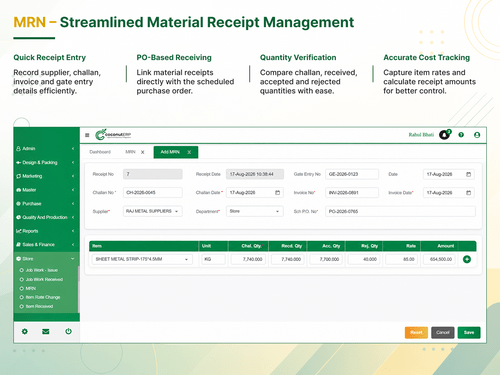
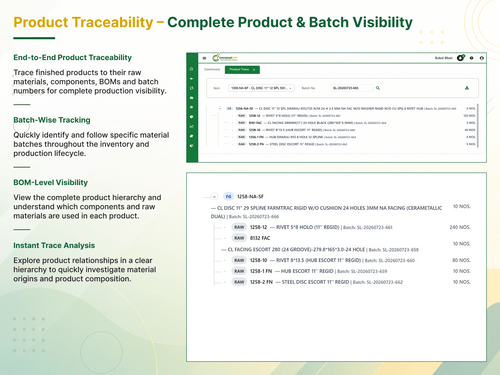
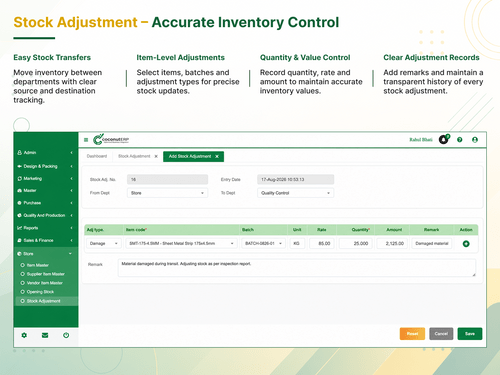
    Delivers real-time storage visibility, item rate tracking, and multi-batch inventory control.
  • icon_check Supplier Relationship Management
    Consolidates procurement, purchase history logs, and indents to handle vendor channels.
  • icon_check Procurement and Purchasing
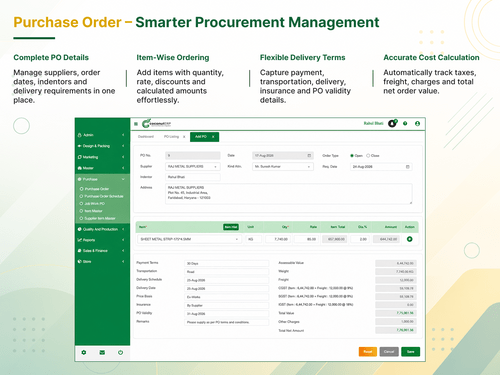
    Automates end-to-end buying workflows using indents, automatic rate metrics, and PO generation.
  • icon_check Logistics and Distribution
    Manages physical tracking pathways guiding items all the way from raw procurement down to final dispatch.
  • icon_check Transportation Management
    Manages logistics, shipment tracking, and carrier performance for efficient delivery.
  • icon_check Route Planning
    Optimizes delivery routes to minimize costs and ensure timely deliveries.

Manufacturing

  • icon_check Work Order Management
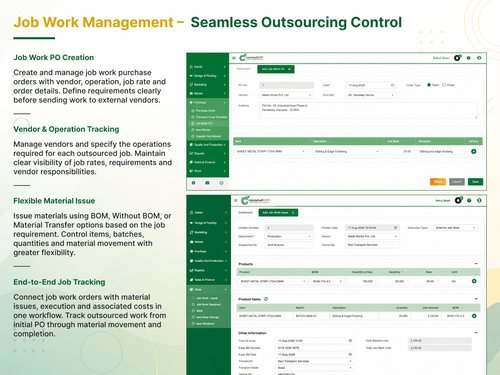
    Coordinates job tasks, floor assignments, and production routes using specific Job Work configurations.
  • icon_check Bill Of Materials (BOM)
    Houses structural material recipes, parts directories, and customized customer BOM configurations.
  • icon_check Production Planning and Scheduling
    Aligns automated floor conversion schedules directly with inventory material availability.
  • icon_check Quality Control Management
    Runs strict batch and serial tracking parameters across multiple inspection stages.
  • icon_check Shop Floor Management
    Minimizes machine idle durations and schedules assembly flows using Item Operation Configuration.
  • icon_check Material Requirement Planning (MRP)
    Identifies production inventory shortages to clear floor delay bottlenecks before they slow output.
  • icon_check Maintenance Management
    Tracks and schedules maintenance tasks to ensure equipment reliability and reduce downtime.

Customer Relationship Management (CRM)

  • icon_check Contact Management
    Coordinates vendor registries, customer contacts, and supplier details within a unified database.
  • icon_check Lead Management
    Captures and pathways prospective customer sales inquiries directly under the Leads/Enquiry module.
  • icon_check Sales Pipeline Management
    Tracks incoming client quotation inquiries right down to finalised shipping confirmations.
  • icon_check Marketing Automation
    Tools for email, SMS, and social media campaigns.
  • icon_check Audience Segmentation
    Insights into customer behavior and preferences.

Project Management

  • icon_check Time Tracking
    Records labor hours and operational execution durations to optimize plant productivity levels.
  • icon_check Collaboration Tools
    Connects cross-functional internal departments by maintaining a single source of operational truth.
  • icon_check Resource Management
    Distributes machinery capacity and materials efficiently across active floor schedules.
  • icon_check Task Scheduling
    Maps production schedules seamlessly to keep active operations aligned with material readiness.
  • icon_check Cost Management
    Provides a consolidated view of multi-month purchase history logs to master vendor costs.

Reporting and Analytics

  • icon_check Predictive Analytics
    Leverages smart data algorithms to estimate trends and actions across sales, procurement, and finance.
  • icon_check Sales Reports
    Generates analytical updates tracing actual product delivery rows and incoming revenue streams.
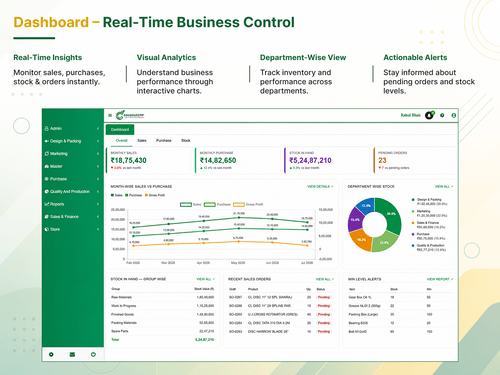
  • icon_check Dashboards
    Features dedicated, module-specific visual control panels customized by individual system roles.
  • icon_check Financial Reports
    Compiles real-time data readouts tracking item rate averages, purchase costs, and raw expenses.
  • icon_check Business Intelligence
    Generates real-time, live reporting data inputs to drive smarter, faster business choices.
  • icon_check Custom Reports
    Creates tailored data readouts across manufacturing, sales, or financial sectors.
  • icon_check Regulatory Compliance Reports
    Generates structured operational data logs designed to align with strict manufacturing audits.
  • icon_check Real Time Reports
    Powerful system architecture enabling continuous live real-time processing and report extraction.

Integrations

  • icon_check API Integration
    Secure connection pathways to tether accounting tools, CRM architectures, and custom apps cleanly.
  • icon_check Third Party Integration
    Bridges external pipelines smoothly with external sales CRM networks and enterprise applications.
  • icon_check Payment Gateway Integration
    Support for various payment methods.
  • icon_check Ecommerce Integration
    Syncs ERP with e-commerce platforms for real-time order, inventory, and customer data updates.
  • icon_check Customer Support
    Integration with helpdesk and ticketing systems.

Security and Compliance

  • icon_check Disaster Recovery
    Employs cloud-based database storage protection architectures to secure data against system dropouts.
  • icon_check Data Encryption
    Secures highly sensitive business files and operational information records from data leak issues.
  • icon_check Audit Management
    Employs AI anomaly detection systems to automatically flag policy violations and duplicate rows.
  • icon_check Role-Based Access Control (RBAC)
    Standardizes workspace security by restricting module access based on employee job definitions.
  • icon_check GDPR and Other Compliance
    Adheres to foundational user privacy guidelines and data localization directives.

Administrative Features

  • icon_check Workflow Automation
    Automatically constructs necessary purchase orders based on real-time raw material shortage triggers.
  • icon_check Data Import/Export
    Ingests spreadsheet data or downloads report rows safely using standard structured templates.
  • icon_check Admin Panel
    Central portal utilized to map user permissions, system variables, and role actions.
  • icon_check User Access Management
    Controls precise database permissions to safeguard sensitive corporate parameters.
  • icon_check Workflow Approval
    Channels purchase requisitions or indents through verification gates prior to final PO generation.
  • icon_check Centralized Database
    Unifies scattered files into a single source of truth, replacing messy spreadsheet arrays.

Alerts & Notifications

  • icon_check Email and SMS Notifications
    Fires smart automated text alerts when business rules or policy constraints are met.
  • icon_check Security Alerts
    Triggers instant in-app, email, or SMS notification alerts when sensitive data actions are caught.
  • icon_check Custom Event Alerts
    Configures tailored in-app and email alert responses based on custom business rules.
  • icon_check Non-Compliance Issues
    Deploys AI anomaly scanning to catch duplicate accounting inputs and policy violations instantly.

CoconutERP Specifications

Supported Platforms
Windows Windows MacOS MacOS
Devices
Desktop Desktop
Deployment
Cloud-Based Cloud-Based
Suitable For
All Industries
Business Specific
All Businesses
Business Size
Small Business Medium Business Enterprises SMBs SMEs MSMBs MSMEs
Customer Support
Phone Email
Language
English
Integration
API Integration
Training Resources
Live Online
AI Features
AI Integrated

CoconutERP Review

Techjockey Trusted Reviews from Verified Users

No reviews are currently available for CoconutERP. Discover similar ERP Software reviews

  • Dynamics 365 Business Central

    4.4

    Whats great - The capacity to use Excel to mass input data into the system and to extract data. read more

  • DataNote ERP

    4.8

    Whats great - The most impressive thing with this ERP is the reporting and analytics. I'm daily using the AI reports available in various f... read more

  • Eazy ERP

    4.7

    Whats great - Real-time data. Better sales tracking. Customizable reports. Since using EAZY ERP, our work and sales tracking have improved ... read more
Articles for CoconutERP

See All Related Articles

20,000+ Software Listed

Best Price Guranteed

Free Expert Consultation

2M+ Happy Customers

Terms and Condtions

close

Users with registered businesses can purchase goods from merchants on the platform to satisfy their business needs. Users are not permitted to utilize any products acquired through the platform for resale, advertising, business, or further distribution.

For each purchase made, users will receive a Tax Invoice (or 'GST invoice') that includes specific details such as:

  • the GSTIN of the user associated with their registered business, and

  • the specified Entity Name for their business.

It should be noted that not all products are eligible for GST Invoice. Only the products displayed by participating sellers with the 'GST-based Invoice Available' callout on the product description page would qualify.

Certain goods and services are not eligible to get a GST Invoice, including items with VAS, i.e., Value Added Services (e.g., Total Mobile Protection/Assured Buyback) and those involving an exchange offer at the time of purchase.

Users must ensure the accuracy of the GSTIN, and business entity name provided for the GST Invoice. Requests for corrections into GST Invoice would not be accommodated by Techjockey.com or any Seller, and any issues arising from user-provided information are the sole responsibility of users.

Techjockey.com is not liable for the GST Invoice or any associated input tax credit. To efficiently claim an input tax credit, users should select the registered place of business address as per the GST authority's data and follow the provisions of the GST Act and rules.

To claim an input tax credit, the delivery and billing addresses must match. Furthermore, input tax credits will not be granted if the delivery address and GSTIN on the invoice are from different states. In case of incorrect GST details provided during the order placement, the order will be canceled automatically.