linkedin
Feepayr logo
play Feepayr demo
feepayr-payment
Feepayr-online-fees

Feepayr

Brand: Feepayr

  • 4.4

  • 3 Ratings

A cloud-based online fee collection and management portal for educational institutions.

See More

Have you used Feepayr before?

Share your insights for better experience

Add a Review

Price Available on Request

Questions about pricing or customization? We’re here to help, just a click away.

100% Genuine
Products
Best Price
Guaranteed
Safe & Secure
Payment
  • Description

  • Pricing

  • Features

  • Specification

  • Review

  • Compare

  • Alternatives

  • FAQ

Feepayr Software Overview

What is Feepayr?

Feepayr is an online fee collection platform specially designed for all types of educational institutions including schools and colleges. This fee collection platform allows parents and students to pay school fees online hassle-free.

Feepayr is integrated with multiple payment gateways, digital wallets, and banks for easy transactions. The fee paid by students or parents gets deposited directly into the institute’s bank account. Hence, this online fee collection and submission system is indeed a safe and secure way to pay school fees without wasting time standing in long queues.

How Does Feepayr Ease the Process of School Fees Collection?

Feepayr is a simple and easy-to-use fee collection interface for educational institutions. Know the steps to use Feepayr to start collecting online fees hassle-free!

  • On the Feepayr portal, click on the ‘Register your institute button’ and get your school or college registered free of cost.
  • The existing ERP user can transfer student and fee details to the cloud with just a tap.
  • In case you’re not an ERP user, enter data online or upload courses, student, and fee details using Excel.
  • The user name for student login is the respective mobile number of students.
  • Now, students/parents can log in through the portal and pay fees online hassle-free using various payment modes including credit cards, debit cards and net banking.
  • Parents and students also have the option to pay in installments or the entire amount in one go.
  • Money is transferred by payment gateway to the institute’s bank account within 24 hours, as per GOI and the institute gets a quick update on fees collected.

Why Choose Feepayr as your Payment Processing Software?

  • Easily Accessible: Feepayr provides an opportunity to pay fees online via smartphone anytime, anywhere.
  • Fast, Safe, and Secure: A cloud-based fee management software that provides a unique login ID to parents and students to always ensure secure login to the dashboard.

How Can Feepayr Help Parents/Students and Educational Institutions?

  • Save time without standing in long queues at cash/bank counters
  • Management has full control over the fee collection process and can track and manage paid/outstanding fees easily
  • Saves infrastructure costs as there is no need for endless paperwork and high-data servers
  • The option to pay fees in installments is the main benefit for parents & students

Feepayr Pricing

Feepayr price details are available on request at techjockey.com. To get detailed feepayr pricing and subscription-related details as per your requirements, and to avail of offers on premium packages request a call back at techjockey.com.

Feepayr price in India may vary based on factors like customization, additional features required, number of users, and the deployment type.

Read more

Feepayr Company Details

Founded Year:  2016

Feepayr is an online fee collection platform for educational campuses.

Director/Founders Sham Somani
Company Size 1-100 Employees

Feepayr Pricing & Plans

Looking for The Right Pricing?

Share your requirements and get a plan built around your business.

  • Define your business needs
  • Get customised pricing
  • Choose features that fit your workflow

Price Available on Request

Get personalised Feepayr pricing that fits your needs. Our team will connect with you.

Feepayr Features

  • icon_check Mobile Payments
    Using a mobile app is a convenient option to pay fees using the preferred mode of payment – debit/credit card etc.
  • icon_check Online Payment
    Feepayr online fee collection platform is integrated with multiple payment gateways and digital wallets.
  • icon_check Debit/Credit Card Processing
    Offers safe and secure payment solutions to parents to pay fees using a debit/credit card.
  • icon_check Payment Gateway
    Backed with multiple and safe payment gateways, Feepayr ensures complete security of the payment process.
  • icon_check Fee Collection
    An online fee collection platform that simplifies fee transactions process in institutes.
  • icon_check MIS Reports
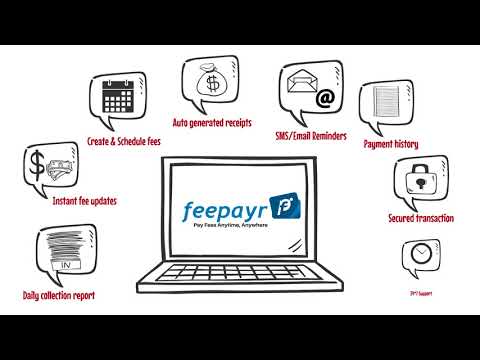
    Generates precise MIS reports and important daily reports automatically on the portal at the end of the day.
  • icon_check Fee Management
    A fee management software that let parents pay fees online with ease and help institutes save up on paper & resources.
Feepayr Demo Video play icon

Get Feepayr Demo

Watch the demo video to explore key features, real workflows, and how the software fits your business needs.

Understand
Key Features
Personal
Demo Insights
Interactive
Demo Support

Feepayr Specifications

Supported Platforms
Windows Windows
Devices
Desktop Desktop
Deployment
Cloud-Based Cloud-Based
Suitable For
All Industries
Business Specific
All Businesses
Business Size
Small Business Startups Medium Business SMBs SMEs
Language
English

Explore the Best Alternative Solutions Similar to Your Business Size and Needs

Small Business

Designed for startups and growing businesses

Payoneer

4.2

Rapyd

4.4

Melio

4.0

See More

Feepayr Review

4.4

Out of 5

img

Overall Rating

Based on
3 Verified Ratings

Rating Breakdown

  • Features 4.8
  • Value for Money 4.1
  • Ease of Use 4.3
  • Customer Support 4.3

86% Recommend this Product

Add Review

Be the First to Review

This product has no reviews yet. Be the first to leave your feedback.

Add Review

Compare Feepayr With other Payment Processing Software

Products
Ratings
Pricing
Device Supported
Deployment
Supported Platforms
  • img

    Feepayr

  • 4.4

  • Price On Request

  • Desktop

    Mobile

  • Web based

    On Premises

  • Windows

    Mac OS

  • img

    Hyperswitch

  • 4.1

  • Price On Request

  • Desktop

    Mobile

  • Web based

    On Premises

  • Windows

    Mac OS

  • img

    Rapyd

  • 4.4

  • Price On Request

  • Desktop

    Mobile

  • Web based

    On Premises

  • Windows

    Mac OS

  • img

    Melio

  • 4.0

  • Price On Request

  • Desktop

    Mobile

  • Web based

    On Premises

  • Windows

    Mac OS

  • img

    Noda

  • 4.3

  • Price On Request

  • Desktop

    Mobile

  • Web based

    On Premises

  • Windows

    Mac OS

  • img

    Payfunnels

  • 4.4

  • Price On Request

  • Desktop

    Mobile

  • Web based

    On Premises

  • Windows

    Mac OS

  • img

    Airwallex

  • 4.2

  • Price On Request

  • Desktop

    Mobile

  • Web based

    On Premises

  • Windows

    Mac OS

  • img

    Veem

  • 4.1

  • Price On Request

  • Desktop

    Mobile

  • Web based

    On Premises

  • Windows

    Mac OS

  • img

    CCBill

  • 4.3

  • Price On Request

  • Desktop

    Mobile

  • Web based

    On Premises

  • Windows

    Mac OS

  • img

    Zoho Checkout

  • 4.3

  • ₹ 1800

  • Desktop

    Mobile

  • Web based

    On Premises

  • Windows

    Mac OS

(0) Product(s) selected

Feepayr Alternatives

See All Feepayr Alternatives

Noda

4.3

Available

Price on Request

Available

Price on Request

Veem

4.1

Available

Price on Request

Available

Price on Request

Available

Price on Request

TSYS

4.2

Available

Price on Request

Available

Price on Request

Available

Price on Request

Available

Price on Request

Wise

4.5

Available

Price on Request

Articles for Feepayr

See All Related Articles

Which operating system does Feepayr support?

Feepayr is compatible with Windows operating systems.

Is there any Feepayr app?

There is no Feepayr app available.

What is the deployment type of Feepayr?

Feepayr supports cloud-based deployment types.

How much does Feepayr payment processing software cost?

Feepayr payment processing software pricing is available on request at techjockey.com.

Who uses Feepayr?

Feepayr is typically used by educational institutions, students and parents.

Is there any free trial or demo for Feepayr?

Feepayr demo is available for free with techjockey.com.

Is Feepayr payment processing software free?

Feepayr payment processing software offers a free trial. However, the premium plan with advanced features is available at techjockey.com with exciting deals.

How can you download Feepayr?

Feepayr installation is not required, as it is cloud-based. Just open the Setup Wizard to get started.

20,000+ Software Listed

Best Price Guranteed

Free Expert Consultation

2M+ Happy Customers

Terms and Condtions

close

Users with registered businesses can purchase goods from merchants on the platform to satisfy their business needs. Users are not permitted to utilize any products acquired through the platform for resale, advertising, business, or further distribution.

For each purchase made, users will receive a Tax Invoice (or 'GST invoice') that includes specific details such as:

  • the GSTIN of the user associated with their registered business, and

  • the specified Entity Name for their business.

It should be noted that not all products are eligible for GST Invoice. Only the products displayed by participating sellers with the 'GST-based Invoice Available' callout on the product description page would qualify.

Certain goods and services are not eligible to get a GST Invoice, including items with VAS, i.e., Value Added Services (e.g., Total Mobile Protection/Assured Buyback) and those involving an exchange offer at the time of purchase.

Users must ensure the accuracy of the GSTIN, and business entity name provided for the GST Invoice. Requests for corrections into GST Invoice would not be accommodated by Techjockey.com or any Seller, and any issues arising from user-provided information are the sole responsibility of users.

Techjockey.com is not liable for the GST Invoice or any associated input tax credit. To efficiently claim an input tax credit, users should select the registered place of business address as per the GST authority's data and follow the provisions of the GST Act and rules.

To claim an input tax credit, the delivery and billing addresses must match. Furthermore, input tax credits will not be granted if the delivery address and GSTIN on the invoice are from different states. In case of incorrect GST details provided during the order placement, the order will be canceled automatically.