linkedin
FRAS logo
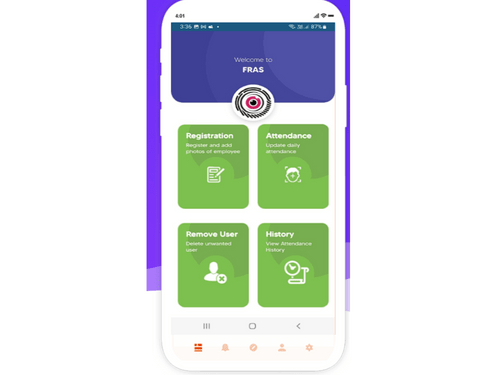
Fras dashboard
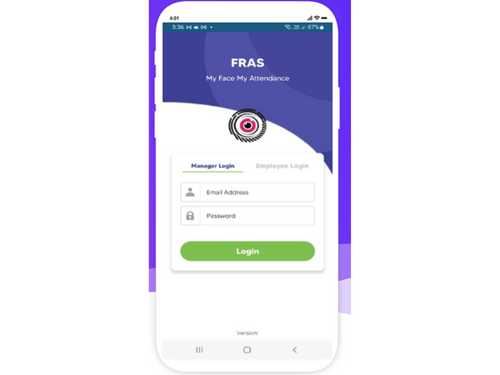
fras login page
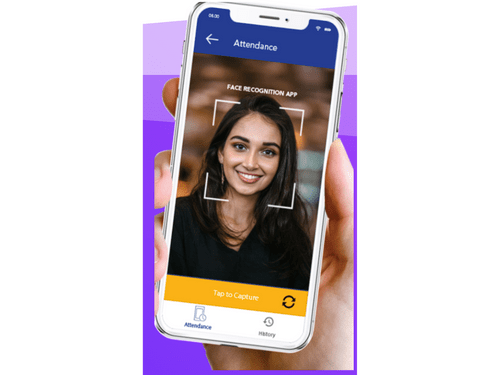
fras face recognition

FRAS

Brand: Sysmedac Technologies

  • 4.0

  • 4 Ratings

Automates attendance management for indoor and outdoor staff, allowing employees to check in using their facial recognition and providing real-time data.

See More

Have you used FRAS before?

Share your insights for better experience

Add a Review

Price Available on Request

Questions about pricing or customization? We’re here to help, just a click away.

100% Genuine
Products
Best Price
Guaranteed
Safe & Secure
Payment
  • Description

  • Pricing

  • Features

  • Specification

  • Review

  • Compare

  • Alternatives

  • FAQ

FRAS Software Overview

What is FRAS?

FRAS is a face recognition attendance application designed to automate attendance management for both indoor and outdoor staff. It allows managers to add or remove employee faces, while employees can register their own faces and check in using their login.

The system provides real-time data for accurate attendance tracking, enabling easy updates for missed dates via a web-based platform. With features like mobile clock-in options and detailed reporting, FRAS enhances accountability and productivity within organizations by simplifying the attendance tracking process.

Why Choose FRAS Software?

  • Automated Attendance Management: It simplifies attendance tracking for both indoor and outdoor staff through facial recognition technology, reducing manual errors.
  • Real-Time Data: The application provides accurate, real-time attendance data, enabling better monitoring of employee presence.
  • User-Friendly Interface: Employees can easily register their faces and check in using a mobile app, making the process straightforward and efficient.
  • Web-Based Tracking: Attendance can be tracked from anywhere with internet access, allowing for flexibility in managing attendance records.
  • Easy Updates: Users can quickly update attendance for missed dates with a simple click, ensuring accurate records without hassle.
  • Cost-Effective Solution: It offers a free version to help organizations start tracking attendance without significant upfront costs.
  • Comprehensive Reporting: The software provides detailed reports on attendance patterns, aiding in decision-making and operational efficiency.

Benefits of FRAS Software

  • Flexible Access: Users can manage attendance from any location with internet access, providing convenience for remote or field-based staff.
  • Quick Setup: The software allows for easy configuration of students and classes, enabling organizations to get started with minimal delay.
  • Mobile Compatibility: Employees can clock in and out using their mobile devices, enhancing accessibility and ease of use.
  • Granular Data Insights: FRAS provides detailed attendance data, allowing managers to analyze trends and make informed decisions regarding workforce management.
  • User Empowerment: Employees have the ability to manage their own attendance records, promoting responsibility and engagement in the tracking process.
  • Cost-Effective Entry Point: The availability of a free version allows organizations to implement attendance tracking without financial commitment, making it accessible for smaller businesses.
  • Streamlined Communication: The app facilitates better communication regarding attendance policies and updates, ensuring all employees are informed.
  • Increased Productivity: By automating attendance management, FRAS helps reduce time spent on administrative tasks, allowing staff to focus on their core responsibilities.
  • Customizable Features: Organizations can tailor the software to meet specific needs, adapting functionalities as required.
  • Enhanced Accountability: With accurate tracking and reporting, employees are more likely to adhere to attendance policies, fostering a culture of accountability within the organization.

Pricing of FRAS

FRAS price details are available on request at techjockey.com.

The pricing model is based on different parameters, including extra features, deployment type, and the total number of users. For further queries related to the product, you can contact our product team and learn more about the pricing and offers.

Read more

Sysmedac Technologies Company Details

Founded Year:  2012

Sysmedac is an IT Solution provider across different technologies and industries globally Our unique industry based approach helps clients, build and run more innovative and efficient businesses

Director/Founders Saravanan Thangadurai
Company Size 1-100 Employees

FRAS Pricing & Plans

Looking for The Right Pricing?

Share your requirements and get a plan built around your business.

  • Define your business needs
  • Get customised pricing
  • Choose features that fit your workflow

Price Available on Request

Get personalised FRAS pricing that fits your needs. Our team will connect with you.

FRAS Features

  • icon_check Self Based Attendance
    Employees can independently mark their attendance through a self-service portal, reducing dependency on HR.
  • icon_check Check-in & Check-out
    Allows employees to log their working hours by checking in at the start and checking out at the end of their shifts.
  • icon_check Attendance Management
    Automates the tracking of attendance, ensuring accurate records for employees’ working hours, leaves, and absences.
  • icon_check Time & Attendance History
    Provides employees and managers with easy access to past attendance records, helping to track trends and resolve issues.
  • icon_check OT Calculation
    Automatically calculates overtime hours based on defined policies, ensuring accurate compensation.
  • icon_check Live Employee Loaction
    Monitors the real-time location of employees.
  • icon_check Employee Management
    Manages employee details and tracks their attendance, leave, and performance, simplifying HR tasks.
  • icon_check Good Performance
    Helps identify high-performing employees based on attendance and work-related data, fostering motivation and reward programs.
  • icon_check Report Analysis
    Provides detailed reports and analytics on attendance trends, helping to optimize workforce management and productivity.
  • icon_check Support & Upgrades
    Offers ongoing support and system updates to ensure the software remains efficient and up-to-date with evolving needs.

FRAS Specifications

Supported Platforms
Android Android
Devices
Mobile Mobile
Deployment
Cloud-Based Cloud-Based
Suitable For
All Industries
Business Specific
All Businesses
Business Size
Startups Medium Business Enterprises SMBs SMEs MSMBs MSMEs
Customer Support
Email
Language
English
Training Resources
Videos

Explore the Best Alternative Solutions Similar to Your Business Size and Needs

FRAS Review

4.0

Out of 5

img

Overall Rating

Based on
4 Verified Ratings

Rating Breakdown

  • Features 3.8
  • Value for Money 4
  • Ease of Use 3.8
  • Customer Support 4.5

85% Recommend this Product

Add Review

Techjockey Trusted Reviews from Verified Users

No reviews are currently available for FRAS. Discover similar Attendance Management Software reviews

  • Kent CamAttendance

    4.4

    Whats great - Affordable pricing, robust features, excellent customer support. read more

  • truMe Attendance Management

    4.9

    Whats great - Rule based configuration help you apply your policy on need basis read more

  • RollCall Attendance

    4.4

    Whats great - Techjockey was very helpful in taking my listed requirements and narrowing my search to a usable list of providers. Techjocke... read more

Compare FRAS With other Attendance Management Software

Products
Ratings
Pricing
Device Supported
Deployment
Supported Platforms
  • img

    FRAS

  • 4.0

  • Price On Request

  • Desktop

    Mobile

  • Web based

    On Premises

  • Windows

    Mac OS

  • img

    Nialabs

  • 5

  • Price On Request

  • Desktop

    Mobile

  • Web based

    On Premises

  • Windows

    Mac OS

  • img

    PagarGuru

  • 4.3

  • ₹ 500

  • Desktop

    Mobile

  • Web based

    On Premises

  • Windows

    Mac OS

  • img

    Spryple

  • 4.2

  • Price On Request

  • Desktop

    Mobile

  • Web based

    On Premises

  • Windows

    Mac OS

  • img

    Hajiri

  • 4.3

  • ₹ 69

  • Desktop

    Mobile

  • Web based

    On Premises

  • Windows

    Mac OS

  • img

    Tempus Central

  • 4.3

  • Price On Request

  • Desktop

    Mobile

  • Web based

    On Premises

  • Windows

    Mac OS

  • img

    NoQu TAM

  • 4.1

  • Price On Request

  • Desktop

    Mobile

  • Web based

    On Premises

  • Windows

    Mac OS

(0) Product(s) selected

FRAS Alternatives

See All FRAS Alternatives

Available

Price on Request

Starting Price:

₹600 /Month

Starting Price:

₹69 /Month

Available

Price on Request

Starting Price:

₹200 /Month

Available

Price on Request

Starting Price:

$500 /Month

Available

Price on Request

Articles for FRAS

See All Related Articles

What is the cost of FRAS Software?

The price details of FRAS are available upon request at techjockey.com.

Does FRAS Software have a mobile app?

Yes, FRAS Software has an Android mobile app.

Which operating systems are supported by FRAS Software?

FRAS Software supports Android operating system only.

Is a free trial available for FRAS Software?

Yes, a free trial is available for FRAS Software.

How does FRAS Software function?

FRAS Software functions by allowing employees to clock in using facial recognition while managers can manage attendance through a web-based platform.

Who can use FRAS Software?

FRAS Software can be used by organizations with indoor and outdoor staff.

Is there a free demo available for FRAS Software?

Yes, FRAS Software provides a free demo to showcase its features and functionality to potential users.

Is FRAS Software free of charge?

FRAS software is designed to help users get started tracking attendance online without any charge.

20,000+ Software Listed

Best Price Guranteed

Free Expert Consultation

2M+ Happy Customers

Terms and Condtions

close

Users with registered businesses can purchase goods from merchants on the platform to satisfy their business needs. Users are not permitted to utilize any products acquired through the platform for resale, advertising, business, or further distribution.

For each purchase made, users will receive a Tax Invoice (or 'GST invoice') that includes specific details such as:

  • the GSTIN of the user associated with their registered business, and

  • the specified Entity Name for their business.

It should be noted that not all products are eligible for GST Invoice. Only the products displayed by participating sellers with the 'GST-based Invoice Available' callout on the product description page would qualify.

Certain goods and services are not eligible to get a GST Invoice, including items with VAS, i.e., Value Added Services (e.g., Total Mobile Protection/Assured Buyback) and those involving an exchange offer at the time of purchase.

Users must ensure the accuracy of the GSTIN, and business entity name provided for the GST Invoice. Requests for corrections into GST Invoice would not be accommodated by Techjockey.com or any Seller, and any issues arising from user-provided information are the sole responsibility of users.

Techjockey.com is not liable for the GST Invoice or any associated input tax credit. To efficiently claim an input tax credit, users should select the registered place of business address as per the GST authority's data and follow the provisions of the GST Act and rules.

To claim an input tax credit, the delivery and billing addresses must match. Furthermore, input tax credits will not be granted if the delivery address and GSTIN on the invoice are from different states. In case of incorrect GST details provided during the order placement, the order will be canceled automatically.