linkedin
iSpring Cam Pro logo
play Getting Started with iSpring Cam Pro 9
Ispring CAm Pro
Ispring CAm Pro2

iSpring Cam Pro

Brand: iSpring

  • 4.1

  • 3 Ratings

iSpring Cam Pro is a video and screen capture software especially developed for online course designers. This software helps create how-to videos, software tutorials, etc. using screencasts with voiceovers. The software allows users to get more descriptive with their explanations, as users can add their voice over the screen recording. Users can provide narration for what is shown on the screen ...

See More

Have you used iSpring Cam Pro before?

Share your insights for better experience

Add a Review
Starting Price
₹27,795 excl.GST
₹ 27,795 incl. GST

View plans

offer Save upto 18%, Get GST Invoice on your business purchase T&C
offer Buy Now & Pay Later, Check offer on payment page.
Buy Now
100% Genuine
Products
Best Price
Guaranteed
Safe & Secure
Payment
  • Description

  • Pricing

  • Features

  • Specification

  • Review

  • Compare

  • Alternatives

  • FAQ

Starting at ₹27,795
Buy Now

iSpring Cam Pro Software Overview

What is iSpring Cam Pro? 

iSpring Cam Pro is a video and screen capture software especially developed for online course designers. This software helps create how-to videos, software tutorials, etc. using screencasts with voiceovers. The software allows users to get more descriptive with their explanations, as users can add their voice over the screen recording. Users can provide narration for what is shown on the screen to explain their point better. 

iSpring Cam Pro ensures that the videos care visually appealing, and it uses spotlight cursor actions to draw the attention of the user during screencasts. This live screen recording software offers a wide range of plugins and integration to share the videos effortlessly across platforms. 

Why users prefer iSpring Cam Pro? 

iSpring Cam Pro is one of the best video and screen capture software to capture live screen recorders and editors available in the market. Its easy to use interface enables even the most technically inept person to master the software and get working. The software also allows users to record their personalized videos and merge the clips with the screen recording clips seamless transition. 

iSpring Cam Pro also allows users to collect feedback from their audience through system generated web forms to identify the shortcomings in their videos and improve on them. It has a multi-track video editing system to add multiple elements like music, voice-over, etc. and synchronize them perfectly. 

Unique Features of iSpring Cam Pro?

The software enables users to create screencasts to train employees regarding the usage of the software. Some of the useful purposes served by iSpring Cam Pro are:

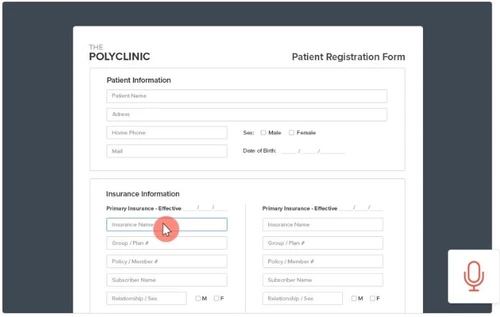
Screencasts with Voiceovers: This enables users to quickly produce tutorials to explain the difficult topics whilst keeping the learner’s attention. The procedure adopted for the same are:

  1. Grab a Screen Area: Users can choose a recording screen, which may be the entire screen or simply a portion of it.
  2. Record Voiceover: By recording a narration using a microphone, one can add more context to a topic.
  3. System Sounds Recording: You may record sound effects to demonstrate an app’s behavior or add some music to make the video more appealing.
  4. Spotlight Mouse Actions: You can draw the attention of your listeners by highlighting a cursor or adding click sounds through iSpring Cam Pro.

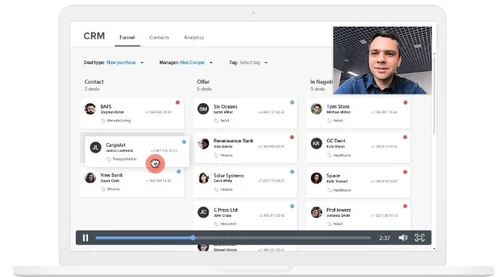
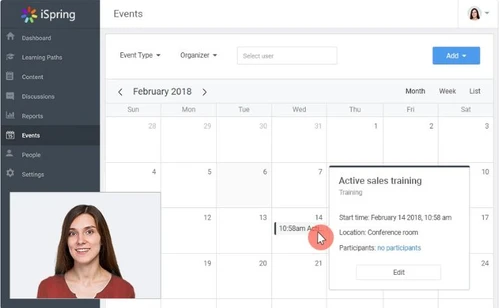
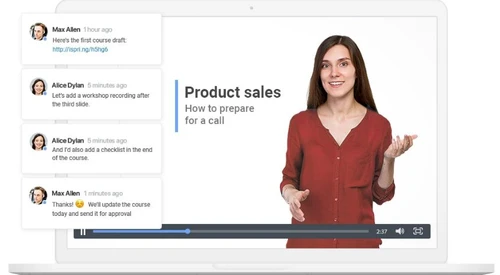
Picture-in picture Screencasts: Through this specialty of the software, users can add personalized touches to their online training by complementing a screencast with a presenter video.

Software Tutorials with Annotations: This helps employees learn the operations of an app and you can add hints for each step so that they can repeat those actions.

What is the price of iSpring Cam Pro? 

The price of iSpring Cam Pro starts at INR 27795 at techjockey.com.

How can users record professional training videos through iSpring Cam Pro?

One of the key aspects of any business is to record professional training videos for their employees so that they can get accustomed to the software. This also helps in highlighting key concepts to engage them in “live” training and boost retention. Here are the 4 steps on how it is done in iSpring Cam Pro:

  1. Interactive Canvas: You can drag and drop annotations, videos, images onto the canvas to produce professional-looking videos swiftly.
  2. Intro Slides and Annotations: Users can create videos and give intro slides and annotations. They can also design visual hints, infographics, add images and captions to assist viewers to retain their information.
  3. Smooth Scene Transitions: You can apply transition effects in order to remove unwanted cuts and create polished videos through this software.
  4. Multi-track Timeline: You can mix your videos and support them with suitable music or voiceover. Besides, you can also trim or delete parts of your video and split or merge them together.

Compatible OS of iSpring Cam Pro

The software runs exclusively on Windows OS and is available only on the desktop version.

Read more

iSpring Company Details

Founded Year:  2001

iSpring Solutions is a global software company focused on providing professional eLearning solutions to corporate and educational clients.

Director/Founders Yury Uskov
Company Size 101-500 Employees

iSpring Cam Pro Pricing & Plans

iSpring Cam Pro
Key Features
  • Screencasts with voice-overs
  • Picture-in-picture screencasts
  • Screencasts with annotations
  • Record keystrokes

Calculated Price

₹ 27795 Exclusive of all taxes
    • Users (Author)

      Users (Author)
      Users (Author)
    • Yearly

      Yearly
      Yearly

Key Features

  • Screencasts with voice-overs

  • Picture-in-picture screencasts

  • Screencasts with annotations

  • Record keystrokes

iSpring Cam Pro Features

  • icon_check Screen Capture
    iSpring Cam Pro offers features to record live screen. Users can either record the whole screen or a part of it. 
  • icon_check Audio Capture
    This screen recording solution captures sounds of two different types. First is the external audio of the user for voice overs,
  • icon_check Mouse Effects
    The software highlights mouse movements to divert the attention towards the action on the screen.
  • icon_check Annotations
    Users can annotate their video and add extra details for better and interactive video production.
  • icon_check Save & Share
    Users can save all the video files in the software and share it through the solution using various social media and email
  • icon_check Scene Transitions
    Smooth transitions between scenes / clips to polish tutorials.
  • icon_check Upload to LMS
    Publish videos directly to an LMS or upload to YouTube from Cam.
  • icon_check Text-to-Speech Voiceover
    Convert text to natural-sounding voice automatically.
  • icon_check Noise Removal
    Remove audio noise in recorded videos to make voiceovers cleaner.
  • icon_check Interactive Canvas
    In editor, drag & drop videos, images, and annotations to build polished content.
  • icon_check High DPI Support
    Ensures the interface and recordings look crisp and clear on modern 4K monitors and high-resolution laptop screens now.
  • icon_check Hardware Accel
    Utilizes your computer's GPU to speed up the video rendering process, saving you valuable time during the final export.
  • icon_check Project Templates
    Saves your specific layout and style settings so you can maintain a consistent brand look across a whole video series.
iSpring Cam Pro Demo Video play icon

Get iSpring Cam Pro Demo

Watch the demo video to explore key features, real workflows, and how the software fits your business needs.

Understand
Key Features
Personal
Demo Insights
Interactive
Demo Support

iSpring Cam Pro Specifications

Supported Platforms
Windows Windows
Devices
Desktop Desktop
Deployment
Cloud-Based Cloud-Based
Suitable For
Media House
Business Specific
All Businesses
Customer Support
Phone Email Communities
Language
English

Explore the Best Alternative Solutions Similar to Your Business Size and Needs

iSpring Cam Pro Review

4.1

Out of 5

img

Overall Rating

Based on
3 Verified Ratings

Rating Breakdown

  • Features 4
  • Value for Money 4.5
  • Ease of Use 4.1
  • Customer Support 3.8

80% Recommend this Product

Add Review

Techjockey Trusted Reviews from Verified Users

No reviews are currently available for iSpring Cam Pro. Discover similar Screen Recording Software reviews

  • GOM CAM Screen Recording

    4.8

    Whats great - So easy to use, not only for simply recording your pc screen also you can add text, underline it, add webcams. So useful for ... read more

  • Camtasia

    4.6

    Whats great - Have made great videos for my youtube channel and the overall experience is great read more

  • DU Recorder

    4.4

    Whats great - Edit all your recordings with this recorder. Equally easy is cropping and linking together of the different fragments. read more

Compare iSpring Cam Pro With other Screen Recording Software

Products
Ratings
Pricing
Device Supported
Deployment
Supported Platforms
  • img

    iSpring Cam Pro

  • 4.1

  • ₹ 27795.00 excl. GST

  • Desktop

    Mobile

  • Web based

    On Premises

  • Windows

    Mac OS

  • img

    Camtasia

  • 4.5

  • ₹ 7099

  • Desktop

    Mobile

  • Web based

    On Premises

  • Windows

    Mac OS

  • img

    ScreenPal

  • 4.2

  • Price On Request

  • Desktop

    Mobile

  • Web based

    On Premises

  • Windows

    Mac OS

  • img

    Fraps

  • 4.3

  • Price On Request

  • Desktop

    Mobile

  • Web based

    On Premises

  • Windows

    Mac OS

  • img

    Fluvid

  • 4.2

  • Price On Request

  • Desktop

    Mobile

  • Web based

    On Premises

  • Windows

    Mac OS

  • img

    Screen Studio

  • 4.3

  • Price On Request

  • Desktop

    Mobile

  • Web based

    On Premises

  • Windows

    Mac OS

  • img

    Macro Recorder

  • 4.1

  • ₹ 9376

  • Desktop

    Mobile

  • Web based

    On Premises

  • Windows

    Mac OS

  • img

    TechSmith Snagit

  • 4.6

  • ₹ 1499

  • Desktop

    Mobile

  • Web based

    On Premises

  • Windows

    Mac OS

(2) Product(s) selected

iSpring Cam Pro Alternatives

See All iSpring Cam Pro Alternatives

Starting Price:

$3 /Month

Starting Price:

$37 /Quantity

Articles for iSpring Cam Pro

See All Related Articles

Do I need a 64-bit or 32-bit version of iSpring Cam Pro?

It completely depends on the PC of the users. Accordingly, they can decide which version of iSpring Cam Pro will be helpful for them.

What are the system requirements for iSpring Cam Pro?

Here are the system requirements for iSpring Cam Pro:? 1. Processor: Intel/AMD 500 MHz or faster ? 2. Memory: 512 MB recommended? 3. Hard Disk: 300 MB minimum? 4. Display: 1024x768 or higher? 5. Sound Card: Sound Card and microphone

Can I synchronize a single audio file with any video presentation in iSpring Cam Pro?

Yes, you can record the audio file separately and sync it with the entire presentation by using PowerPoint integration.

Where does iSpring Cam Pro save all the data?

iSpring Cam Pro uses cloud-based storage system to save all the organization data.

What audio formats does iSpring Cam Pro support??

iSpring Cam Pro supports WAV, MP3, and WMA audio formats.

Can I get a live demo of iSpring Cam Pro?

Yes, techjockey provides online demo of the software as per your chosen date and time.

How do I share my videos socially?

Users can upload their created videos to their LMS for gathering reports on viewers’ activity. If tracking audience activity is optional for you, simply upload them to your own YouTube channel.

What is the role of the multi-track timeline in iSpring Cam Pro?

The multi-track timeline is primarily used for video editing. It helps users mix videos and support them with a voiceover or music. Additionally, you can also trim or delete your video fragments and/or split and/or merge them together.

Is there a mobile app for iSpring Cam Pro?

There isn’t any mobile app version of iSpring Cam Pro as it runs exclusively on Windows desktop versions.

How much does iSpring Cam Pro cost?

The price of iSpring Cam Pro starts at INR 27795 at techjockey.com.

20,000+ Software Listed

Best Price Guranteed

Free Expert Consultation

2M+ Happy Customers

Terms and Condtions

close

Users with registered businesses can purchase goods from merchants on the platform to satisfy their business needs. Users are not permitted to utilize any products acquired through the platform for resale, advertising, business, or further distribution.

For each purchase made, users will receive a Tax Invoice (or 'GST invoice') that includes specific details such as:

  • the GSTIN of the user associated with their registered business, and

  • the specified Entity Name for their business.

It should be noted that not all products are eligible for GST Invoice. Only the products displayed by participating sellers with the 'GST-based Invoice Available' callout on the product description page would qualify.

Certain goods and services are not eligible to get a GST Invoice, including items with VAS, i.e., Value Added Services (e.g., Total Mobile Protection/Assured Buyback) and those involving an exchange offer at the time of purchase.

Users must ensure the accuracy of the GSTIN, and business entity name provided for the GST Invoice. Requests for corrections into GST Invoice would not be accommodated by Techjockey.com or any Seller, and any issues arising from user-provided information are the sole responsibility of users.

Techjockey.com is not liable for the GST Invoice or any associated input tax credit. To efficiently claim an input tax credit, users should select the registered place of business address as per the GST authority's data and follow the provisions of the GST Act and rules.

To claim an input tax credit, the delivery and billing addresses must match. Furthermore, input tax credits will not be granted if the delivery address and GSTIN on the invoice are from different states. In case of incorrect GST details provided during the order placement, the order will be canceled automatically.