 USA
USA UAE
UAESmall Business
Designed for startups and growing businesses


See More




Brand: Apowersoft
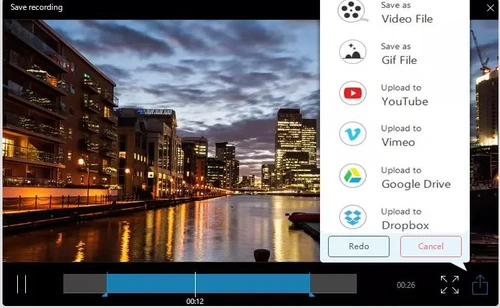
Apowersoft free online screen recording software provides a comprehensive set of features for business users to boost their productivity and achieve core functionalities. The software is fully scalable and provides flexible features depending on the size and project requirements of your organization. You can record live chat, video chat, product demonstrations, and all other activities with a si...
See MoreHave you used Apowersoft Screen Recorder before?
Share your insights for better experience
 Task Scheduler Spotlight Recording AI Subtitle / Transcription Floating Recording Toolbar High-quality videos Video Recording Screen Capture Audio Recording Record Webcam Split & Trim Multi file formats Support Save & Share Interface Annotations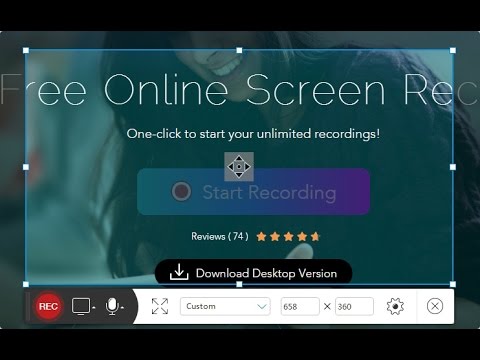

Watch the demo video to explore key features, real workflows, and how the software fits your business needs.
 Windows
  iOS
iOS  Android MacOS
  Desktop
  Mobile
  Cloud-Based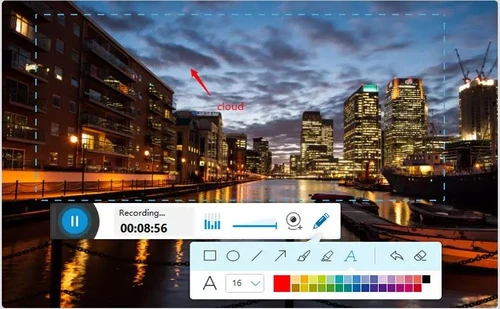
Small Business
Designed for startups and growing businesses
Medium Business
Built for business growth and flexibility
Enterprises
Designed for complex and large-scale business needs
3.9
Out of 5

Overall Rating
Based on
1 Verified Review
Rating Breakdown
85% Recommend this Product
Add Review

Apowersoft Screen Recorder
Price On Request
Desktop
Mobile
Web based
On Premises
Windows
Mac OS

Camtasia
₹ 7099
Desktop
Mobile
Web based
On Premises
Windows
Mac OS

Ace Thinker Screen Recorder
Price On Request
Desktop
Mobile
Web based
On Premises
Windows
Mac OS

ScreenPal
Price On Request
Desktop
Mobile
Web based
On Premises
Windows
Mac OS
Fraps
Price On Request
Desktop
Mobile
Web based
On Premises
Windows
Mac OS

Fluvid
Price On Request
Desktop
Mobile
Web based
On Premises
Windows
Mac OS

Screen Studio
Price On Request
Desktop
Mobile
Web based
On Premises
Windows
Mac OS

Macro Recorder
₹ 9376
Desktop
Mobile
Web based
On Premises
Windows
Mac OS

TechSmith Snagit
₹ 1499
Desktop
Mobile
Web based
On Premises
Windows
Mac OS

Movavi Screen Recorder
₹ 2399
Desktop
Mobile
Web based
On Premises
Windows
Mac OS

ZD Soft Screen Recorder
Price On Request
Desktop
Mobile
Web based
On Premises
Windows
Mac OS
(0) Product(s) selected
Starting Price:
$10 /Month
Starting Price:
$3 /Month
Starting Price:
$37 /Quantity
Available
Price on Request
Starting Price:
$29 /Month
Starting Price:
₹9,376 /Quantity
Starting Price:
$39 /LifeTime

Starting Price:
$33 /Year
Starting Price:
$30 /Year

Available
Price on Request

Starting Price:
$6 /Month




Open the software and select the type of recording you want and click REC button. For HD recording, enter the frame rate and choose the constant frame rate to keep the quality intact.
Yes, Apowersoft free online screen recording allows users to record webcam videos while screen recording simultaneously.
Apowersoft free online screen recording has an integrable interface that allows users to merge it with their cloud storage service
Apowersoft free online screen recording is available for a demo at Techjockey. You can request a call to get the demo scheduled.
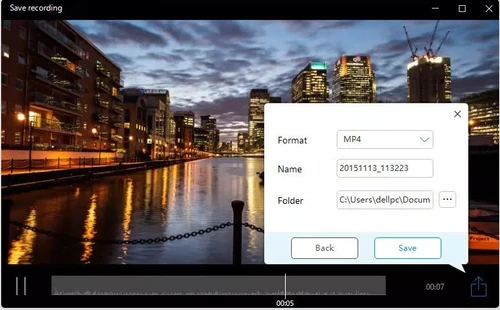
Here is how you do it: ?1. Click “Edit” on the side dashboard and it will drop down the Trim effect with a scissor logo.? 2. Under trim tab, select “add trim maker” and drag the sliders according to your requirements.? 3. Drop down “Preference”, select to keep or delete the part you trimmed just now.? 4. Hit Ok and proceed to save.
Apowersoft Screen Recorder price for the premium plan starts from $40 at techjockey.com.
20,000+ Software Listed
Best Price Guranteed
Free Expert Consultation
2M+ Happy Customers
Terms and Condtions

Users with registered businesses can purchase goods from merchants on the platform to satisfy their business needs. Users are not permitted to utilize any products acquired through the platform for resale, advertising, business, or further distribution.
For each purchase made, users will receive a Tax Invoice (or 'GST invoice') that includes specific details such as:
the GSTIN of the user associated with their registered business, and
the specified Entity Name for their business.
It should be noted that not all products are eligible for GST Invoice. Only the products displayed by participating sellers with the 'GST-based Invoice Available' callout on the product description page would qualify.
Certain goods and services are not eligible to get a GST Invoice, including items with VAS, i.e., Value Added Services (e.g., Total Mobile Protection/Assured Buyback) and those involving an exchange offer at the time of purchase.
Users must ensure the accuracy of the GSTIN, and business entity name provided for the GST Invoice. Requests for corrections into GST Invoice would not be accommodated by Techjockey.com or any Seller, and any issues arising from user-provided information are the sole responsibility of users.
Techjockey.com is not liable for the GST Invoice or any associated input tax credit. To efficiently claim an input tax credit, users should select the registered place of business address as per the GST authority's data and follow the provisions of the GST Act and rules.
To claim an input tax credit, the delivery and billing addresses must match. Furthermore, input tax credits will not be granted if the delivery address and GSTIN on the invoice are from different states. In case of incorrect GST details provided during the order placement, the order will be canceled automatically.



