linkedin
ZD Soft Screen Recorder logo
ZD SOft Screen recorder
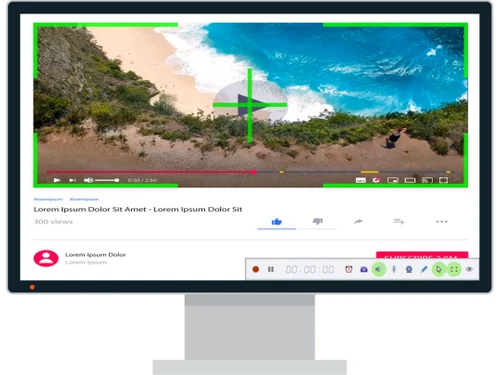
zd soft screen recorder live streaming
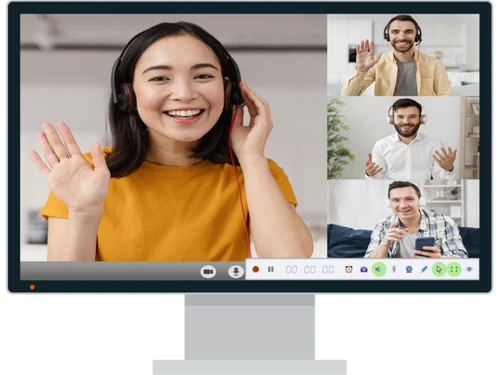
zd soft screen recorder record online class

ZD Soft Screen Recorder

Brand: ZD Soft

  • 4.2

  • 3 Ratings

ZD Screen Recorder is utility software for screencasting and editing videos. The software has an instant click and record feature that allows users to record their screen at any time. This screen recording software also features a markup function that allows users to annotate their videos with a mouse. ZD Screen Recorder also supports microphone for users to speak an add their voice over to the ...

See More

Have you used ZD Soft Screen Recorder before?

Share your insights for better experience

Add a Review
Starting Price
$39

View plans

100% Genuine
Products
Best Price
Guaranteed
Safe & Secure
Payment
  • Description

  • Pricing

  • Features

  • Specification

  • Review

  • Compare

  • Alternatives

  • FAQ

Starting at $39

ZD Soft Screen Recorder Software Overview

What is ZD Screen Recorder? 

ZD Screen Recorder is utility software for screencasting and editing videos. The software has an instant click and record feature that allows users to record their screen at any time. This screen recording software also features a markup function that allows users to annotate their videos with a mouse. ZD Screen Recorder also supports microphone for users to speak an add their voice over to the videos. Plus, users can even edit their videos to crop out the parts that they find unnecessary or combine two different videos into one. 

The software also provides a layered capture window to its users, making it easy for them to select the recording area and proceed with the recording procedure as per their requirement. It supports 22+ file formats like GIF, MKA, MOV, SWF and many more. It also supports 32+ video encoders and 13+ audio encoders. ZD Soft Screen Recorder also supports arbitrary video resolutions, frame rates, and bitrates.

How can users Livestream their screencast with ZD Soft Screen Recorder?

With ZD Soft Screen Recorder, users can Livestream their videos on any online video platforms like YouTube and Twitch with just a click. The software’s friendly user interface and high-performance tools and features make the process easier for users. From high-quality games, video tutorials to online demo classes, users can share all these with the software. They can present their computer screen to the whole world in real-time.

ZD Screen Recording software can also be used to download online videos through screen recording like digitizing VCR. Students, employees, etc. can use this feature to record their lectures, webinars, meetings, among other things. It directly captures videos from the screen and saves it in the hard disk.

What is so unique about ZD Screen Recorder? 

ZD Screen recorder has a unique feature of live streaming screencasts to the internet. The screen recording software offers an integrable interface that allows them to go live on various platforms. It has an in-built plug-in for direct live streaming to several social media sites like Twitch, YouTube, Periscope, etc. It can be used for live streaming video games, educational content, or for showcasing live sketching. ZD Screen Recorder is one of the most preferred software for such screencast live streaming because of its lightweight on hard disk, along with easy to use interface and high-performance screen capturing. 

Latest version of ZD Soft Screen Recorder

The latest version of the software, that’s V11.2.1, was launched on 30th May 2019. Some of its special features are -

  1. A new logging system is added, that will log all the essential error and system info. These will be helpful later for debugging.
  2. In order to avoid the potential black screen issue in the latest version, Windows 7 Aero screen capture does not utilize GPU acceleration anymore.
  3. The makers have also improved the screen resolution initialization routine so that it can be adequately initialized at any time.

Compatible Platforms of ZD Soft Screen Recorder

The software is compatible with Windows XP, Vista, 7, 8, 8.1 and 10 versions.

Alternatives of ZD Soft Screen Recorder

If you are not satisfied with the services provided by ZD Soft Screen Recorder, you can check out the features of -

  1. IceCream Screen Recorder 
  2. Apowersoft Free Onlne Screen Recording

What are the benefits of using ZD Soft Screen Recorder?

  1. Create how-to videos with ease: With ZD Soft Screen Recorder, you can create step-by-step demonstrative videos easily. It allows you to add markups and other relevant annotations in your video while the recording process is still on. Users can also add voice-overs in the video by connecting their microphones.
  2. Download Videos: The software acts as a VCR and allows users to capture online videos from their computer screens with ease. You no longer need to install a bunch of apps to download online videos. ZD Soft Screen Recorder provides a solution to all your problems.
  3. Record live meetings: With ZD Soft Screen Recorder, users can easily record live conferences, webinars, university online lectures and more. All these recordings are saved within your drive and you can review it later as per your convenience.
  4. Livestream Screencasting: The software allows users to Livestream their video content on video platforms like Youtube, Twitch and more.

ZD Soft Screen Recorder Pricing

ZD Soft Screen Recorder pricing starts at $ 39 at Techjockey.com. The pricing model is based on different parameters, including extra features, deployment type, and the total number of users. For further queries related to the product, you can contact our product team and learn more about the pricing and offers.

Read more

ZD Soft Screen Recorder Pricing & Plans

ZD Soft Screen Recorder
Starting at $39
    • Licenses (Lifetime)

      Licenses (Lifetime)
      Licenses (Lifetime)
    • Pc

      Pc
      Pc

ZD Soft Screen Recorder Features

  • icon_check Screen Capture
    The software is designed for users to record their live screens. 
  • icon_check Record Webcam
    ZD Screen recorder integrates with webcam and records videos in real-time. This feature works simultaneously with live screen
  • icon_check Audio Recording
    This live screen recording solution enables users to record their audio over recorded videos through a microphone plugin. 
  • icon_check Gameplay Recording
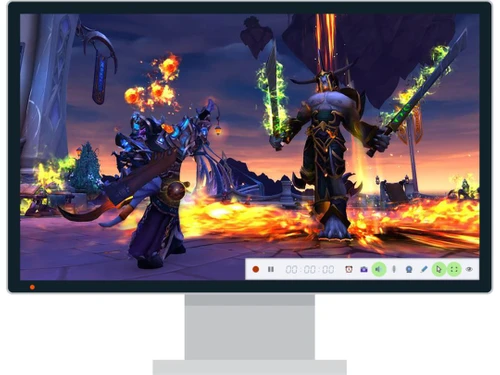
    The software offers live streaming and screen recording of gameplay footage for users to create a montage.
  • icon_check Video Editing
    ZD Screen recorder allows users to edit their live screen and video recordings with audio synchronization, clip adjustments,
  • icon_check Multiple Screenshots
    Users can take multiple screen recordings via ZD Screen recorder in real-time and take image screenshots in real-time. 
  • icon_check Livestream
    This feature is especially designed for social media content creators where they can go live through their screen and showcase
  • icon_check Mouse Effects
    The software offers real-time mouse cursor effect for users to make edits in the video while recording live. 
  • icon_check GPU Acceleration
    Uses GPU (hardware acceleration) to lessen CPU load while recording.
  • icon_check Dynamic Zoom
    Allows “dynamic region” recording and zooming during capture.
  • icon_check On-Screen Annotation
    Draw, highlight, or annotate on-screen content during recording.
  • icon_check High-Performance Codecs
    Supports many video formats / encoders: H.264, MPEG, Xvid, ProRes etc.
  • icon_check Real-Time FPS Overlay
    Displays real-time frame rate (FPS) during game recording.
  • icon_check SDK for Developers
    ZD provides a Screen Recorder SDK (140+ APIs) to embed recording features into custom apps.

ZD Soft Screen Recorder Specifications

Supported Platforms
Windows Windows
Devices
Desktop Desktop
Deployment
Cloud-Based Cloud-Based Perpetual Perpetual
Suitable For
Media House
Business Specific
All Businesses
Language
English

Explore the Best Alternative Solutions Similar to Your Business Size and Needs

ZD Soft Screen Recorder Review

4.2

Out of 5

img

Overall Rating

Based on
3 Verified Ratings

Rating Breakdown

  • Features 4.3
  • Value for Money 3.6
  • Ease of Use 4.3
  • Customer Support 4.8

90% Recommend this Product

Add Review

Techjockey Trusted Reviews from Verified Users

No reviews are currently available for ZD Soft Screen Recorder. Discover similar Screen Recording Software reviews

  • GOM CAM Screen Recording

    4.8

    Whats great - So easy to use, not only for simply recording your pc screen also you can add text, underline it, add webcams. So useful for ... read more

  • Camtasia

    4.6

    Whats great - Have made great videos for my youtube channel and the overall experience is great read more

  • DU Recorder

    4.4

    Whats great - Edit all your recordings with this recorder. Equally easy is cropping and linking together of the different fragments. read more

Compare ZD Soft Screen Recorder With other Screen Recording Software

Products
Ratings
Pricing
Device Supported
Deployment
Supported Platforms
  • img

    ZD Soft Screen Recorder

  • 4.2

  • Price On Request

  • Desktop

    Mobile

  • Web based

    On Premises

  • Windows

    Mac OS

  • img

    Camtasia

  • 4.5

  • ₹ 7099

  • Desktop

    Mobile

  • Web based

    On Premises

  • Windows

    Mac OS

  • img

    ScreenPal

  • 4.2

  • Price On Request

  • Desktop

    Mobile

  • Web based

    On Premises

  • Windows

    Mac OS

  • img

    Fraps

  • 4.3

  • Price On Request

  • Desktop

    Mobile

  • Web based

    On Premises

  • Windows

    Mac OS

  • img

    Fluvid

  • 4.2

  • Price On Request

  • Desktop

    Mobile

  • Web based

    On Premises

  • Windows

    Mac OS

  • img

    Screen Studio

  • 4.3

  • Price On Request

  • Desktop

    Mobile

  • Web based

    On Premises

  • Windows

    Mac OS

  • img

    Macro Recorder

  • 4.1

  • ₹ 9376

  • Desktop

    Mobile

  • Web based

    On Premises

  • Windows

    Mac OS

  • img

    TechSmith Snagit

  • 4.6

  • ₹ 1499

  • Desktop

    Mobile

  • Web based

    On Premises

  • Windows

    Mac OS

(2) Product(s) selected

ZD Soft Screen Recorder Alternatives

See All ZD Soft Screen Recorder Alternatives

Starting Price:

$3 /Month

Starting Price:

$37 /Quantity

Available

Price on Request

Articles for ZD Soft Screen Recorder

See All Related Articles

What is the highest resolution of video recording in ZD Screen recorder?

ZD Screen recorder offers support for 480P to 4K resolution for all the recorded videos.

What is the frame rate of the videos in ZD Screen recorder?

The frame rates in ZD Screen recorder can be customized by users according to their requirements. The software supports up to 120fps frame rate for seamless recording.

Can I record lengthy videos in ZD Screen recorder?

Yes, users can record videos over the duration of 24-hours with ZD Screen recorder.

Does ZD Screen recorder work automatically?

ZD Screen recorder offers the scheduling function that allows users to schedule their recording task. It automatically starts at the appointed time.

Can I get a demo for ZD Screen recorder?

Techjockey provides a demo for ZD Screen recorder solution. You can request a call for getting the demo scheduled.

Does ZD Soft Screen Recorder allow users to record games?

Yes, you can record HD quality games and share them with your friends and viewers on multiple social media platforms. Unlike other software, ZD Soft Screen Recorder never blacks out while recording DirectX and OpenGL accelerated games.

Does ZD Soft Screen Recorder allow users to download online videos in their hard disk?

With ZD Screen Soft Recorder, users can record online videos and store them in their hard disk. The software functions as a regular VCR.

What are the system requirements for installing ZD Soft Screen Recorder?

- RAM: 1GB or more. - Processor: Intel/ AMD 1.5GHz or faster multi-core CPU. - Hard Disk: 20MB Hard Disk space for software installation. - Graphics: NVIDIA/ ATI/ Intel Graphics Card/ AMD.

Does ZD Soft Screen Recorder have a mobile app?

No, there isn’t any app for the ZD Soft Screen recorder as of now.

How much does ZD Soft Screen Recorder cost?

ZD Soft Screen Recorder pricing starts at $ 39 at Techjockey.com.

20,000+ Software Listed

Best Price Guranteed

Free Expert Consultation

2M+ Happy Customers

Terms and Condtions

close

Users with registered businesses can purchase goods from merchants on the platform to satisfy their business needs. Users are not permitted to utilize any products acquired through the platform for resale, advertising, business, or further distribution.

For each purchase made, users will receive a Tax Invoice (or 'GST invoice') that includes specific details such as:

  • the GSTIN of the user associated with their registered business, and

  • the specified Entity Name for their business.

It should be noted that not all products are eligible for GST Invoice. Only the products displayed by participating sellers with the 'GST-based Invoice Available' callout on the product description page would qualify.

Certain goods and services are not eligible to get a GST Invoice, including items with VAS, i.e., Value Added Services (e.g., Total Mobile Protection/Assured Buyback) and those involving an exchange offer at the time of purchase.

Users must ensure the accuracy of the GSTIN, and business entity name provided for the GST Invoice. Requests for corrections into GST Invoice would not be accommodated by Techjockey.com or any Seller, and any issues arising from user-provided information are the sole responsibility of users.

Techjockey.com is not liable for the GST Invoice or any associated input tax credit. To efficiently claim an input tax credit, users should select the registered place of business address as per the GST authority's data and follow the provisions of the GST Act and rules.

To claim an input tax credit, the delivery and billing addresses must match. Furthermore, input tax credits will not be granted if the delivery address and GSTIN on the invoice are from different states. In case of incorrect GST details provided during the order placement, the order will be canceled automatically.