 USA
USA UAE
UAESmall Business
Designed for startups and growing businesses

See More





Brand: TechSmith
TechSmith Camtasia is one of the best screen recording and video editing software. The software helps in the creation of educational videos. This video editing tool enables academicians to add personalized graphics to the video for enhanced engagement and interactivity with their students. What makes TechSmith Camtasia better in comparison to other software? TechSmith has an exceptionally easy...
See MoreHave you used Camtasia before?
Share your insights for better experience
View plans
 Save upto 18%, Get GST Invoice on your business purchase T&C Buy Now & Pay Later, Check offer on payment page.
 Brand: TechSmith
Founded Year: 1987
TechSmith is the #1 global provider of screen capture and screen recording software.
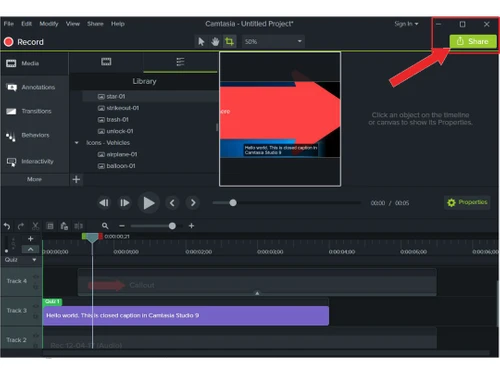
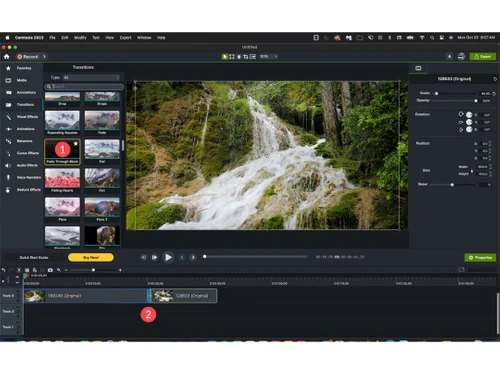
 Zooming system Animation Quizzes Presentation Import Library of assets 4K support Screen Recording Effects Music & Audio Annotations

Watch the demo video to explore key features, real workflows, and how the software fits your business needs.
 Windows
  MacOS
MacOS  Desktop
  Perpetual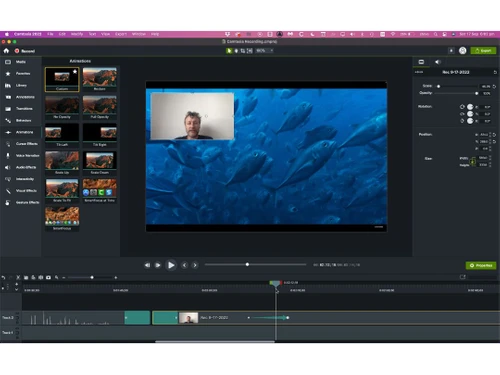
Small Business
Designed for startups and growing businesses
Medium Business
Built for business growth and flexibility
Enterprises
Designed for complex and large-scale business needs
4.5
Out of 5

Overall Rating
Based on
5 Verified Reviews
Rating Breakdown
96% Recommend this Product
Add ReviewCamtasia receives positive feedback for its user-friendly video editing capabilities, making it accessible for beginners and non-professionals. Users appreciate the time-saving autosave feature and the quality of the final products. However, some common complaints include high loading times during rendering and occasional crashes with larger editing files, as well as issues with the direct YouTube upload function. Overall, users find significant value in the software despite these limitations.
Pros
"It made video editing simple and fast even for beginners and non-professionals."
"Autosave project as a file saves a lot of time and work when we suddenly close it because of any reasons."
"Have made great videos for my youtube channel and the overall experience is great"
Cons
"Direct youtube upload option is not working and it's been a glitch in the editor for quite some time."
"It takes too much time while rendering and exporting video. It has high loading time issue."
"When the editing file is large ..Camtasia stops suddenly which is quite irritating"

Jul 12, 2020
Techjockey Verified
“great experience overall”
Pros
Have made great videos for my youtube channel and the overall experience is great
Cons
When the editing file is large ..Camtasia stops suddenly which is quite irritating
Reason to switch
Because of its predefined ready-made templates
Oct 19, 2020
Techjockey Verified
“High loading time while rendering video”
Pros
Autosave project as a file saves a lot of time and work when we suddenly close it because of any reasons.
Cons
It takes too much time while rendering and exporting video. It has high loading time issue.
Reason to switch
Many presets and smooth editing process
Jan 2, 2021
Techjockey Verified
“Made editing a piece of cake for beginners”
Pros
It made video editing simple and fast even for beginners and non-professionals.
Cons
Direct youtube upload option is not working and it's been a glitch in the editor for quite some time.
Reason to switch
Making complex video made simple and easy without a professional background

Camtasia
₹ 7099.00 excl. GST
Desktop
Mobile
Web based
On Premises
Windows
Mac OS

TechSmith Snagit
₹ 1499
Desktop
Mobile
Web based
On Premises
Windows
Mac OS

Techsmith Relay
Price On Request
Desktop
Mobile
Web based
On Premises
Windows
Mac OS

Apowersoft Screen Recorder
Price On Request
Desktop
Mobile
Web based
On Premises
Windows
Mac OS

Ace Thinker Screen Recorder
Price On Request
Desktop
Mobile
Web based
On Premises
Windows
Mac OS

ScreenPal
Price On Request
Desktop
Mobile
Web based
On Premises
Windows
Mac OS

Fraps
Price On Request
Desktop
Mobile
Web based
On Premises
Windows
Mac OS

Fluvid
Price On Request
Desktop
Mobile
Web based
On Premises
Windows
Mac OS

Screen Studio
Price On Request
Desktop
Mobile
Web based
On Premises
Windows
Mac OS

Movavi Screen Recorder
₹ 2399
Desktop
Mobile
Web based
On Premises
Windows
Mac OS

Macro Recorder
₹ 9376
Desktop
Mobile
Web based
On Premises
Windows
Mac OS
(2) Product(s) selected
Starting Price:
$40 /Month
Starting Price:
$10 /Month
Starting Price:
$37 /Quantity
Available
Price on Request
Starting Price:
$29 /Month
Starting Price:
₹9,376 /Quantity

Starting Price:
$39 /LifeTime

Starting Price:
$33 /Year

Starting Price:
$30 /Year

Available
Price on Request

Available
Price on Request




Yes, Camtasia is available for free demo that interested buyers can try out before the purchase.
TechSmith Camtasia saves all edited videos on the PC. It is available for on-premise deployment.
This video editing software used to be Windows exclusive only. But the latest version is designed to work with both Windows and Mac OS systems.
The latest version of TechSmith Camtasia ava is Camtasia 2025.0.1.
Yes, TechSmith Camtasia offers exemplary features that facilitate the simultaneous recording of the screen. That means synchronizing your video lectures is now way easier than ever before.
Camtasia pricing starts from INR 7099 at techjockey.com
To fix export issues in Camtasia 2025 follow these steps:
0 0
Here are some of the ways using which one could fix an issue while screen recording in Techsmith Camtasia:
0 0
To enable screen recording using Techsmith Camtasia, follow the steps given below:
0 0
20,000+ Software Listed
Best Price Guranteed
Free Expert Consultation
2M+ Happy Customers
Terms and Condtions

Users with registered businesses can purchase goods from merchants on the platform to satisfy their business needs. Users are not permitted to utilize any products acquired through the platform for resale, advertising, business, or further distribution.
For each purchase made, users will receive a Tax Invoice (or 'GST invoice') that includes specific details such as:
the GSTIN of the user associated with their registered business, and
the specified Entity Name for their business.
It should be noted that not all products are eligible for GST Invoice. Only the products displayed by participating sellers with the 'GST-based Invoice Available' callout on the product description page would qualify.
Certain goods and services are not eligible to get a GST Invoice, including items with VAS, i.e., Value Added Services (e.g., Total Mobile Protection/Assured Buyback) and those involving an exchange offer at the time of purchase.
Users must ensure the accuracy of the GSTIN, and business entity name provided for the GST Invoice. Requests for corrections into GST Invoice would not be accommodated by Techjockey.com or any Seller, and any issues arising from user-provided information are the sole responsibility of users.
Techjockey.com is not liable for the GST Invoice or any associated input tax credit. To efficiently claim an input tax credit, users should select the registered place of business address as per the GST authority's data and follow the provisions of the GST Act and rules.
To claim an input tax credit, the delivery and billing addresses must match. Furthermore, input tax credits will not be granted if the delivery address and GSTIN on the invoice are from different states. In case of incorrect GST details provided during the order placement, the order will be canceled automatically.



