linkedin

Get Free Advice

Get Quote

Microsoft Clarity logo
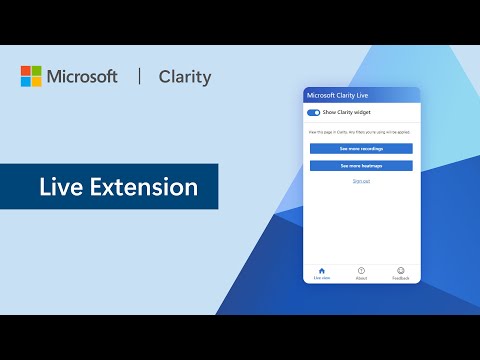
Gallery An Overview of the Microsoft Clarity Live Extension
microsoft clarity-dashboard microsoft clarity-analytics microsoft clarity-interface
play An Overview of the Microsoft Clarity Live Extension
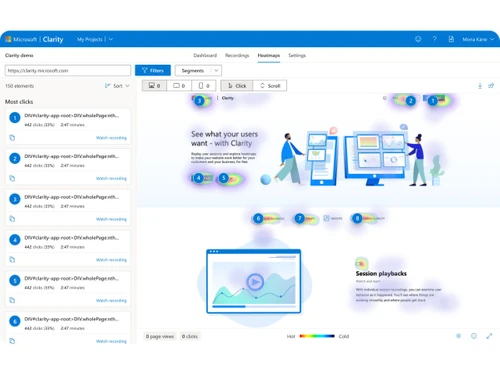
microsoft clarity-dashboard
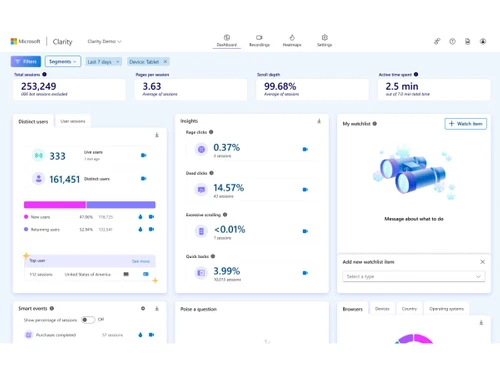
microsoft clarity-analytics
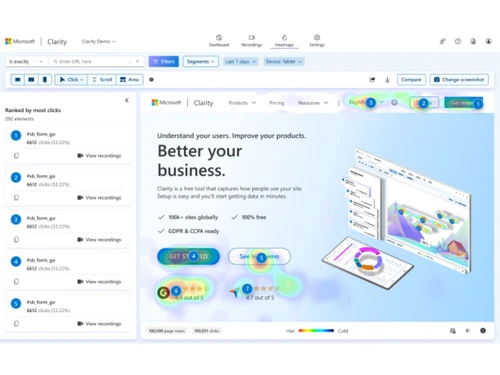
microsoft clarity-interface

Microsoft Clarity

Brand : Microsoft Corporation

FREE

Save Extra with 2 Offers

  • offer_icon Save upto 18%, Get GST Invoice on your business purchase |
  • offer_icon Buy Now & Pay Later, Check offer on payment page.

A free Microsoft tool that helps you understand website user behavior through heatmaps and session recordings. ...Read more

  • AdviceGet Instant Expert
    Advice
  • PaymentSafe & Secure
    Payment
  • GuaranteedAssured Best Price
    Guaranteed

Microsoft Clarity Software Pricing, Features & Reviews

What is Microsoft Clarity?

Microsoft Clarity is a free conversion rate optimisation tool from Microsoft that shows how people interact with your website. It tracks user behavior like clicks, scrolls, and movements to help you understand what visitors are doing on your pages.

Clarity creates heatmaps that visually highlight areas with high and low engagement using color coding. It also provides session recordings so you can watch real visitor sessions and see how users navigate your site.

The insights help you find what content works, what doesn't, and where users get stuck. Clarity is easy to install and starts showing data quickly. It supports multiple device types like desktop, tablet, and mobile.

Why Choose Microsoft Clarity Software?

  • Completely Free Tool: Use all features without paying anything.
  • No Traffic Restrictions: Track unlimited visitors on your website.
  • Built-In Heatmaps: Automatically see where users interact most.
  • Visitor Session Recordings: Watch real user journeys on your site.
  • Fast and Easy Setup: Start collecting data within minutes.
  • Click Tracking: Understand which elements users click the most.
  • Scroll Behavior Analysis: See how far visitors scroll on pages.
  • Page Area Insights: Analyze performance of specific page sections.
  • Attention Mapping: Know where users spend the most time.
  • Near Real-Time Data: Access insights quickly for faster decisions.
  • Privacy Compliant: Built to support GDPR and CCPA standards.
  • No Data Sampling: Every visitor interaction is recorded.
  • Detailed Behavior Tracking: Capture clicks, scrolls, and movements.
  • User Frustration Detection: Spot rage clicks and dead clicks easily.

Benefits of Microsoft Clarity Software

  • UX Improvement Support: Identify usability issues visually.
  • Simple Analytics Dashboard: View key insights in one place.
  • Multi-Device Tracking: Works across desktop, mobile, and tablet.
  • Heatmap Comparison: Compare engagement across pages or versions.
  • AI-Powered Insights: Uses machine learning to tag user behavior.
  • Google Analytics Integration: Combine Clarity with traffic analytics.
  • Data Privacy Masking: Automatically hides sensitive user data.
  • Lightweight Script: Does not slow down website performance.
  • Cross-Page Behavior Analysis: Track engagement across multiple pages.
  • Advanced Filters: Segment and filter data for deeper insights.
  • Unlimited Projects: Add and manage multiple websites easily.
  • Design Testing Support: Improve layouts using visual behavior data.

Microsoft Clarity Pricing

Microsoft Clarity is available for FREE on techjockey.com. The pricing model is based on different parameters, including extra features, deployment type, and the total number of users. For further queries related to the product, you can contact our product team and learn more about the pricing and offers.

Microsoft Clarity Pricing & Plans

This product is available Free Forever.
Start using it instantly — no charges, no commitments.

  • Full access to basic version available
  • No credit card required

Free Forever Plan

Get started immediately at no cost.
Upgrade anytime if your business needs grow.

Get Microsoft Clarity Demo

We make it happen! Get your hands on the best solution based on your needs.

Interacted

Microsoft Clarity Features

  • icon_check Session Recording This feature captures and replays individual user sessions to observe mouse movements, clicks, and page navigation sequences.
  • icon_check Click Heatmaps Visualizes aggregate data of user interactions by highlighting specific elements or areas that receive the most click activity.
  • icon_check Scroll Heatmaps Displays the percentage of users who reach various vertical depths of a page to evaluate content visibility and engagement.
  • icon_check Rage Click Tracking Automatically flags instances where users click rapidly in a small area, indicating frustration or non-responsive elements.
  • icon_check Dead Click Reports Identifies user clicks that do not trigger any page change or functional response, highlighting potential broken interface.
  • icon_check Quick Back Tracking Logs instances where a visitor navigates to a new page but immediately returns to the previous one due to lack of interest.
  • icon_check JavaScript Error Log Captures client-side JavaScript errors occurring during user sessions and links them to specific recordings for debugging.
  • icon_check Google Analytics Integration Connects user behavior data with Google Analytics to provide a unified view of quantitative and qualitative website metrics.
  • icon_check Custom Tags Allows developers to pass specific metadata to Clarity for filtering sessions based on unique business or technical criteria.
  • icon_check Data Masking Automatically redacts sensitive text and input fields in recordings to ensure user privacy and compliance with data rules.
  • icon_check Funnel Analysis Tracks the progression of users through a defined sequence of steps to identify where drop-offs occur in the conversion path.
  • icon_check Area Heatmaps Measures total click volume for specific regions of a webpage rather than individual elements for broad engagement analysis.
  • icon_check Segment Filtering Enables data slicing by device type, browser, operating system, and geographic location to isolate specific user behaviors.
  • icon_check Team Management Provides administrative controls to add multiple users to a project with specific permissions for collaborative data review.
  • icon_check Performance Metrics Reports page load times and core web vitals to correlate site speed with user engagement and overall session satisfaction.

Microsoft Clarity Specifications

  • Supported Platforms :
  • Device:
  • Deployment :
  • Suitable For :
  • Business Specific:
  • Business Size:
  • Customer Support:
  • Integration:
  • Training:
  • Language:
  • AI Features:
  • Compliance Regulation:
  • Ubuntu Windows Android MacOS Linux
  • DesktopMobileTablet
  • Web-Based
  • All Industries
  • All Businesses
  • Individual, Small Business, Startups, Medium Business, Enterprises, SMBs, SMEs, MSMBs, MSMEs, Freelancers
  • Email, Communities
  • API Integration
  • Documentation, Videos
  • English
  • AI Integrated
  • CCPA

Microsoft Clarity Reviews and Ratings

banner

Would you like to review this product?

Submit Reviews

Microsoft Corporation Company Details

Brand Name Microsoft Corporation
Information Microsoft Corporation is an American multinational technology company with headquarters in Redmond, Washington.
Founded Year 1975
Director/Founders Paul Allen , Bill Gates
Company Size 1000+ Employees
Other Products Microsoft Office 365 for Business (MOLP), Microsoft Office 365 Business Basic, Microsoft Intune Open (MOLP), Microsoft Open Licensing Program MOLP, Microsoft Office Home & Business

Compare Microsoft Clarity With other Heatmaps

Microsoft Claritylogo

Microsoft Clarity

by : Microsoft Corporation

4.5

VS
SWIPER_PRODUCTS_CARD_NEW

Microsoft Clarity FAQ

A Microsoft Clarity is available for FREE on techjockey.com.
A Yes, Microsoft Clarity has a dedicated Android mobile app.
A Microsoft Clarity works on any operating system such as Ubuntu, Windows, MacOS, or Linux through a modern web browser.
A No, Microsoft Clarity does not offer a free trial because it is permanently free to use.
A Microsoft Clarity functions by recording heatmaps and session recordings to show how visitors interact with your website.
A Microsoft Clarity is used by website owners and analysts to understand visitor behavior and improve user experience.
A Yes, a live demo is available to explore Microsoft Clarity's features.
A Yes, Microsoft Clarity is completely free to use with no cost or traffic limits.

Microsoft Clarity Alternatives

See All
Why Choose Techjockey?

Software icon representing 20,000+ Software Listed 20,000+ Software Listed

Price tag icon for best price guarantee Best Price Guaranteed

Expert consultation icon Free Expert Consultation

Happy customer icon representing 2 million+ customers 2M+ Happy Customers