linkedin
Paycom logo
play Enhanced Background Checks®
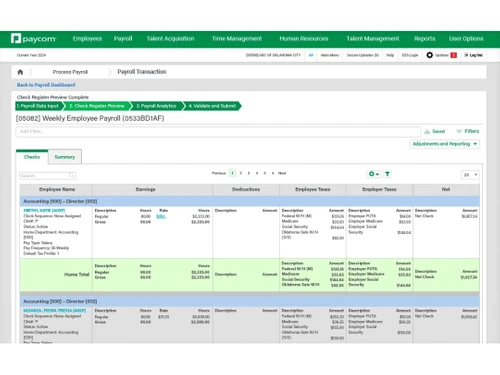
paycom-dashboard
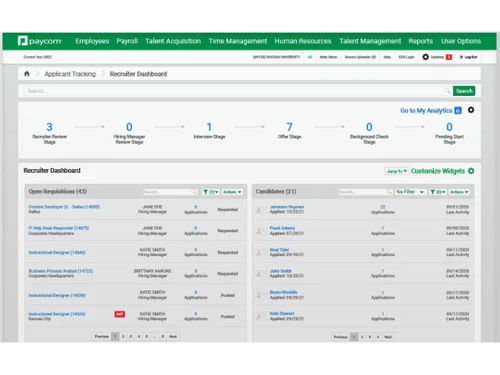
paycom recruiter-dashboard

Paycom

Brand: Paycom Payroll

  • 4.2

  • 4 Ratings

Paycom is a cloud-based HR software that automates and integrates various human resources tasks, including payroll, hiring, and employee management, into a single platform.

See More

Have you used Paycom before?

Share your insights for better experience

Add a Review

Price Available on Request

Questions about pricing or customization? We’re here to help, just a click away.

100% Genuine
Products
Best Price
Guaranteed
Safe & Secure
Payment
  • Description

  • Pricing

  • Features

  • Specification

  • Review

  • Compare

  • Alternatives

  • FAQ

Paycom Software Overview

What is Paycom?

Paycom is a cloud-based HR software platform designed to streamline and automate various human resources tasks.

It covers the entire employee lifecycle from recruitment and onboarding to payroll, benefits administration, and performance management all within a single system.

One of its standout features is the Beti system, which allows employees to manage their own payroll, reducing errors and administrative workload.

This self-service approach enhances data accuracy and compliance. Paycom integrated tools help businesses save time, cut costs, and improve HR efficiency.

Why Choose Paycom Software?

  • All-in-One HR and Payroll Platform: Paycom offers a unified system that seamlessly integrates payroll, HR, talent acquisition, and benefits administration, eliminating the need for multiple software solutions.
  • Employee-Driven Payroll with Beti: Beti empowers employees to manage their own payroll, reducing errors and enhancing transparency.
  • Single Database Architecture: All modules operate on a single database, ensuring real-time data updates and consistency across the platform.
  • Enhanced Compliance Management: Stay updated with the latest employment laws and regulations, reducing the risk of non-compliance.
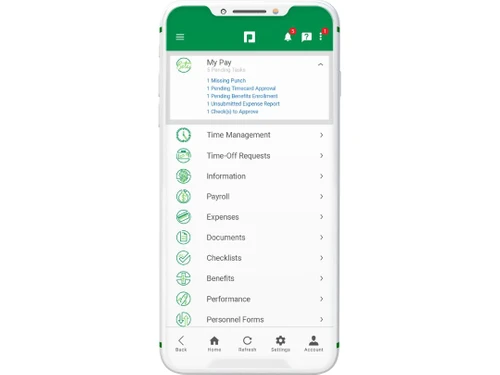
  • Mobile Accessibility with Manager on-the-Go: Managers can perform essential tasks anytime, anywhere, enhancing flexibility and responsiveness.
  • Automated HR Processes: Automate routine HR tasks like onboarding and benefits enrollment, freeing up time for strategic initiatives.
  • Customizable Reporting Tools: Generate tailored reports to gain insights into various HR metrics and make informed decisions.
  • Integrated Benefits Administration: Streamline benefits management with tools that allow for easy setup of deduction amounts, enrollment dates, and eligibility criteria.
  • Employee Self-Service Portal: Employees can access and manage their personal information, reducing administrative workload.
  • Efficient Time and Attendance Tracking: Monitor employee hours accurately, ensuring proper compensation and compliance.
  • Streamlined Onboarding Process: Automate the onboarding process, ensuring new hires are integrated smoothly and efficiently.

Benefits of Paycom Software

  • Customizable Workflows: Tailor workflows to match your organization specific processes and requirements.
  • Dedicated Support Model: Receive personalized support without the need to wait in queues or submit tickets.
  • User-Friendly Interface: Navigate the platform with ease, thanks to its intuitive design and layout.
  • Integration Capabilities: Integrate Paycom with other essential business tools, enhancing overall efficiency.
  • Performance Management Tools: Track and manage employee performance, setting goals and monitoring progress effectively.
  • Survey and Feedback Mechanisms: Collect employee feedback through surveys, fostering a culture of continuous improvement.
  • Compliance with Employment Laws: Stay compliant with ever-changing employment laws, reducing legal risks.
  • Global HCM Capabilities: Manage human capital across multiple countries with support for various languages and regulations.
  • Continuous Product Innovation: Regular updates and new features ensure the platform evolves with industry needs.

Paycom Pricing

Paycom price details are available on request at Techjockey.com. The pricing model is based on different parameters, including extra features, deployment type, and the total number of users. For further queries related to the product, you can contact our product team and learn more about the pricing and offers.

Read more

Paycom Payroll Company Details

Founded Year:  1998

Paycom’s (NYSE:PAYC) payroll and HR software simplifies life for employees and transforms how people do business.

Director/Founders Chad Richison
Company Size 1000+ Employees

Paycom Pricing & Plans

Looking for The Right Pricing?

Share your requirements and get a plan built around your business.

  • Define your business needs
  • Get customised pricing
  • Choose features that fit your workflow

Price Available on Request

Get personalised Paycom pricing that fits your needs. Our team will connect with you.

Paycom Features

  • icon_check Automated Payroll
    Automatically calculates and processes employee wages, taxes, and deductions for timely and accurate payroll.
  • icon_check Expense Claims
    Allows employees to submit and track reimbursements while giving employers easy approval and reporting tools.
  • icon_check Applicant Tracking System
    Streamlines the recruitment process by managing job postings, applications, interviews, and candidate communication.
  • icon_check Document Management
    Securely stores, organizes, and accesses HR documents digitally, reducing paperwork and improving compliance.
  • icon_check Background Screening
    Conducts pre-employment background checks to ensure candidates meet job and legal requirements.
  • icon_check Performance Management
    Enables goal setting, feedback, and evaluations to monitor and enhance employee performance.
  • icon_check Position Management
    Manages job structures and roles within the organization to maintain clarity and workforce alignment.
  • icon_check Time Tracking
    Records employee hours, attendance, and leave, helping ensure accurate payroll and compliance with labor laws.
  • icon_check Benefit Administration
    Simplifies enrollment, eligibility tracking, and management of employee benefits like health insurance and retirement plans.
  • icon_check 401(k) reporting
    Generates reports on retirement plan contributions and compliance, aiding in audits and financial planning.
Paycom Demo Video play icon

Get Paycom Demo

Watch the demo video to explore key features, real workflows, and how the software fits your business needs.

Understand
Key Features
Personal
Demo Insights
Interactive
Demo Support

Paycom Specifications

Supported Platforms
Ubuntu Ubuntu Windows Windows iOS iOS Android Android MacOS MacOS Linux Linux
Devices
Desktop Desktop Mobile Mobile Tablet Tablet iPad iPad
Deployment
Cloud-Based Cloud-Based
Suitable For
All Industries
Business Specific
All Businesses
Business Size
Small Business Startups Medium Business Enterprises
Customer Support
Phone Email Communities
Language
English
Training Resources
Webinars Documentation Videos

Explore the Best Alternative Solutions Similar to Your Business Size and Needs

Paycom Review

4.2

Out of 5

img

Overall Rating

Based on
4 Verified Ratings

Rating Breakdown

  • Features 4.1
  • Value for Money 4.1
  • Ease of Use 4.1
  • Customer Support 4.6

95% Recommend this Product

Add Review

Techjockey Trusted Reviews from Verified Users

No reviews are currently available for Paycom. Discover similar HR Software reviews

  • Zfour HRMS

    4.9

    Whats great - The service is professional, user-friendly, and genuinely helpful. Highly recommend to anyone looking for quality and trust. read more

  • HROne

    4.8

    Whats great - None read more

  • factoHR

    4.6

    Whats great - Get real-time HR insights! Data-driven reports help you make faster, smarter decisions for workforce management read more

Compare Paycom With other HR Software

Products
Ratings
Pricing
Device Supported
Deployment
Supported Platforms
  • img

    Paycom

  • 4.2

  • Price On Request

  • Desktop

    Mobile

  • Web based

    On Premises

  • Windows

    Mac OS

  • img

    Spine HR

  • 4.3

  • Price On Request

  • Desktop

    Mobile

  • Web based

    On Premises

  • Windows

    Mac OS

  • img

    ClusterHR

  • 5

  • ₹ 40

  • Desktop

    Mobile

  • Web based

    On Premises

  • Windows

    Mac OS

  • img

    Fix HR

  • 4.9

  • ₹ 600

  • Desktop

    Mobile

  • Web based

    On Premises

  • Windows

    Mac OS

  • img

    Zfour HRMS

  • 4.9

  • ₹ 45

  • Desktop

    Mobile

  • Web based

    On Premises

  • Windows

    Mac OS

  • img

    WeekMate

  • 4.7

  • ₹ 3999

  • Desktop

    Mobile

  • Web based

    On Premises

  • Windows

    Mac OS

  • img

    SignalHRM

  • 4.6

  • ₹ 648

  • Desktop

    Mobile

  • Web based

    On Premises

  • Windows

    Mac OS

  • img

    WoCo

  • 4.8

  • ₹ 50

  • Desktop

    Mobile

  • Web based

    On Premises

  • Windows

    Mac OS

  • img

    Presence360

  • 4.9

  • ₹ 2999

  • Desktop

    Mobile

  • Web based

    On Premises

  • Windows

    Mac OS

  • img

    TruHR

  • 4.9

  • ₹ 2200

  • Desktop

    Mobile

  • Web based

    On Premises

  • Windows

    Mac OS

  • img

    Keka HR

  • 4.4

  • Price On Request

  • Desktop

    Mobile

  • Web based

    On Premises

  • Windows

    Mac OS

(0) Product(s) selected

Paycom Alternatives

See All Paycom Alternatives

Starting Price:

₹600 /Month ₹900

SAVE UPTO 33%

Starting Price:

₹2,200 /Month

Starting Price:

₹49 /Month

Starting Price:

₹890 /Month
Starting Price:

₹1,499 /Month

Starting Price:

$49 /Month

Available

Price on Request

Starting Price:

₹5,000 /Month

Articles for Paycom

See All Related Articles

How much does Paycom Software cost?

Paycom pricing details are available upon request through Techjockey.com.

Is there a mobile app available for Paycom Software?

Yes, Paycom offers a mobile app on Android and iOS..

Which operating systems are compatible with Paycom Software?

Paycom is compatible with web browsers on Ubuntu, Linux, Windows, macOS, Android, and iOS devices.

Does Paycom Software offer a free trial?

No, Paycom does not offer a free trial.

How does Paycom Software function?

Paycom software functions by letting businesses manage HR tasks like payroll, hiring, and employee data all in one online system.

Who uses Paycom Software?

Mid-sized to large businesses across industries use Paycom for HR, payroll, and workforce management.

Is a free demo available for Paycom Software?

Yes, Paycom provides a free demo upon request through their website.

Is Paycom Software available for free?

No, Paycom is a paid enterprise software solution.

Can Paycom handle tax filing?

Yes, Paycom automates federal, state, and local tax calculations and filings.

Does Paycom support employee self-service?

Yes, employees can manage their own data, pay stubs, benefits, and more via self-service.

20,000+ Software Listed

Best Price Guranteed

Free Expert Consultation

2M+ Happy Customers

Terms and Condtions

close

Users with registered businesses can purchase goods from merchants on the platform to satisfy their business needs. Users are not permitted to utilize any products acquired through the platform for resale, advertising, business, or further distribution.

For each purchase made, users will receive a Tax Invoice (or 'GST invoice') that includes specific details such as:

  • the GSTIN of the user associated with their registered business, and

  • the specified Entity Name for their business.

It should be noted that not all products are eligible for GST Invoice. Only the products displayed by participating sellers with the 'GST-based Invoice Available' callout on the product description page would qualify.

Certain goods and services are not eligible to get a GST Invoice, including items with VAS, i.e., Value Added Services (e.g., Total Mobile Protection/Assured Buyback) and those involving an exchange offer at the time of purchase.

Users must ensure the accuracy of the GSTIN, and business entity name provided for the GST Invoice. Requests for corrections into GST Invoice would not be accommodated by Techjockey.com or any Seller, and any issues arising from user-provided information are the sole responsibility of users.

Techjockey.com is not liable for the GST Invoice or any associated input tax credit. To efficiently claim an input tax credit, users should select the registered place of business address as per the GST authority's data and follow the provisions of the GST Act and rules.

To claim an input tax credit, the delivery and billing addresses must match. Furthermore, input tax credits will not be granted if the delivery address and GSTIN on the invoice are from different states. In case of incorrect GST details provided during the order placement, the order will be canceled automatically.