linkedin
PCRecruiter logo
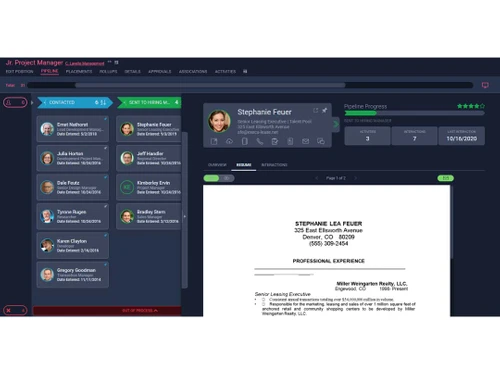
play PCRecruiter Pipeline
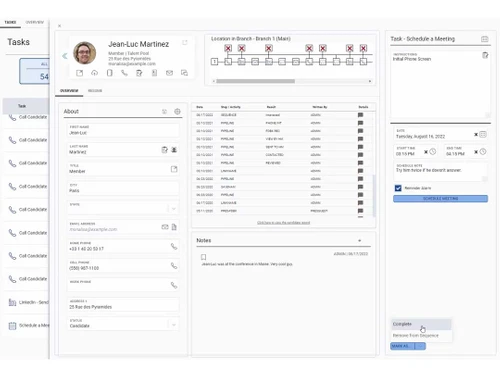
PCRecruiter tasks
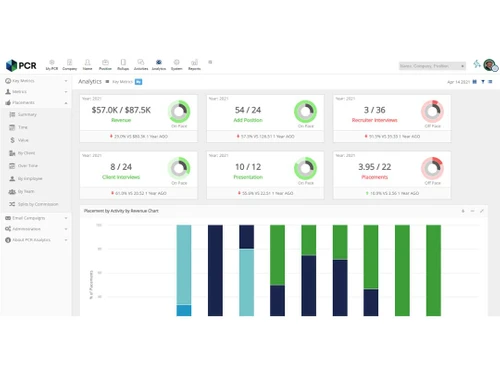
PCRecruiter dashboard

PCRecruiter

Brand: PCRecruiter

  • 4.0

  • 3 Ratings

PCRecruiter combines Applicant Tracking System (ATS) and Customer Relationship Management (CRM) features to help organizations efficiently manage their hiring processes and candidate relationships.

See More

Have you used PCRecruiter before?

Share your insights for better experience

Add a Review

Price Available on Request

Questions about pricing or customization? We’re here to help, just a click away.

100% Genuine
Products
Best Price
Guaranteed
Safe & Secure
Payment
  • Description

  • Pricing

  • Features

  • Specification

  • Review

  • Compare

  • Alternatives

  • FAQ

PCRecruiter Software Overview

What is PCRecruiter?

PCRecruiter is a recruitment software that combines Applicant Tracking System (ATS) and Customer Relationship Management (CRM) functionalities to streamline the hiring process. It allows recruiters to manage candidate applications, track job openings, and maintain communication with clients and candidates all in one platform.

With customizable workflows and forms, PCRecruiter can be tailored to meet the specific needs of different organizations, making it suitable for various recruitment styles. The software also features powerful search capabilities, enabling users to quickly find and organize candidate data. Additionally, PCRecruiter integrates with tools like Zoom for seamless communication and supports secure data management with configurable access options. It serves a wide range of users, from staffing firms to corporate HR departments, helping them efficiently manage their talent acquisition processes.

Why Choose PCRecruiter Software?

  • Integrated ATS and CRM: It combines Applicant Tracking System (ATS) and Customer Relationship Management (CRM) functionalities, streamlining recruitment and client management in one platform.
  • Customizable Workflows: The software offers virtually unlimited custom fields, forms, and workflows, allowing users to tailor the system to fit their specific recruitment processes.
  • Powerful Search Capabilities: It features advanced search functions that enable recruiters to quickly find and organize candidate data, enhancing efficiency.
  • Seamless Communication Integration: The integration with Zoom allows for easy video calling directly within the platform, improving communication with candidates and clients.
  • Flexible Security Options: Users can configure security settings to manage data access effectively while ensuring compliance with regulations like EEO and OFCCP.
  • Automated Processes: The software includes automation features that help streamline everyday tasks, allowing recruiters to focus more on personal connections with candidates.
  • Open API for Customization: It provides an open API, enabling users to connect and create custom software solutions that enhance their recruiting processes.
  • Award-Winning Support: Recognized for its exceptional customer service, PCRecruiter offers reliable support to help users maximize the software’s capabilities.
  • End-to-End Recruitment Support: The software supports the entire talent acquisition process from start to finish, making it suitable for permanent placements, staffing, and corporate hiring.

Benefits of PCRecruiter Software

  • Enhanced Communication Tools: The integration with Zoom allows for seamless video and voice communication, improving connectivity with candidates and clients.
  • Award-Winning Support: It has received recognition for its exceptional customer support, ensuring users have assistance when needed.
  • Flexible Security Management: The software offers powerful security features that allow users to customize access levels and protect sensitive data effectively.
  • Customizable Data Management: Users can create virtually unlimited custom fields and forms, tailoring the database to meet specific recruitment needs.
  • Efficient Activity Tracking: It enables users to monitor team activities and performance indicators, helping optimize recruitment efforts.
  • Seamless Email Integration: The platform integrates with Outlook and Gmail, allowing recruiters to manage communications directly within PCRecruiter.
  • Compliance Assurance: It helps organizations maintain compliance with EEO and OFCCP regulations, reducing legal risks in hiring practices.
  • Powerful Candidate Capture: The software includes advanced candidate capture functionality that simplifies the process of collecting applicant information from various sources.
  • Global Reach and Scalability: With thousands of customers worldwide, it is designed to scale with organizations as they grow and adapt to changing recruitment needs.

Pricing of PCRecruiter

Price details for PCRecruiter are available upon request at techjockey.com.

The pricing model is based on different parameters, including extra features, deployment type, and the total number of users. For further queries related to the product, you can contact our product team and learn more about the pricing and offers.

Read more

PCRecruiter Company Details

Founded Year:  1998

Main Sequence Technology, Inc. is one of the world's most successful developers of applicant tracking and staffing software. Tens of thousands of recruiters and human resources professionals rely on PCRecruiter every day, along with thousands of public users interacting with them.

Director/Founders William Kubicek
Company Size 1-100 Employees

PCRecruiter Pricing & Plans

Looking for The Right Pricing?

Share your requirements and get a plan built around your business.

  • Define your business needs
  • Get customised pricing
  • Choose features that fit your workflow

Price Available on Request

Get personalised PCRecruiter pricing that fits your needs. Our team will connect with you.

PCRecruiter Features

  • icon_check Candidate Management
    Organizes and tracks candidate profiles, resumes, and application status.
  • icon_check Job Posting
    Posts job openings across various platforms and job boards.
  • icon_check Interview Scheduling
    Automates interview scheduling and manages candidate communication.
  • icon_check Applicant Tracking
    Tracks applicants through every stage of the recruitment process.
  • icon_check Pipeline Management
    Manages and visualizes the recruitment pipeline to track progress.
  • icon_check Recruitment Analytics
    Provides insights and reports on recruitment performance and metrics.
  • icon_check Custom Workflows
    Allows customization of recruitment workflows to fit specific business needs.
  • icon_check Custom Forms
    Enables the creation of tailored forms for applications and candidate data collection.
PCRecruiter Demo Video play icon

Get PCRecruiter Demo

Watch the demo video to explore key features, real workflows, and how the software fits your business needs.

Understand
Key Features
Personal
Demo Insights
Interactive
Demo Support

PCRecruiter Specifications

Supported Platforms
Windows Windows Android Android
Devices
Desktop Desktop Mobile Mobile
Deployment
Cloud-Based Cloud-Based
Suitable For
All Industries
Business Specific
All Businesses
Business Size
Small Business Medium Business SMBs SMEs
Customer Support
Email Live Chat Forums
Language
English
Integration
API Integration
Training Resources
Live Online Documentation

Explore the Best Alternative Solutions Similar to Your Business Size and Needs

PCRecruiter Review

4.0

Out of 5

img

Overall Rating

Based on
3 Verified Ratings

Rating Breakdown

  • Features 4.5
  • Value for Money 3.5
  • Ease of Use 3.8
  • Customer Support 4.5

93% Recommend this Product

Add Review

Techjockey Trusted Reviews from Verified Users

No reviews are currently available for PCRecruiter. Discover similar Recruitment Management Software reviews

  • Oorwin

    4.2

    Whats great - The way oorwin designed is perfect and easy to understand the modules and upload all details that needed. read more

  • Loopcv

    4.4

    Whats great - Premium plan offers robust outreach, up to 300 applications and CV checks read more

  • Talent500

    4.4

    Whats great - Full HR automation—from payroll to compliance—ideal for scaling remote teams read more

Compare PCRecruiter With other Recruitment Management Software

Products
Ratings
Pricing
Device Supported
Deployment
Supported Platforms
  • img

    PCRecruiter

  • 4.0

  • Price On Request

  • Desktop

    Mobile

  • Web based

    On Premises

  • Windows

    Mac OS

  • img

    Zoho Recruit

  • 4.5

  • ₹ 1500

  • Desktop

    Mobile

  • Web based

    On Premises

  • Windows

    Mac OS

  • img

    Skima

  • 4.3

  • Price On Request

  • Desktop

    Mobile

  • Web based

    On Premises

  • Windows

    Mac OS

  • img

    Fetcher

  • 4.5

  • Price On Request

  • Desktop

    Mobile

  • Web based

    On Premises

  • Windows

    Mac OS

  • img

    Juicebox

  • 4.1

  • Price On Request

  • Desktop

    Mobile

  • Web based

    On Premises

  • Windows

    Mac OS

  • img

    Loopcv

  • 4.3

  • ₹ 453

  • Desktop

    Mobile

  • Web based

    On Premises

  • Windows

    Mac OS

  • img

    Rakuna

  • 4.5

  • Price On Request

  • Desktop

    Mobile

  • Web based

    On Premises

  • Windows

    Mac OS

  • img

    Babblebots AI

  • 4.3

  • Price On Request

  • Desktop

    Mobile

  • Web based

    On Premises

  • Windows

    Mac OS

  • img

    Ashby

  • 4.2

  • Price On Request

  • Desktop

    Mobile

  • Web based

    On Premises

  • Windows

    Mac OS

  • img

    Expertia AI

  • 4.3

  • ₹ 2500

  • Desktop

    Mobile

  • Web based

    On Premises

  • Windows

    Mac OS

  • img

    Qureos

  • 4.4

  • Price On Request

  • Desktop

    Mobile

  • Web based

    On Premises

  • Windows

    Mac OS

(0) Product(s) selected

PCRecruiter Alternatives

See All PCRecruiter Alternatives

Starting Price:

$79 /Month

Starting Price:

$499 /Month

Starting Price:

$119 /Month

Available

Price on Request

Starting Price:

$300 /Month

Available

Price on Request

Available

Price on Request

Starting Price:

$75 /Month

Available

Price on Request

Articles for PCRecruiter

See All Related Articles

How much does PCRecruiter Software cost?

Price details for PCRecruiter is available upon request at techjockey.com.

Is there any PCRecruiter Software app?

Yes, PCRecruiter Software offers Android mobile app.

Which operating system does PCRecruiter Software support?

PCRecruiter Software is compatible with Windows operating systems.

Does PCRecruiter offer a free trial?

Yes, PCRecruiter offers a free trial for users to evaluate the software before making a commitment.

How does PCRecruiter Software work?

PCRecruiter Software works by providing a web-based platform that combines recruitment and customer relationship management tools to streamline the hiring process.

Who are the potential users of PCRecruiter Software?

Potential users of PCRecruiter Software include recruiters, staffing agencies, HR professionals, and organizations of all sizes looking to manage their hiring processes effectively.

Is there any free demo for PCRecruiter Software?

Yes, PCRecruiter Software offers a free demo upon request at techjockey.com.

Is PCRecruiter Software free?

No, PCRecruiter is a paid software with customizable pricing plans.

20,000+ Software Listed

Best Price Guranteed

Free Expert Consultation

2M+ Happy Customers

Terms and Condtions

close

Users with registered businesses can purchase goods from merchants on the platform to satisfy their business needs. Users are not permitted to utilize any products acquired through the platform for resale, advertising, business, or further distribution.

For each purchase made, users will receive a Tax Invoice (or 'GST invoice') that includes specific details such as:

  • the GSTIN of the user associated with their registered business, and

  • the specified Entity Name for their business.

It should be noted that not all products are eligible for GST Invoice. Only the products displayed by participating sellers with the 'GST-based Invoice Available' callout on the product description page would qualify.

Certain goods and services are not eligible to get a GST Invoice, including items with VAS, i.e., Value Added Services (e.g., Total Mobile Protection/Assured Buyback) and those involving an exchange offer at the time of purchase.

Users must ensure the accuracy of the GSTIN, and business entity name provided for the GST Invoice. Requests for corrections into GST Invoice would not be accommodated by Techjockey.com or any Seller, and any issues arising from user-provided information are the sole responsibility of users.

Techjockey.com is not liable for the GST Invoice or any associated input tax credit. To efficiently claim an input tax credit, users should select the registered place of business address as per the GST authority's data and follow the provisions of the GST Act and rules.

To claim an input tax credit, the delivery and billing addresses must match. Furthermore, input tax credits will not be granted if the delivery address and GSTIN on the invoice are from different states. In case of incorrect GST details provided during the order placement, the order will be canceled automatically.