USA
USA UAE
UAESmall Business
Designed for startups and growing businesses


See More





Brand: Pipedrive
Pipedrive CRM is a web-based Sales CRM software used by over 90,000 companies in 179 countries. This customer relationship management software helps organizations to get their salesforce organized in an efficient manner. Enterprises can organize individual deals within pipelines and customize multiple stages as per the particular requirements of their sales cycle. The advanced lead labeling featu...
See MoreHave you used Pipedrive CRM before?
Share your insights for better experience
Brand: Pipedrive
Founded Year: 2010
Pipedrive is a software company that offers cloud-based sales management platform design and management services for CRM solutions.
Customer Data Management (CDM)
 Contact Management Account Management Customer Profiles Activity History Contact Segmentation
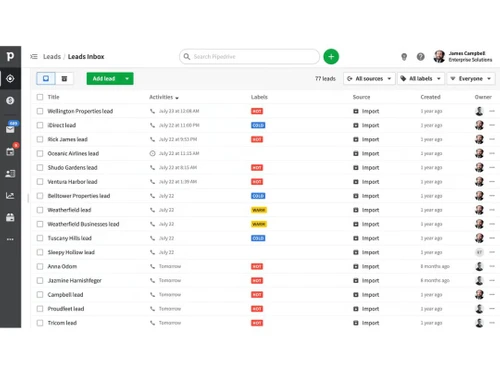
 Lead Management
Lead Generation Lead Tracking Lead Qualification Lead Assignment Lead Prioritization Lead Nurturing Sales Pipeline Management
Order Management Opportunity Management Task Management Deal Rotting Quote & Proposal Management Territory Management Deal Management Collaboration and Communication
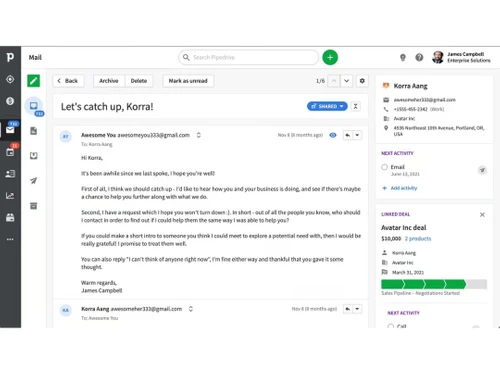
Document Sharing & File Storage Call Tracking and Recording Internal Communication Built-in Dialer Activity Logging Bulk Email and SMS Integrations
API Access Calendar Integration Third Party Integrations Email Marketing Tools Interactive Voice Response (IVR) Integration Workflow Automation and Management
Workflow Automation Task Automation Lead Capture Automation Customizable Workflows Auto Qualify Leads Security & Compliance
Audit Logs Data Encryption Audit Trails Backup & Disaster Recovery GDPR and CCPA Compliance Role-Based Access Control (RBAC) IP Whitelisting AI Capabilities
Predictive Analytics Chatbots Lead and Deal Scoring Analytics and Reporting
Sales Forecasting Custom Dashboards Sales Funnel Analysis Conversion Reports Activity Overview Reports Forecasting & Trends Customizable Pipeline Views Sales Performance Tracking Alerts & Notifications
Event-Triggered Notifications Custom Workflow Alerts System Errors/Failures Customer Interaction Alerts Workflow Trigger Alerts SLA Violations Lead Activity Alerts Others
Online Lead Management 

Watch the demo video to explore key features, real workflows, and how the software fits your business needs.
 Ubuntu
  Windows
  iOS
iOS  Android MacOS
  Linux
Linux  Desktop
  Mobile
  Tablet
  iPad
iPad  Cloud-Based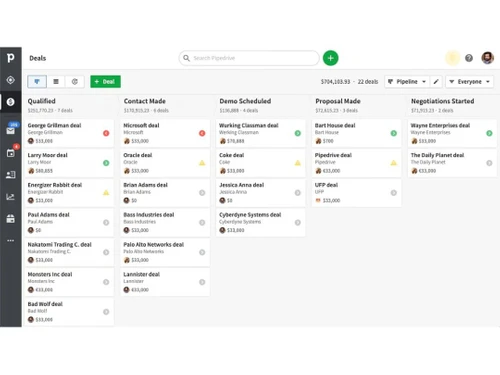
Small Business
Designed for startups and growing businesses
Medium Business
Built for business growth and flexibility
Enterprises
Designed for complex and large-scale business needs
3.8
Out of 5

Overall Rating
Based on
5 Verified Reviews
Rating Breakdown
82% Recommend this Product
Add ReviewPipedrive CRM is generally well-received for its user-friendly interface and strong sales-centric features, particularly appreciated by sales teams for its pipeline management and AI insights. Users value the customization options and automation capabilities, which enhance productivity. However, common concerns include the lack of built-in post-sale tools, scalability issues for growing businesses, and potential hidden costs associated with add-ons. Additionally, some users noted the steep learning curve for advanced features and limited customer support on lower-tier plans.


Feb 13, 2025
Techjockey Verified
“Perfect for Sales-Focused Teams Needing Pipeline Clarity”
Pipedrive excels as a no-nonsense CRM for sales teams prioritizing pipeline organization. Its visual interface makes tracking deals effortless, while AI insights help prioritize high-value leads. The automation features save hours weekly, though smaller teams might find add-ons like LeadBooster costly.
Pros
Intuitive drag-and-drop pipeline management with Kanban-style visualization AI-powered sales assistant provides actionable recommendations to improve deal velocity Robust automation reduces manual tasks (e.g., email sequences, deal stage updates) Flexible customization for pipelines, fields, and workflows
Cons
Marketing and customer service tools require third-party integrations Advanced features like email tracking and automations locked behind higher-tier plans Mobile app has usability issues compared to desktop version
Reason to switch
We migrated from HubSpot CRM to reduce complexity. Pipedrive’s laser focus on sales processes eliminated clutter while maintaining essential automation.
Feb 13, 2025
Techjockey Verified
“Great Customization but Limited for Scaling Businesses”
Pipedrive shines for businesses needing tailored sales workflows but struggles with scalability. Custom fields and pipelines let us mirror our unique process perfectly, though integrating marketing tools required extra costs.
Pros
Unlimited pipeline customization adapts to niche sales processes Centralized communication tracking (calls, emails, meetings) with timeline views Strong third-party integrations (400+ apps including Zapier and Google Workspace) Easy lead capture via chatbots and web forms
Cons
No inventory management or payment processing for eCommerce Steep learning curve for advanced automations and API configurations Limited multilingual support compared to competitors
Reason to switch
We switched from Salesforce due to overcomplicated reporting. Pipedrive’s Insights dashboard gave us real-time metrics without the bloat.
Feb 12, 2025
Techjockey Verified
“Affordable Starter Plan but Watch for Hidden Costs”
Ideal for startups needing basic CRM functionality. The Essential plan covers core needs, but growing teams will quickly need upgrades. LeadBooster simplified our lead capture, though email campaigns required separate purchases.
Pros
Transparent pricing starting at $14/user/month 14-day free trial with no credit card required LeadBooster add-on effectively captures website leads Clean interface with minimal training needed
Cons
Essential plan lacks email templates and automations Add-ons (e.g., Campaigns at $13.33/month) inflate costs Limited customer support options on lower tiers
Reason to switch
We moved from spreadsheets to Pipedrive for its deal-tracking simplicity. The visual pipeline made onboarding new reps effortless.

Pipedrive CRM
Price On Request
Desktop
Mobile
Web based
On Premises
Windows
Mac OS

Freshsales CRM
₹ 899
Desktop
Mobile
Web based
On Premises
Windows
Mac OS

OttoCRM
₹ 99
Desktop
Mobile
Web based
On Premises
Windows
Mac OS

Kommo Sales CRM
₹ 13800
Desktop
Mobile
Web based
On Premises
Windows
Mac OS

monday CRM
Price On Request
Desktop
Mobile
Web based
On Premises
Windows
Mac OS

Pepper Cloud
Price On Request
Desktop
Mobile
Web based
On Premises
Windows
Mac OS

SalesBabu CRM
₹ 9000
Desktop
Mobile
Web based
On Premises
Windows
Mac OS

Pipeline CRM
Price On Request
Desktop
Mobile
Web based
On Premises
Windows
Mac OS

LEDSAK
Price On Request
Desktop
Mobile
Web based
On Premises
Windows
Mac OS

Cratio CRM
₹ 2997
Desktop
Mobile
Web based
On Premises
Windows
Mac OS

Nexved CRM
₹ 799
Desktop
Mobile
Web based
On Premises
Windows
Mac OS
(0) Product(s) selected
Starting Price:
₹99 /Month
Starting Price:
₹13,800 /Year
Available
Price on Request
Starting Price:
$29 /Month
Starting Price:
₹2,997 /User/Month
Starting Price:
₹799 /Month

Starting Price:
$50 /Month

Starting Price:
$25 /Month

Available
Price on Request

Starting Price:
$20 /User/Month

Starting Price:
₹1,000 /Month
You can maintain an unlimited but classified contact database, view their activity timeline in a comprehensive manner. Organizations can also import existing contacts from spreadsheets and previously used CRM, or sync Pipedrive CRM with Microsoft or Google contacts.
Yes, you can make sales calls using Pipedrive CRM and get access to options like automated call tracking, recording and logging support.
Yes, you can request an online demo of Pipedrive CRM. Our in-house product experts will get in touch with you as per the date and time mentioned in your callback request.
Pipedrive has integrations with external platforms like Zapier, Talkdesk, PandaDoc, Yesware, MailChimp and more.
Yes, Pipedrive CRM is available with native iOS and Android Apps.
Pipedrive starts from $19 per seat per month for an essential plan. For the Advanced plan it costs $34, for the professional plan it costs $64, for the power plan it costs $74, & for enterprise, it costs $99 per seat per month.
Here’s how you can set up a workflow in Pipedrive:
0 0
Steps to Create a Workflow in Pipedrive
0 0
Yes, Pipedrive offers mobile applications for iOS and Android devices. These apps allow sales teams to access and manage their pipelines, contacts, and activities on the go, ensuring they stay connected and productive even when they are away from their desks.
0 0
Yes, Pipedrive works well with many marketing tools, like Mailchimp. This means your contacts are automatically updated, you can send emails easily, and it's easier for marketing and sales to share information.
0 0
Pipedrive and Salesmate are both great tools for sales, but they serve different purposes. Pipedrive is easy to use and helps teams see their sales steps clearly, which is great for those who want a simple process. Salesmate is better for people who need a lot of automated features and customization options, making it ideal for businesses that want to tailor the tool to their specific needs.
0 0
20,000+ Software Listed
Best Price Guranteed
Free Expert Consultation
2M+ Happy Customers
Terms and Condtions

Users with registered businesses can purchase goods from merchants on the platform to satisfy their business needs. Users are not permitted to utilize any products acquired through the platform for resale, advertising, business, or further distribution.
For each purchase made, users will receive a Tax Invoice (or 'GST invoice') that includes specific details such as:
the GSTIN of the user associated with their registered business, and
the specified Entity Name for their business.
It should be noted that not all products are eligible for GST Invoice. Only the products displayed by participating sellers with the 'GST-based Invoice Available' callout on the product description page would qualify.
Certain goods and services are not eligible to get a GST Invoice, including items with VAS, i.e., Value Added Services (e.g., Total Mobile Protection/Assured Buyback) and those involving an exchange offer at the time of purchase.
Users must ensure the accuracy of the GSTIN, and business entity name provided for the GST Invoice. Requests for corrections into GST Invoice would not be accommodated by Techjockey.com or any Seller, and any issues arising from user-provided information are the sole responsibility of users.
Techjockey.com is not liable for the GST Invoice or any associated input tax credit. To efficiently claim an input tax credit, users should select the registered place of business address as per the GST authority's data and follow the provisions of the GST Act and rules.
To claim an input tax credit, the delivery and billing addresses must match. Furthermore, input tax credits will not be granted if the delivery address and GSTIN on the invoice are from different states. In case of incorrect GST details provided during the order placement, the order will be canceled automatically.