 USA
USA UAE
UAESmall Business
Designed for startups and growing businesses

See More




Brand: PlagAware GmbH
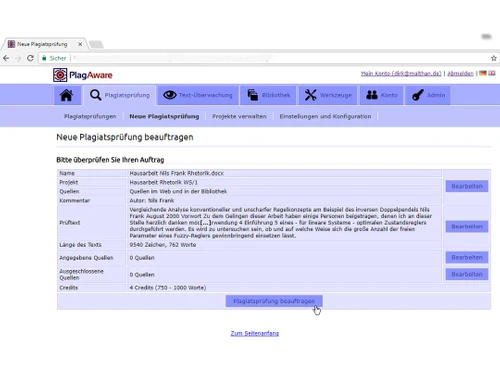
PlagAware is a professional plagiarism detection tool that offers extensive reports and accurate checks by comparing the content with many other sources thereby ensuring academic and professional integrity.
See MoreHave you used PlagAware before?
Share your insights for better experience
Brand: PlagAware GmbH
Founded Year: 2020
PlagAware is a multiple awarded plagiarism finder for plagiarism checking and plagiarism controlling of texts and websites.
Core Detection Features
 Multi Language Support API Access Plagiarism Detection Source Matching Paraphrase Detection AI Detection
 Document Management
Multi Format Support File Upload Management Bulk Document Checking Document Retention and History Performance and Security
Data Security Multi Device Compatibility Scan Speed Automated Alerts and Monitoring Branding & Marketing
Custom Branding White Label Solution Client Based Reporting PDF Reports Productivity and Enhancements
Grammar Checker Citation Generation Collaboration Integrations and Extensions
API Integration Browser Extension Google Docs Integration Microsoft Office Integration Administrative Features
Domain Filtering Content Filtering Global Content Access User Access Management Report and Analysis
Data Export Plagiarism Reports Paraphrasing Score Side-by-Side Comparison Customizable Exclusion Originality Score Writing Statistics 

Watch the demo video to explore key features, real workflows, and how the software fits your business needs.
 Ubuntu
  Windows
  MacOS
MacOS  Linux
Linux  Desktop
  Cloud-Based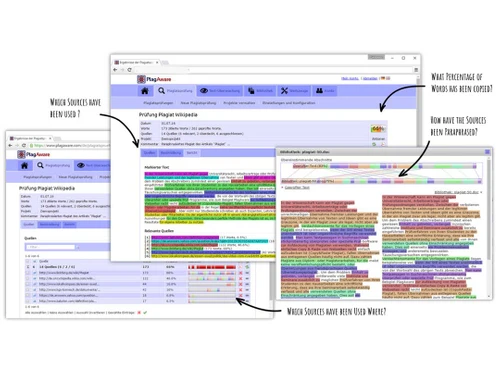
Small Business
Designed for startups and growing businesses
Medium Business
Built for business growth and flexibility
Enterprises
Designed for complex and large-scale business needs
4.2
Out of 5

Overall Rating
Based on
10 Verified Reviews
Rating Breakdown
86% Recommend this Product
Add ReviewUsers generally appreciate PlagAware for its speed, reliability, and ability to handle various content formats, making it a dependable choice for plagiarism checks. Many find the reports clear and helpful, particularly for collaborative work. However, common concerns include the occasional slow customer support response, limitations in handling non-text content, and the lack of a dedicated mobile app. Additionally, some users note that the detailed reports can be overwhelming, and the tool requires an internet connection to function.
Pros
"I received the result comparatively faster as it does not take forever. This is great when I am in a rush."
"It is dependable and I do not have to worry about my data and documentation being stored or misused."
"It works for more than just English, which is ideal if I am dealing with international content."
Cons
"Its main use was for written text. It is not as helpful for non-text content like images and code."
"The customer support response time can be a little slow. They are helpful but I wish they would respond sooner."
"It sometimes flags commonly used phrases as plagiarism and it can be annoying since I sometime overlook this."

Dec 16, 2024
Techjockey Verified
“Fast Results but Not Great for Non-Text Content”
I like PlagAware's speed; it provides results without needless delays when I am in a hurry. However, I have discovered that it is not that useful when working with graphics or code because it is mostly focused on words.
Pros
I received the result comparatively faster as it does not take forever. This is great when I am in a rush.
Cons
Its main use was for written text. It is not as helpful for non-text content like images and code.
Reason to switch
CrossPlag was good, but PlagAware’s speed is a time-saver.
Nov 23, 2024
Techjockey Verified
“Secure but Customer Support Could Be Quicker”
PlagAware is dependable, therefore I trust it with my data because I know my documents will not be saved or exploited. The only issue is that, while customer service is always helpful when they do answer, they can occasionally be a little slow.
Pros
It is dependable and I do not have to worry about my data and documentation being stored or misused.
Cons
The customer support response time can be a little slow. They are helpful but I wish they would respond sooner.
Reason to switch
I switched form Plagiarism since I was not sure how secure it was with my data.
Oct 23, 2024
Techjockey Verified
“Great for International Content but Watch for False Flags”
PlagAware is fantastic since it supports a variety of languages, which is great for content from other countries. Nevertheless, it occasionally marks commonly used terms as plagiarism, which can be a little annoying to navigate.
Pros
It works for more than just English, which is ideal if I am dealing with international content.
Cons
It sometimes flags commonly used phrases as plagiarism and it can be annoying since I sometime overlook this.
Reason to switch
PlagAware manages multi-language content much better than Duplichecker.

PlagAware
Price On Request
Desktop
Mobile
Web based
On Premises
Windows
Mac OS

DrillBit Plagiarism Checker
₹ 4500
Desktop
Mobile
Web based
On Premises
Windows
Mac OS

Plagiarism Detector Pro
₹ 3729
Desktop
Mobile
Web based
On Premises
Windows
Mac OS

Plagiarism Checker X
₹ 3700
Desktop
Mobile
Web based
On Premises
Windows
Mac OS

CopyLeaks
Price On Request
Desktop
Mobile
Web based
On Premises
Windows
Mac OS

Urkund
Price On Request
Desktop
Mobile
Web based
On Premises
Windows
Mac OS

iThenticate Plagiarism
Price On Request
Desktop
Mobile
Web based
On Premises
Windows
Mac OS

DupliChecker
Price On Request
Desktop
Mobile
Web based
On Premises
Windows
Mac OS

Unicheck
Price On Request
Desktop
Mobile
Web based
On Premises
Windows
Mac OS

Plag AI
Price On Request
Desktop
Mobile
Web based
On Premises
Windows
Mac OS

Crossplag
Price On Request
Desktop
Mobile
Web based
On Premises
Windows
Mac OS
(0) Product(s) selected
Starting Price:
$10 /Month
Available
Price on Request
Available
Price on Request

Starting Price:
€30 /License

Starting Price:
$20 /Month

Available
Price on Request

Starting Price:
$10 /Month

Available
Price on Request

Available
Price on Request

Starting Price:
$15 /Month $30

Available
Price on Request


PlagAware is secure to use. Its encryption of documents at the upload stage throughout the process provides a layer of privacy and safety to all users’ information. In addition, the platform does not keep records of its users’ content indefinitely or make it known to outside parties.
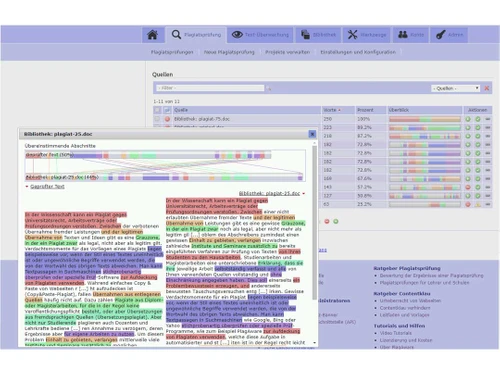
By taking any content you upload and comparing it to a large pool of sources, PlagAware works. These sources include websites, and scholarly articles, among others. The instrument checks your writing for likenesses and provides an extensive report that shows possible cases of cheating in writing.
The initial charge for basic checks on PlagAware in India could be as low as ?400 per document. For those who frequently need these services or institutions that require them in bulk, subscription packages may be offered; in this case, there will always be some variations in price range based on the number of documents processed other than the specifications given.
It has been confirmed that PlagAware’s accuracy levels in plagiarism detection are very high because it draws from an extensive database for comprehensive checking purposes. Checking accuracy may change depending on how complicated the material is and what supplies are contrasted against each other.
PlagAware identifies similarities and offers a report detailing numerous possible matches and their references by comparing the submitted text with its huge repository of online sources, academic papers and other published works.
To know how to use PlagAware in a better way visit their official website support section or help center. They provide user guides, FAQs and customer support contact options for going through any kind of queries or technical glitches.
Supported file types include .doc,.docx, .pdf and .txt. Generally speaking, the platform covers normal file sizes, but they may differ according to each document type or individual requirements. It is important to visit the website’s recommendations or resources section if you have large papers or require specific shapes of them.
If you're getting just one scan a day on PlagAware even though you paid for it, it's probably because your account is set to allow only a few scans each day.
0 0
The license administrator in PlagAware has several important functions. User access management, ScanCredit distribution and the exploitation of the system are under his or her management. Administrators make sure that users abide by all the conditions that are set, such as limitations on the number of scans performed per day or month and active monitoring of the usage of the license. They also work to protect the licensing agreement and may need to reach out to PlagAware’s support centre when problems come up.
0 0
When a teaching license surpasses the predetermined usage in PlagAware, there will be a block to carrying out any more plagiarism checks until the beginning of the next billing cycle or will request that other ScanCredits be purchased. Exceeding the limits will create notifications for both the user and the administrator of the license, thus necessitating a suspension of use and reassessment of the license agreement. In some situations, users may be required to cross-grade their teaching license to that level which permits excess usage due to an increase in students and assignments.
0 0
The duration of the ScanCredits in PlagAware differs concerning the subscription plan or package bought. Most of the time, ScanCredits do not expire as long as the subscriber is active. However, the expiry of the remaining ScanCredits may depend on the dedicated plan when the subscription is not active or is cancelled. It is advisable to read the particulars of your plan because, in some scenarios, the unused ScanCredits could be eligible for a rollover while in some instances, they will be lost at the end of the subscription term.
0 0
PlagAware may identify text produced solely by AI applications like ChatGPT whose text has copied content available on the internet. Since many AI-powered applications generate texts based on information contained in already existing public materials, overlaps in already text submitted may be red-flagged for plagiarism. Nevertheless, as long as the text produced by the AI is an original one, and has no reference from any available sources, there is a high chance that the document will not pass through the copy-scan in PlagAware.
0 0
20,000+ Software Listed
Best Price Guranteed
Free Expert Consultation
2M+ Happy Customers
Terms and Condtions

Users with registered businesses can purchase goods from merchants on the platform to satisfy their business needs. Users are not permitted to utilize any products acquired through the platform for resale, advertising, business, or further distribution.
For each purchase made, users will receive a Tax Invoice (or 'GST invoice') that includes specific details such as:
the GSTIN of the user associated with their registered business, and
the specified Entity Name for their business.
It should be noted that not all products are eligible for GST Invoice. Only the products displayed by participating sellers with the 'GST-based Invoice Available' callout on the product description page would qualify.
Certain goods and services are not eligible to get a GST Invoice, including items with VAS, i.e., Value Added Services (e.g., Total Mobile Protection/Assured Buyback) and those involving an exchange offer at the time of purchase.
Users must ensure the accuracy of the GSTIN, and business entity name provided for the GST Invoice. Requests for corrections into GST Invoice would not be accommodated by Techjockey.com or any Seller, and any issues arising from user-provided information are the sole responsibility of users.
Techjockey.com is not liable for the GST Invoice or any associated input tax credit. To efficiently claim an input tax credit, users should select the registered place of business address as per the GST authority's data and follow the provisions of the GST Act and rules.
To claim an input tax credit, the delivery and billing addresses must match. Furthermore, input tax credits will not be granted if the delivery address and GSTIN on the invoice are from different states. In case of incorrect GST details provided during the order placement, the order will be canceled automatically.

