 USA
USA UAE
UAESmall Business
Designed for startups and growing businesses


See More





Brand: Quetext
Quetext is an advanced plagiarism-checking software that focuses on ethical writing practices by maintaining the originality of a text along with correct citations.
See MoreHave you used Quetext before?
Share your insights for better experience
Brand: Quetext
Founded Year: 2016
Quetext is a leading plagiarism-detection software, providing services to over 2 million teachers, students, and professionals worldwide. By combining advanced DeepSearch™ technology with clear and engaging feedback, we provide our users with the tools necessary to improve their writing.
Core Detection Features
 Multi Language Support Plagiarism Detection Source Matching Paraphrase Detection AI Detection API Access
 Document Management
Multi Format Support Bulk Document Checking File Upload Management Document Retention and History Performance and Security
Data Security Multi Device Compatibility Scan Speed Automated Alerts and Monitoring Branding & Marketing
PDF Reports Custom Branding White Label Solution Client Based Reporting Productivity and Enhancements
Citation Generation Grammar Checker Collaboration Integrations and Extensions
Browser Extension API Integration Google Docs Integration Microsoft Office Integration Administrative Features
Domain Filtering Content Filtering Global Content Access User Access Management Report and Analysis
Data Export Plagiarism Reports Side-by-Side Comparison Customizable Exclusion Originality Score Writing Statistics Paraphrasing Score 

Watch the demo video to explore key features, real workflows, and how the software fits your business needs.
 Ubuntu
  Windows
  MacOS
MacOS  Linux
Linux  Desktop
  Cloud-Based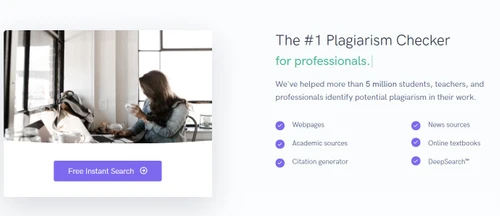
Small Business
Designed for startups and growing businesses
Medium Business
Built for business growth and flexibility
Enterprises
Designed for complex and large-scale business needs
4.4
Out of 5

Overall Rating
Based on
9 Verified Reviews
Rating Breakdown
86% Recommend this Product
Add ReviewUsers generally appreciate Quetext for its efficiency in providing accurate citations and simplifying plagiarism checks, with many highlighting its detailed reports and fast results. The tool is particularly favored by professionals like teachers and content creators for its user-friendly interface and effectiveness in maintaining content authenticity. However, several users express frustration over the limitations of the free version, particularly regarding word count, and the absence of a mobile app, which they believe would enhance usability.
Pros
"It gives me proper citation when I need them. It saves so much time when I am working on formal documents."
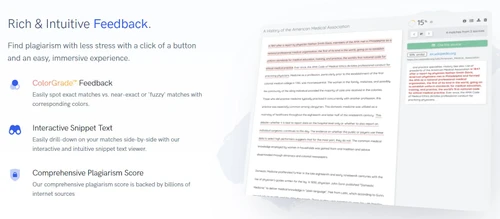
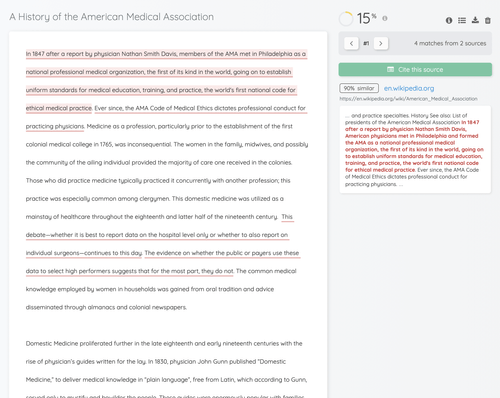
"I like how it breaks down everything. It shows the sources and exact matches. It makes it easier to fix stuff."
"I do not have to go through settings and menus just to check my text. I just copy, paste and done, its scanning."
Cons
"Occasionally it will flag phrases that are common expressions. It is annoying to fix it since it is not actually an issue."
"There is no dedicated mobile app. I wish that I could check my stuff on the go with a mobile app."
"The free plan is good but I feel like I hit the work limit way too fast."

Oct 12, 2024
Techjockey Verified
“Simplified Citation Works for Me”
Quetext saves me a ton of time by providing me with accurate citations. It can be a little annoying to correct when it flags popular phrases.
Pros
It gives me proper citation when I need them. It saves so much time when I am working on formal documents.
Cons
Occasionally it will flag phrases that are common expressions. It is annoying to fix it since it is not actually an issue.
Reason to switch
I moved from WriterZen since it did not provide automatic citations and I needed something faster and more efficient.
Oct 2, 2024
Techjockey Verified
“Fixing Plagiarism Is So Much Easier”
It simplifies everything by displaying the sources and precise matches, which makes editing my writing a breeze. All I need is a mobile app so I can monitor my work while I am on the go.
Pros
I like how it breaks down everything. It shows the sources and exact matches. It makes it easier to fix stuff.
Cons
There is no dedicated mobile app. I wish that I could check my stuff on the go with a mobile app.
Reason to switch
Feedback Studio was good but Quetext has a clean interface and detailed reports which saved me so much effort.
Jul 2, 2024
Techjockey Verified
“Quetext Made Plagiarism Checking Simple”
Editing is made easy by the highlighted matches and comprehensive reports. Although the free plan is useful, I soon reached my word limit, so I subscribed to the premium plan.
Pros
I do not have to go through settings and menus just to check my text. I just copy, paste and done, its scanning.
Cons
The free plan is good but I feel like I hit the work limit way too fast.
Reason to switch
I moved to Quetext since Grammarly felt limited as a plagiarism checker.
Quetext
Price On Request
Desktop
Mobile
Web based
On Premises
Windows
Mac OS

DrillBit Plagiarism Checker
₹ 4500
Desktop
Mobile
Web based
On Premises
Windows
Mac OS

Plagiarism Detector Pro
₹ 3729
Desktop
Mobile
Web based
On Premises
Windows
Mac OS

Plagiarism Checker X
₹ 3700
Desktop
Mobile
Web based
On Premises
Windows
Mac OS

CopyLeaks
Price On Request
Desktop
Mobile
Web based
On Premises
Windows
Mac OS

Urkund
Price On Request
Desktop
Mobile
Web based
On Premises
Windows
Mac OS

iThenticate Plagiarism
Price On Request
Desktop
Mobile
Web based
On Premises
Windows
Mac OS

PlagAware
Price On Request
Desktop
Mobile
Web based
On Premises
Windows
Mac OS

DupliChecker
Price On Request
Desktop
Mobile
Web based
On Premises
Windows
Mac OS

Unicheck
Price On Request
Desktop
Mobile
Web based
On Premises
Windows
Mac OS

Plag AI
Price On Request
Desktop
Mobile
Web based
On Premises
Windows
Mac OS
(0) Product(s) selected
Starting Price:
€13 /License
Starting Price:
$10 /Month
Available
Price on Request

Available
Price on Request

Starting Price:
€30 /License

Starting Price:
$20 /Month

Starting Price:
$10 /Month

Available
Price on Request

Available
Price on Request

Starting Price:
$15 /Month $30

Available
Price on Request


No, Quetext plagiarism checker online does not save its user’s content within its database. In case you have uploaded any personal data within the software’s database, it doesn't get shared with any third party organization.
Yes, the Quetext plagiarism checker free version has a limit of 250 words. For more, you will have to purchase premium subscription.
Quetext software has a free plan and 2 paid subscriptions with different features and word limits. The pricing starts at $15.99 per month for Essential plan and $14.99 per month for enterprise plan.
No, Quetext does not have an API as of now.
No, Quetext does not have a mobile app.
Quetext works by comparing your writing to a huge database of academic and professional sources. If it finds any matches, it will highlight the plagiarized sections and provide you with information about the source.
To use the Quetext extension, you need to install it in your web browser. Once installed, you can simply highlight the text you want to check and click on the Quetext icon to start the plagiarism check.
Quetext is a quite accurate in detecting plagiarism scores. Although, it is not 100% accurate.
Yes, Quetext is safe to use.
Suppose the Quetext report does not generate each time you upload a document; there can be several reasons for that. The factors that cause the problems most often include issues such as a free account upload size exceeding the particular document, unsupported documents, and system issues on the platform. Aside from that, please ascertain that your document is in an acceptable file type i.e. .docx, .pdf, and .txt among others and then re-upload. On the other hand, rule out any maintenance or server problems on the Quetext site and if the issue continues, reach out to their helpdesk.
0 0
The plagiarism detection service provided by Quetext Pro allows users to exclude the reference section. You will be able to do this as long as you have the correct citation styles (e.g., MLA, APA, etc.), incorporated in your work. This is because when the system then finds a citation that is correctly cited within the text, the system can be programmed not to scan that area. This is beneficial in academic essays or many other kinds of papers that have footnotes or endnotes with long lists of references to avoid unwarranted plagiarism accusations.
0 0
With Quetext, Pro comes with several features including no limit on the word counts for plagiarism checking, a more advanced DeepSearch feature that accesses additional databases, and the capability to print out detailed reports. It even comes with functionalities like exclusion of citations and checking of larger scopes of texts for possible instances of plagiarism which is perfect for business or scholarly purposes.
0 0
Some false positives in the Quetext report stem from the fact that common phrases and properly cited text passages are detected as plagiarism by the underlying engine. The other frequent reason is the tool marking the low-risk section of borrowed language that spans across many documents including but not limited to literature reviews or background information. To remedy this, check the content of the stated sections and use common sense to evaluate if they are plagiarized or are just coincidences. Certain phrases or paragraphs may also be flagged as improper use of outside sources if the relevant format is not adhered to.
0 0
Getting a plagiarism report from Quetext cannot be performed unless you finish a document scan. After the scanning process is over, go to the page where results are available and you will see a Download Report option, which allows you to download the report. This feature is only accessible to Pro users. The report contains a similarity percentage, a list of highlighted text sections that are plagiarized and their respective sources which are made available for posting or further studies.
0 0
20,000+ Software Listed
Best Price Guranteed
Free Expert Consultation
2M+ Happy Customers
Terms and Condtions

Users with registered businesses can purchase goods from merchants on the platform to satisfy their business needs. Users are not permitted to utilize any products acquired through the platform for resale, advertising, business, or further distribution.
For each purchase made, users will receive a Tax Invoice (or 'GST invoice') that includes specific details such as:
the GSTIN of the user associated with their registered business, and
the specified Entity Name for their business.
It should be noted that not all products are eligible for GST Invoice. Only the products displayed by participating sellers with the 'GST-based Invoice Available' callout on the product description page would qualify.
Certain goods and services are not eligible to get a GST Invoice, including items with VAS, i.e., Value Added Services (e.g., Total Mobile Protection/Assured Buyback) and those involving an exchange offer at the time of purchase.
Users must ensure the accuracy of the GSTIN, and business entity name provided for the GST Invoice. Requests for corrections into GST Invoice would not be accommodated by Techjockey.com or any Seller, and any issues arising from user-provided information are the sole responsibility of users.
Techjockey.com is not liable for the GST Invoice or any associated input tax credit. To efficiently claim an input tax credit, users should select the registered place of business address as per the GST authority's data and follow the provisions of the GST Act and rules.
To claim an input tax credit, the delivery and billing addresses must match. Furthermore, input tax credits will not be granted if the delivery address and GSTIN on the invoice are from different states. In case of incorrect GST details provided during the order placement, the order will be canceled automatically.

