linkedin
Quirkos logo
play Quirkos Web - 4 minute tutorial
quirkos-dashboard
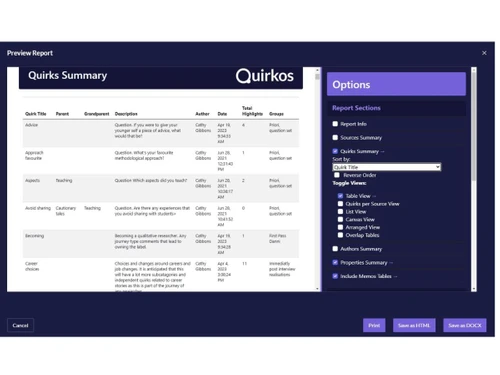
quirkos-interface

Quirkos

Brand: Quirkos

  • No Ratings & Reviews

Quirkos is a qualitative research tool that helps users organize, analyze, and visualize text-based data easily.

See More

Have you used Quirkos before?

Share your insights for better experience

Add a Review
Starting Price
$5

View plans

100% Genuine
Products
Best Price
Guaranteed
Safe & Secure
Payment
  • Description

  • Pricing

  • Features

  • Specification

  • Review

  • FAQ

Starting at $5

Quirkos Software Overview

What is Quirkos?

Quirkos is a data analysis software designed to help researchers analyze qualitative data easily. It allows users to organize and study text, interviews, surveys, and documents. The software uses a visual interface that makes data analysis simple. Users can create themes and categories to group information. Quirkos helps researchers find patterns and insights in their data. It supports collaboration among team members on research projects. The software works with various file formats and transcripts.

It is useful for academic, business, and social research. Quirkos saves time by simplifying complex analysis tasks. Users can generate reports and visualize their findings clearly. The platform is easy to learn, even for beginners.

Why Choose Quirkos Software?

  • Easy-to-Use Interface: Quirkos offers a simple and intuitive interface that makes qualitative data analysis easier for beginners and professionals.
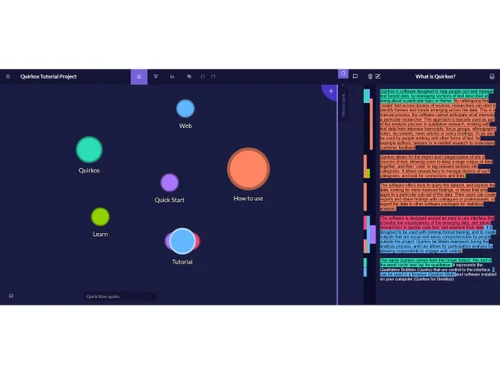
  • Visual Data Coding: Uses interactive bubble-based coding to organize and visualize research themes effectively.
  • Fast Data Organization: Helps structure and manage large volumes of qualitative data efficiently.
  • Supports Multiple Data Formats: Works with interviews, surveys, focus groups, transcripts, and documents.
  • Quick Theme Identification: Enables users to detect trends and patterns faster.
  • Real-Time Data Exploration: Allows users to explore coded data dynamically during analysis.
  • Cross-Platform Compatibility: Available for Windows, Mac, Linux, and web environments.
  • Collaboration Features: Supports team-based qualitative research projects.
  • Research-Focused Design: Built specifically for academic and professional qualitative research.
  • Easy Project Management: Simplifies organizing and tracking research progress.
  • Flexible Coding System: Allows users to create and customize categories based on research needs.

Benefits of Quirkos Software

  • Visual Reporting Tools: Generates visual outputs for presenting findings clearly.
  • Reduced Learning Curve: Easy to learn compared to traditional qualitative analysis tools.
  • Cloud Accessibility: Provides access to projects from different locations.
  • Data Import Options: Supports importing data from various file formats.
  • Secure Data Handling: Helps maintain privacy and security of research data.
  • Detailed Insights Generation: Converts raw data into meaningful findings.
  • Ideal for Academic Use: Widely suitable for students, educators, and researchers.
  • Time-Saving Workflow: Automates parts of the qualitative analysis process.
  • Scalable for Different Projects: Suitable for both small studies and large research projects.

Quirkos Pricing

Quirkos price starts at USD 5 at techjockey.com.

The pricing model is based on different parameters, including extra features, deployment type, and the total number of users. For further queries related to the product, you can contact our product team and learn more about the pricing and offers.

Read more

Quirkos Company Details

Founded Year:  2013

Quirkos creates intuitive software for qualitative researchers, and anyone with text data to process. It lets users code, retrieve, search, explore and visualise in-depth sources of text. We have a true multi-platform product, which you can start using in minutes, not days.

Director/Founders Quirkos
Company Size 1-100 Employees

Quirkos Pricing & Plans

Quirkos Cloud-[Student]
Starting at $5
    • Licenses

      Licenses
      Licenses
    • Monthly

      Monthly
      Monthly

Key Features

  • Access to Quirkos on all devices

  • Unlimited, secure Cloud storage

  • Live collaboration and project sharing

Offline Licence-[Student]
Starting at $69
    • Licenses (Lifetime)

      Licenses (Lifetime)
      Licenses (Lifetime)

Key Features

  • Lifetime access to Quirkos 3 on one or two compute

  • Store projects offline on your hard drive

  • Collaborate with other Quirkos users offline

Quirkos Features

  • icon_check Data Import/Export
    Supports the ingestion of various text-based formats including Word documents, PDF files, and plain text for thematic analysis.
  • icon_check Real-Time Collaboration
    Enables multiple researchers to work on the same cloud-hosted project simultaneously with real-time updates across all users.
  • icon_check Keyword Searches
    Features an integrated search engine to locate specific terms or phrases across the entire dataset for rapid coding actions.
  • icon_check Automatic Transcription
    Converts audio and video recordings into formatted text transcripts directly within the platform for immediate coding use.
  • icon_check Project Merging
    Allows administrators to combine separate project files into a single master database while maintaining all unique coding tags.
  • icon_check Thematic Grouping
    Facilitates the organization of codes into hierarchical structures to represent complex relationships between different themes.
  • icon_check Memo and Note Taking
    Enables users to attach descriptive annotations and analytical thoughts to specific text segments or overall project themes.
  • icon_check Search and Filter
    Allows users to isolate specific subsets of data based on assigned properties like age, gender, or specific participant traits.
  • icon_check Data Export
    Generates structured JSON files of project data to allow for manual integration with external statistical or coding software.
  • icon_check CSV Metadata Mapping
    Supports the import of spreadsheet data to automatically assign participant attributes and demographic markers to documents.
  • icon_check Query Comparison
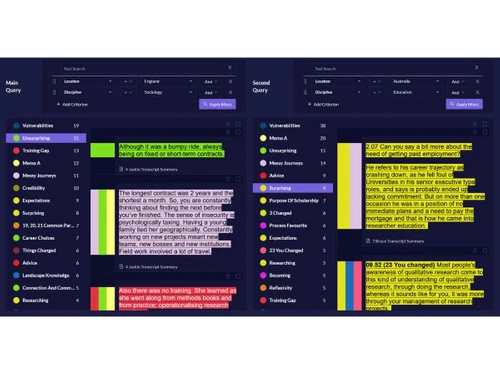
    Generates side-by-side visual comparisons of how different groups or individuals discuss specific themes within the project.
  • icon_check Cross-Platform Synchronization
    Synchronizes project progress across Windows, macOS, Linux, and web browser interfaces via the integrated cloud infrastructure.
  • icon_check Reporting
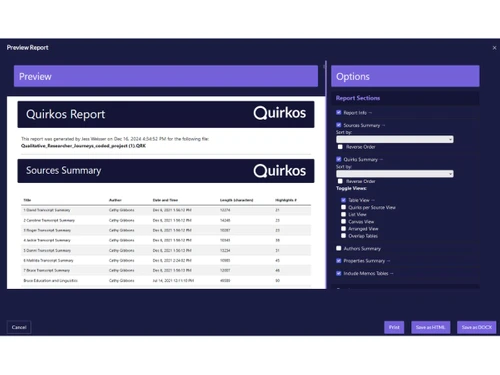
    Produces formatted summary reports that include coded text excerpts, visualizations, and project statistics for documentation.
  • icon_check REFI-QDA Integration
    Adopts the standard exchange format to allow the migration of projects between different qualitative analysis software tools.
Quirkos Demo Video play icon

Get Quirkos Demo

Watch the demo video to explore key features, real workflows, and how the software fits your business needs.

Understand
Key Features
Personal
Demo Insights
Interactive
Demo Support

Quirkos Specifications

Supported Platforms
Windows Windows MacOS MacOS Linux Linux
Devices
Desktop Desktop
Deployment
Cloud-Based Cloud-Based Perpetual Perpetual
Suitable For
Education Corporations Universities Non-Profit
Business Specific
All Businesses
Business Size
Individual Small Business Startups Medium Business Enterprises SMBs SMEs MSMBs MSMEs Freelancers
Customer Support
Email
Language
English
Training Resources
Documentation Videos

Quirkos Review

Techjockey Trusted Reviews from Verified Users

No reviews are currently available for Quirkos. Discover similar Data Analysis Software reviews

  • Perfios

    4.2

    Whats great - Makes it easy to check credit data and process loans faster. read more
  • Qlik Insight Bot

    4.1

    Whats great - Qlik Insight Bot generates data-oriented insights and findings, and delivers it in a conversational format. It makes it reall... read more

  • Microsoft Power BI

    4.4

    Whats great - Flexibility to connect multiple data sources and visualize data read more
Articles for Quirkos

See All Related Articles

How much does Quirkos Software cost?

Quirkos pricing starts at USD 5 and is available on techjockey.com.

Is there a mobile app available for Quirkos Software?

No dedicated mobile app is available, but Quirkos Web works on phones and tablets through a browser.

Which operating systems are compatible with Quirkos Software?

Quirkos is compatible with Windows, MacOS, Linux, and web browsers.

Does Quirkos Software offer a free trial?

Yes, Quirkos offers a free 14-day trial with access to its features.

How does Quirkos Software function?

Quirkos helps users code, organize, visualize, and analyze qualitative research data such as interviews and surveys.

Who uses Quirkos Software?

Quirkos is used by students, researchers, academic institutions, nonprofits, and professional analysts.

Is a free demo available for Quirkos Software?

Yes, users can access a free trial and explore the software before purchasing.

Is Quirkos Software available for free?

No, Quirkos is not completely free, but it provides a free trial period for evaluation.

20,000+ Software Listed

Best Price Guranteed

Free Expert Consultation

2M+ Happy Customers

Terms and Condtions

close

Users with registered businesses can purchase goods from merchants on the platform to satisfy their business needs. Users are not permitted to utilize any products acquired through the platform for resale, advertising, business, or further distribution.

For each purchase made, users will receive a Tax Invoice (or 'GST invoice') that includes specific details such as:

  • the GSTIN of the user associated with their registered business, and

  • the specified Entity Name for their business.

It should be noted that not all products are eligible for GST Invoice. Only the products displayed by participating sellers with the 'GST-based Invoice Available' callout on the product description page would qualify.

Certain goods and services are not eligible to get a GST Invoice, including items with VAS, i.e., Value Added Services (e.g., Total Mobile Protection/Assured Buyback) and those involving an exchange offer at the time of purchase.

Users must ensure the accuracy of the GSTIN, and business entity name provided for the GST Invoice. Requests for corrections into GST Invoice would not be accommodated by Techjockey.com or any Seller, and any issues arising from user-provided information are the sole responsibility of users.

Techjockey.com is not liable for the GST Invoice or any associated input tax credit. To efficiently claim an input tax credit, users should select the registered place of business address as per the GST authority's data and follow the provisions of the GST Act and rules.

To claim an input tax credit, the delivery and billing addresses must match. Furthermore, input tax credits will not be granted if the delivery address and GSTIN on the invoice are from different states. In case of incorrect GST details provided during the order placement, the order will be canceled automatically.