linkedin
Roka Expense Management Software logo
play ROKA | What is ROKA - Roka Demo
Roka Expense Management Software

Roka Expense Management Software

Brand: Roka

  • 4.0

  • 3 Ratings

Roka Expense Management Software is a cloud-based corporate payment management platform. The makers of the software solely believe in the principles of security, user-friendliness and innovation, enabling its users to control their office expenses from a single platform in a hassle-free manner. From workflows to expense related configurations and settings, everything can be managed in an automate...

See More

Have you used Roka Expense Management Software before?

Share your insights for better experience

Add a Review

Price Available on Request

Questions about pricing or customization? We’re here to help, just a click away.

100% Genuine
Products
Best Price
Guaranteed
Safe & Secure
Payment
  • Description

  • Pricing

  • Features

  • Specification

  • Review

  • Compare

  • Alternatives

  • FAQ

Roka Expense Management Software Overview

What is Roka Expense Management Software?

Roka Expense Management Software is a cloud-based corporate payment management platform. The makers of the software solely believe in the principles of security, user-friendliness and innovation, enabling its users to control their office expenses from a single platform in a hassle-free manner. From workflows to expense related configurations and settings, everything can be managed in an automated way with Roka Expenses Software. Further, you can integrate the software with external  ERP solutions. Thus, you don’t need to perform manual tasks related to the collection and tracking of expense receipts and report generation based on them.

How is the Roka Card helpful for businesses?

Roka Card is just like other ATM cards used by a person, but the card gets operated based on the concepts of pockets. It enables large corporate firms to share their tax savings related funds, with their employees in the form of digital pockets like fuel, medical grounds and food. When an employee performs a payment task through the Roka card, it ensures that the amount gets debited from the right pocket. If they make a payment in the grocery shop, a certain amount will get debited from the food pocket. The audit team no longer has to manually ensure that the specified amount is being spent on the right category and the employees no longer need to maintain a manual expense register.  

Pricing of Roka Expense Management Software

The pricing of Roka Enterprise Management Software is available as per the customer’s requirements. You can request a callback in case you want to use the software. We also offer support for license renewal.

Compatible Platforms for Roka Expense Management Software

Roka Expense Management Software cloud-based solution can be accessed from any web browser across Windows and Mac OS operated platforms. The software also has a dedicated mobile app that is compatible with Android and iOS operated mobile platforms.  

What are the benefits of using Roka Expense Management Software?

  1. Active Cards for Remote Management: Roka Expense Management Software features an active expense card for your employees, enabling them to remotely manage their cash disbursements without making a visit to the other branches in person. The Roka card given to the employees allows them to make all business-related payments in a safe and secure way. The software maintains a detailed record of all the transactions that take place via the Roka card.
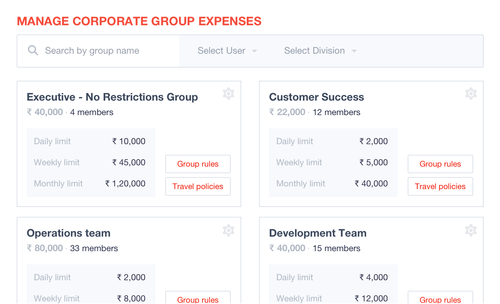
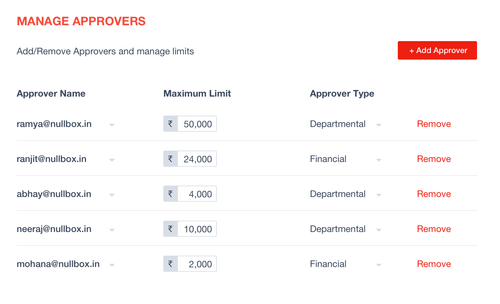
  2. Significant Financial Controls: By using Roka Expense Management Software, you can pass over certain financial controls to departmental heads, enabling them to view the expenses of their field staff and control them as per the companies regulations in real-time.
  3. Complete Automation: Users get access to an advanced expense management system where their entire business-related expenses, workflows, controls and configurations are being processed in an automatic manner. Your audit team can focus on other important tasks, ensuring more savings.
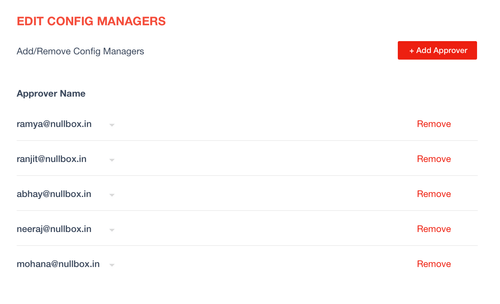
  4. Intuitive Authorization: The software allows its users to actively choose the employees who can view and approve the expense related data for which department, with just a few clicks.
Read more

Roka Expense Management Software Pricing & Plans

Looking for The Right Pricing?

Share your requirements and get a plan built around your business.

  • Define your business needs
  • Get customised pricing
  • Choose features that fit your workflow

Price Available on Request

Get personalised Roka Expense Management Software pricing that fits your needs. Our team will connect with you.

Roka Expense Management Software Features

  • icon_check Control and Tracking
    Roka Expense Management Software offers real-time control and tracking facilities to its users, enabling them to make decisions
  • icon_check Analytics
    Users can analyze their business expenses and take the necessary steps with the help of detailed expense reports offered by the
  • icon_check Multi-stage Approval Workflow
    Multi-stage workflow feature of the software enables its users and their financial teams to verify an expense claim at multiple
  • icon_check Cards
    Company admins can provide Roka cards to their employees allowing them to make all company-related payments from that card.
  • icon_check Employee Expense Management
    Users can specify an expense amount, track the overall expenses made and finally pay for those expenses to their employees with
  • icon_check Travel Expense
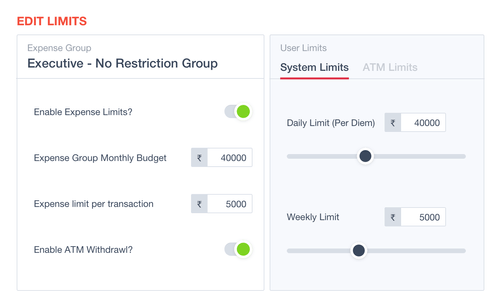
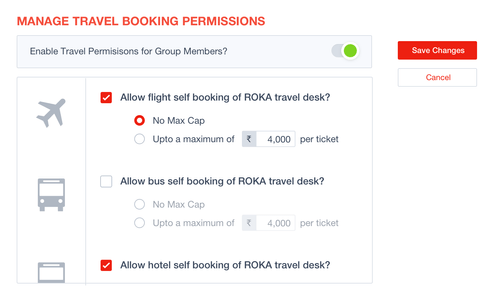
    Admins can view and approve the travel bookings cost and specify an overall limit for the entire trip as per their company
  • icon_check Vendor Payment
    The software maintains all vendor-related receipts in an organised manner, enabling its users and their audit team to check them
  • icon_check Automated Workflow Optimization
    By using Roka Expense Management Software, users get access to an automated workflow, within which they can manage the expense
  • icon_check Admin Module
    Admin users get access to authoritative rights using which they can limit access to those who can view and manage the expense
  • icon_check Reimbursement
    The intuitive employee based expense reports offered by the software enable its user’s to keep track of their employees
  • icon_check Data Storage
    Roka Expense Management Software stores its user’s data on the cloud in a safe and secure manner.
  • icon_check On Cloud
    Roka Expense Management Software stores its user’s data on the cloud in an encrypted manner, enabling its users to get access
  • icon_check Vendor Management
    Users can track and negotiate the expenses claimed by vendors with the help of the intuitive reports offered by the software.
  • icon_check Mileage Tracking
    Advanced mileage tracking tools offered by Roka Expense Management Software allows its users to track the exact distance
  • icon_check Expense Management
    The software initiates higher levels of productivity by automating the entire process related to expense management and
Roka Expense Management Software Demo Video play icon

Get Roka Expense Management Software Demo

Watch the demo video to explore key features, real workflows, and how the software fits your business needs.

Understand
Key Features
Personal
Demo Insights
Interactive
Demo Support

Roka Expense Management Software Specifications

Supported Platforms
Windows Windows iOS iOS Android Android
Devices
Desktop Desktop Mobile Mobile
Deployment
Cloud-Based Cloud-Based
Suitable For
All Industries
Business Specific
All Businesses
Language
English

Explore the Best Alternative Solutions Similar to Your Business Size and Needs

Roka Expense Management Software Review

4.0

Out of 5

img

Overall Rating

Based on
3 Verified Ratings

Rating Breakdown

  • Features 4
  • Value for Money 3.6
  • Ease of Use 4.1
  • Customer Support 4.5

86% Recommend this Product

Add Review

Techjockey Trusted Reviews from Verified Users

No reviews are currently available for Roka Expense Management Software. Discover similar Expense Management Software reviews

  • Zaggle EMS

    4.2

    Whats great - Quick approvals, simple interface. read more

  • Zoho Expense

    4.8

    Whats great - zoho-cost I had the option to explore different avenues regarding the Zoho Expense the board instrument in our association. W... read more

  • EasyForm Expense Management

    4.5

    Whats great - easyform-cost programming anticipated that it should come as a Cd to download. Well I did and the downloading procedure was a... read more

Compare Roka Expense Management Software With other Expense Management Software

Products
Ratings
Pricing
Device Supported
Deployment
Supported Platforms
  • img

    Roka Expense Management Software

  • 4.0

  • Price On Request

  • Desktop

    Mobile

  • Web based

    On Premises

  • Windows

    Mac OS

  • img

    Zoho Expense

  • 4.8

  • ₹ 199

  • Desktop

    Mobile

  • Web based

    On Premises

  • Windows

    Mac OS

  • img

    Amadeus Cytric

  • 4.2

  • Price On Request

  • Desktop

    Mobile

  • Web based

    On Premises

  • Windows

    Mac OS

  • img

    Brex

  • 4

  • Price On Request

  • Desktop

    Mobile

  • Web based

    On Premises

  • Windows

    Mac OS

  • img

    CashBook

  • 4.1

  • Price On Request

  • Desktop

    Mobile

  • Web based

    On Premises

  • Windows

    Mac OS

  • img

    Klipit Bizpro

  • 4.1

  • Price On Request

  • Desktop

    Mobile

  • Web based

    On Premises

  • Windows

    Mac OS

  • img

    eXBA

  • 4.2

  • ₹ 150

  • Desktop

    Mobile

  • Web based

    On Premises

  • Windows

    Mac OS

  • img

    Costipro

  • 4.7

  • ₹ 2376

  • Desktop

    Mobile

  • Web based

    On Premises

  • Windows

    Mac OS

(0) Product(s) selected

Roka Expense Management Software Alternatives

See All Roka Expense Management Software Alternatives

Starting Price:

$12 /Month

Available

Price on Request

Starting Price:

₹350 /month
Pleo

4.2

Starting Price:

$45 /Month

Peko

4.3

Available

Price on Request

Articles for Roka Expense Management Software

See All Related Articles

How can I reset the PIN of my Roka Card?

You have to login into your Roka account, click on the Roka Card option and reset your PIN by generating an OTP to your registered mobile number.

What type of expenses gets covered by the Roka card offered by Roka Expense Management Software?

The Roka card is capable of covering all the expenses related to air ticket bookings, fuel payments, food bill clearance and corporate gifting. Employees can also use the card for making cash withdrawals from nearby ATM counters.

Can I get a demo of Roka Expense Management Software?

Yes, Techjockey provides an online demo for Roka Expense Management Software. You can share your preferred time and date along with the demo request.

What type of payment options are supported by Roka Expense Management Software?

By using Roka Expense Management Software, you will get access to a wide variety of payment options including VISA, Rupay, UPI, NetBanking, BHIM and Mastercard. You can also make payments through any mobile wallet of your choice.

Does Roka Expense Management Software have a mobile app?

Roka Expense Management has a dedicated mobile app known as the Roka App. it is compatible with Android and iOS mobile devices.

20,000+ Software Listed

Best Price Guranteed

Free Expert Consultation

2M+ Happy Customers

Terms and Condtions

close

Users with registered businesses can purchase goods from merchants on the platform to satisfy their business needs. Users are not permitted to utilize any products acquired through the platform for resale, advertising, business, or further distribution.

For each purchase made, users will receive a Tax Invoice (or 'GST invoice') that includes specific details such as:

  • the GSTIN of the user associated with their registered business, and

  • the specified Entity Name for their business.

It should be noted that not all products are eligible for GST Invoice. Only the products displayed by participating sellers with the 'GST-based Invoice Available' callout on the product description page would qualify.

Certain goods and services are not eligible to get a GST Invoice, including items with VAS, i.e., Value Added Services (e.g., Total Mobile Protection/Assured Buyback) and those involving an exchange offer at the time of purchase.

Users must ensure the accuracy of the GSTIN, and business entity name provided for the GST Invoice. Requests for corrections into GST Invoice would not be accommodated by Techjockey.com or any Seller, and any issues arising from user-provided information are the sole responsibility of users.

Techjockey.com is not liable for the GST Invoice or any associated input tax credit. To efficiently claim an input tax credit, users should select the registered place of business address as per the GST authority's data and follow the provisions of the GST Act and rules.

To claim an input tax credit, the delivery and billing addresses must match. Furthermore, input tax credits will not be granted if the delivery address and GSTIN on the invoice are from different states. In case of incorrect GST details provided during the order placement, the order will be canceled automatically.