USA
USA UAE
UAESmall Business
Designed for startups and growing businesses

See More





Brand: Zoho Corporation
Zoho Expense is an online expense management solutions, featuring a GST-compliant user interface. Users can automatically scan multiple receipts, record their business mileage, synchronize their debit and credit cards and manage multiple currency expenses within a single platform. The software employs a state of art firewall protection to eliminate any chance of unauthorised intrusion by third pa...
See MoreHave you used Zoho Expense before?
Share your insights for better experience
View plans
 Save upto 18%, Get GST Invoice on your business purchase T&C Buy Now & Pay Later, Check offer on payment page.
 Brand: Zoho Corporation
Founded Year: 1996
Zoho Corporation is an Indian multinational company that specialises in software development, cloud computing, and web-based business tools. It is best known for Zoho Office suite and its enterprise IT management division, ManageEngine
 Expense Reporting Automated Workflow Manages Policies Budget Audit Customization Integrations Mobile App 24/7 Technical Support Security Insight & Analytics Approval

Watch the demo video to explore key features, real workflows, and how the software fits your business needs.
 Windows
  iOS
iOS  Android MacOS
  Desktop
  Mobile
  iPad
iPad  Cloud-Based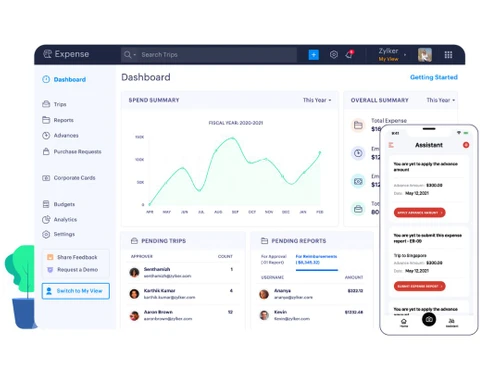
Small Business
Designed for startups and growing businesses
Medium Business
Built for business growth and flexibility
Enterprises
Designed for complex and large-scale business needs
4.8
Out of 5

Overall Rating
Based on
3 Verified Reviews
Rating Breakdown
86% Recommend this Product
Add ReviewUsers of Zoho Expense generally express high satisfaction, highlighting its productivity and ease of use, particularly for small to medium-sized businesses. The tool is appreciated for simplifying expense reporting, especially for teams that travel frequently. However, there is a common sentiment that expense reporting can still be a complex task that requires further refinement. Overall, the positive feedback outweighs the limitations, making it a recommended choice for organizations looking to streamline their expense management.

Mar 19, 2019
Techjockey Verified
“Explorative Module”
Pros
zoho-cost I had the option to explore different avenues regarding the Zoho Expense the board instrument in our association. We regularly travel for work. We feel cost detailing is a tricky thing that requirements settling. At last, I exceedingly prescribe this for little and medium organizations as it's productive and easy to work.
Cons
NO CONS
Jan 6, 2019
Techjockey Verified
“Productive & easy to work”
Pros
zoho-cost I had the option to explore different avenues regarding the Zoho Expense the board instrument in our association. We regularly travel for work. So, We feel cost detailing is a tricky thing that requirements settling. At last, exceedingly prescribe this for little and medium organizations as it's productive and easy to work.
Cons
NO CONS
Sep 5, 2018
Techjockey Verified
“Techjockey is a good place to go”
Pros
They provided information I may not have found otherwise. We are considering two of the solutions they recommended, and at least one of them we were unlikely to know about otherwise. The followup calls from the solution providers were a little aggressive--but overall it was a worthwhile exercise and I would recommend Techjockey.
Cons
N/A

Zoho Expense
₹ 199.00 excl. GST
Desktop
Mobile
Web based
On Premises
Windows
Mac OS

Happay Expense Management
Price On Request
Desktop
Mobile
Web based
On Premises
Windows
Mac OS

Finly - Expense Management
₹ 250
Desktop
Mobile
Web based
On Premises
Windows
Mac OS
Amadeus Cytric
Price On Request
Desktop
Mobile
Web based
On Premises
Windows
Mac OS

eXBA
₹ 150
Desktop
Mobile
Web based
On Premises
Windows
Mac OS
Brex
Price On Request
Desktop
Mobile
Web based
On Premises
Windows
Mac OS

Travel & Expense Management System
Price On Request
Desktop
Mobile
Web based
On Premises
Windows
Mac OS

Expensify
Price On Request
Desktop
Mobile
Web based
On Premises
Windows
Mac OS
CashBook
Price On Request
Desktop
Mobile
Web based
On Premises
Windows
Mac OS

Costipro
₹ 2376
Desktop
Mobile
Web based
On Premises
Windows
Mac OS

Klipit Bizpro
Price On Request
Desktop
Mobile
Web based
On Premises
Windows
Mac OS
(0) Product(s) selected
Available
Price on Request
Starting Price:
$12 /Month
Starting Price:
₹350 /month
Available
Price on Request

Available
Price on Request

Available
Price on Request

Starting Price:
$45 /Month

Available
Price on Request

Starting Price:
$10

Starting Price:
$12

Available
Price on Request


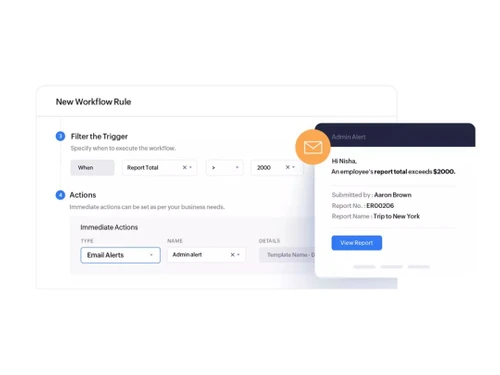
The software offers detailed policy violation analytics, enabling the admins to easily spot those employees who are violating their company’s expense policies.
Yes. Reports with expired expenses can be approved. However, it will be considered a policy violation.
Users can differentiate their expenses into multiple categories like business, travel and entertainment to identify and manage the areas of major expenditure.
Yes, Techjockey provides an online software demos for Zoho Expense. You can mention a fixed time and date as per your convenience while sending us a demo request.
The software allows users to set up approval specific due dates. It also sends notifications to the submitters and approvers once the approval procedure is completed.
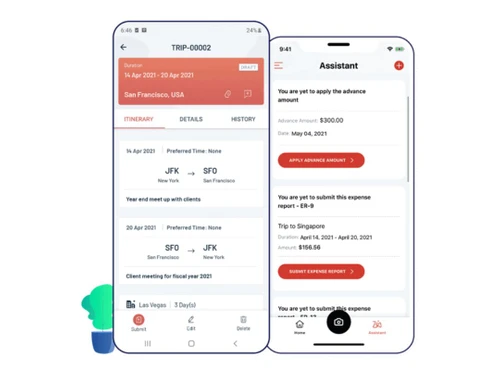
The software has a dedicated mobile app known as Expense Reporting and Approval- Zoho. It is compatible with Android and iOS operated mobile devices.
20,000+ Software Listed
Best Price Guranteed
Free Expert Consultation
2M+ Happy Customers
Terms and Condtions

Users with registered businesses can purchase goods from merchants on the platform to satisfy their business needs. Users are not permitted to utilize any products acquired through the platform for resale, advertising, business, or further distribution.
For each purchase made, users will receive a Tax Invoice (or 'GST invoice') that includes specific details such as:
the GSTIN of the user associated with their registered business, and
the specified Entity Name for their business.
It should be noted that not all products are eligible for GST Invoice. Only the products displayed by participating sellers with the 'GST-based Invoice Available' callout on the product description page would qualify.
Certain goods and services are not eligible to get a GST Invoice, including items with VAS, i.e., Value Added Services (e.g., Total Mobile Protection/Assured Buyback) and those involving an exchange offer at the time of purchase.
Users must ensure the accuracy of the GSTIN, and business entity name provided for the GST Invoice. Requests for corrections into GST Invoice would not be accommodated by Techjockey.com or any Seller, and any issues arising from user-provided information are the sole responsibility of users.
Techjockey.com is not liable for the GST Invoice or any associated input tax credit. To efficiently claim an input tax credit, users should select the registered place of business address as per the GST authority's data and follow the provisions of the GST Act and rules.
To claim an input tax credit, the delivery and billing addresses must match. Furthermore, input tax credits will not be granted if the delivery address and GSTIN on the invoice are from different states. In case of incorrect GST details provided during the order placement, the order will be canceled automatically.