linkedin
Rows AI logo
play There’s an answer for that
Rows AI-reports
Rows AI-dashboard

Rows AI

Brand: Rows

  • 4.1

  • 5 Ratings

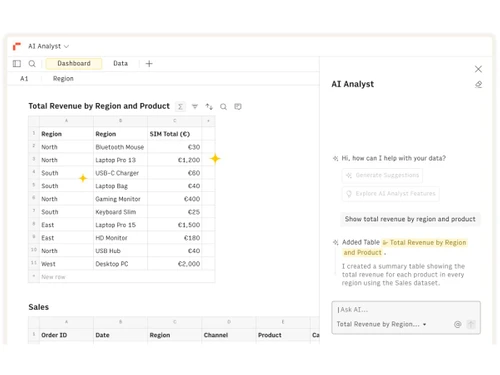
Rows AI helps users analyze data, automate tasks, create reports, and generate insights using simple natural language commands.

See More

Have you used Rows AI before?

Share your insights for better experience

Add a Review
Starting Price
$8

View plans

100% Genuine
Products
Best Price
Guaranteed
Safe & Secure
Payment
  • Description

  • Pricing

  • Features

  • Specification

  • Review

  • FAQ

Starting at $8

Rows AI Software Overview

What is Rows AI?

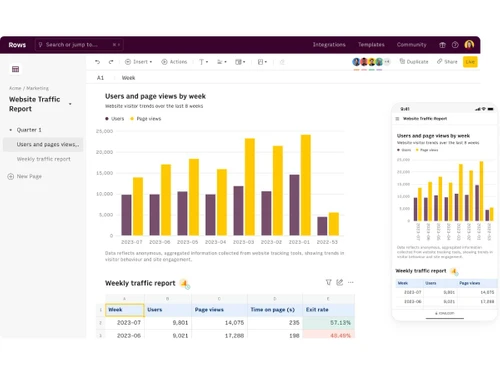
Rows AI is an AI-powered spreadsheet software that helps users work with data more easily and efficiently. It combines the features of a traditional spreadsheet with artificial intelligence, allowing users to analyze data using simple text commands instead of complex formulas. Users can import data from different sources, organize information, create reports, and generate insights quickly. Rows AI can automatically summarize data, answer questions, create charts, and perform calculations with the help of AI.

The platform also supports integrations with various business tools and online services for seamless data management. Teams can collaborate on spreadsheets in real time and share reports easily. It helps reduce manual work by automating repetitive tasks and data processing. Rows AI is useful for business professionals, marketers, analysts, startups, and operations teams. The software works directly in a web browser, making it accessible from anywhere.

Why Choose Rows AI Software?

  • AI-Powered Spreadsheets: Combines spreadsheets with artificial intelligence.
  • Natural Language Queries: Analyze data using simple text commands.
  • No Complex Formulas Needed: Reduces dependence on advanced spreadsheet formulas.
  • Automated Data Analysis: Generates insights automatically from data.
  • Quick Report Creation: Creates reports faster with AI assistance.
  • Data Visualization Tools: Builds charts and visual reports easily.
  • Workflow Automation: Automates repetitive spreadsheet tasks.
  • Real-Time Collaboration: Allows teams to work together on spreadsheets.
  • Cloud-Based Access: Access data from anywhere through a browser.
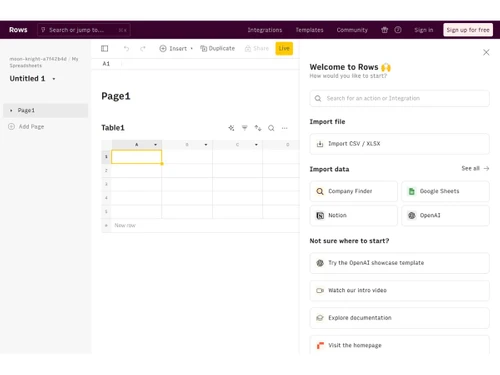
  • Easy Data Import: Import information from multiple sources.
  • AI-Powered Summaries: Instantly summarize large datasets.
  • Business Intelligence Support: Helps users make data-driven decisions.

Benefits of Rows AI Software

  • Marketing Analytics Support: Useful for tracking campaign performance.
  • Sales Data Management: Helps organize and analyze sales information.
  • Project Tracking: Monitor tasks and project progress effectively.
  • Automated Calculations: Performs calculations with AI assistance.
  • Live Data Updates: Keeps information current and accurate.
  • Collaborative Reporting: Share reports easily across teams.
  • Scalable Platform: Suitable for startups and large organizations.
  • Improved Productivity: Reduces manual spreadsheet work.
  • Data Organization Tools: Keeps information structured and accessible.
  • Web-Based Platform: No software installation required.
  • AI Assistance for Research: Helps gather and process information faster.
  • Flexible Use Cases: Supports finance, marketing, operations, and more.
  • Regular Feature Updates: Continuously enhanced with new AI capabilities.

Rows AI Pricing

Rows AI price starts at USD 8 at techjockey.com.

The pricing model is based on different parameters, including extra features, deployment type, and the total number of users. For further queries related to the product, you can contact our product team and learn more about the pricing and offers.

Read more

Rows Company Details

Founded Year:  2016

Rows is the world’s smartest AI spreadsheet. Import cloud data, extract table from PDFs, and build powerful analysis and reports.

Director/Founders Humberto Ayres Pereira, Rui Maranhao, Torben Schulz
Company Size 101-500 Employees

Rows AI Pricing & Plans

Plus
Starting at $8
    • Users

      Users
      Users
    • Monthly

      Monthly
      Monthly

Key Features

  • AI Analyst

  • Data Tables Automate per day

  • Cell enrichment 100k

  • Up to 10 guests

  • White-labeled embeds

Pro
Starting at $87
    • Users

      Users
      Users
    • Monthly

      Monthly
      Monthly

Key Features

  • Everything in Plus

  • Data Tables Automate per min

  • Cell enrichment 1 million

  • Up to 200 guests

  • Video Support

Rows AI Features

  • icon_check Text Classification
    Categorize text entries into defined labels like Sales, Marketing, or Support using AI functions.
  • icon_check Data Extraction
    Extract entities like names, emails, zip codes, or keywords directly from unstructured text columns.
  • icon_check Summarization
    Condense long text, notes, or reports into concise summaries tailored to a specific style or audience.
  • icon_check Automatic Translation
    Translate text from one language to another without leaving your spreadsheet, powered by AI.
  • icon_check AI Chart Generation
    Automatically generate charts, pivot tables, and visualizations based on dataset queries in plain text.
  • icon_check Forecasting
    Run AI-driven trend analysis and generate future projections based on historical dataset patterns.
  • icon_check Data Enrichment
    Enhance raw data by adding company info, web details, or context pulled in through AI enrichment.
  • icon_check Built-in Python Support
    Run Python scripts directly in Rows for advanced statistics, forecasting, or cohort analysis.
  • icon_check Natural Language Queries
    Ask questions in plain English and Rows AI instantly analyzes, modifies, or summarizes spreadsheet data.
  • icon_check AI-Powered Formulas
    Use built-in AI functions like SUMMARIZE_AI, CLASSIFY_AI, or TRANSLATE_AI to automate tasks directly in cells.
  • icon_check Data Cleaning
    Detect duplicates, standardize values, fix formatting issues, and prepare data for analysis with simple prompts.
  • icon_check Sentiment Analysis
    Quickly classify text sentiment (positive, negative, neutral) across large datasets for feedback or reviews.
Rows AI Demo Video play icon

Get Rows AI Demo

Watch the demo video to explore key features, real workflows, and how the software fits your business needs.

Understand
Key Features
Personal
Demo Insights
Interactive
Demo Support

Rows AI Specifications

Supported Platforms
Ubuntu Ubuntu Windows Windows MacOS MacOS Linux Linux
Devices
Desktop Desktop
Deployment
Cloud-Based Cloud-Based
Suitable For
All Industries
Business Specific
All Businesses
Business Size
Small Business Startups Medium Business Enterprises
Customer Support
Email Communities
Language
English
Training Resources
Videos
AI Features
AI Integrated

Rows AI Review

4.1

Out of 5

img

Overall Rating

Based on
5 Verified Ratings

Rating Breakdown

  • Features 4.2
  • Value for Money 4
  • Ease of Use 4.3
  • Customer Support 3.9

80% Recommend this Product

Add Review

Techjockey Trusted Reviews from Verified Users

No reviews are currently available for Rows AI. Discover similar Spreadsheet Software reviews

  • Truly Office

    4.8

    Whats great - I've had a fantastic experience with Truly-Office! The platform is incredibly user-friendly, making my work more efficient an... read more
  • Microsoft Excel

    4.8

    Whats great - It has an intuitive and easy-to-navigate user interface. I can simplify my work's operational requirements using it. It doesn... read more
  • Google Sheets

    4.5

    Whats great - Google Sheets has garnered widespread praise for its user-friendly interface, collaboration features, and cloud-based accessi... read more

Articles for Rows AI

See All Related Articles

How much does Rows AI Software cost?

Rows AI pricing starts at USD 8 on techjockey.com.

Is there a mobile app available for Rows AI Software?

No, Rows AI mobile app is not available.

Which operating systems are compatible with Rows AI Software?

Rows AI is compatible with Windows, MacOS, Linux, and Ubuntu through cloud-based access.

Does Rows AI Software offer a free trial?

Yes, Rows AI provides a free trial and free plan for users to explore its features.

How does Rows AI Software function?

Rows AI uses artificial intelligence and spreadsheet technology to automate data analysis, reporting, and workflow tasks.

Who uses Rows AI Software?

Businesses, marketers, analysts, startups, and teams use Rows AI for smarter data management and automation.

Is a free demo available for Rows AI Software?

Yes, Rows AI offers demos, tutorials, and onboarding resources for new users.

Is Rows AI Software available for free?

Yes, Rows AI has a free version with limited features for individual users and small teams.

20,000+ Software Listed

Best Price Guranteed

Free Expert Consultation

2M+ Happy Customers

Terms and Condtions

close

Users with registered businesses can purchase goods from merchants on the platform to satisfy their business needs. Users are not permitted to utilize any products acquired through the platform for resale, advertising, business, or further distribution.

For each purchase made, users will receive a Tax Invoice (or 'GST invoice') that includes specific details such as:

  • the GSTIN of the user associated with their registered business, and

  • the specified Entity Name for their business.

It should be noted that not all products are eligible for GST Invoice. Only the products displayed by participating sellers with the 'GST-based Invoice Available' callout on the product description page would qualify.

Certain goods and services are not eligible to get a GST Invoice, including items with VAS, i.e., Value Added Services (e.g., Total Mobile Protection/Assured Buyback) and those involving an exchange offer at the time of purchase.

Users must ensure the accuracy of the GSTIN, and business entity name provided for the GST Invoice. Requests for corrections into GST Invoice would not be accommodated by Techjockey.com or any Seller, and any issues arising from user-provided information are the sole responsibility of users.

Techjockey.com is not liable for the GST Invoice or any associated input tax credit. To efficiently claim an input tax credit, users should select the registered place of business address as per the GST authority's data and follow the provisions of the GST Act and rules.

To claim an input tax credit, the delivery and billing addresses must match. Furthermore, input tax credits will not be granted if the delivery address and GSTIN on the invoice are from different states. In case of incorrect GST details provided during the order placement, the order will be canceled automatically.