linkedin
Zoho Tables logo
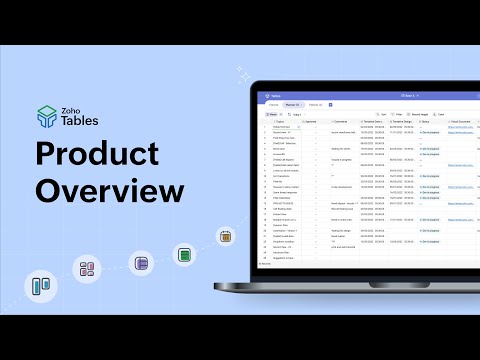
play Zoho Tables | Work Management Software | Product Overview
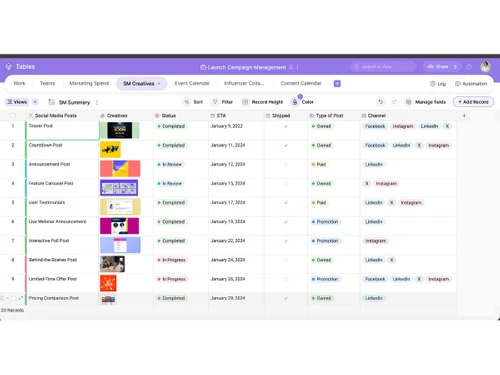
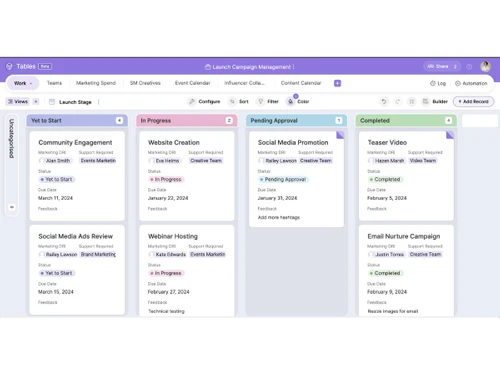
Zoho Tables-grid view
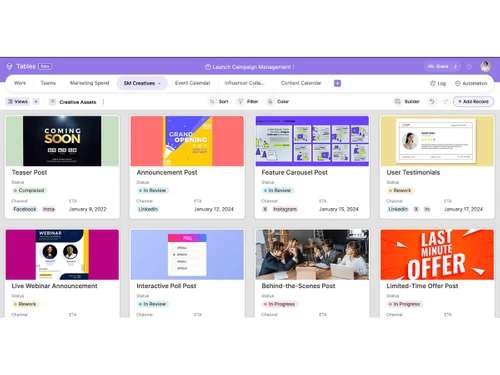
Zoho Tables-gallery view

Zoho Tables

Brand: Zoho Corporation

  • 4.2

  • 4 Ratings

Zoho Tables is a spreadsheet-style software that helps teams organize, track, and automate data while collaborating in real time.

See More

Have you used Zoho Tables before?

Share your insights for better experience

Add a Review
Starting Price
₹300 excl.GST
₹ 300 incl. GST

View plans

offer Save upto 18%, Get GST Invoice on your business purchase T&C
offer Buy Now & Pay Later, Check offer on payment page.
Buy Now
100% Genuine
Products
Best Price
Guaranteed
Safe & Secure
Payment
  • Description

  • Pricing

  • Features

  • Specification

  • Review

  • Compare

  • Alternatives

  • FAQ

Starting at ₹300
Buy Now

Zoho Tables Software Overview

What is Zoho Tables?

Zoho Tables is a modern spreadsheet software that helps you organize, track, and collaborate on data more smartly than a basic spreadsheet.

It looks like a familiar grid but also lets you link related data, automate repetitive tasks, and build workflows without coding.

You can switch between views like grid, Kanban, calendar, and form to work the way you like. It supports real-time teamwork, custom permissions, and integrations with many other tools. Z

oho Tables helps teams manage projects, tasks, leads, inventory, and more all in one place.

Why Choose Zoho Tables Software?

  • No-Code Platform: Create and manage databases without any coding knowledge.
  • Collaborative Work: Work with your team in real-time with shared access and permissions.
  • Multiple Views: Visualize data in Grid, Kanban, Calendar, and Form views.
  • Workflow Automation: Automate repetitive tasks and notifications to save time.
  • Data Linking: Connect related tables for relational database functionality.
  • Customizable Templates: Start quickly with pre-built templates for various business needs.
  • Real-Time Updates: See changes instantly as team members edit data.
  • Conditional Formatting: Highlight important data automatically based on rules.
  • Data Validation: Ensure accurate data entry with validation rules.
  • Integrations: Seamlessly connect with Zoho apps and third-party tools.
  • Access Controls: Define roles and permissions to secure sensitive data.
  • Forms for Data Collection: Collect information via forms that feed directly into tables.

Benefits of Zoho Tables Software

  • Alerts & Notifications: Get notified on task updates or changes automatically.
  • Mobile Access: Manage and update tables on the go with mobile apps.
  • Import & Export: Easily import data from spreadsheets and export reports.
  • Advanced Filters: Filter and sort data to find insights quickly.
  • Audit Logs: Track all changes and activities for accountability.
  • Scalability: Handle small projects or large enterprise-level databases efficiently.
  • Cloud-Based: Access your tables anytime, anywhere, without installation.
  • Cost-Effective: Offers powerful features at competitive pricing for businesses of all sizes.

Zoho Tables Pricing

Zoho Tables price starts at INR 300 at techjockey.com.

The pricing model is based on different parameters, including extra features, deployment type, and the total number of users. For further queries related to the product, you can contact our product team and learn more about the pricing and offers.

Read more

Zoho Corporation Company Details

Founded Year:  1996

Zoho Corporation is an Indian multinational company that specialises in software development, cloud computing, and web-based business tools. It is best known for Zoho Office suite and its enterprise IT management division, ManageEngine

Director/Founders Sridhar Vembu / Tony Thomas
Company Size 1000+ Employees

Zoho Tables Pricing & Plans

Professional
Key Features
  • User Management
  • Data Management
  • Storage & Backup
  • Field Types
  • Customization
  • Collaboration

Calculated Price

300 Exclusive of all taxes
    • Users

      Users
      Users
    • Monthly

      Monthly
      Monthly

Key Features

  • User Management

  • Data Management

  • Storage & Backup

  • Field Types

  • Customization

  • Collaboration

Zoho Tables Features

  • icon_check Customizable Tables
    Design flexible tables with custom fields, data types, and layouts to structure and organize information efficiently.
  • icon_check Multiple Data Views
    Switch between Grid, Kanban, Calendar, and Gallery views to visualize, manage, and analyze records in preferred formats.
  • icon_check Data Relationships
    Link related records across multiple tables to create structured, relational databases for connected data management.
  • icon_check Workflow Automation
    Automate repetitive tasks using no-code trigger-action workflows for updates, notifications, and data processing.
  • icon_check Form Builder
    Collect data directly into tables through customizable web forms with validation rules and embedded sharing options.
  • icon_check Collaboration Tools
    Enable real-time collaboration with comments, mentions, and shared access controls for seamless team coordination.
  • icon_check Version Control
    Track changes made to tables, view modification history, and restore previous versions to maintain data integrity.
  • icon_check Template Library
    Start quickly with prebuilt templates for sales, HR, finance, project tracking, and various business use cases.
  • icon_check Permission Management
    Control who can view, edit, or share data with detailed access roles and sharing settings for secure collaboration.
  • icon_check Import/Export Management
    Easily import data from spreadsheets or CSVs and export tables to multiple formats for backup or integration use.
  • icon_check Integrations & APIs
    Connect Zoho Tables with other Zoho apps, Google Workspace, Zapier, and third-party tools via robust API support.
  • icon_check Advanced Filtering
    Use multi-criteria filters and sorting to locate, group, and analyze specific records efficiently within large datasets.
  • icon_check Attachment Support
    Attach images, files, and documents to records to maintain context and consolidate related assets in one place.
  • icon_check Alerts & Notifications
    Stay updated with automated email or in-app notifications for task assignments, approvals, and record changes.
Zoho Tables Demo Video play icon

Get Zoho Tables Demo

Watch the demo video to explore key features, real workflows, and how the software fits your business needs.

Understand
Key Features
Personal
Demo Insights
Interactive
Demo Support

Zoho Tables Specifications

Supported Platforms
Windows Windows iOS iOS Android Android MacOS MacOS
Devices
Desktop Desktop Mobile Mobile Tablet Tablet iPad iPad
Deployment
Cloud-Based Cloud-Based
Suitable For
All Industries
Business Specific
All Businesses
Business Size
Small Business Medium Business Enterprises
Customer Support
Phone Email Communities
Language
English
Training Resources
Webinars Videos

Explore the Best Alternative Solutions Similar to Your Business Size and Needs

Zoho Tables Review

4.2

Out of 5

img

Overall Rating

Based on
4 Verified Ratings

Rating Breakdown

  • Features 4
  • Value for Money 4.2
  • Ease of Use 4.6
  • Customer Support 4.2

80% Recommend this Product

Add Review

Techjockey Trusted Reviews from Verified Users

No reviews are currently available for Zoho Tables. Discover similar Spreadsheet Software reviews

  • Truly Office

    4.8

    Whats great - I've had a fantastic experience with Truly-Office! The platform is incredibly user-friendly, making my work more efficient an... read more

  • Microsoft Excel

    4.8

    Whats great - It has an intuitive and easy-to-navigate user interface. I can simplify my work's operational requirements using it. It doesn... read more
  • Google Sheets

    4.5

    Whats great - Google Sheets has garnered widespread praise for its user-friendly interface, collaboration features, and cloud-based accessi... read more
Compare Zoho Tables With other Spreadsheet Software

Products
Ratings
Pricing
Device Supported
Deployment
Supported Platforms
  • img

    Zoho Tables

  • 4.2

  • ₹ 300.00 excl. GST

  • Desktop

    Mobile

  • Web based

    On Premises

  • Windows

    Mac OS

  • img

    Zoho Sheet

  • 4.4

  • Price On Request

  • Desktop

    Mobile

  • Web based

    On Premises

  • Windows

    Mac OS

  • img

    Paradigm AI

  • 4.3

  • Price On Request

  • Desktop

    Mobile

  • Web based

    On Premises

  • Windows

    Mac OS

  • img

    Gigasheet

  • 4.3

  • Price On Request

  • Desktop

    Mobile

  • Web based

    On Premises

  • Windows

    Mac OS

  • img

    Coefficient

  • 4.2

  • Price On Request

  • Desktop

    Mobile

  • Web based

    On Premises

  • Windows

    Mac OS

  • img

    Truly Office

  • 4.7

  • Price On Request

  • Desktop

    Mobile

  • Web based

    On Premises

  • Windows

    Mac OS

  • img

    Sheet+

  • 4.4

  • Price On Request

  • Desktop

    Mobile

  • Web based

    On Premises

  • Windows

    Mac OS

  • img

    Formulas HQ

  • 4.5

  • Price On Request

  • Desktop

    Mobile

  • Web based

    On Premises

  • Windows

    Mac OS

  • img

    Bricks

  • 4.1

  • Price On Request

  • Desktop

    Mobile

  • Web based

    On Premises

  • Windows

    Mac OS

  • img

    Rows AI

  • 4.1

  • Price On Request

  • Desktop

    Mobile

  • Web based

    On Premises

  • Windows

    Mac OS

  • img

    SheetAI

  • 4.5

  • Price On Request

  • Desktop

    Mobile

  • Web based

    On Premises

  • Windows

    Mac OS

(0) Product(s) selected

Zoho Tables Alternatives

See All Zoho Tables Alternatives

Available

Price on Request

Starting Price:

$25 /Month
Starting Price:

$8 /Month

Starting Price:

$20 /Month

Articles for Zoho Tables

See All Related Articles

How much does Zoho Tables Software cost?

Zoho Tables pricing starts from INR 300, available at techjockey.com.

Is there a mobile app available for Zoho Tables Software?

Yes, Zoho Tables has mobile apps for both iOS and Android.

Which operating systems are compatible with Zoho Tables Software?

Zoho Tables is compatible with Windows, MacOS, iOS, and Android.

Does Zoho Tables Software offer a free trial?

Yes, Zoho Tables offers a free trial for new users.

How does Zoho Tables Software function?

Zoho Tables functions as a no-code collaborative platform combining spreadsheets and databases for workflow and data management.

Who uses Zoho Tables Software?

Teams, businesses, and organizations that need to organize, track, and automate data and workflows use Zoho Tables.

Is a free demo available for Zoho Tables Software?

Yes, Zoho Tables provides a free demo on request.

Is Zoho Tables Software available for free?

Zoho Tables offers a free plan with limited features for small teams.

20,000+ Software Listed

Best Price Guranteed

Free Expert Consultation

2M+ Happy Customers

Terms and Condtions

close

Users with registered businesses can purchase goods from merchants on the platform to satisfy their business needs. Users are not permitted to utilize any products acquired through the platform for resale, advertising, business, or further distribution.

For each purchase made, users will receive a Tax Invoice (or 'GST invoice') that includes specific details such as:

  • the GSTIN of the user associated with their registered business, and

  • the specified Entity Name for their business.

It should be noted that not all products are eligible for GST Invoice. Only the products displayed by participating sellers with the 'GST-based Invoice Available' callout on the product description page would qualify.

Certain goods and services are not eligible to get a GST Invoice, including items with VAS, i.e., Value Added Services (e.g., Total Mobile Protection/Assured Buyback) and those involving an exchange offer at the time of purchase.

Users must ensure the accuracy of the GSTIN, and business entity name provided for the GST Invoice. Requests for corrections into GST Invoice would not be accommodated by Techjockey.com or any Seller, and any issues arising from user-provided information are the sole responsibility of users.

Techjockey.com is not liable for the GST Invoice or any associated input tax credit. To efficiently claim an input tax credit, users should select the registered place of business address as per the GST authority's data and follow the provisions of the GST Act and rules.

To claim an input tax credit, the delivery and billing addresses must match. Furthermore, input tax credits will not be granted if the delivery address and GSTIN on the invoice are from different states. In case of incorrect GST details provided during the order placement, the order will be canceled automatically.