USA
USA UAE
UAESmall Business
Designed for startups and growing businesses

See More


Brand: Truly Office
Empower your productivity with intuitive spreadsheet software Truly Office, streamline your business operations, and enhance teamwork.
See MoreHave you used Truly Office before?
Share your insights for better experience
Brand: Truly Office
Founded Year: 2023
Software should be simple, lifetime and paid for once to be used for forever Saving productivity costs for individuals, small business and startups that they can re-invest in their businesses to grow faster
 Charting Analytics Templates Audit Trail Privacy Protection Email Merge Document Management Presentations Data Visualizations PDF Management Cloud Storage File Synchronization File Sharing
  Windows
  MacOS Windows(Phone)
  Desktop
  Mobile
  Tablet
  iPad
iPad  Cloud-Based
  Perpetual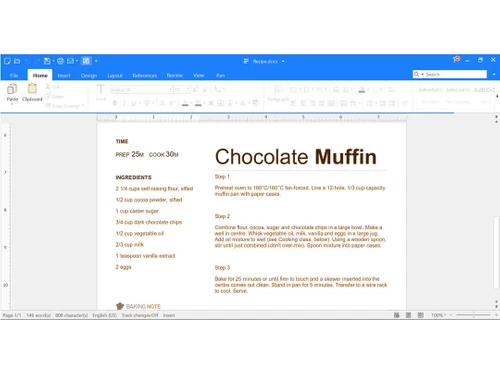
Small Business
Designed for startups and growing businesses
Medium Business
Built for business growth and flexibility
Enterprises
Designed for complex and large-scale business needs
4.7
Out of 5

Overall Rating
Based on
5 Verified Reviews
Rating Breakdown
93% Recommend this Product
Add ReviewOverall, customers express high satisfaction with Truly Office, highlighting its user-friendly interface, affordability, and strong emphasis on privacy. Users appreciate the comprehensive features that cater to various professional needs, making it a valuable tool for productivity. However, some common concerns include a limited range of third-party integrations and a learning curve for those transitioning from more established office suites. Despite these limitations, many recommend Truly Office for its functionality and cost-effectiveness.

Jan 30, 2024
Techjockey Verified
“Incredibly user-friendly”
I've had a fantastic experience with Truly-Office! The platform is incredibly user-friendly, making my work more efficient and enjoyable. The emphasis on privacy is reassuring, and I appreciate the rich set of features that cater to various needs. What's even better is that all these benefits come at a budget-friendly cost, making Truly Office an excellent choice for those looking for both functionality and affordability.
Pros
I've had a fantastic experience with Truly-Office! The platform is incredibly user-friendly, making my work more efficient and enjoyable. The emphasis on privacy is reassuring, and I appreciate the rich set of features that cater to various needs. What's even better is that all these benefits come at a budget-friendly cost, making Truly Office an excellent choice for those looking for both functionality and affordability.
Cons
It has a more limited range of third-party integrations compared to well-established office suites, which could potentially restrict its seamless collaboration with other applications.
Sep 14, 2023
Techjockey Verified
“Totally worth the price!!”
Pros
As a student who is looking to save money, I find their one-time payment for lifetime access to be very suitable for me! They basically have all the features of Microsoft but without the exorbitant price. I love it!
Cons
Transferring from the Microsoft suite, it is inevitable that there will be differences in the UI and how things generally work. I would say that this learning curve is the biggest downside for me. Human error, really. Other than that, I dont see anything wrong with it.
Reason to switch
I find the monthly subscription for Microsoft to be way above my budget.
Sep 13, 2023
Techjockey Verified
“A lightning-fast, full-feature office suite”
Pros
Affordable office suite with all the features you need to create professional documents, spreadsheets, and presentations efficiently. Lightweight with smooth performance and many built-in templates, tools, and functions. The interface is familiar and intuitive, and the suite supports all the file formats I use in my work. The seamless support for multiple platforms is incredible.
Cons
No support for plug-ins and lack of integrations as of right now.
Reason to switch
Truly Office provides a more streamlined experience and runs way faster on all of my devices. I get the same functions and can work with the same files seamlessly for a much better price without having to worry about subscriptions.

Truly Office
Price On Request
Desktop
Mobile
Web based
On Premises
Windows
Mac OS

Paradigm AI
Price On Request
Desktop
Mobile
Web based
On Premises
Windows
Mac OS
Zoho Tables
₹ 300
Desktop
Mobile
Web based
On Premises
Windows
Mac OS

Zoho Sheet
Price On Request
Desktop
Mobile
Web based
On Premises
Windows
Mac OS
Google Sheets
Price On Request
Desktop
Mobile
Web based
On Premises
Windows
Mac OS

Formula Bot
Price On Request
Desktop
Mobile
Web based
On Premises
Windows
Mac OS

Coefficient
Price On Request
Desktop
Mobile
Web based
On Premises
Windows
Mac OS

Gigasheet
Price On Request
Desktop
Mobile
Web based
On Premises
Windows
Mac OS

Microsoft Excel
₹ 14443
Desktop
Mobile
Web based
On Premises
Windows
Mac OS

Sheet+
Price On Request
Desktop
Mobile
Web based
On Premises
Windows
Mac OS

Bricks
Price On Request
Desktop
Mobile
Web based
On Premises
Windows
Mac OS
(0) Product(s) selected
Starting Price:
$20 /Month
Starting Price:
$7
Starting Price:
$59 /Month
Available
Price on Request
Starting Price:
$25 /Month

Starting Price:
$8 /Month

Starting Price:
$20 /Month

Available
Price on Request

Available
Price on Request
Truly Office software is compatible with Windows and macOS device systems.
Truly Office app is not available on Android and iOS devices.
Truly Office system supports cloud-based deployment.
Truly Office Spreadsheet Software price in India is available on request at techjockey.com. Its price in India may vary based on factors like customization, additional features required, the number of users, and the deployment type. Please request a call back for subscription-related details and to avail yourself of offers on premium packages.
Truly Office suits professionals, businesses, and individuals seeking user-friendly spreadsheet software for data management, analysis, and collaboration.
Truly Office Spreadsheet solution demo is available for free with techjockey.com.
Truly Office Spreadsheet platform does not offer a free trial.
Truly Office Spreadsheet Software’s installation is not required, as it is web-based. Just open the Setup Wizard to get started.
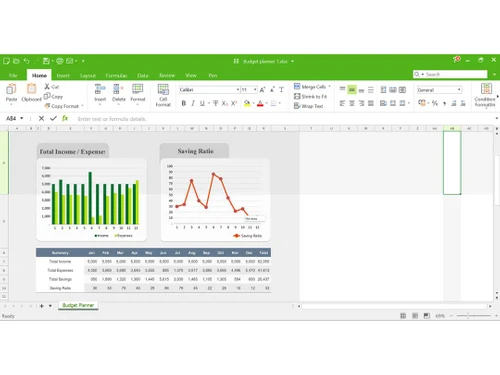
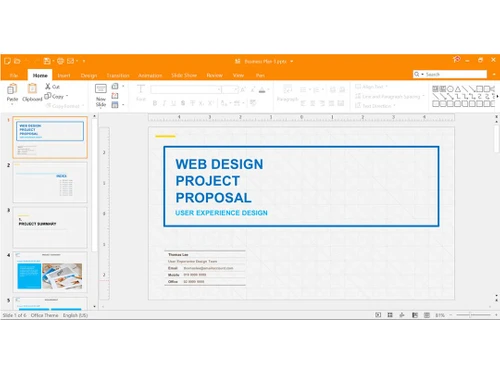
Truly Office is a versatile spreadsheet software that empowers users to organize and analyze data effectively. It provides a user-friendly interface for creating and editing spreadsheets, with various functions and formatting options. Users can collaborate in real-time, making it an essential tool for businesses and individuals seeking to streamline data management and decision-making processes.
20,000+ Software Listed
Best Price Guranteed
Free Expert Consultation
2M+ Happy Customers
Terms and Condtions

Users with registered businesses can purchase goods from merchants on the platform to satisfy their business needs. Users are not permitted to utilize any products acquired through the platform for resale, advertising, business, or further distribution.
For each purchase made, users will receive a Tax Invoice (or 'GST invoice') that includes specific details such as:
the GSTIN of the user associated with their registered business, and
the specified Entity Name for their business.
It should be noted that not all products are eligible for GST Invoice. Only the products displayed by participating sellers with the 'GST-based Invoice Available' callout on the product description page would qualify.
Certain goods and services are not eligible to get a GST Invoice, including items with VAS, i.e., Value Added Services (e.g., Total Mobile Protection/Assured Buyback) and those involving an exchange offer at the time of purchase.
Users must ensure the accuracy of the GSTIN, and business entity name provided for the GST Invoice. Requests for corrections into GST Invoice would not be accommodated by Techjockey.com or any Seller, and any issues arising from user-provided information are the sole responsibility of users.
Techjockey.com is not liable for the GST Invoice or any associated input tax credit. To efficiently claim an input tax credit, users should select the registered place of business address as per the GST authority's data and follow the provisions of the GST Act and rules.
To claim an input tax credit, the delivery and billing addresses must match. Furthermore, input tax credits will not be granted if the delivery address and GSTIN on the invoice are from different states. In case of incorrect GST details provided during the order placement, the order will be canceled automatically.