USA
USA UAE
UAESmall Business
Designed for startups and growing businesses


See More





Brand: Microsoft Corporation
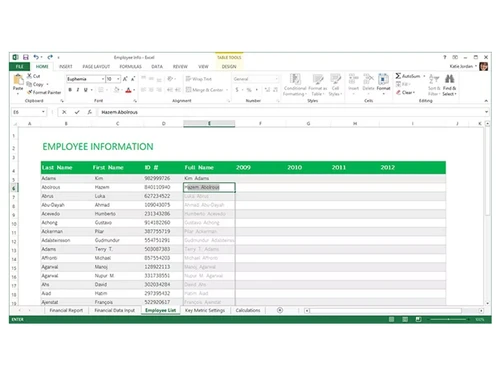
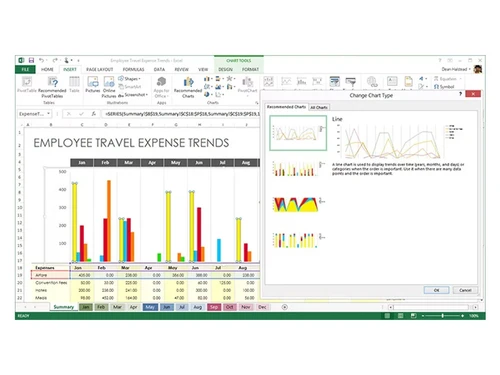
Microsoft Excel spreadsheet software enables users to organize and calculate data in spreadsheets. It helps users to store and calculate the data with the help of various formulas, tables, charts, etc. You can quickly create spreadsheets with the given templates or create your own templates and use the latest formulas to do the calculations. MS Excel can be used by various business entities for d...
See MoreHave you used Microsoft Excel before?
Share your insights for better experience
View plans
 Save upto 18%, Get GST Invoice on your business purchase T&C Buy Now & Pay Later, Check offer on payment page.
 Brand: Microsoft Corporation
Founded Year: 1975
Microsoft Corporation is an American multinational technology company with headquarters in Redmond, Washington.
 Insights Data Analysis Collaboration Graphs & Charts Spreadsheet Management File Sharing Data Entry Calculators Data Visualizations Templates Pivot Tables Notes Data Validation Data Cleaning

Watch the demo video to explore key features, real workflows, and how the software fits your business needs.
 Ubuntu
  Windows
  iOS
iOS  Android MacOS
  Linux
Linux  Desktop
  Mobile
  Tablet
  iPad
iPad  Perpetual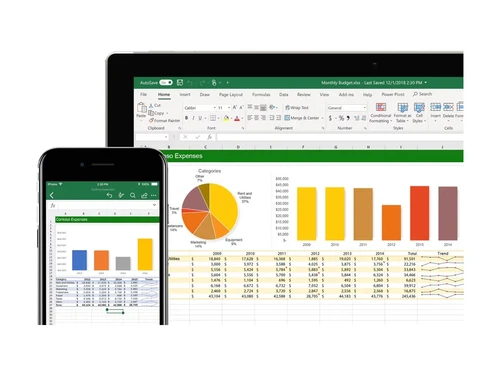
Small Business
Designed for startups and growing businesses
Medium Business
Built for business growth and flexibility
Enterprises
Designed for complex and large-scale business needs
4.7
Out of 5

Overall Rating
Based on
2 Verified Reviews
Rating Breakdown
90% Recommend this Product
Add Review
Jan 7, 2024
Techjockey Verified
“Amazing experience working with Microsoft Excel”
Microsoft Excel us probably the best spreadsheet software I have used so far. It upgrades its features time to time and keeps on simplifying it for the end user. I need it to manage the inventories, create mathematical models and do some predictions.
Pros
It has an intuitive and easy-to-navigate user interface. I can simplify my work's operational requirements using it. It doesn't take long to learn it if I'm a new user and hence I can train my staff easily. The cloud version is also there and that is no different from the offline version.
Cons
I do not find any drawbacks or downsides to using it for my spreadsheet requirements. One are of improvement could be the price of subscriptions which can be reduced if possible. Rest apart, the software works perfectly.
Oct 16, 2023
Techjockey Verified
“Best Among all similar softwares”
Pros
Easy to use, every option on right-click, Proper documentation, Community support, also has a cloud version.
Cons
If system has low configuration it will work slow, and might hang.
Reason to switch
Less Features, Less Quick to use option on right click, Not present as offline app

Microsoft Excel
₹ 14443.00 excl. GST
Desktop
Mobile
Web based
On Premises
Windows
Mac OS

Paradigm AI
Price On Request
Desktop
Mobile
Web based
On Premises
Windows
Mac OS

Truly Office
Price On Request
Desktop
Mobile
Web based
On Premises
Windows
Mac OS
Zoho Tables
₹ 300
Desktop
Mobile
Web based
On Premises
Windows
Mac OS

Zoho Sheet
Price On Request
Desktop
Mobile
Web based
On Premises
Windows
Mac OS
Google Sheets
Price On Request
Desktop
Mobile
Web based
On Premises
Windows
Mac OS

Formula Bot
Price On Request
Desktop
Mobile
Web based
On Premises
Windows
Mac OS

Coefficient
Price On Request
Desktop
Mobile
Web based
On Premises
Windows
Mac OS

Gigasheet
Price On Request
Desktop
Mobile
Web based
On Premises
Windows
Mac OS

Sheet+
Price On Request
Desktop
Mobile
Web based
On Premises
Windows
Mac OS

Bricks
Price On Request
Desktop
Mobile
Web based
On Premises
Windows
Mac OS
(2) Product(s) selected
Starting Price:
$20 /Month
Starting Price:
$7
Starting Price:
$59 /Month
Available
Price on Request
Starting Price:
$25 /Month

Starting Price:
$8 /Month

Starting Price:
$20 /Month

Available
Price on Request

Available
Price on Request
Microsoft Excel spreadsheet software is available for windows and Mac and its web version can be accessed from any device.
Yes, the Microsoft Excel app is available for Android and iOS devices.
Microsoft Excel spreadsheets software supports web-based deployment.
Microsoft Excel demo is available for free with techjockey.com.
Microsoft Excel spreadsheet system offers a free trial. However, the premium plan with advanced features is also available.
Microsoft Excel spreadsheet system helps with data analysis, file sharing, calculations, etc. It's a complete solution for data collection, graphical data representation, spreadsheet templates, etc.
Three common uses of excel include data collection, analysis, and accounting.
There are almost 475 formulas in Microsoft Excel to perform simple to advanced calculations.
There are almost 1,048,576 rows and 16,384 columns in Microsoft Excel.
Microsoft Excel is written in C programming language.
The 4 types of data you can find in Micrisoft Excel Spreadsheet solution include text, number, logic, error, etc.
MS Word is processing software you can use for writing letters, essays, etc. However, MS Excel spreadsheet software is used to store data or information in tabular form in numerical and alphabetical value.
Some of the tools you can get in Microsoft Excel include, Flash fill, Remove Duplicates, Sort, Conditional Formatting, Data Validation, etc.
To convert a VBA macro to an Excel add-in, the general process involves saving the macro-enabled workbook as an add-in file (.xlam), then making it available for use in other workbooks by installing it as an add-in. You will need to open the VBA editor (Alt + F11), save the workbook as an .xlam file, and then add it as an add-in in Excel.
0 0
The simple way to convert the text into an editable Excel table is:
0 0
Vlookup in Microsoft Excel is used to find specific information in a table.
To use Vlookup:
0 0
Here’s how you can create a heatmap in Excel:
0 0
Here’s how you can create a bar chart in Excel:
0 0
20,000+ Software Listed
Best Price Guranteed
Free Expert Consultation
2M+ Happy Customers
Terms and Condtions

Users with registered businesses can purchase goods from merchants on the platform to satisfy their business needs. Users are not permitted to utilize any products acquired through the platform for resale, advertising, business, or further distribution.
For each purchase made, users will receive a Tax Invoice (or 'GST invoice') that includes specific details such as:
the GSTIN of the user associated with their registered business, and
the specified Entity Name for their business.
It should be noted that not all products are eligible for GST Invoice. Only the products displayed by participating sellers with the 'GST-based Invoice Available' callout on the product description page would qualify.
Certain goods and services are not eligible to get a GST Invoice, including items with VAS, i.e., Value Added Services (e.g., Total Mobile Protection/Assured Buyback) and those involving an exchange offer at the time of purchase.
Users must ensure the accuracy of the GSTIN, and business entity name provided for the GST Invoice. Requests for corrections into GST Invoice would not be accommodated by Techjockey.com or any Seller, and any issues arising from user-provided information are the sole responsibility of users.
Techjockey.com is not liable for the GST Invoice or any associated input tax credit. To efficiently claim an input tax credit, users should select the registered place of business address as per the GST authority's data and follow the provisions of the GST Act and rules.
To claim an input tax credit, the delivery and billing addresses must match. Furthermore, input tax credits will not be granted if the delivery address and GSTIN on the invoice are from different states. In case of incorrect GST details provided during the order placement, the order will be canceled automatically.