linkedin
SheetAI logo
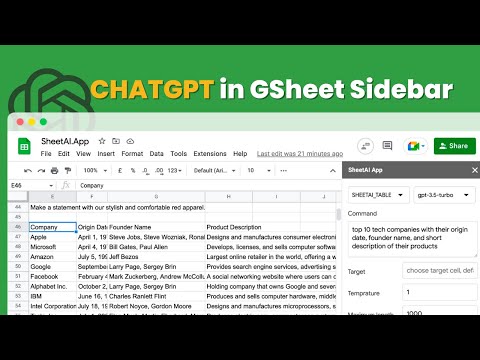
play AI Magic in Google Sheets Sidebar: Create Tables and Generate Catchy Taglines in Seconds!
SheetAI Copywriting
SheetAI Multiple

SheetAI

Brand: IndianAppGuy

  • 4.5

  • 4 Ratings

SheetAI unlocks the efficiency of your spreadsheets with AI magic—automate tasks, get data-driven insights, and transform data effortlessly.

See More

Have you used SheetAI before?

Share your insights for better experience

Add a Review
Starting Price
$20

View plans

100% Genuine
Products
Best Price
Guaranteed
Safe & Secure
Payment
  • Description

  • Pricing

  • Features

  • Specification

  • Review

  • Compare

  • Alternatives

  • FAQ

Starting at $20

SheetAI Software Overview

What is SheetAI Software?

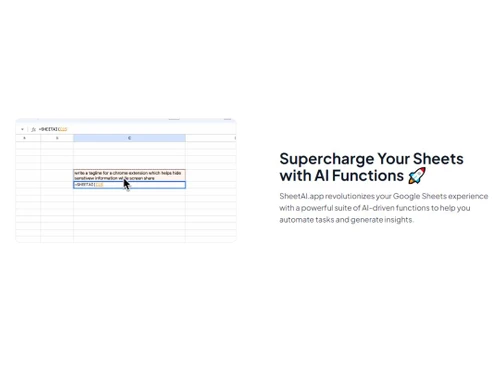
SheetAI is an AI-driven advanced spreadsheet tool. Users can seamlessly integrate this tool into Google Sheets to supercharge Excel Sheets with AI functions. With AI capabilities, you can simply express requirements in plain English, and SheetAI generates insights and performs tasks automatically. The software is currently available for desktop and laptop devices. SheetAI introduces a new paradigm for interacting with spreadsheets and empowers users with a suite of AI-driven functions. Some of the key functions are SHEETAI_BRAIN, SHEETAI_LIST, SHEETAI_FILL. These features simplify copywriting and content creation, generate AI answers, populate sheets with dummy data, and enhance data management using AI.

This is an invaluable tool for marketers, data analysts, and entrepreneurs. The plain English commands minimize the learning curve and save substantial time. SheetAI is powered by OpenAI, making it a reliable and high-quality software product to transform spreadsheet interactions.

Why Choose SheetAI Platform?

  • AI-Powered Automation:Experience the magic of AI in your spreadsheet by automating tasks and generate insights using simple English commands.
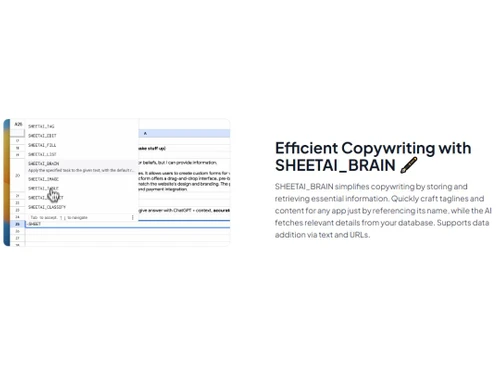
  • Copywriting Simplified:Create high-quality copywriting content, taglines, and ad copies by referencing names with SHEETAI_BRAIN.
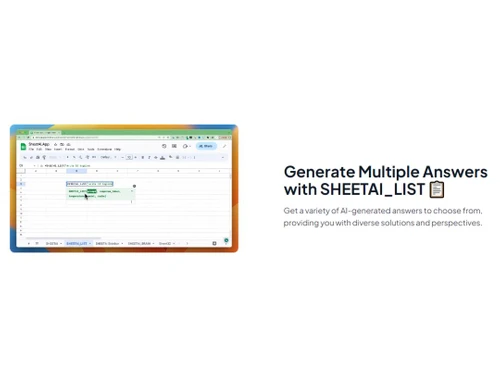
  • AI-Generated Answers:Access AI-generated answers with SHEETAI_LIST for users to explore diverse solutions and perspectives to make data-driven decisions.
  • Data Population:Effortlessly populate data with SHEETAI_FILL, from product descriptions to cleaning email lists, and efficiently manage data using AI power.
  • Easy Spreadsheet Interaction:Transform your spreadsheet experience with this user-friendly tool powered by OpenAI and make spreadsheet tasks efficient and insightful.

Benefits of SheetAI Spreadsheet Software

  • Get AI-driven insights through data.
  • Automate tasks, save time, and increase productivity.
  • Fill data dynamically, like product descriptions, email lists, etc.
  • Simplify copywriting by storing and retrieving crucial information.
  • Enhance spreadsheet efficiency by sanitizing data, predicting values, and more.
  • Enjoy user-friendly AI integration.
  • Generate fresh ideas with speech analysis.

Pricing of SheetAI Spreadsheet Platform

SheetAI spreadsheet platform pricing starts from $20 at techjockey.com.

For subscription-related details and offers on premium packages, please request a call back from our product experts.

Read more

SheetAI Pricing & Plans

UNLIMITED MONTHLY
Starting at $20
    • Licenses

      Licenses
      Licenses
    • Monthly

      Monthly
      Monthly

Key Features

  • Unlimited Sheet formula generation per month

  • Unlimited SHEETAI function calls

  • Access to all previously generated formula

  • Access to all prior SHEETAI functions calls

  • Supports all Languages

  • Cache feature to save cost of SHEETAI function cal

UNLIMITED YEARLY
Starting at $200
    • Licenses

      Licenses
      Licenses
    • Yearly

      Yearly
      Yearly

Key Features

  • Unlimited Sheet formula generation per month

  • Unlimited SHEETAI function calls.

  • Access to all previously generated formula

  • Access to all prior SHEETAI functions calls

  • Supports all Languages

  • Cache feature to save cost of SHEETAI function cal

SheetAI Features

  • icon_check Spreadsheets
    Bring automation, insights, and efficiency to your data management using AI-powered enhancement into spreadsheets.
  • icon_check Artificial Intelligence
    This software uses plain English and the power of AI to make data analysis and content creation easier.
  • icon_check Speech Analysis
    Integrate speech analysis functions into spreadsheets for a seamless and efficient way to convert audio into text.
  • icon_check Generate Excel Formulas
    This simplifies tasks by generating Excel formulas and handling complex calculations and data operations with AI assistance.
  • icon_check Ease of Use
    Enjoy the intuitive interface, ease of use, accessibility, and efficiency for all users, from beginners to expert Sheet users.
  • icon_check Multi Language Support
    This software fulfils diverse language needs and enhances accessibility and user experience with multi-language support.
  • icon_check Charting
    Unlock dynamic charting features to create visually appealing & insightful charts to represent data easily.
SheetAI Demo Video play icon

Get SheetAI Demo

Watch the demo video to explore key features, real workflows, and how the software fits your business needs.

Understand
Key Features
Personal
Demo Insights
Interactive
Demo Support

SheetAI Specifications

Supported Platforms
Ubuntu Ubuntu Windows Windows MacOS MacOS Linux Linux
Devices
Desktop Desktop Mobile Mobile Tablet Tablet iPad iPad
Deployment
Cloud-Based Cloud-Based
Suitable For
All Industries
Business Specific
All Businesses
Business Size
Small Business Medium Business Enterprises
Customer Support
Email Communities
Language
English
Training Resources
Videos
AI Features
AI Integrated

Explore the Best Alternative Solutions Similar to Your Business Size and Needs

SheetAI Review

4.5

Out of 5

img

Overall Rating

Based on
4 Verified Ratings

Rating Breakdown

  • Features 4.5
  • Value for Money 4.6
  • Ease of Use 4.5
  • Customer Support 4.5

95% Recommend this Product

Add Review

Techjockey Trusted Reviews from Verified Users

No reviews are currently available for SheetAI. Discover similar Spreadsheet Software reviews

  • Truly Office

    4.8

    Whats great - I've had a fantastic experience with Truly-Office! The platform is incredibly user-friendly, making my work more efficient an... read more

  • Microsoft Excel

    4.8

    Whats great - It has an intuitive and easy-to-navigate user interface. I can simplify my work's operational requirements using it. It doesn... read more
  • Google Sheets

    4.5

    Whats great - Google Sheets has garnered widespread praise for its user-friendly interface, collaboration features, and cloud-based accessi... read more

Compare SheetAI With other Spreadsheet Software

Products
Ratings
Pricing
Device Supported
Deployment
Supported Platforms
  • img

    SheetAI

  • 4.5

  • Price On Request

  • Desktop

    Mobile

  • Web based

    On Premises

  • Windows

    Mac OS

  • img

    Paradigm AI

  • 4.3

  • Price On Request

  • Desktop

    Mobile

  • Web based

    On Premises

  • Windows

    Mac OS

  • img

    Zoho Tables

  • 4.2

  • ₹ 300

  • Desktop

    Mobile

  • Web based

    On Premises

  • Windows

    Mac OS

  • img

    Gigasheet

  • 4.3

  • Price On Request

  • Desktop

    Mobile

  • Web based

    On Premises

  • Windows

    Mac OS

  • img

    Coefficient

  • 4.2

  • Price On Request

  • Desktop

    Mobile

  • Web based

    On Premises

  • Windows

    Mac OS

  • img

    Truly Office

  • 4.7

  • Price On Request

  • Desktop

    Mobile

  • Web based

    On Premises

  • Windows

    Mac OS

  • img

    Sheet+

  • 4.4

  • Price On Request

  • Desktop

    Mobile

  • Web based

    On Premises

  • Windows

    Mac OS

  • img

    Formulas HQ

  • 4.5

  • Price On Request

  • Desktop

    Mobile

  • Web based

    On Premises

  • Windows

    Mac OS

  • img

    Zoho Sheet

  • 4.4

  • Price On Request

  • Desktop

    Mobile

  • Web based

    On Premises

  • Windows

    Mac OS

  • img

    Bricks

  • 4.1

  • Price On Request

  • Desktop

    Mobile

  • Web based

    On Premises

  • Windows

    Mac OS

  • img

    Rows AI

  • 4.1

  • Price On Request

  • Desktop

    Mobile

  • Web based

    On Premises

  • Windows

    Mac OS

(0) Product(s) selected

SheetAI Alternatives

See All SheetAI Alternatives

Available

Price on Request

Starting Price:

$3

Starting Price:

$25 /Month

Starting Price:

$8 /Month

Articles for SheetAI

See All Related Articles

Which operating system does SheetAI support?

SheetAI is compatible with Windows and macOS operating systems.

Is there any SheetAI app?

The SheetAI app is unavailable for both Android and iPhone.

What is the deployment type of SheetAI?

SheetAI supports web-based deployment.

How much does SheetAI cost?

SheetAI pricing starts from $ 20 at techjockey.com.

Who are the potential users of SheetAI?

SheetAI is typically used in small to large business enterprises, startups, data scientists, and Excel masters who need dynamic software to calculate and analyze Excel content.

Is there any free trial or demo for SheetAI?

SheetAI demo is available for free with techjockey.com.

Is SheetAI free?

SheetAI does not offer a free trial. However, the premium plan with advanced features starts at $657.

How can you download SheetAI?

SheetAI installation is not required, as it is web-based. Just open the Setup Wizard to get started.

How does SheetAI Work?

SheetAI transforms your spreadsheet experience with AI. Simply describe your task in plain English, and the AI executes commands, automating tasks like generating Excel formulas, speech analysis, and more. This user-friendly tool adds efficiency by understanding your needs and providing diverse insights through AI-driven functions.

20,000+ Software Listed

Best Price Guranteed

Free Expert Consultation

2M+ Happy Customers

Terms and Condtions

close

Users with registered businesses can purchase goods from merchants on the platform to satisfy their business needs. Users are not permitted to utilize any products acquired through the platform for resale, advertising, business, or further distribution.

For each purchase made, users will receive a Tax Invoice (or 'GST invoice') that includes specific details such as:

  • the GSTIN of the user associated with their registered business, and

  • the specified Entity Name for their business.

It should be noted that not all products are eligible for GST Invoice. Only the products displayed by participating sellers with the 'GST-based Invoice Available' callout on the product description page would qualify.

Certain goods and services are not eligible to get a GST Invoice, including items with VAS, i.e., Value Added Services (e.g., Total Mobile Protection/Assured Buyback) and those involving an exchange offer at the time of purchase.

Users must ensure the accuracy of the GSTIN, and business entity name provided for the GST Invoice. Requests for corrections into GST Invoice would not be accommodated by Techjockey.com or any Seller, and any issues arising from user-provided information are the sole responsibility of users.

Techjockey.com is not liable for the GST Invoice or any associated input tax credit. To efficiently claim an input tax credit, users should select the registered place of business address as per the GST authority's data and follow the provisions of the GST Act and rules.

To claim an input tax credit, the delivery and billing addresses must match. Furthermore, input tax credits will not be granted if the delivery address and GSTIN on the invoice are from different states. In case of incorrect GST details provided during the order placement, the order will be canceled automatically.