 USA
USA UAE
UAESmall Business
Designed for startups and growing businesses


See More




Brand: Salesken
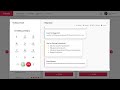
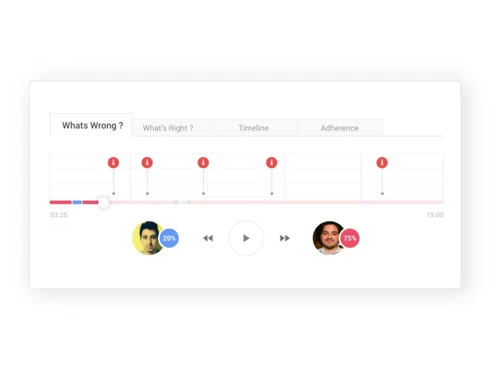
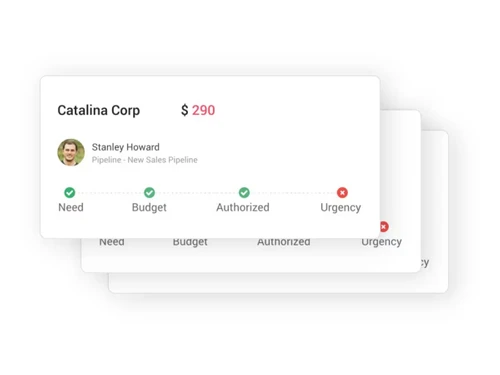
Salesken.ai is a conversational intelligence platform offering sales teams diagnostics intelligence tools for improving performance reducing acquisition costs. Backed by Sequoia Capital Microsoft (M12 Ventures), the conversation intelligence software provides sales reps real-time cues during conversations for better customer engagement. The platform gives managers and sales teams visibility into ...
See MoreHave you used Salesken before?
Share your insights for better experience
Brand: Salesken
Founded Year: 2018
Salesken is a conversational intelligence platform that helps sales teams engage with their customers better. Salesken improves revenue per representative by developing insights on gaps in their sales calls and bridging the gap with real-time cues to the sales reps.
Looking for The Right Pricing?
Share your requirements and get a plan built around your business.
Price Available on Request
Get personalised Salesken pricing that fits your needs. Our team will connect with you.
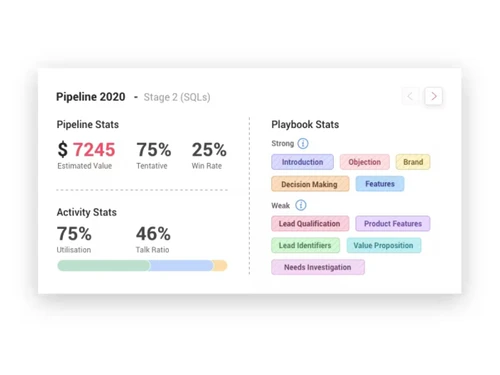
 Assessment Management Goal Management Performance Management Archiving & Retention Dashboards Sales Trend Analysis Lead Management Reports Lead Capture Call Management Performance Metrics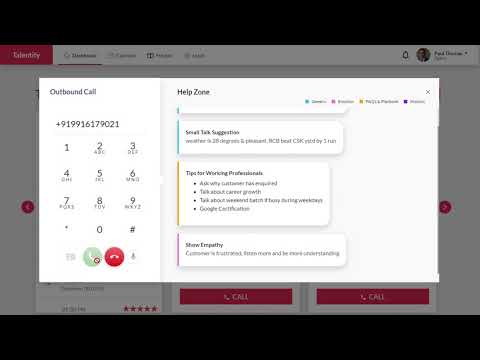

Watch the demo video to explore key features, real workflows, and how the software fits your business needs.
 Windows
  Desktop
  Cloud-Based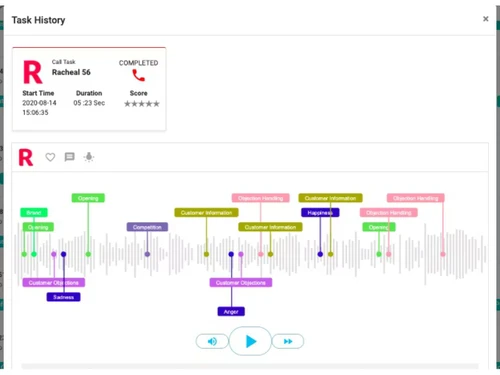
Small Business
Designed for startups and growing businesses
Medium Business
Built for business growth and flexibility
Enterprises
Designed for complex and large-scale business needs
4.8
Out of 5

Overall Rating
Based on
10 Verified Reviews
Rating Breakdown
100% Recommend this Product
Add ReviewCustomers consistently praise Salesken for its ability to enhance sales performance through insightful analysis of conversations, leading to improved communication and deal closure. Users appreciate its ease of use, real-time feedback, and integration with other tools, which collectively streamline the sales process. The overall sentiment is highly positive, with no significant complaints reported, indicating a strong user satisfaction. However, feedback is limited to early adopters, suggesting a need for broader user experiences to assess long-term effectiveness.

Jul 9, 2021
Techjockey Verified
“Salesken - Improve your sales calls with instant insights”
Pros
This is a great sales tool. It helps you gain insights into your sales interactions and helps you improve your calls. It is easy to use and it helps you learn from your past sales calls and your colleagues’ sales calls. The product also has a great customer service. They were responsive and helpful.
Cons
It's working fine no issues found yet.
Reason to switch
It is easy to use, and the tool helps you focus on what works. It allows you to learn from your past sales calls and your colleagues’ sales calls
Aug 29, 2021
Techjockey Verified
“Salesken: Improve your sales calls with instant insights”
Pros
This is a great sales tool. It helps you gain insights into your sales interactions and helps you improve your calls. It is easy to use and it helps you learn from your past sales calls and your colleagues’ sales calls. The product also has great customer service. They were responsive and helpful.
Cons
We like these features and did not come across anything else that we didn’t like.
Reason to switch
It is easy to use, and the tool helps you focus on what works.
Apr 25, 2022
Techjockey Verified
“The Easiest Way to Record and Analyze Your Sales Calls”
Pros
Salesken is the best tool for recording and analyzing your calls. It is so easy to use and it is a must-have for any sales manager. The tool is intuitive and saves a ton of time, allowing me to focus on other important things. I am so impressed with this service and recommend it to everyone in the sales industry.
Cons
All the features are very good and don’t really have any complaints about it.
Reason to switch
This tool is incredible. I feel like it's been designed for the exact way I think and therefore using it has been really easy

Salesken
Price On Request
Desktop
Mobile
Web based
On Premises
Windows
Mac OS

Reverse Contact
Price On Request
Desktop
Mobile
Web based
On Premises
Windows
Mac OS

Clay
Price On Request
Desktop
Mobile
Web based
On Premises
Windows
Mac OS

Substrata
Price On Request
Desktop
Mobile
Web based
On Premises
Windows
Mac OS

Clari Copilot
Price On Request
Desktop
Mobile
Web based
On Premises
Windows
Mac OS
Modjo
Price On Request
Desktop
Mobile
Web based
On Premises
Windows
Mac OS
Persana AI
Price On Request
Desktop
Mobile
Web based
On Premises
Windows
Mac OS

Linkedin Sales Navigator
Price On Request
Desktop
Mobile
Web based
On Premises
Windows
Mac OS

Jiminny
Price On Request
Desktop
Mobile
Web based
On Premises
Windows
Mac OS

SearchLeads
Price On Request
Desktop
Mobile
Web based
On Premises
Windows
Mac OS
Salesbot
Price On Request
Desktop
Mobile
Web based
On Premises
Windows
Mac OS
(0) Product(s) selected
Starting Price:
$29 /Month
Starting Price:
$50 /User/Month
Available
Price on Request
Available
Price on Request
Starting Price:
$85 /Month
Available
Price on Request
Starting Price:
$49 /Month
Starting Price:
$49 /Month
Available
Price on Request
Starting Price:
$2,700 /Month
Starting Price:
$588 /Year
Salesken conversational intelligence platform is compatible with Windows operating systems.?
Salesken app is available for Android and iOS devices.
Salesken conversational intelligence platform supports web-based deployment type.
Salesken conversation intelligence platform for sales pricing is available on request at techjockey.com.
Salesken is typically used by sales team.
Salesken conversation intelligence software demo is available for free with techjockey.com.
Salesken installation is not required, as it is web-based. Just open the Setup Wizard to get started.
Salesken conversational intelligence platform helps with managing customer interactions. It's a complete solution for handling customer calls and converting leads.?
Salesken works on the premise that gaps exist between top-performing reps & the average/bottom ones. Its purpose is to bridge this existing gap to prevent losses. As managers use the modules and methodologies provided by the software, there would be higher lead qualifications and conversations.
The conversational intelligence platform supports a meaning engine, which runs in the background for listening to live conversations. There are four of these engines – Generic, Emotion, FAQs & Playbook, Historic. Each would pop up depending on its settings or based on the conversation that is happening in real-time.
Yes, these are customizable live cues. These are generated after listening to hundreds of conversations and other relevant materials like Sales Playbook, FAQs, etc. The cues that pop up could be regarding an appropriate feature or general conversation/small talk, depending on what is being said in the conversation.
Yes, Salesken offers trial support. It normally starts a POC/trial for five-ten users for a few months and sees how it goes from there. This helps users identify if Salesken is a good fit for their team. If it is, then users can proceed further for long-term association.?
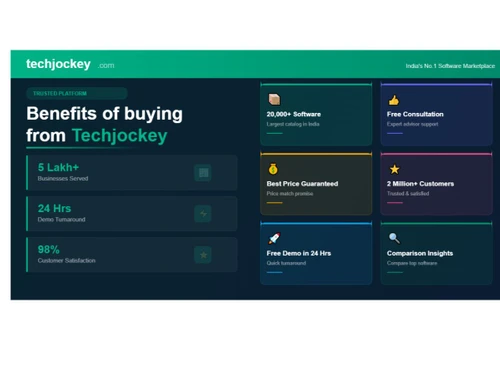
20,000+ Software Listed
Best Price Guranteed
Free Expert Consultation
2M+ Happy Customers
Terms and Condtions

Users with registered businesses can purchase goods from merchants on the platform to satisfy their business needs. Users are not permitted to utilize any products acquired through the platform for resale, advertising, business, or further distribution.
For each purchase made, users will receive a Tax Invoice (or 'GST invoice') that includes specific details such as:
the GSTIN of the user associated with their registered business, and
the specified Entity Name for their business.
It should be noted that not all products are eligible for GST Invoice. Only the products displayed by participating sellers with the 'GST-based Invoice Available' callout on the product description page would qualify.
Certain goods and services are not eligible to get a GST Invoice, including items with VAS, i.e., Value Added Services (e.g., Total Mobile Protection/Assured Buyback) and those involving an exchange offer at the time of purchase.
Users must ensure the accuracy of the GSTIN, and business entity name provided for the GST Invoice. Requests for corrections into GST Invoice would not be accommodated by Techjockey.com or any Seller, and any issues arising from user-provided information are the sole responsibility of users.
Techjockey.com is not liable for the GST Invoice or any associated input tax credit. To efficiently claim an input tax credit, users should select the registered place of business address as per the GST authority's data and follow the provisions of the GST Act and rules.
To claim an input tax credit, the delivery and billing addresses must match. Furthermore, input tax credits will not be granted if the delivery address and GSTIN on the invoice are from different states. In case of incorrect GST details provided during the order placement, the order will be canceled automatically.



