linkedin
SeroPOS logo
play SeroPOS Setup Guide
play SeroPOS Free Restaurant & Retail Management Software, Solution, Systems, contactless QR Code POS.
sero-order

SeroPOS

Brand: Sero Technologies

  • 4.4

  • 5 Ratings

SeroPOS is a restaurant and retail management solution supporting food courts, food trucks, cafes, pizza shops, gift shops, apparel stores, jewellery stores, and more It's a cloud-based solution with the point of sale and billing functionalities. It also helps with inventory management, recipe management, vendor management, loyalty program management, and more. The comprehensive POS billing softw...

See More

Have you used SeroPOS before?

Share your insights for better experience

Add a Review
Starting Price
$50

View plans

100% Genuine
Products
Best Price
Guaranteed
Safe & Secure
Payment
  • Description

  • Pricing

  • Features

  • Specification

  • Review

  • Compare

  • Alternatives

  • FAQ

Starting at $50

SeroPOS Software Overview

What is SeroPOS?

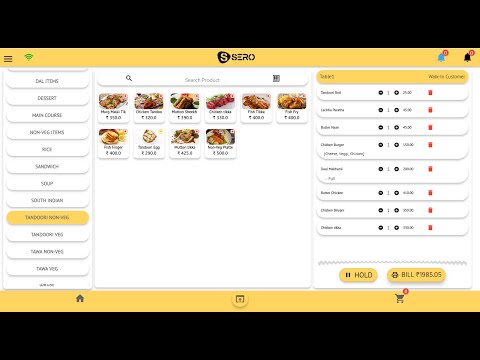
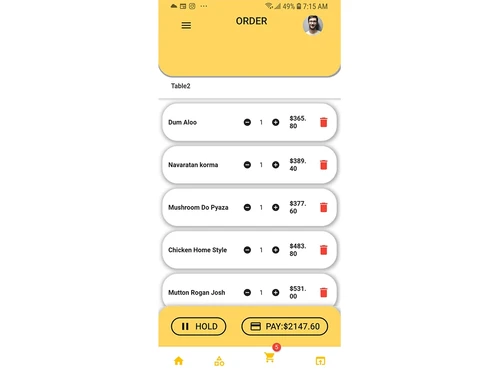
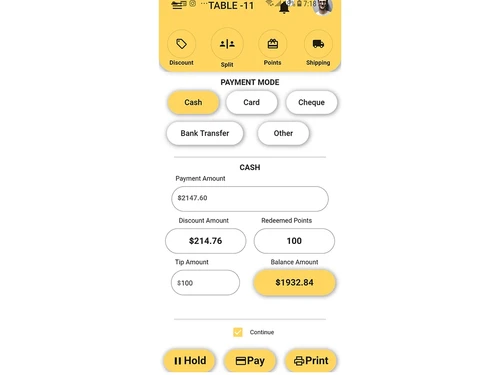
SeroPOS is a restaurant and retail management solution supporting food courts, food trucks, cafes, pizza shops, gift shops, apparel stores, jewellery stores, and more It's a cloud-based solution with the point of sale and billing functionalities. It also helps with inventory management, recipe management, vendor management, loyalty program management, and more. The comprehensive POS billing software allows you to manage and monitor all your retail outlets and restaurant chains through a single platform. SeroPOS is compatible with iOS, Android, PWA, and Windows.

Modules in SeroPOS Solution

  • Point of Sale app: POS app that can be accessed through any device on a web browser.
  • Property management solution: Integrated PMS option to manage in-room bookings.
  • Food court: Prepaid cash cards a separate reporting panel for managing an entire food court.
  • Home delivery: Inbuilt customer, driver manager app for managing all food and retail orders.
  • Contactless QR: QR code-based digital ordering system for taking orders with simple scans.

Why Use SeroPOS Software?

  • Cloud-based: An easy-to-use and intuitive dashboard for managing all business functions.
  • Cross-platform: SeroPOS works on all devices, be it a tablet, mobile, or desktop. It's accessible across multiple platforms like iOS, Android, macOS, and Windows.
  • Table management: Inbuilt table management interface helps manage bookings, orders, and reservations.
  • User access controls: You can assign role-based access rights and control app configurations, reports, etc.
  • Loyalty programs: It lets you create different types of loyalty programs using its dynamic management loyalty functionality.  
  • Cross-store management: Growing a business with this scalable retail restaurant billing management software. Just from one dashboard, you can manage multiple stores.  
  • Inventory management: This POS billing software also helps with inventory management. There are detailed reports for managing inventory operations and stock levels.  
  • Vendor management: Manage your vendors and orders better with this module. The user dashboard provides a complete picture of your vendor accounts.
  • Detailed analytics: The software generates reports with detailed insights into your business performance.

Benefits of SeroPOS

  • Access vendor, billing, and expense related details from any location on any device
  • Cloud-based user dashboard reporting panels for remotely managing your retail or restaurant business
  • A fast, reliable, and secure solution for the complete management of restaurants and retail.
  • Helps manage multiple stores and franchises through a single dashboard.

How Does SeroPOS Work? 

The latest version of SeroPOS is primarily used for managing retail and restaurant businesses. It has an intuitive interface and is simple to use. SeroPOS can be easily integrated with your existing systems to ensure a smooth workflow. For more information, you can also refer to user manuals and take an online SeroPOS demo at Techjockey.com.

How to Use SeroPOS? 

Get started with SeroPOS in 5 simple steps:  

  • Step 1: Buy SeroPOS installation key from Techjockey.com
  • Step 2: Directly login through the official website 
  • Step 3: Sign up Create your account 
  • Step 4: Add users assign permissions 
  • Step 5: Get started with SeroPOS

What is the Price of SeroPOS?

SeroPOS price in India starts at ₹ 962 per month. SeroPOS comes with multiple pricing plans and caters to a diverse customer base.

SeroPOS Price ranges:

  • Basic: ₹ 962/month
  • F B: ₹ 1836/month
  • Retail: ₹ 1836/month

The price may vary based on factors like customization, additional features required, number of users, and the deployment type. For subscription-related details and offers on premium packages, please request a call back from our product experts. 

Read more

Sero Technologies Company Details

Founded Year:  2021

roPOS has everything a modern restaurant & retail can dream of within one App: the best cloud-based Restaurant & Retail Management System, a comprehensive Billing Software, and a complete range of Restaurant & Retail Point of Sale (POS) Apps for Android, iOS, PWA and Windows platforms.

Director/Founders Vikram Khosla
Company Size 1-100 Employees

SeroPOS Pricing & Plans

BASIC POS MONTHLY( 5 Users)
Starting at $815
  • Options

    • Quantity

      Quantity
      Quantity
    • Monthly

      Monthly
      Monthly

Key Features

  • Unlimited Invoices

  • Vendor Management

  • Loyalty & CRM Module

  • Payroll & HRM Module

  • Unlimited Products

BASIC POS Annual ( 5 Users)
Starting at $500
    • Licenses

      Licenses
      Licenses
    • Yearly

      Yearly
      Yearly

Key Features

  • Unlimited Invoices

  • Vendor Management

  • Loyalty & CRM Module

  • Payroll & HRM Module

  • Unlimited Products

SeroPOS Features

  • icon_check Dashboards
    Simple user dashboard for managing vendors, multiple stores, business data, and inventory.
  • icon_check User Management
    User access controls for assigning access rights and controlling app configurations, reports, etc.
  • icon_check Contacts
    Manage customer contacts & details for sending coupons, discounts and loyalty points.
  • icon_check List Products
    List products, manage their inventory level and keep a check on the stock level after every sale.
  • icon_check Purchase & sales
    Detailed sales reports help businesses record all transactions and place purchase orders.
  • icon_check Expense Management
    The feature helps in managing cashflows and tracking expenses.
  • icon_check Stock Management
    Detailed reports on the stock level in the inventory for preventing wastage and managing replenishment.
  • icon_check Kitchen Management
    The software helps manage kitchen order tickets (KOTs), track orders, and maintain the customer database.
  • icon_check Reports
    Inbuilt analytics module for generating detailed reports on your business' performance.
  • icon_check Booking Management
    It lets restaurant visitors book tables in advance and avoid crowding.
  • icon_check Order Management
    QR code-based order system to help customers place orders in a contactless manner.
  • icon_check Invoice Payments
    Prepay and post-pay collection system for receiving payments online.
  • icon_check Alerts & Notifications
    A quick alert system for sending payment reminders, bill details, order status, and table reservation details.
SeroPOS Demo Video play icon

Get SeroPOS Demo

Watch the demo video to explore key features, real workflows, and how the software fits your business needs.

Understand
Key Features
Personal
Demo Insights
Interactive
Demo Support

SeroPOS Specifications

Supported Platforms
Windows Windows iOS iOS Android Android MacOS MacOS Linux Linux
Devices
Desktop Desktop Mobile Mobile
Deployment
Cloud-Based Cloud-Based
Suitable For
All Industries
Business Specific
All Businesses
Business Size
Small Business Startups Medium Business Enterprises SMBs SMEs MSMBs MSMEs
Customer Support
Phone Email
Language
English
Training Resources
Documentation Videos

Explore the Best Alternative Solutions Similar to Your Business Size and Needs

SeroPOS Review

4.4

Out of 5

img

Overall Rating

Based on
5 Verified Ratings

Rating Breakdown

  • Features 4.2
  • Value for Money 4.5
  • Ease of Use 4.4
  • Customer Support 4.6

88% Recommend this Product

Add Review

Techjockey Trusted Reviews from Verified Users

No reviews are currently available for SeroPOS. Discover similar Restaurant POS Software reviews
  • Petpooja

    4.1

    Whats great - The software is easy to use and understand. Currently, it has all the features required to run a restaurant efficiently. read more

  • Mink Foodiee Restaurant POS

    4.8

    Whats great - Works with almost all devices, Very easy to setup and use with many services like crm, loyalty programs, inventory managemen... read more

  • TMBill POS

    4.2

    Whats great - No expertise and solution offered, only duping people. read more

Compare SeroPOS With other Restaurant POS Software

Products
Ratings
Pricing
Device Supported
Deployment
Supported Platforms
  • img

    SeroPOS

  • 4.4

  • Price On Request

  • Desktop

    Mobile

  • Web based

    On Premises

  • Windows

    Mac OS

  • img

    Petpooja

  • 4.2

  • ₹ 10000

  • Desktop

    Mobile

  • Web based

    On Premises

  • Windows

    Mac OS

  • img

    Feedo

  • 4.7

  • ₹ 899

  • Desktop

    Mobile

  • Web based

    On Premises

  • Windows

    Mac OS

  • img

    SpotOn

  • 4.3

  • Price On Request

  • Desktop

    Mobile

  • Web based

    On Premises

  • Windows

    Mac OS

  • img

    SpeedLine POS

  • 4.5

  • Price On Request

  • Desktop

    Mobile

  • Web based

    On Premises

  • Windows

    Mac OS

  • img

    Rezku POS

  • 4.4

  • Price On Request

  • Desktop

    Mobile

  • Web based

    On Premises

  • Windows

    Mac OS

  • img

    Track My Table

  • 4.2

  • ₹ 399

  • Desktop

    Mobile

  • Web based

    On Premises

  • Windows

    Mac OS

  • img

    RestoMPOS

  • 4.3

  • Price On Request

  • Desktop

    Mobile

  • Web based

    On Premises

  • Windows

    Mac OS

  • img

    Solo Billing

  • 4.1

  • ₹ 8000

  • Desktop

    Mobile

  • Web based

    On Premises

  • Windows

    Mac OS

  • img

    TMBill POS

  • 4.4

  • ₹ 5999

  • Desktop

    Mobile

  • Web based

    On Premises

  • Windows

    Mac OS

  • img

    FoodyQueen

  • 4.1

  • ₹ 4188

  • Desktop

    Mobile

  • Web based

    On Premises

  • Windows

    Mac OS

(0) Product(s) selected

SeroPOS Alternatives

See All SeroPOS Alternatives

Starting Price:

$55 /Month

Starting Price:

$49 /Month

Available

Price on Request

Lavu

4.1

Available

Price on Request

Starting Price:

$49 /Month

Available

Price on Request

Which operating system does SeroPOS support?

SeroPOS restaurant billing software is compatible with Windows, iOS, and Android.?

Is there any SeroPOS app?

SeroPOS app is available for iOS and Android devices.

What is the deployment type of SeroPOS?

SeroPOS and billing software supports web-based deployment type.

How much does SeroPOS cost?

SeroPOS pricing starts at INR 962 per month for the Basic plan on techjockey.com.

Who are the potential users of SeroPOS?

SeroPOS is typically used in food trucks, cafes, food joints, apparel stores, jewellery stores, gift shops and more.

Is there any free trial or demo for SeroPOS?

SeroPOS demo is available for free with techjockey.com.?

Is SeroPOS free?

SeroPOS billing system offers a free trial. However, the premium plan with advanced features starts at INR 962 per month at techjockey.com.

How can you download SeroPOS?

SeroPOS invoice billing software installation is not required, as it is web-based. Just open the Setup Wizard to get started.

How does SeroPOS work?

SeroPOS helps with managing retail and restaurant businesses. It's a complete solution for looking after the inventory, billing, payment, order details, and more.

20,000+ Software Listed

Best Price Guranteed

Free Expert Consultation

2M+ Happy Customers

Terms and Condtions

close

Users with registered businesses can purchase goods from merchants on the platform to satisfy their business needs. Users are not permitted to utilize any products acquired through the platform for resale, advertising, business, or further distribution.

For each purchase made, users will receive a Tax Invoice (or 'GST invoice') that includes specific details such as:

  • the GSTIN of the user associated with their registered business, and

  • the specified Entity Name for their business.

It should be noted that not all products are eligible for GST Invoice. Only the products displayed by participating sellers with the 'GST-based Invoice Available' callout on the product description page would qualify.

Certain goods and services are not eligible to get a GST Invoice, including items with VAS, i.e., Value Added Services (e.g., Total Mobile Protection/Assured Buyback) and those involving an exchange offer at the time of purchase.

Users must ensure the accuracy of the GSTIN, and business entity name provided for the GST Invoice. Requests for corrections into GST Invoice would not be accommodated by Techjockey.com or any Seller, and any issues arising from user-provided information are the sole responsibility of users.

Techjockey.com is not liable for the GST Invoice or any associated input tax credit. To efficiently claim an input tax credit, users should select the registered place of business address as per the GST authority's data and follow the provisions of the GST Act and rules.

To claim an input tax credit, the delivery and billing addresses must match. Furthermore, input tax credits will not be granted if the delivery address and GSTIN on the invoice are from different states. In case of incorrect GST details provided during the order placement, the order will be canceled automatically.