USA
USA UAE
UAESmall Business
Designed for startups and growing businesses
See More


Brand: Share India
Provides an online trading platform for buying and selling stocks, commodities, and derivatives offering features like free Demat account opening and advanced trading tools.
See MoreHave you used Share India before?
Share your insights for better experience
Brand: Share India
Founded Year: 1994
Established in 1994, Share India was incepted with the idea of steady growth today to continue multiplying in the future.
Looking for The Right Pricing?
Share your requirements and get a plan built around your business.
Price Available on Request
Get personalised Share India pricing that fits your needs. Our team will connect with you.
Core Features
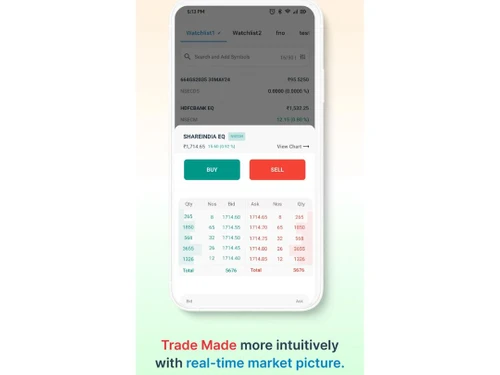
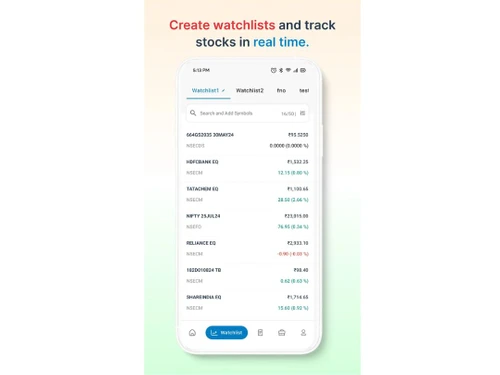
 Portfolio Management Market Data Watchlist Charting Tools Order Control Order Execution
 Order Execution
Limit Order Market Order Stop (Loss) Order Stop Limit Orders Trailing Stop Order Research and Analysis
Technical Analysis Fundamental Analysis Backtesting and Optimization Pattern Recognition Scanning Tools Smart drawing tools Trading Options
Mutual Funds Paper Trading Intraday Trading Algorithm Trading Options Trading Futures Trading Forex Trading Automatic Trading Margin Trading (MTF) Crypto Trading Stock SIP Account Management
Demat Account Creation Platform Migration Multi-Factor Authentication (MFA) Customizable User Interface Integrations
API Integration Financial Tools Integration Reporting & Analytics
Dashboards Automated Reports Report Customization P&L Report Contract Note Financial Transaction Report (CashLedger) Alerts & Notification
Price Alert Real Time Market Updates Volume Alerts News Alerts  Ubuntu
  Windows
  iOS
iOS  Android MacOS
  Linux
Linux  Desktop
  Mobile
  Tablet
  iPad
iPad  Cloud-Based
Small Business
Designed for startups and growing businesses
Medium Business
Built for business growth and flexibility
Enterprises
Designed for complex and large-scale business needs
4.3
Out of 5

Overall Rating
Based on
3 Verified Ratings
Rating Breakdown
90% Recommend this Product
Add ReviewTechjockey Trusted Reviews from Verified Users
No reviews are currently available for Share India. Discover similar Trading Platforms reviews

Masterswift 2.0
Whats great - The charting tools in Masterswift 2.0 are one of its strongest features. I can customize the charts with different technical ... read more

Edelweiss TX3
Whats great - Customer service is prompt and helpful. read more

Zerodha Kite
Whats great - Trading is no longer a hassle, thanks to Zerodha KITE. It's a powerful front-end application that allows you to trade at BSE,... read more

Share India
Price On Request
Desktop
Mobile
Web based
On Premises
Windows
Mac OS
Masterswift 2.0
Price On Request
Desktop
Mobile
Web based
On Premises
Windows
Mac OS
AlgoTest
Price On Request
Desktop
Mobile
Web based
On Premises
Windows
Mac OS

Pocketful
Price On Request
Desktop
Mobile
Web based
On Premises
Windows
Mac OS

StockMock
₹ 349
Desktop
Mobile
Web based
On Premises
Windows
Mac OS

Bajaj Broking
Price On Request
Desktop
Mobile
Web based
On Premises
Windows
Mac OS
Edelweiss TX3
Price On Request
Desktop
Mobile
Web based
On Premises
Windows
Mac OS
Zerodha Kite
Price On Request
Desktop
Mobile
Web based
On Premises
Windows
Mac OS

Bigul
Price On Request
Desktop
Mobile
Web based
On Premises
Windows
Mac OS
Trading Terminal
Price On Request
Desktop
Mobile
Web based
On Premises
Windows
Mac OS

QuantShare
Price On Request
Desktop
Mobile
Web based
On Premises
Windows
Mac OS
(0) Product(s) selected
Available
Price on Request
Available
Price on Request

Available
Price on Request

Available
Price on Request

Available
Price on Request

Available
Price on Request

Available
Price on Request

Available
Price on Request

Available
Price on Request
The pricing details for Share India are available upon request at techjockey.com.
Yes, Share India has a mobile app available for both Android and iOS devices.
Share India software is compatible with Ubuntu, Windows, MacOS, Linux, Android, and iOS operating systems.
Yes, Share India Software offers a 7-day free trial for its uTrade Algos, allowing users to experience the platform without any commitment.
Share India allows users to invest in mutual funds, stocks, and ETFs, offering real-time tracking and easy transactions.
The ideal users of Share India are individuals looking to manage their investments, from beginners to experienced investors.
Yes, Share India offers a free demo.
Yes, Share India Software is free to use for basic trading services, including opening a Demat account, but it charges minimal brokerage fees for trades executed on the platform.
20,000+ Software Listed
Best Price Guranteed
Free Expert Consultation
2M+ Happy Customers
Terms and Condtions

Users with registered businesses can purchase goods from merchants on the platform to satisfy their business needs. Users are not permitted to utilize any products acquired through the platform for resale, advertising, business, or further distribution.
For each purchase made, users will receive a Tax Invoice (or 'GST invoice') that includes specific details such as:
the GSTIN of the user associated with their registered business, and
the specified Entity Name for their business.
It should be noted that not all products are eligible for GST Invoice. Only the products displayed by participating sellers with the 'GST-based Invoice Available' callout on the product description page would qualify.
Certain goods and services are not eligible to get a GST Invoice, including items with VAS, i.e., Value Added Services (e.g., Total Mobile Protection/Assured Buyback) and those involving an exchange offer at the time of purchase.
Users must ensure the accuracy of the GSTIN, and business entity name provided for the GST Invoice. Requests for corrections into GST Invoice would not be accommodated by Techjockey.com or any Seller, and any issues arising from user-provided information are the sole responsibility of users.
Techjockey.com is not liable for the GST Invoice or any associated input tax credit. To efficiently claim an input tax credit, users should select the registered place of business address as per the GST authority's data and follow the provisions of the GST Act and rules.
To claim an input tax credit, the delivery and billing addresses must match. Furthermore, input tax credits will not be granted if the delivery address and GSTIN on the invoice are from different states. In case of incorrect GST details provided during the order placement, the order will be canceled automatically.