USA
USA UAE
UAESmall Business
Designed for startups and growing businesses
See More





Brand: ShareKhan
Sharekhan Online Trading is a stock market software, facilitating investments across derivatives, equity, bonds, commodity, IPOs and more. Its offline presence makes it easy for traders to place their queries and complaints in-person and get access to relevant solutions in real-time. Sharekhan Online Trading is authorized by SEBI and is also an active member of BSE and NSE stock exchanges. It is...
See MoreHave you used Sharekhan before?
Share your insights for better experience
Brand: ShareKhan
Founded Year: 2005
It is a leading online retail broking house, engaged in providing services to individual investors and traders, corporate and NRIs
Looking for The Right Pricing?
Share your requirements and get a plan built around your business.
Price Available on Request
Get personalised Sharekhan pricing that fits your needs. Our team will connect with you.
Core Features
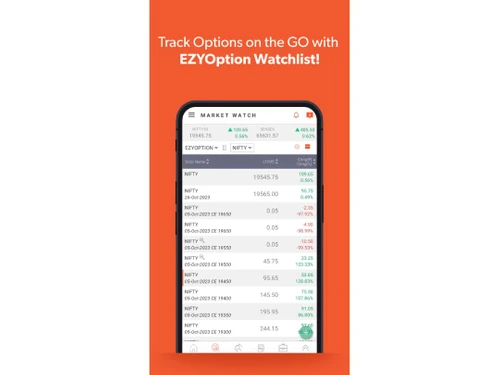
 Portfolio Management Market Data Watchlist Charting Tools Order Control Order Execution
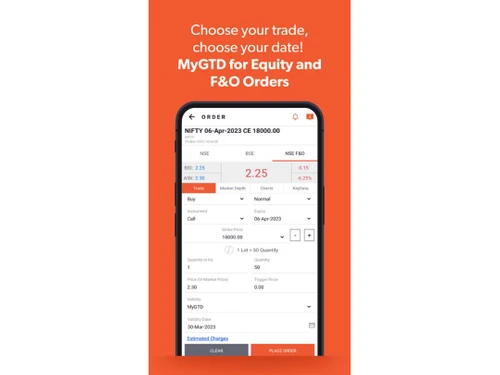
 Order Execution
Limit Order Market Order Stop (Loss) Order Stop Limit Orders Trailing Stop Order Research and Analysis
Technical Analysis Fundamental Analysis Pattern Recognition Scanning Tools Backtesting and Optimization Smart drawing tools Trading Options
Mutual Funds Paper Trading Intraday Trading Algorithm Trading Options Trading Futures Trading Forex Trading Automatic Trading Margin Trading (MTF) Stock SIP Crypto Trading Account Management
Multi-Factor Authentication (MFA) Demat Account Creation Platform Migration Customizable User Interface Integrations
Financial Tools Integration API Integration Reporting & Analytics
Dashboards Automated Reports Report Customization P&L Report Contract Note Financial Transaction Report (CashLedger) Alerts & Notification
Price Alert Real Time Market Updates News Alerts Volume Alerts 

Watch the demo video to explore key features, real workflows, and how the software fits your business needs.
 Windows
  iOS
iOS  Android MacOS
  Desktop
  Mobile
  Tablet
  Cloud-Based
Small Business
Designed for startups and growing businesses
Medium Business
Built for business growth and flexibility
Enterprises
Designed for complex and large-scale business needs
4.4
Out of 5

Overall Rating
Based on
10 Verified Reviews
Rating Breakdown
86% Recommend this Product
Add ReviewUsers generally appreciate Sharekhan for its reliability and supportive customer service, highlighting the helpful relationship managers and user-friendly interface, especially for beginners. The platform offers comprehensive tools and analytics, making it suitable for serious traders, although some users find the complexity overwhelming at first. While the account setup can be slow and the app may lag during peak hours, the overall sentiment is positive, with many recommending it for its ease of use and effective support.
Pros
"Sharekhan is easy to use and navigate through the features. The dashboard is simple, and I got a grasp of what is happening quickly."
"I used personally for 3 year this app I recommend this to all of you. It is very easy to use and a nice app for trading."
"One of the standout features of this app is its customizable alerts system, which allows users to set up notifications for specific price movements news events etc."
Cons
"When I first used it, I found the platform to be a bit overwhelming. There are a lot of features, and it took me some time to learn them."




May 5, 2025
Techjockey Verified
“Easy to Use and Affordable but Overwhelming at First”
My company has benefited greatly from the installation of Sharekhan. It's incredibly simple to use. Nevertheless, it took me some time to become used to all the capabilities because the sheer volume of options initially felt overwhelming.
Pros
Sharekhan is easy to use and navigate through the features. The dashboard is simple, and I got a grasp of what is happening quickly.
Cons
When I first used it, I found the platform to be a bit overwhelming. There are a lot of features, and it took me some time to learn them.
Reason to switch
Sharekhan offered a more comprehensive solution with additional features compared to Zerodha.
May 2, 2025
Techjockey Verified
“Comprehensive Tools for Serious Traders”
Pros
For someone who trades regularly, Sharekhan provides all the necessary tools and analytics. The depth of information available helps in making informed decisions. However, it might be a bit too much for someone just looking to make occasional trades.
Cons
The interface can be a bit complex for casual users.
May 5, 2025
Techjockey Verified
“Trusted Brand with a Personal Touch”
Pros
It’s been around for a long time and feels reliable. Their relationship managers are helpful too.What I really like about Sharekhan is that it’s not just an app – there’s a human side to it. I was assigned a relationship manager who actually called me to explain how things work and even gave tips based on my investment goals. That kind of service made me trust them more. Even though the account setup was a bit slow, the service after that made up for it.
Cons
The account opening took longer than I expected.

Sharekhan
Price On Request
Desktop
Mobile
Web based
On Premises
Windows
Mac OS

Masterswift 2.0
Price On Request
Desktop
Mobile
Web based
On Premises
Windows
Mac OS
AlgoTest
Price On Request
Desktop
Mobile
Web based
On Premises
Windows
Mac OS

Pocketful
Price On Request
Desktop
Mobile
Web based
On Premises
Windows
Mac OS

StockMock
₹ 349
Desktop
Mobile
Web based
On Premises
Windows
Mac OS

Bajaj Broking
Price On Request
Desktop
Mobile
Web based
On Premises
Windows
Mac OS

Edelweiss TX3
Price On Request
Desktop
Mobile
Web based
On Premises
Windows
Mac OS

Zerodha Kite
Price On Request
Desktop
Mobile
Web based
On Premises
Windows
Mac OS

Bigul
Price On Request
Desktop
Mobile
Web based
On Premises
Windows
Mac OS
Trading Terminal
Price On Request
Desktop
Mobile
Web based
On Premises
Windows
Mac OS

QuantShare
Price On Request
Desktop
Mobile
Web based
On Premises
Windows
Mac OS
(0) Product(s) selected
Available
Price on Request
Available
Price on Request

Available
Price on Request

Available
Price on Request

Available
Price on Request

Available
Price on Request

Available
Price on Request

Available
Price on Request

Available
Price on Request
Yes, you can open multiple charts and get them linked with each other via script, exchange or period.
Yes, you can export live market data within Excel from Sharekhan online trading or push the particulars from Excel to the latter.
Yes, you can request an online demo of Sharekhan online trading. Our product experts will get back to you as per your convenient time schedule.
You need to have: RAM: 2GB Processor: Intel Dual Core Hard Disk: 2GB out of the available space
Yes, Sharekhan online trading has a dedicated mobile app for Android and iOS users.
20,000+ Software Listed
Best Price Guranteed
Free Expert Consultation
2M+ Happy Customers
Terms and Condtions

Users with registered businesses can purchase goods from merchants on the platform to satisfy their business needs. Users are not permitted to utilize any products acquired through the platform for resale, advertising, business, or further distribution.
For each purchase made, users will receive a Tax Invoice (or 'GST invoice') that includes specific details such as:
the GSTIN of the user associated with their registered business, and
the specified Entity Name for their business.
It should be noted that not all products are eligible for GST Invoice. Only the products displayed by participating sellers with the 'GST-based Invoice Available' callout on the product description page would qualify.
Certain goods and services are not eligible to get a GST Invoice, including items with VAS, i.e., Value Added Services (e.g., Total Mobile Protection/Assured Buyback) and those involving an exchange offer at the time of purchase.
Users must ensure the accuracy of the GSTIN, and business entity name provided for the GST Invoice. Requests for corrections into GST Invoice would not be accommodated by Techjockey.com or any Seller, and any issues arising from user-provided information are the sole responsibility of users.
Techjockey.com is not liable for the GST Invoice or any associated input tax credit. To efficiently claim an input tax credit, users should select the registered place of business address as per the GST authority's data and follow the provisions of the GST Act and rules.
To claim an input tax credit, the delivery and billing addresses must match. Furthermore, input tax credits will not be granted if the delivery address and GSTIN on the invoice are from different states. In case of incorrect GST details provided during the order placement, the order will be canceled automatically.