linkedin
Shortwave logo
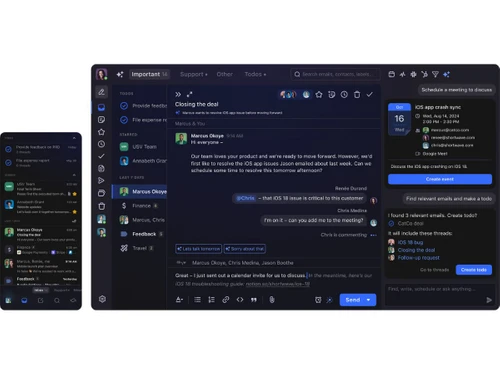
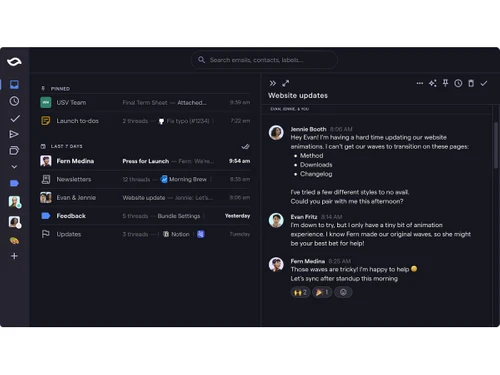
Shortwave-dashboard
Shortwave-automation
Shortwave AI-native email

Shortwave

Brand: Shortwave Communications

  • 4.3

  • 5 Ratings

Shortwave is an AI-powered email assistant that helps users organize, write, and search emails while streamlining inbox management and team collaboration.

See More

Have you used Shortwave before?

Share your insights for better experience

Add a Review
Starting Price
$30

View plans

100% Genuine
Products
Best Price
Guaranteed
Safe & Secure
Payment
  • Description

  • Pricing

  • Features

  • Specification

  • Review

  • Compare

  • Alternatives

  • FAQ

Starting at $30

Shortwave Software Overview

What is Shortwave?

Shortwave is an intelligent email client designed to enhance productivity by leveraging the power of artificial intelligence. Developed by a team of ex-Googlers, it transforms your inbox from a cluttered repository into a streamlined, organized workspace. The software acts as an AI email assistant, capable of automating routine tasks such as organizing, scheduling, writing, and searching through your emails. By using natural language prompts, users can save hours each day, allowing them to focus on more critical work. Shortwave is available across all major platforms, including iOS, Android, Mac, and Windows, providing a consistent and powerful email experience for both individuals and ambitious teams.

Why Choose Shortwave?

  • AI-Powered Automation: The Shortwave Agent automates your most tedious email tasks. It can draft replies in your personal writing style, summarize long threads, schedule meetings, and find answers buried in your team's email history.
  • Superior Inbox Organization: Achieve "inbox zero" with powerful features like bundles, which group newsletters and promotions for bulk processing. You can also split your inbox into focused tabs and turn emails into a prioritized to-do list.
  • Seamless Team Collaboration: Move discussions out of external chat apps and directly into your inbox. Share live email threads with your team, add private comments for context, and assign emails to specific owners to ensure clear accountability and track progress.
  • Intelligent and Fast Search: Go beyond simple keyword searches. Shortwave's AI-powered search allows you to find emails and analyze attachments using natural language descriptions, delivering precise answers from your entire email archive.
  • Enhanced Productivity Tools: Features like delivery schedules, read statuses, and extensive keyboard shortcuts are designed for power users who want to minimize distractions and maximize efficiency.

Advanced Features of Shortwave

  • AI Email Assistant: The core of Shortwave is its AI assistant. It learns your unique voice and style from sent emails to draft authentic replies. It can also analyze attachments like PDFs and text files, providing summaries and key insights without you ever having to open them.
  • Custom AI Filters: Take control of your incoming mail by creating powerful automation rules with plain English. You can instruct the AI to automatically label, star, archive, or delete emails based on complex criteria, keeping your inbox pristine.
  • Workflow Integrations: The AI connects directly to your most-used tools, including Slack, Google Calendar, Notion, Asana, and Hubspot. This allows you to automate cross-application workflows, such as creating a task in Asana from an email, without leaving your inbox.
  • Real-Time Collaboration Suite:
    • Shared Threads: Keep your team synchronized with shared email threads that update in real-time for everyone.
    • Private Comments: Discuss emails with teammates directly in the thread, eliminating the need to forward emails or paste screenshots into other apps.
    • Email Assignment: Assign a clear owner to any important email and track its status through to completion.
  • Smart Scheduling: The AI assistant simplifies scheduling by checking your availability, creating calendar events, and drafting scheduling emails on your behalf based on a simple prompt.

Key Capabilities of Shortwave

  1. AI-Powered Email Management

    This capability centers on the AI assistant that automates and enhances email interactions. It includes personalized AI writing, intelligent autocomplete with factual suggestions from your email history, and AI-powered inbox organization that can triage your emails with a single click.

  2. Inbox Productivity & Organization

    Shortwave provides a suite of tools to help you manage email volume effectively. Bundles group low-priority emails for easy archiving, while Splits create focused inbox tabs for specific senders or labels. You can also transform emails into an organized to-do list and use Delivery Schedules to control when emails arrive, minimizing interruptions.

  3. Collaborative Workspace

    This capability transforms the inbox into a shared hub for teamwork. Teams can utilize shared labels to create a searchable knowledge base, use shared prompts and templates for consistent communication, and collaborate directly on emails through shared threads and private comments.

How to Use Shortwave?

  1. Sign Up and Connect: Begin by signing up for Shortwave on the website. Connect your existing Gmail account to sync your email and import your recent email history. Shortwave automatically imports the last 90 days of email history, while full history import is available with a paid plan.
  2. Organize Your Inbox: Use the one-click AI organization feature to perform an initial sweep of your inbox. Let the AI identify important emails, star action items, and bundle newsletters and promotions for you to review and archive in bulk.
  3. Automate with AI Filters: Identify recurring, low-value emails. Create an AI filter using a simple prompt like, "Archive all marketing emails from retail companies." This will automate future inbox management.
  4. Leverage the AI Assistant: Instead of manually typing every reply, use a prompt like, "Write a polite decline to this meeting invitation and suggest a time next week." Use the AI search to ask questions like, "What was the final decision on the Q3 budget?"
  5. Collaborate with Your Team: Invite your team members. When an important customer email arrives, share the thread instead of forwarding it. Add a private comment like, "@[teammate] can you handle this?" to assign ownership and provide context.

Shortwave Pricing

Shortwave price starts at USD 30 at techjockey.com.

The pricing model is based on different parameters, including extra features, deployment type, and the total number of users. For further queries related to the product, you can contact our product team and learn more about the pricing and offers.

Read more

Shortwave Communications Company Details

Founded Year:  2020

Shortwave is a software development company that helps in writing emails faster and smarter.

Director/Founders Andrew Lee
Company Size 1-100 Employees

Shortwave Pricing & Plans

Business
Starting at $30
    • Seat

      Seat
      Seat
    • Monthly

      Monthly
      Monthly

Key Features

  • Full standard search history

  • Standard intelligence

  • 5 years AI search history

  • Max 50 threads per AI search

  • 3 AI-powered filters

  • AI integrations & web browsing

Premier
Starting at $45
    • Seat

      Seat
      Seat
    • Monthly

      Monthly
      Monthly

Key Features

  • Everything in Business, plus

  • Advanced intelligence

  • Unlimited AI search history

  • Max 100 threads per AI search

  • 10 AI-powered filters

  • Smarter AI answers with 2x context tokens

Max
Starting at $120
    • Seat

      Seat
      Seat
    • Monthly

      Monthly
      Monthly

Key Features

  • Everything in Premier, plus

  • Expert intelligence

  • Max 150 threads per AI search

  • 50 AI-powered filters

  • Smarter AI answers with 3x context tokens

  • Live 1:1 training

Shortwave Features

  • icon_check AI Email Assistant
    Automates inbox tasks with natural-language prompts for organizing, searching, and responding to emails instantly.
  • icon_check Smart Inbox Organization
    Bundles related emails, applies filters, and prioritizes messages for a clutter-free, focused inbox experience.
  • icon_check Thread Summarization
    Generates concise AI-powered summaries of long email threads so you can catch up quickly without reading everything.
  • icon_check AI-Powered Drafting
    Writes and improves emails in your personal style using AI ghostwriting to match tone, grammar, and clarity.
  • icon_check Scheduling
    Creates meetings, drafts invites, and checks calendar availability directly from your inbox using AI.
  • icon_check Task Management
    Turns emails into actionable tasks with starring, to-dos, and drag-and-drop prioritization tools inside inbox.
  • icon_check Collaboration Tools
    Allows teams to share threads, assign ownership, and leave inline comments directly on email conversations.
  • icon_check Multi-Platform Support
    Seamlessly works across web, desktop, and mobile apps, keeping your email workflow consistent everywhere.
  • icon_check Security & Privacy
    Protects sensitive data with enterprise-grade security standards and strict compliance with privacy policies.
  • icon_check AI Summoned Context
    Fetches relevant information like attachments, key details, or conversation history from threads instantly.

Shortwave Specifications

Supported Platforms
Windows Windows iOS iOS Android Android MacOS MacOS
Devices
Desktop Desktop Mobile Mobile Tablet Tablet iPad iPad
Deployment
Cloud-Based Cloud-Based Perpetual Perpetual
Suitable For
All Industries
Business Specific
All Businesses
Business Size
Individual Small Business Startups Medium Business Enterprises
Customer Support
Email Communities
Language
English
Training Resources
Videos
AI Features
AI Integrated

Explore the Best Alternative Solutions Similar to Your Business Size and Needs

Shortwave Review

4.3

Out of 5

img

Overall Rating

Based on
5 Verified Ratings

Rating Breakdown

  • Features 4.3
  • Value for Money 4.2
  • Ease of Use 4.4
  • Customer Support 4.5

80% Recommend this Product

Add Review

Techjockey Trusted Reviews from Verified Users

No reviews are currently available for Shortwave. Discover similar Email Software reviews

  • Zoho Mail

    4.4

    Whats great - From an insider's perspective, I can confidently say that this ERP system truly streamlines business processes. The user-frie... read more

  • MailsDaddy OST to PST Converter

    5.0

    Whats great - It is easy to use and makes the conversion process simple. The software works smoothly, maintains mailbox data properly, and ... read more

  • Mithi SkyConnect

    5.0

    Whats great - I was not certain of our actual needs due to limited experience with shipping. I was provided recommendations for some produc... read more

Compare Shortwave With other Email Software

Products
Ratings
Pricing
Device Supported
Deployment
Supported Platforms
  • img

    Shortwave

  • 4.3

  • Price On Request

  • Desktop

    Mobile

  • Web based

    On Premises

  • Windows

    Mac OS

  • img

    Zoho Mail

  • 4.3

  • ₹ 708

  • Desktop

    Mobile

  • Web based

    On Premises

  • Windows

    Mac OS

  • img

    GMass

  • 4.5

  • ₹ 1200

  • Desktop

    Mobile

  • Web based

    On Premises

  • Windows

    Mac OS

  • img

    Mailinator

  • 4.2

  • Price On Request

  • Desktop

    Mobile

  • Web based

    On Premises

  • Windows

    Mac OS

  • img

    Beefree

  • 4.5

  • Price On Request

  • Desktop

    Mobile

  • Web based

    On Premises

  • Windows

    Mac OS

  • img

    MailDex

  • 4.2

  • Price On Request

  • Desktop

    Mobile

  • Web based

    On Premises

  • Windows

    Mac OS

  • img

    Woodpecker

  • 4.2

  • Price On Request

  • Desktop

    Mobile

  • Web based

    On Premises

  • Windows

    Mac OS

  • img

    Mailtrack

  • 4.3

  • Price On Request

  • Desktop

    Mobile

  • Web based

    On Premises

  • Windows

    Mac OS

  • img

    Zoho TeamInbox

  • 4.3

  • ₹ 360

  • Desktop

    Mobile

  • Web based

    On Premises

  • Windows

    Mac OS

  • img

    Zoho Zeptomail

  • 4.2

  • Price On Request

  • Desktop

    Mobile

  • Web based

    On Premises

  • Windows

    Mac OS

  • img

    ImprovMX

  • 4.4

  • Price On Request

  • Desktop

    Mobile

  • Web based

    On Premises

  • Windows

    Mac OS

(0) Product(s) selected

Shortwave Alternatives

See All Shortwave Alternatives

Starting Price:

$30

Starting Price:

$139 /License

Starting Price:

$35 /Month

Starting Price:

$10 /Month

Starting Price:

$9 /Month

Tuta

4.3

Starting Price:

€4 /Month

Starting Price:

$15 /Month

Starting Price:

$30 /Month

OwIU

4.4

Available

Price on Request

Starting Price:

$30 /Month

Starting Price:

₹200 /Month

Articles for Shortwave

See All Related Articles

What is Shortwave email?

Shortwave is an AI-powered email software designed to automate and enhance your email experience, helping individuals and ambitious teams organize, schedule, write, and search emails more efficiently.

Is Shortwave email free?

Shortwave offers a free trial to get started without requiring a credit card, allowing users to experience its features before committing to a paid plan.

How much does Shortwave cost?

Shortwave price starts at USD 30 at techjockey.com.

Is Shortwave safe to use?

Shortwave is trusted by thousands of companies and leading professionals, indicating its reliability as an email management solution for both individuals and teams.

Does Shortwave replace Gmail?

Shortwave enhances your existing email experience, particularly for Gmail users, by providing advanced AI features and an ultimate inbox experience that many wish Gmail offered natively.

Who can use Shortwave?

Shortwave is designed for both individuals and ambitious teams at companies of all sizes, available across iOS, Android, Mac, and Windows platforms.

How does Shortwave use AI to enhance email management?

Shortwave leverages AI for advanced automation, including organizing inboxes, filtering emails, writing and enhancing messages in your unique voice, powering search, intelligently autocompleting, and scheduling with ease.

What are Shortwave's key features for team collaboration?

Shortwave facilitates real-time team collaboration through shared live threads, private in-inbox comments, assigning next steps, shared AI-searchable labels, and sharing prompts and templates.

Can Shortwave help me achieve inbox zero?

Yes, Shortwave helps users achieve inbox zero by enabling bulk triage with bundles for promotions and newsletters, transforming emails into organized to-do lists, and allowing delivery schedules to avoid interruptions.

What is the Tasklet integration mentioned with Shortwave?

Tasklet is Shortwave's sister product that integrates to provide 24/7 workflow automation, automatically drafting replies, adding team comments, and connecting to over 3,000 other applications.

21,000+ Software Listed

Best Price Guranteed

Free Expert Consultation

5M+ Happy Customers

Terms and Condtions

close

Users with registered businesses can purchase goods from merchants on the platform to satisfy their business needs. Users are not permitted to utilize any products acquired through the platform for resale, advertising, business, or further distribution.

For each purchase made, users will receive a Tax Invoice (or 'GST invoice') that includes specific details such as:

  • the GSTIN of the user associated with their registered business, and

  • the specified Entity Name for their business.

It should be noted that not all products are eligible for GST Invoice. Only the products displayed by participating sellers with the 'GST-based Invoice Available' callout on the product description page would qualify.

Certain goods and services are not eligible to get a GST Invoice, including items with VAS, i.e., Value Added Services (e.g., Total Mobile Protection/Assured Buyback) and those involving an exchange offer at the time of purchase.

Users must ensure the accuracy of the GSTIN, and business entity name provided for the GST Invoice. Requests for corrections into GST Invoice would not be accommodated by Techjockey.com or any Seller, and any issues arising from user-provided information are the sole responsibility of users.

Techjockey.com is not liable for the GST Invoice or any associated input tax credit. To efficiently claim an input tax credit, users should select the registered place of business address as per the GST authority's data and follow the provisions of the GST Act and rules.

To claim an input tax credit, the delivery and billing addresses must match. Furthermore, input tax credits will not be granted if the delivery address and GSTIN on the invoice are from different states. In case of incorrect GST details provided during the order placement, the order will be canceled automatically.